23 posts tagged with "Announcements"

View All Tags

Gunbot reseller program: instant payouts, up to 100 USD per license

@boekenbox
@boekenbox
Gunbot reseller program: instant payouts, up to 100 USD per license

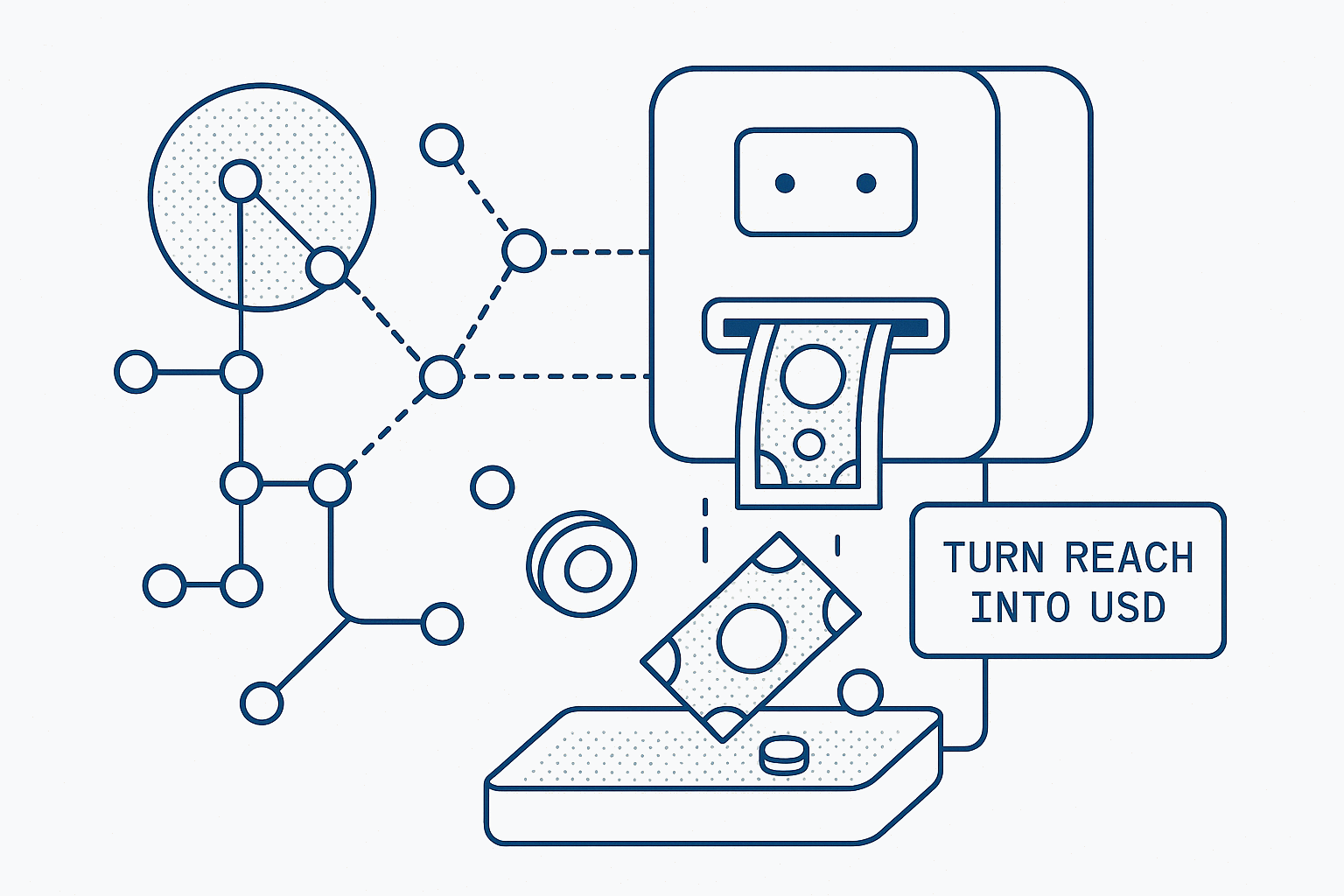
We are expanding our reseller network. If you already reach traders through a newsletter, Discord, Telegram, YouTube, a forum, or a shop, this program gives you clean attribution and fast commission payouts. For the most sold product, Gunbot DeFi, the payout is 100 USD per license.

What is new

Instant payouts mean no month end waits. As soon as a purchase is confirmed through your link, the commission is released. Depending on product and campaign, commissions can reach up to 100 USD per license.

We are open to hearing proposals for expanded partnerships. Think white label or bundling with your services. Details are not fixed yet. Use the application form to outline what you need and we will evaluate what is reasonable.

How the referral system works

  • Existing Gunbot users already have a rewards code on the Rewards page inside the Gunbot interface. New partners get their link after approval.
  • Last click wins. Attribution is granted when the last click with a valid code happened within a rolling 30 day window.
  • If you plan a special launch or a paid campaign, ask for a dedicated link so you can segment results.

Rewards

License PurchasedYour Reward
Gunbot Standard (lifetime)$25
Gunbot Pro (lifetime)$50
Gunbot DeFi (lifetime)$100

How partners typically work

Strong results come from practical content. Tutorials, configuration guides, comparison posts, tool roundups, and case studies convert consistently. Add your link in the walkthrough and distribute through your usual channels. Communities that offer onboarding or Q and A support often see higher close rates and better retention.

Approved partners can join our internal Telegram rooms for coordination. Use that to keep copy accurate, sync on releases, and get quick answers.

Assets and materials

This intake is the start of a larger program. We are building an asset library now and we want your input. Tell us what formats you actually use, like raw screenshots, logo packs, short feature blurbs, etc. We will prioritize the most requested items and keep quality consistent across channels.

Ground rules

Represent features accurately. Do not make performance promises. Keep pricing and product names current. Follow regional marketing laws and platform rules. No spam tactics. Paid ads are fine when compliant.

Apply

Submit your contact details and a short plan here: https://docs.google.com/forms/d/e/1FAIpQLSfMJ4Vy-qcX3ZR5H3TWFrDqp9m1hjCodbA-2ofAihW1FKBZwQ/viewform?usp=dialog

If you also want us to consider a deeper cooperation, outline the idea briefly. We review applications continuously and onboard in waves.

Re-introducing StepGridScalp - another Gunbot classic strategy

@boekenbox
@boekenbox
Re-introducing StepGridScalp - another Gunbot classic strategy

Blending grid and scalping approaches

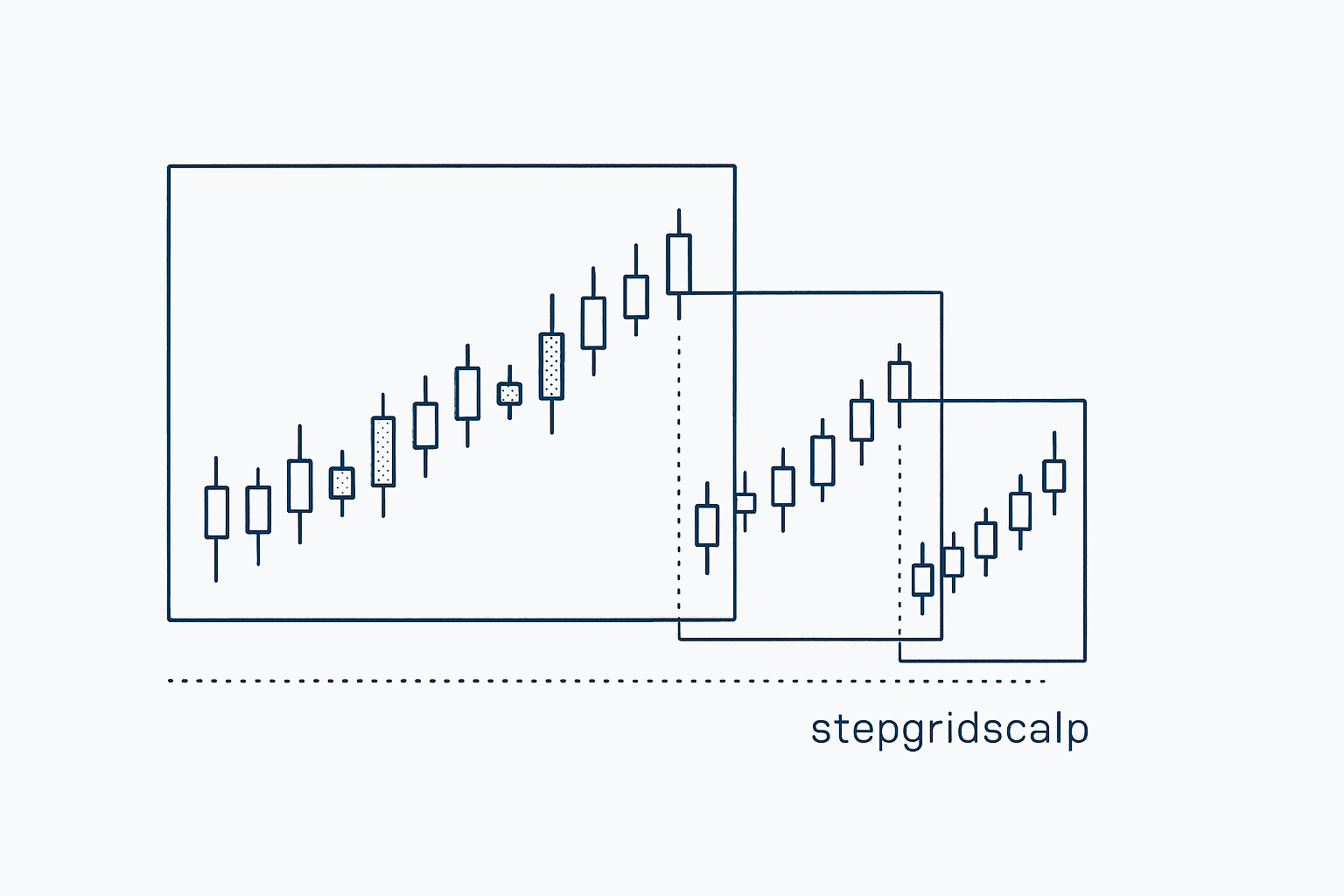
StepGridScalp takes Gunbot's classic StepGrid strategy a step further by blending disciplined grid trading with dynamic scalping and strategic support buys. This unique combination means you can efficiently trade spot markets through rapid intraday price movements as well as deeper market dips, all within one cohesive, automated strategy.

Instead of manually switching strategies or constantly adjusting settings, StepGridScalp automatically evaluates market conditions in real-time. It adjusts your position sizing, entries, and exits accordingly, helping you stay profitable while reducing the need for constant oversight usually needed in fast-moving markets.

Grid Trading with a Scalping Twist

At its heart, StepGridScalp relies on the familiar grid trading model, buying assets at set intervals as prices fall and selling them at higher intervals as prices recover. This helps trades close profitably after covering trading fees.

What makes StepGridScalp special, however, is its added scalping capability. When bullish momentum kicks in, your bot will execute quick, opportunistic trades designed to capture profits from short-term price jumps. It also places limit orders at medium- or long-term support levels identified by Gunbot’s built-in trend detection, giving you another way to manage downturns.

Capturing Momentum with Dynamic Scalps

When Gunbot detects rising bullish momentum, StepGridScalp actively seeks scalping opportunities. These trades are smaller than typical grid trades but timed perfectly around short-term market dips, such as when prices momentarily fall beneath key indicators like EMA10.

These quick trades use ultra-tight trailing stops, protecting your profits without risking them due to market volatility. StepGridScalp continuously recalibrates these scalp trades, keeping each entry and exit aligned with current market conditions.

Smart Accumulation at Support Levels

Alongside quick scalps, StepGridScalp strategically positions larger limit buy orders at important support levels identified through Gunbot’s trend analysis. These buys happen at points historically proven as strong support, lowering your overall average entry price.

This smart accumulation approach allows you to confidently navigate deeper corrections, turning market downturns into opportunities rather than setbacks.

Unified and Intelligent Trade Management

StepGridScalp manages all your trades as a unified position. It calculates profitability against a common break-even point, so each trade genuinely contributes to your bottom line after accounting for fees.

The strategy automatically prevents unprofitable partial sells, so every executed trade adds positive value to your portfolio.

Tuning StepGridScalp to Your Needs

Despite its advanced mechanics, StepGridScalp remains easy to customize. Key parameters allow you to quickly fine-tune the strategy to your trading style and risk appetite:

  • Adjust your standard trade sizes easily with the Trading Limit.
  • Fine-tune your scalping trade size using the Scalp Trading Ratio.
  • Set the aggressiveness of your support buys with simple Support Buy Ratios.
  • Choose automatic or manual grid spacing through the Step Size parameter.

Adjusting these simple settings lets you comfortably manage risk, increase profitability, and easily adapt to changing market conditions.

Making the Most Out of StepGridScalp

To maximize your results, here are some practical suggestions:

Try starting with very low trading amounts, and using a fairly unrestricted setup. This keeps your risk super low, while you can observe the strategy behavior.

Regularly check your scalps and support buys, making slight adjustments based on your personal observations.

Keep an eye on market volatility - if it changes significantly, adjust your grid spacing accordingly to avoid unnecessary losses. Moving to higher timeframes can also be a solution to reduce activitity in uncertain market situations.

Accurately configure your exchange fees in Gunbot. This small step is essential for keeping profitability calculations accurate, especially when scalping.

Conclusion: A Complete Strategy for Diverse Markets

StepGridScalp effectively merges structured grid discipline with responsive scalping and smart support-level trading. This blend gives you a trading setup that can adapt smoothly to different market conditions.

With StepGridScalp, you can confidently participate in different market phases - slow accumulation periods, sudden bullish spikes, or sharp downturns - all managed within a single, reliable strategy.

If you want to simplify your trading approach while maximizing your returns, StepGridScalp offers the perfect combination of consistency, flexibility, and performance.

Gunbot Python SDK – Automate Trading Logic with Simpler Code

@boekenbox
@boekenbox
Gunbot Python SDK \u2013 Automate Trading Logic with Simpler Code

The Gunbot Python SDK is a newly released wrapper for the Gunbot REST API. It offers a practical way to write Python scripts that automate trading tasks like placing orders, managing strategies, pulling balances - without having to deal directly with raw HTTP requests.

If you're scripting quick tasks or building out more structured bots, this SDK saves time and removes friction from common interactions with the Gunbot backend.

TL;DR

  • Simplifies working with the Gunbot API in Python
  • Lets you send trades, check balances, manage config, analyze market data, etc
  • No need to handle auth headers or raw requests manually
  • Available now as package on PyPI and source code on GitHub

Why This SDK Exists

Using the Gunbot REST API directly in Python usually means building every request by hand. That includes forming URLs, setting headers, serializing payloads, and checking for response errors manually. It's tedious and error-prone.

This SDK takes care of the low-level plumbing so you can focus on writing your trading logic.

Without SDKWith gunbot-sdk-python
Manual URL buildingUse named methods like config_pair_add()
Custom headers/authHandled automatically
JSON serializationDone behind the scenes
Error handling?Still on you, but cleaner

Install in One Step

pip install gunbot-sdk-python

It’s a lightweight package published to PyPI, with minimal external dependencies.


Setup Example

from gunbot_sdk_python import ApiClient, GunbotApi

client = ApiClient(
base_path="http://<your-gunbot-host>:3000/api/v1",
token="<your-api-token>"
)

api = GunbotApi(client)

That’s enough to start making requests against your running Gunbot instance. If you want to review auth and endpoints first, use the Gunbot REST API intro.


Common Use Cases

Total Portfolio Value

result = api.assets_total(body={
"exchange": "binance",
"base": "USDT",
"start": 1719350400000,
"end": 1719436800000
})

print(f"Total USDT: {result['data']['total']}")

Add a Trading Pair to Strategy Config

api.config_pair_add(body={
"exchange": "binance",
"pair": "USDT-ETH",
"settings": {}
})

You provide Python dictionaries as input, and the SDK handles formatting and sending the request.


Where It Fits

This SDK is useful in various Python environments:

  • CLI scripts: Automate trading tasks or daily reports
  • Jupyter notebooks: For testing signals or visualizing asset data
  • FastAPI/Flask apps: Build basic web dashboards or control panels
  • Airflow or cron jobs: Schedule config updates or balance pulls
  • Serverless functions: Trigger alerts or simple trades with minimal code

There’s no framework lock-in. The SDK is straightforward to integrate wherever plain Python runs.


Open Source & Contributions

The SDK is licensed under MIT and source code is available on GitHub:

Pull requests, issues and suggestions are welcome.


A Quick Reminder on Security

When automating anything related to real funds:

  • Don’t hardcode tokens in scripts
  • Use secure environments or secrets managers
  • Avoid exposing your Gunbot instance publicly
  • Prefer HTTPS whenever not using Gunbot on localhost

What Is Gunbot?

Gunbot is a self hosted bot for trading automation that connects to major centralized and decentralized exchanges. It supports a range of built-in strategies (grid, DCA, scalping, etc) and includes a full REST API for users who want deeper control or custom workflows.

The Python SDK is just one way to extend Gunbot with your own code.


Getting Started

To recap:

  1. Install the SDK: pip install gunbot-sdk-python
  2. Connect to your Gunbot instance
  3. Authenticate using your API token
  4. Call API methods using simple Python

Resources:

Alpaca Integration: Automate Stock and ETF Trading with Gunbot

@boekenbox
@boekenbox
Alpaca Integration: Automate Stock and ETF Trading with Gunbot

Gunbot is expanding beyond crypto. With our new integration for Alpaca, you can now automate trading strategies on U.S. stock and ETF markets, using the same tools and logic you already know from crypto trading. It’s a straightforward way to bring automated strategy execution into traditional finance, without having to learn an entirely new system.

info

This is a new integration. Some things may not work perfectly yet. We're actively tracking issues and improving stability as we go.

Why Alpaca?

We integrated Alpaca because it gives us access to traditional markets in a way that aligns with how Gunbot works. It’s a clean, developer-friendly brokerage platform with a reliable API, and it supports a wide range of U.S.-listed equities and ETFs.

For us, this isn’t about features like free trades or bells and whistles, it’s about enabling strategy-based trading in new markets, with full control and minimal friction. Alpaca allows Gunbot to connect directly to your brokerage account, execute trades based on your settings, and give you the flexibility to automate strategies outside of crypto.

What You Can Automate

The Alpaca integration opens up the full range of Gunbot's automation tools for use in traditional asset markets. This includes running multiple bots simultaneously, customizing trade logic, and reacting to market movements in real time, just like you would with crypto.

Stock and ETF Trading

You can now apply Gunbot strategies to TradFi markets like stocks and ETFs. If you're focused on large-cap stocks, sector-specific ETFs, or a mix of both, Gunbot allows you to automate your trades based on whatever logic fits your goals, trend following, DCA, rebalancing, or volatility-driven setups.

Strategy Reuse and Adaptation

If you’ve built strategies in Gunbot that work well in crypto, many of them can be adapted for traditional markets. You can also create new ones specifically designed for equities, taking into account factors like market hours, daily price ranges, or reduced volatility.

Diversification, Without Manual Overhead

This integration lets you diversify across asset classes while keeping your trading fully automated. It’s useful if you want to reduce dependence on a single market or build a more balanced portfolio, all without adding more manual work.

Setup and Control

Like with other exchanges Gunbot supports, you stay in full control of your account and funds. Gunbot connects to Alpaca via API keys, executes trades based on your chosen strategy, and doesn’t hold or move your assets.

Setup is quick:

  1. Connect your Alpaca account using API keys
  2. Configure a strategy, choose from Gunbot’s library or build your own
  3. Let Gunbot run the strategy and handle execution

Everything runs locally or on your server, just like with crypto, giving you the same security and transparency you’re used to.

Why This Matters

This is a practical way to bring Gunbot into new territory. If you’ve relied on Gunbot to automate crypto trading, Alpaca offers a bridge into traditional finance, without needing a new system, new tools, or a steep learning curve.

This does not replace crypto automation. It lets you use the same automation stack in more places. If you want to trade stocks, manage long-term ETF positions, or build a mixed portfolio, Gunbot can now handle it for you, on your terms.

Hyperliquid Integration: Trade Spot and Perps with Gunbot on DeFi

@boekenbox
@boekenbox
Hyperliquid Integration: Trade Spot and Perps with Gunbot on DeFi

We’re rolling out Gunbot support for Hyperliquid, covering both spot and perpetual swap (derivatives) trading. This is a practical step for us and for the many traders in our community who are looking to automate strategies on decentralized platforms, without giving up control of their funds or switching tools.

info

This is a new integration. Some things may not work perfectly yet. We're actively tracking issues and improving stability as we go.

Why Hyperliquid?

When we evaluate new integrations, we look for technical reliability, a good trading experience, and real utility for Gunbot users. Hyperliquid checked those boxes. It’s a decentralized exchange with fast execution, low fees, and enough liquidity to make automation viable for both spot and perps markets. If you want the exchange-specific details, see our Hyperliquid trading bot overview.

This isn’t about chasing trends. We’re integrating Hyperliquid because it works well with the way Gunbot operates, and it opens up more flexibility for traders who want to try self-hosted DeFi trading automation without compromising on the speed or efficiency they’re used to.

What You Can Do with Gunbot on Hyperliquid

Gunbot’s integration with Hyperliquid covers both market types: spot and perpetual swaps. That means you can automate trades across a wider range of strategies, all while keeping your assets in your own wallet.

Spot Trading

You can use Gunbot to automate spot trading directly on Hyperliquid. If you're running grid bots, dollar-cost averaging (DCA), or basic market making, it works just like it does on centralized exchanges, except now, you're doing it directly from your wallet, in a fully decentralized environment.

Perpetual Swap (Derivatives) Trading

We’ve also added full support for Hyperliquid’s perps markets. If you use leverage, hedge positions, or run volatility-based strategies, you can now automate all of that on-chain. This includes long/short setups, trailing stop strategies, or more advanced logic using Gunbot’s customizable strategy engine.

These tools can help traders manage risk and maintain consistency, especially in markets where conditions change quickly and manual trading becomes a bottleneck.

How to Set It Up

Setting up Gunbot for Hyperliquid is straightforward. There’s no deposit step, Gunbot interacts with Hyperliquid directly. This means your funds never leave your control, which is one of the core advantages of DeFi trading.

As always, Gunbot runs locally or on your own server, just like it does for any other exchange. Your data stays with you, and the bot trades according to your strategy parameters.

Why It Matters

We’re seeing more and more traders move at least part of their activity into DeFi, looking for transparency, better security models, or just different market opportunities. By adding support for Hyperliquid, we’re giving Gunbot users the option to automate trades in this environment without switching tools or giving up functionality.

This isn’t a replacement for centralized exchanges, but an expansion. Gunbot continues to support a broad range of CEXs, and now also offers native support for trading on Hyperliquid.

If you’ve been thinking about experimenting with decentralized trading but didn’t want to manage everything manually, this makes it easier to start. You can apply the same strategies you already use, test new ones, or adapt to different market conditions, all without giving up control of your assets.

PancakeSwap Integration: Trade DeFi on BSC with Gunbot

@boekenbox
@boekenbox
PancakeSwap Integration: Trade DeFi on BSC with Gunbot

Gunbot now supports PancakeSwap, making it easier to automate token swaps directly on Binance Smart Chain (BSC). This integration brings our trading automation toolkit to one of the most widely used decentralized exchanges, giving Gunbot users more options to run strategies in a fast, low-cost environment, without relying on centralized platforms. It is a practical extension of our DeFi trading bot automation stack.

info

This is a new integration. Some things may not work perfectly yet. We're actively tracking issues and improving stability as we go.

Why We’re Supporting PancakeSwap

PancakeSwap has earned its place as a core part of the BSC ecosystem. It offers a familiar trading experience, wide token coverage, and consistently low fees, making it a practical choice for running automated strategies.

We’re not adding PancakeSwap just because it’s popular. We added it because the infrastructure works well for what Gunbot does: reliable, rules-based automation that interacts directly with DeFi protocols. With deep liquidity and an expanding set of token pairs, PancakeSwap gives traders the flexibility to deploy bots across a wide range of assets and market conditions.

What Gunbot Can Do on PancakeSwap

With this integration, Gunbot users can now automate token swaps across BSC using the same strategies and tools already available for other platforms. Here’s what that looks like in practice:

Token Swap Automation

You can run fully automated trading strategies on PancakeSwap’s swap markets, using your own wallet. If you want to scalp smaller-cap tokens, run a DCA strategy, or apply a grid system across volatile pairs, Gunbot handles execution according to your rules, no centralized custody required.

Strategy Flexibility

Most of Gunbot’s existing strategies can be used out of the box. This includes setups for volatility trading, rebalancing, and passive market making. You can also customize your own logic to suit the kinds of tokens and pairs you want to focus on in the BSC space.

Derivatives-like Products

Some PancakeSwap markets offer instruments with use-like behavior or mechanics that mimic perps-style exposure. These can also be automated using Gunbot, giving traders access to more advanced DeFi products without manual execution.

Setup and Wallet Interaction

As with other DeFi platforms Gunbot supports, your assets stay in your wallet, and Gunbot interacts with PancakeSwap. That means:

  • You keep custody of your funds
  • Everything happens on-chain

This setup reduces counterparty risk while still giving you access to full automation.

Trading on BSC with Gunbot

BSC continues to be a high-volume chain for retail traders, and PancakeSwap remains one of its most accessible tools. By adding PancakeSwap support, we’re opening the door for more flexible and affordable trading strategies in that environment.

If you're focused on smaller tokens, looking for faster trade execution, or just want to avoid CEX friction, this integration adds one more way to trade the way you want, with automation that runs locally and keeps your assets in your control.

Gunbot Xmas 2024 Trading Tournament – Watch Live

@boekenbox
@boekenbox
Gunbot Xmas 2024 Trading Tournament \u2013 Watch Live

The Gunbot Xmas 2024 Trading Tournament is happening right now, and it’s been a blast to watch so far. Running from 27 December 2024 to 26 January 2025, this event brings together some of the most creative minds in the Gunbot community. If you love trading, bots, or just seeing clever ideas in action, this is for you.

Where to Watch?

You can catch it live right here:

Or hop over to YouTube to join the chat.

What’s This Tournament About?

This isn’t just a regular competition. It’s a chance for Gunbot traders to show off how they use the platform in all sorts of clever ways. We’re seeing strategies that range from straightforward builder setups to custom-coded logic that’s built from scratch. It’s good to see what people are building, and no two approaches are the same.

Here’s a quick overview of the kinds of strategies that are competing:

  • Builder Strategies – Using Gunbot’s built-in tools to craft smart, adaptive setups.
  • Native + Tweaked Logic – Taking a default strategy and supercharging it with personal touches through autoconfig.
  • Custom Code – Completely unique trading algorithms written specifically for this tournament.

The variety here is what makes it so cool. If you're a new trader or a seasoned dev, there’s something to learn from these setups.


What’s on the Line?

The tournament isn’t just about pride (though there’s a lot of that, too). The winner of the official category gets:

  • 1268 USDT
  • 2.06 SOL

And here’s a fun twist: the prize pool comes from the contributions of the losers from the last competition. Talk about motivation to win!

This tournament is also the finals for the Gunbot Community Cup 2024, so there’s plenty of history and rivalry behind it.


How Are Winners Picked?

The leaderboard is not based only on who makes the most money. It uses a performance metric that accounts for consistency, risk, and overall efficiency. If you’re curious about how it all works, there’s a great write-up here: Comparing Trading Bot Performance, this post got updated with the full code for the metric.


Why Tune In?

Honestly, it’s just fun to watch. The Gunbot community is a tight-knit group, and events like this are a reminder of how much creativity and innovation people bring to the table. If you're watching for inspiration or just for the drama, it’s worth checking out.

So grab a snack, drop into the livestream, and see what’s happening. Who knows? You might walk away with an idea for your next setup.

Join the livestream on YouTube and join the chat while you’re there. See you in the comments!

Gunbot REST API: What Developers Actually Need to Know

@boekenbox
@boekenbox
Gunbot REST API: What Developers Actually Need to Know

If you’ve ever messed around with coding your own trading tools, you already know the grind: endless hours wrestling with exchange APIs, debugging connectivity issues, and dealing with stale data feeds. Gunbot’s REST API steps in and says, “Hey, I’ll take care of the annoying stuff so you can focus on the fun part, building something that works the way you want.”

We've developed this API over the years and use it for our own GUI, now we've opened it up and fully documented it. The API is available in the current preview builds from v29.5.5 and above. This isn’t about reinventing the wheel; it’s about not wasting time rebuilding wheels you don’t have to. Let’s break it down.

Why Use the API?

First off, if you’re here, you probably already know Gunbot has a solid set of built-in features, including custom JS trading strategies. Those are great for a lot of scenarios, but what if you need more control over runtime? Like, say you want to hook up a machine learning model that predicts market swings or act on external triggers that aren’t baked into Gunbot’s core logic. That’s where the REST API makes sense, it lets you run your own show.

Let Gunbot Handle the Annoying Stuff

If you’ve ever tried coding a trading bot from scratch, you know how painful it is to set up reliable exchange connections. Every exchange has its quirks, rate limits, different order types, inconsistent data formats. Keeping everything synced is a headache, and it only gets worse as you add more exchanges.

Gunbot already nails this, as well as having proper charting for custom bots. When you’re working with the API, you’re building on a foundation that handles all the tedious exchange connectivity for you. It collects the data, formats it properly, and keeps everything running smoothly. You just focus on the logic.

Build What You Need In A Trading Bot

This is where things get interesting. The API isn’t just about adding bells and whistles, it’s about creating tools that match your exact needs.

Custom Algorithms on Your Schedule

Gunbot’s custom strategies work well for most setups, but they’re tied to the bot’s execution cycle and must be codes with JavaScript. If you want something that runs independently or using a different programming language, like a sentiment tracker that reacts to Twitter spikes or an ML model crunching live data, you can do that with the API. You decide how often your code runs, what inputs it needs, and what outputs it generates.

Better Risk Controls

Risk management is a big deal, but most off-the-shelf solutions only cover the basics. The API lets you build safeguards that actually make sense for your approach:

  • Adjust position sizes dynamically based on your own risk models.
  • Create early warning systems tied to market conditions, like volatility spikes or liquidity drops.
  • Automate fail-safes that kick in before things go south; pause trades, hedge positions, or close out risky ones automatically.

This isn’t “set it and forget it.” It’s active risk management matched to how you trade.

Integrate Everything

One of the coolest things about the API is how easily it integrates with other systems. You’re not locked into a single tool or workflow, you can hook Gunbot up to pretty much anything.

  • Bring in External Data: Pull in forex prices, economic indicators, or even weird niche stuff like NFT market activity or Telegram messages. If it’s got an API, you can probably use it.
  • Sync With Other Tools: Need to track trades for taxes? Want to send performance reports to a Slack channel? The API makes it easy to plug Gunbot into your existing stack.
  • Build Custom Dashboards: Let’s be real, sometimes you just want a clean interface that shows exactly what you care about and nothing else. The API lets you design your own dashboards, no compromises.

Why It’s Worth Your Time

At the end of the day, the Gunbot REST API isn’t about adding fluff to your trading setup. It’s about making your life easier as a developer. You don’t have to deal with the slog of exchange integrations or waste hours debugging stuff that shouldn’t be broken in the first place. Gunbot takes care of that so you can focus on the fun part: building tools that actually work.

If you’re the kind of person who looks at trading bots and thinks, “This is good, but I could make it better,” the API is for you. It’s not a silver bullet, but it gives you the freedom to innovate without getting bogged down in the basics.

Visual Studio Code extension for custom strategy devs

@boekenbox
@boekenbox
Visual Studio Code extension for custom strategy devs

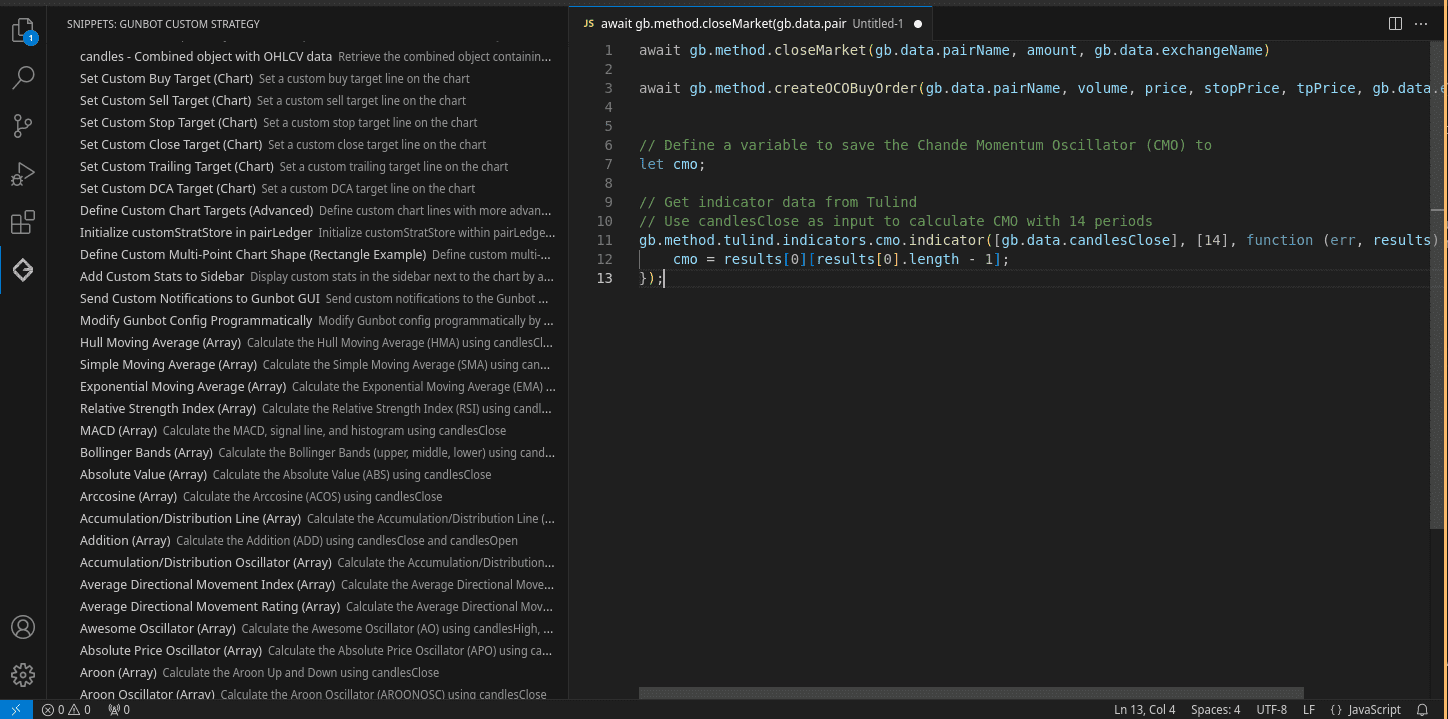
We've built a new Gunbot Custom Trading Strategy Snippets extension for Visual Studio Code. It provides a collection of pre-built snippets to make coding your trading strategies smoother and easier, minimizing the need to repeatedly check documentation for how methods work and which data is available. This extension helps you quickly access methods and data points that Gunbot supports.

Key Features of the Gunbot Snippet Extension

The Gunbot Custom Trading Strategy Snippets extension includes a variety of ready-made JavaScript snippets specifically designed for Gunbot strategy development. Here’s what it offers:

  • Immediate access to Gunbot methods: Save time and avoid manual lookups by inserting common trading commands like buyMarket() or sellLimit() directly from the snippet library.
  • Snippets for technical indicators: Easily include popular technical indicators, such as Moving Averages or RSI, into your strategy without needing to write the logic from scratch.
  • Integration with live data points: Snippets are designed to work with live data points supported by Gunbot, which can simplify integrating real-time market data into your strategies.
  • Snippet sidebar for easy browsing: A dedicated sidebar in VS Code helps you quickly locate and insert the right snippets for your strategy.

Simplifying Gunbot Strategy Development

For developers working on custom Gunbot strategies, this thing is a timesaver, but above all it reduces the hassle of having to frequently reference documentation to remember method names or how to call certain data points. With the snippets readily available, you can avoid interruptions to your workflow and focus on fine-tuning your strategy's logic.

  • Streamlined Prototyping: The snippets library allows you to rapidly set up key parts of a strategy. Instead of writing common methods manually, you can insert a snippet, make small customizations, and move forward faster.
  • Reducing Documentation Overhead: One of the main advantages of the extension is that it reduces the need to look up method documentation frequently, which can help developers stay focused on their code.

vscode extension

How to Install the Extension

Follow these simple steps to install the Gunbot Custom Trading Strategy Snippets extension:

  1. Open Visual Studio Code and navigate to the Extensions view (Ctrl + Shift + X).
  2. In the search bar, type "Gunbot Custom Trading Strategy Snippets."
  3. Click Install.

Once the extension is installed, you can start using the snippets in any JavaScript file related to your Gunbot strategies.

Example Usage of Snippets

Let’s look at an example. Suppose you want to place a limit sell within your Gunbot strategy and do so using a promise chain. Normally, you'd need to reference the method name and its parameters in the documentation, and remember how to do the .then chain. With the extension, you just type the prefix sellLimit, select the then variant and move on.

// Example of placing a limit buy order in Gunbot, in this case with a chained .then and .catch
gb.method.sellLimit(amount, price, gb.data.pairName, gb.data.exchangeName)
.then(response => {
console.log('Limit Sell Success:', response);
})
.catch(error => {
console.error('Limit Sell Error:', error);
});

This streamlines your coding experience and reduces potential errors from mistyped methods or forgotten parameters.

Contribute to the Snippets Collection

This extension is open source, and contributions are welcome! If you have your own snippets that could benefit other Gunbot developers, consider sharing them with the community. Here's how you can contribute:

  1. Fork the repository on GitHub.
  2. Add your snippets in the json file with snippets and their metadata.
  3. Submit a pull request to propose your addition.

Your contributions will help expand the snippet library and make it an even more valuable resource for the Gunbot development community.

Conclusion

The Gunbot Custom Trading Strategy Snippets extension is a useful tool for any developer working with Gunbot custom strategies. With instant access to key methods, technical indicators, and live data points, it helps simplify the trading strategy development process and reduces the need to constantly reference external documentation. If you're developing Gunbot strategies, this extension is a great addition to your toolkit.

Install the Extension from the VS Code Marketplace

Launching our Backtesting Archive

@boekenbox
@boekenbox
Launching our Backtesting Archive

We’re excited to announce the launch of the backtesting archive on Gunbot.com! This tool is designed for traders who want to optimize their Gunbot strategies by analyzing detailed historical trading data. With the backtesting archive, you can look closely at backtest reports, compare different strategies, and gain valuable insights to improve your trading methods.

Easy-to-Use Viewer for Backtest Reports

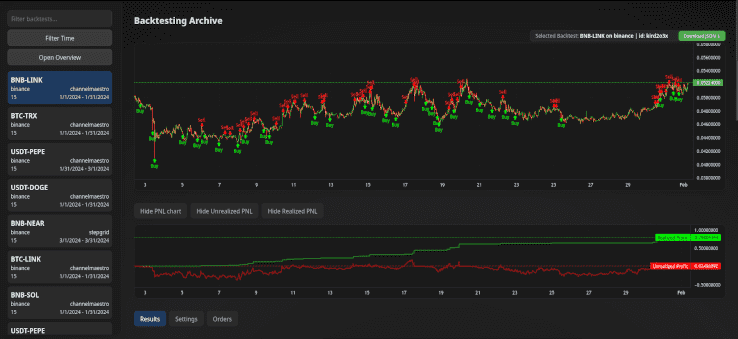
The backtesting archive provides a dedicated viewer for Gunbot-generated backtest reports. This intuitive interface makes it easy to analyze your backtesting results in detail. Each backtest includes a download option that has all needed settings to run your crypto trading bot in the exact same way.

Chart viewer

Visualize and Compare Results

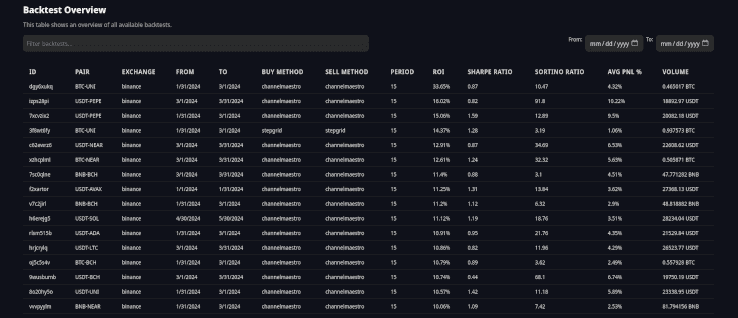
Our detailed charts allow you to visualize all your backtesting results at a glance. The overview table lets you easily compare performance metrics across various strategies and timeframes to identify what works best.

Overview viewer

Contribute to the Backtesting Archive

Join the Community Effort

The Gunbot backtesting archive will thrive on contributions from traders like you. By sharing your backtesting results, you help build a richer, more diverse database that benefits the entire community.

How to Submit Your Data

Contributing is simple. You can submit your backtesting results in two ways:

Each submission goes through a review process for quality and accuracy. While it might take some time, your valuable insights will soon be part of this collective resource.

What’s Inside a Backtest Report?

Here’s a sneak peek at the kind of data you can look at in the backtesting archive:

  • Pair: BTC-SOL
  • Exchange: Binance
  • Fee Percentage: 0.1%
  • Time Period: From June 7, 2024, to February 24, 2056

Key Performance Metrics

  • Starting Funds: 0.1 BTC
  • Realized PnL: 0.003594 BTC
  • ROI: 3.59%
  • Sharpe Ratio: 0.56
  • Sortino Ratio: 9.72
  • Realized Profit: 0.005393 BTC
  • Realized Loss: -0.001798 BTC
  • Average PnL %: 1.78%
  • Average Profit %: 1.93%
  • Average Loss %: -5.66%
  • Volume: 0.663889 BTC
  • Buy Volume: 0.339088 BTC
  • Sell Volume: 0.324801 BTC
  • Buys: 47
  • Sells: 51
  • Trades with Profit: 50
  • Trades with Loss: 1
  • Fees Paid: 0.000663 BTC

Strategy Settings

Review the detailed settings used in backtests, such as:

  • Initial Funds: 0.1 BTC
  • Buy Method: channelmaestro
  • Sell Method: channelmaestro
  • Profit Target %: 7.5
  • Use Auto Gain: true
  • Buy Enabled: true
  • Sell Enabled: true

These settings allow you to see exactly how strategies are configured and how they perform under different conditions.

Bonus: Guide to Mass Backtest Runs with Gunbot on Linux

This guide will help you set up and run a mass backtest script for Gunbot on a Linux system.

Prerequisites

  1. Gunbot: Make sure you have Gunbot installed and configured.
  2. Python 3.10: Make sure Python 3.10 is installed.
  3. Required Python Libraries: Install the necessary Python libraries by running:
    pip install subprocess time os signal shutil json re itertools multiprocessing

Script Setup

  1. Download the Script: Save the provided script as mass_backtest.py in your working directory.
  2. Set Up Working Directories: Make sure you have the following directory structure:
    /home/user/dev/backtesting-runs/
    ├── 1/
    ├── 2/
    └── 3/
    Each directory should contain:
    • A complete Gunbot installation
    • A unique GUI port set for each instance
    • A config.js file with "BACKFESTER": true in the bot section and preconfigured starting balances for simulator.

Configuration

Modify Paths

Adjust the paths in the script if your directory structure is different.

Trading Pairs and Months

Customize the trading_pairs and months variables according to your needs.

Pair Overrides and Trading Limit

The script will override the configuration for each pair for proper backtesting. It updates:

  • BF_SINCE and BF_UNTIL: The start and end timestamps for the backtest period.
  • TRADING_LIMIT: Calculated as the available balance divided by 30.
  • MIN_VOLUME_TO_SELL: Set as 30% of the trading limit.
  • Other strategy-specific settings.

These overrides keep each backtest on consistent parameters.

Using RAM Disk

Importance of RAM Disk

Using a RAM disk can significantly speed up the backtesting process by reducing read/write times. The script copies necessary files to the RAM disk, performs the backtest, and then copies the results back to the main storage.

Check Available RAM Disk Volume

Before running the script, make sure you have sufficient space in your RAM disk (/dev/shm). Check the available volume with the following command:

df -h /dev/shm

Make sure you have enough space to handle the data for your backtests. If necessary, adjust your system's RAM disk size in your system settings.

Running the Script

  1. Navigate to the Script Directory:
    cd /path/to/your/script
  2. Run the Script:
    python3 mass_backtest.py

Script Workflow

Initial Setup

The script starts by clearing any existing temporary backtesting directories in the RAM disk (/dev/shm). It then loads or initializes the task queue with all trading pairs and date ranges.

Managing Tasks

The task queue manages which trading pairs and date ranges need to be processed. The script uses a worker directory queue to handle different working directories where backtests will be run.

Running Backtests

The script launches multiple worker processes to perform backtests concurrently. Each worker:

  • Copies necessary files to the RAM disk
  • Executes the backtest using Gunbot
  • Monitors the output for completion
  • Terminates the process upon completion
  • Copies the backtesting results back to the main storage
  • Marks the task as done and updates the completed tasks file

Completion

The script waits for all worker processes to finish. It periodically saves the state of the task queue to a file, allowing you to resume if the script is interrupted.

Increasing Process Count

To increase the number of processes running backtests concurrently:

  1. Create Enough Working Directories:

    • You need one working directory per process. For example, if you want to run 5 processes concurrently, you should have 5 working directories:
      /home/pim/dev/backtesting-runs/
      ├── 1/
      ├── 2/
      ├── 3/
      ├── 4/
      └── 5/
    • Each directory must have a complete Gunbot installation with a unique GUI port and a config.js file.
  2. Update the Number of Processes:

    • Open the mass_backtest.py script.
    • Locate the section where the processes are started:
      processes = []
      for _ in range(3): # 3 processes
      p = Process(target=worker, args=(task_queue, working_directory_queue))
      p.start()
      processes.append(p)
    • Change the number 3 to the desired number of processes. For example, to run 5 processes concurrently, change it to:
      processes = []
      for _ in range(5): # 5 processes
      p = Process(target=worker, args=(task_queue, working_directory_queue))
      p.start()
      processes.append(p)
  3. Update the Working Directories List:

    • Update the working_directories list at the beginning of the script to match the number of processes. For example, if you want to run 5 processes, you need 5 working directories. You should update the range to range(1, 6) to match the folder count:
      working_directories = [os.path.join(base_working_directory, str(i)) for i in range(1, 6)] # 5 working directories
    • The number 6 here is one more than the actual count because the range function in Python is inclusive of the start value but exclusive of the end value. So, range(1, 6) creates a list from 1 to 5.

Considerations

  • System Resources: Make sure your system has enough CPU and RAM to handle the increased process count. Running too many processes can lead to resource contention and slow down the overall performance.
  • RAM Disk Space: Verify that your RAM disk (/dev/shm) has enough space to accommodate the additional processes.

Monitoring Progress

  • Console Logs: The script prints logs to the console, showing the progress of each backtest.
  • Completion Reports: Backtesting reports are saved back to the respective working directories.

Script source

mass_backtest.py

import subprocess
import time
import os
import signal
import shutil
import json
import re
from multiprocessing import Process, Queue, current_process
from queue import Empty

# Define the base working directory
base_working_directory = '/home/user/dev/backtesting-runs'
working_directories = [os.path.join(base_working_directory, str(i)) for i in range(1, 4)] # 3 working directories
command = ['./gunthy-linux']

# Static list of pairs and timeframes to use
trading_pairs = [
"USDT-BTC", "USDT-ETH", "USDT-BNB", "USDT-SOL", "USDT-XRP", "USDT-DOGE", "USDT-ADA", "USDT-TRX",
"USDT-AVAX", "USDT-SHIB", "USDT-DOT", "USDT-LINK", "USDT-BCH", "USDT-NEAR", "USDT-MATIC", "USDT-LTC",
"USDT-UNI", "USDT-PEPE", "BTC-ETH", "BTC-BNB", "BTC-SOL", "BTC-XRP", "BTC-DOGE", "BTC-ADA", "BTC-TRX",
"BTC-AVAX", "BTC-DOT", "BTC-LINK", "BTC-BCH", "BTC-NEAR", "BTC-MATIC", "BTC-LTC", "BTC-UNI", "BNB-SOL",
"BNB-XRP", "BNB-ADA", "BNB-TRX", "BNB-AVAX", "BNB-DOT", "BNB-LINK", "BNB-BCH", "BNB-NEAR", "BNB-MATIC",
"BNB-LTC", "ETH-BNB", "ETH-XRP", "ETH-SOL", "ETH-ADA", "ETH-TRX", "ETH-AVAX"
]

months = [
(1704067200000, 1706659199000), # Jan 2024
(1706659200000, 1709251199000), # Feb 2024
(1709251200000, 1711843199000), # Mar 2024
(1711843200000, 1714435199000), # Apr 2024
(1714435200000, 1717027199000), # May 2024
(1717027200000, 1719619199000), # Jun 2024
]

def transform_pair(pair):
if pair.endswith('BTC'):
return f"BTC-{pair[:-3]}"
elif pair.endswith('ETH'):
return f"ETH-{pair[:-3]}"
elif pair.endswith('USDT'):
return f"USDT-{pair[:-4]}"
elif pair.endswith('BNB'):
return f"BNB-{pair[:-3]}"
return pair

def clear_ramdisk():
ramdisk_base = '/dev/shm/'
for item in os.listdir(ramdisk_base):
item_path = os.path.join(ramdisk_base, item)
if os.path.isdir(item_path) and item.startswith('backtesting_'):
shutil.rmtree(item_path)
print(f"Cleared RAM disk directory: {item_path}")

def delete_folders(working_directory):
json_folder = os.path.join(working_directory, 'json')
backtesting_folder = os.path.join(working_directory, 'backtesting')

if os.path.exists(json_folder):
shutil.rmtree(json_folder)
print(f"Deleted folder: {json_folder}")
if os.path.exists(backtesting_folder):
shutil.rmtree(backtesting_folder)
print(f"Deleted folder: {backtesting_folder}")

def read_config(working_directory):
config_path = os.path.join(working_directory, 'config.js')
with open(config_path, 'r') as file:
config_data = file.read()
config_data = re.sub(r'^module\.exports\s*=\s*', '', config_data)
config_data = re.sub(r';\s*$', '', config_data)
return json.loads(config_data)

def write_config(config, working_directory):
config_path = os.path.join(working_directory, 'config.js')
config_data = json.dumps(config, indent=4)
with open(config_path, 'w') as file:
file.write(config_data)

def ensure_pair_config(config, pair):
exchange = 'binance'
if exchange not in config['pairs']:
config['pairs'][exchange] = {}

config['pairs'][exchange] = {}
if pair not in config['pairs'][exchange]:
config['pairs'][exchange][pair] = {
"strategy": "channelmaestro",
"enabled": True,
"override": {
"INITIAL_FUNDS": "500",
"BUY_METHOD": "channelmaestro",
"SELL_METHOD": "channelmaestro",
"COMPOUND_RATIO": "1",
"COMPOUND_PROFITS_SINCE": "0",
"USE_STOP_AFTER_PROFIT": False,
"PROFIT_TARGET_PCT": "7.5",
"USE_AUTO_GAIN": True,
"GAIN_PARTIAL": "0.5",
"GAIN": "2",
"BUY_ENABLED": True,
"SELL_ENABLED": True,
"STOP_AFTER_SELL": False,
"MIN_VOLUME_TO_SELL": 10,
"MAX_INVESTMENT": "999999999999999",
"PERIOD": "5",
"PERIOD_MEDIUM": "15",
"PERIOD_LONG": "30",
"IGNORE_TRADES_BEFORE": "0",
"BF_SINCE": 0,
"BF_UNTIL": 0,
"USE_EXPERIMENTS": False
}
}

def update_config(config, pair, start, end):
if not config['bot']['BACKFESTER']:
config['bot']['BACKFESTER'] = True

base, quote = pair.split('-')[0], pair.split('-')[1]
balance = float(config['bot']['simulatorBalances']['binance'][base])

trading_limit = balance / 30
min_volume_to_sell = trading_limit * 0.3

ensure_pair_config(config, pair)

config['pairs']['binance'][pair]['override']['BF_SINCE'] = start
config['pairs']['binance'][pair]['override']['BF_UNTIL'] = end
config['pairs']['binance'][pair]['override']['TRADING_LIMIT'] = trading_limit
config['pairs']['binance'][pair]['override']['MIN_VOLUME_TO_SELL'] = min_volume_to_sell
config['pairs']['binance'][pair]['override']['INITIAL_FUNDS'] = balance

def copy_to_ram(working_directory, ram_directory):
print(f"Copying {working_directory} to {ram_directory}")
if os.path.exists(ram_directory):
shutil.rmtree(ram_directory)
shutil.copytree(working_directory, ram_directory)

def copy_backtesting_reports_from_ram(working_directory, ram_directory):
print(f"Copying backtestingReports from {ram_directory} back to {working_directory}")
ram_backtesting_reports = os.path.join(ram_directory, 'backtestingReports')
main_backtesting_reports = os.path.join(working_directory, 'backtestingReports')
if os.path.exists(ram_backtesting_reports):
if os.path.exists(main_backtesting_reports):
shutil.rmtree(main_backtesting_reports)
shutil.copytree(ram_backtesting_reports, main_backtesting_reports)

def launch_and_kill_process(command, working_directory, ram_directory):
copy_to_ram(working_directory, ram_directory)
process = subprocess.Popen(command, cwd=ram_directory, stdout=subprocess.PIPE, stderr=subprocess.PIPE, text=True)
print(f"Process {process.pid} started in {ram_directory}.")

last_output_time = time.time()

try:
while True:
output = process.stdout.readline()
if output == '' and process.poll() is not None:
break
if output:
last_output_time = time.time()
print(output.strip())
if 'Backtesting report created successfully' in output:
break
if 'Backtester completed the job: your data will be available soon on your GUI' in output:
time.sleep(3)
break
if time.time() - last_output_time > 8:
print(f"No log output for 8 seconds, restarting process {process.pid}")
os.kill(process.pid, signal.SIGTERM)
process.wait()
process = subprocess.Popen(command, cwd=ram_directory, stdout=subprocess.PIPE, stderr=subprocess.PIPE, text=True)
last_output_time = time.time()
finally:
if process.poll() is None:
os.kill(process.pid, signal.SIGTERM)
print(f"Process {process.pid} in {ram_directory} has been terminated.")
copy_backtesting_reports_from_ram(working_directory, ram_directory)
delete_folders(ram_directory)

def run_backtest(pair, start, end, working_directory, ram_directory, queue):
config = read_config(working_directory)
update_config(config, pair, start, end)
write_config(config, working_directory)
launch_and_kill_process(command, working_directory, ram_directory)
time.sleep(1) # Wait for 1 second before the next run
queue.put(working_directory) # Indicate that this working directory is free

def save_queue(task_queue, filename='task_queue.json'):
with open(filename, 'w') as file:
tasks = []
while not task_queue.empty():
tasks.append(task_queue.get())
json.dump(tasks, file)
for task in tasks:
task_queue.put(task)

def load_queue(filename='task_queue.json'):
task_queue = Queue()
if os.path.exists(filename):
with open(filename, 'r') as file:
tasks = json.load(file)
for task in tasks:
task_queue.put(tuple(task))
else:
for pair in trading_pairs:
for start, end in months:
task_queue.put((pair, start, end))
return task_queue

def worker(task_queue, working_directory_queue, completed_tasks_filename='completed_tasks.json'):
completed_tasks = []

if os.path.exists(completed_tasks_filename):
with open(completed_tasks_filename, 'r') as file:
completed_tasks = json.load(file)

while True:
try:
pair, start, end = task_queue.get(timeout=5) # timeout added to allow graceful shutdown
except Empty:
break

if (pair, start, end) in completed_tasks:
continue

working_directory = working_directory_queue.get()
ram_directory = os.path.join('/dev/shm', f'backtesting_{current_process().pid}')

print(f"Worker {current_process().pid} processing {pair} from {start} to {end} in {working_directory}")
run_backtest(pair, start, end, working_directory, ram_directory, working_directory_queue)

completed_tasks.append((pair, start, end))
with open(completed_tasks_filename, 'w') as file:
json.dump(completed_tasks, file)

if __name__ == "__main__":
clear_ramdisk()

task_queue = load_queue()
working_directory_queue = Queue()
save_queue(task_queue)

for wd in working_directories:
working_directory_queue.put(wd)

processes = []
for i in range(3): # 3 processes
p = Process(target=worker, args=(task_queue, working_directory_queue))
p.start()
processes.append(p)
time.sleep(0.5) # Introduce a small time offset of 0.5 seconds before starting the next process

for p in processes:
p.join()

save_queue(task_queue)

Conclusion

The new backtesting archive on Gunbot.com helps you refine strategies with better data. By using and contributing to this resource, you can improve your trading methods and share useful findings with the Gunbot community. Start with the backtesting archive and keep improving from there.

Gunbot Now Supports Spot Trading on BingX

@boekenbox
@boekenbox
Gunbot Now Supports Spot Trading on BingX

Gunbot now supports spot trading on BingX. After initial testing, this integration is available to the wider community and gives you another exchange option for automated spot trading.

BingX also has launch promotions available. Check the details below.

What is Spot Trading?

Spot trading involves buying and selling assets for immediate delivery. It’s a fundamental trading method widely used by both beginners and experienced traders. In spot trading, transactions are settled "on the spot," meaning that the trade is executed and settled immediately, as opposed to futures or options trading, where the settlement takes place at a later date.

Spot trading is useful if you prefer straightforward, transparent trading. Prices in the spot market are determined by supply and demand dynamics in real-time, offering traders the ability to react quickly to market movements and take advantage of price fluctuations.

Benefits of Using Gunbot for Spot Trading on BingX

Gunbot's integration with BingX for spot trading brings several key benefits:

  • Automated Trading Strategies: Gunbot allows users to automate their trading strategies, maximizing efficiency and potential profits. By using Gunbot’s advanced algorithms, traders can set up automated trades based on predefined conditions, reducing the need for constant monitoring and manual execution.

  • Smooth Integration: The integration with BingX’s reliable trading platform keeps trading smooth and efficient. You get BingX market access with Gunbot strategy automation.

  • Promising Results: Initial feedback from our testing phase has been overwhelmingly positive. Users have reported efficient trade execution and reliable performance, highlighting the potential for improved trading outcomes with this new feature.

BingX Launch Promotions

To celebrate the launch, BingX is introducing some interesting promotions that users can take advantage of. Check out the event page for full details and participation.

  • KYC Verification: Complete "Advanced Identity Verification" to get 1 draw entry.
  • Sign Up: Create a BingX account to get 1 draw entry.
  • Total Deposit: Deposit ≥ 50 USDT to get 1 draw entry.
  • Spot Trading Volume: Achieve a Spot trading volume of 10 USDT to get 1 draw entry, with more entries for higher volumes (up to 6 entries).

Event Details:

  • Period: 2024-06-28 00:00 to 2024-07-18 00:00 (UTC+8)
  • Participants: Invited users only (those who trade using Gunbot)
  • Conditions: Complete tasks to earn draw entries. Rewards are issued instantly, with bonus vouchers unlocked after meeting the specified trading volume requirement.

Notes:

  • BingX reserves the right to final interpretation of the event. Users involved in unfair activities will be disqualified.

Follow BingX on X for the latest updates.

Detailed Overview of the Testing Phase

During the initial testing phase, a select group of users were given access to the spot trading feature on BingX through Gunbot. The primary goal was to assess the functionality, performance, and overall user experience. Here are some key insights from the testing phase:

  • Trade Execution: The execution of trades was smooth and efficient, with minimal latency. Users were able to place and execute trades quickly, benefiting from real-time price updates and market data. It's likely that edge cases will soon be found out when more users start with Gunbot on BingX, within a few iterations we should reach a pretty stable status.

  • User Interface: While the core functionality performed well, some minor visual issues were identified. These issues are currently being addressed by our development team to provide a polished and user-friendly interface before the official launch.

Future Plans and Improvements

As we prepare for launch of the spot trading feature on BingX, our team is actively working on addressing the minor visual issues identified during testing. We are committed to delivering a smooth and high-quality user experience, and these refinements are an important part of our final preparations.

In addition to resolving visual issues, we are also improving the overall functionality based on user feedback. Our goal is to provide a reliable BingX trading bot that meets the diverse needs of our users. We look forward to continuing to improve your trading experience with practical features and steady performance.

More Gunbot updates will follow.

Introducing the Gunbot Dev Community

@boekenbox
@boekenbox
Introducing the Gunbot Dev Community

Gunbot has come a long way from offering preset trading bots to becoming a flexible platform that lets developers create their own custom trading strategies and automation setups. This shift has helped create a small and enthusiastic community of developers who are now offering their custom setups to Gunbot users. We're happy to announce the first three community-developed offers, with more to come.

With or without extensions made by community devs, Gunbot remains the most versatile crypto trading bot on the market. Offering a wide range of built-in strategies that are ready to use right out of the box. If you use these community-developed setups or stick with the built-in options, Gunbot provides a reliable trading solution for all users.

Broxynet-V1

The Broxynet-V1 strategy suite, as described by its developer @Steven0_0Smith, includes multiple trading modes, Accumulator, Gribz, Calm, Normal, and Aggressive, catering to both novice traders and seasoned Gunbot users.

  • Accumulator: Reinvest profits to buy and hold your favorite cryptocurrencies.
  • Gribz Mode: A grid-style trading approach with dual sell levels.
  • Calm, Normal, and Aggressive Modes: Customizable settings to protect against market downtrends.

Broxynet-V1's active Trading Panel provides real-time data on buy and sell triggers, current pair state, and trading mode.

More details about Broxynet

Quanta exoTrader

According to its developer @flightcommander, Quanta exoTrader offers a data science approach to trading.

  • Data Science Core: High probability entry and exit points.
  • Adaptive Trading Algorithm: Adjusts to market volatility in real-time.
  • Risk Management Tools: Multi-timeframe trend protection and custom risk thresholds.

Quanta exoTrader is said to be ideal for traders who want a sophisticated, data-driven strategy that adapts to market conditions.

More details about Quanta-exoTrader

ChannelMaestro

ChannelMaestro, described by its developer @boekenbox, is an all-around trading strategy designed for simplicity and effectiveness. With minimal settings required, it can be deployed in under 10 seconds.

  • Simple Configuration: Easy to start trading with just a few settings.
  • Single Setting Funds Management: Integrated stop losses and automatic trade size adjustments.
  • Multi-Timeframe Analysis: Analyzes different timeframes to make informed trading decisions.

ChannelMaestro is said to be perfect for traders who prefer a straightforward approach without the need for extensive configuration.

More details about ChannelMaestro

Conclusion

The Gunbot community is growing, thanks to the creativity and hard work of our developers. Setups like Broxynet-V1, Quanta exoTrader, and ChannelMaestro give users more choices for their trading strategies. These first community-developed setups are available for purchase, with the developers getting the proceeds. More community strategies and extensions are on the way, providing even more ways to customize your Gunbot experience.

If you use these community setups or stick with Gunbot's built-in strategies, you have a solid tool for your trading needs. The future of Gunbot trading is looking better than ever with help from our dedicated community.

Gunbot Now Supports Automated Trading on dYdX v4 Protocol

@boekenbox
@boekenbox
Gunbot Now Supports Automated Trading on dYdX v4 Protocol

We’re excited to announce that Gunbot now lets you automate trades on the dYdX v4 protocol, offering you a fully decentralized way to trade. With this integration, you get the chance to bring your trading strategies into a transparent, secure environment where you stay in full control. This isn’t just a new feature; it’s a meaningful step toward trading freedom.

What is dYdX v4?

The dYdX v4 protocol is all about decentralization. It’s an open-source platform designed to take the middleman out of trading. Everything runs through smart contracts, so there’s no central authority. Users can help shape and govern the platform, making it a trading space run by the community, for the community. This setup means more control for you and a trustless system where security is baked in.

Key Features of dYdX v4

Here’s what dYdX v4 brings to the table:

  • Full Decentralization: The platform is entirely managed by smart contracts and community governance, with no single point of control.
  • Community Governance: You have a voice. Users actively participate in decisions and can vote on important changes.
  • Advanced Trading Tools: A range of trading options with strong security and efficiency.

Why Gunbot with dYdX v4 is Worth Trying

With Gunbot’s new support for dYdX v4, you can automate your trading in a space where trust and transparency are built into the foundation. Here’s what that looks like for you:

  • Automated, Decentralized Trading: Take advantage of Gunbot’s trading strategies on dYdX v4, where trades are automatically executed in a decentralized system that you can count on.
  • Security You Can See: Because every transaction happens on-chain, you get a clear view of your trading activity, reducing the risk of hacks and fraud.
  • Fair and Transparent Trading: With decentralized trading, there’s no room for hidden moves or unexpected changes. You see exactly what’s happening, every step of the way.

To get started with automated trading on dYdX v4 using Gunbot, follow these steps:

  1. Update Gunbot: Make sure you’re on the latest version of Gunbot that includes the dYdX v4 integration.
  2. Connect Your Wallet: Link your dYdX wallet to Gunbot. You’ll need to use dYdX’s “export secret phrase” option to connect. In Gunbot, this exchange is simply called dydx4.
  3. Set Up Your Strategies: Configure your trading strategies in Gunbot to start automating your trades on dYdX v4.
  4. Monitor and Adjust: Use Gunbot’s performance tracking tools to optimize your strategies and adjust as needed.

For more on how to get started or to read the details, check out our dydx trading bot.

Wrapping Up

Gunbot’s integration with dYdX v4 opens up new options for automated, secure, and fully decentralized trading. We’re looking forward to seeing how you put these tools to use, and we’re here to help if you have any questions. Give it a try and see how decentralization can make your trading even better.

Display Custom Metrics in Gunbot with AutoConfig Hack (UPDATED, NO LONGER A HACK)

@boekenbox
@boekenbox
Display Custom Metrics in Gunbot with AutoConfig Hack (UPDATED, NO LONGER A HACK)

This guide shows how to use AutoConfig to display custom metrics next to your trading chart. Although displaying custom metrics is usually reserved for custom strategies, we will use a simple AutoConfig setup to place custom metrics right next to your trading chart.

Update

The feedback on this article has been overwhelmingly positive, and we've taken note of the technical challenges some of you faced with setting custom metrics for strategies like stepgridhybrid.

Thanks to your input, starting from version 28.5.6_beta, we are officially supporting this feature in AutoConfig, allowing for the customization of metrics in the strategy stats sidebar.

Getting Custom Metrics with AutoConfig 🔓

AutoConfig is primarily used for configuration automation, but we'll demonstrate how to use it for improving the Gunbot frontend too. By creating an AutoConfig job that alters nothing in the Gunbot config, you can have it write data to the internal memory of the bot and display custom metrics in the right sidebar, next to the chart. These metrics can include a title, value, and tooltip text.

Note: This article assumes you are familiar with your bot and basic steps like enabling AutoConfig itself.

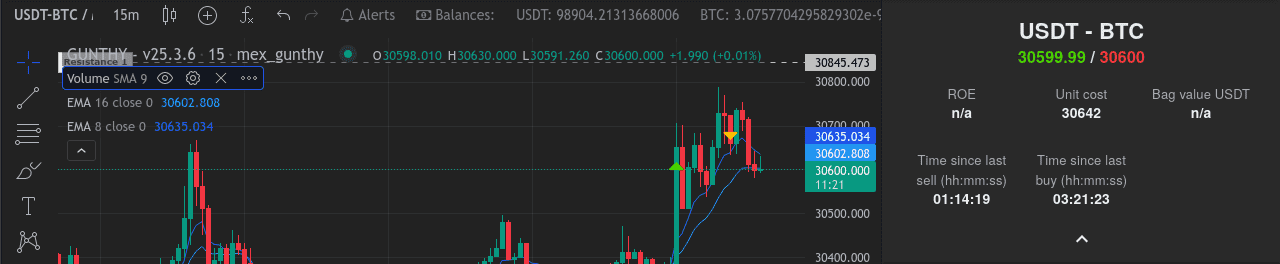
Time Since Last Buy & Sell: A Complex Example ⏰

Let's examine an example of how to display the time since last buy and sell for the USDT-BTC pair. This complex example iterates over order data to calculate the final values. Keep in mind that the JavaScript code must be on a single line, within double quotes, and have a leading space to be evaluated.

autoconfig.json example

{
"customMetrics": {
"pairs": {
"exclude": "",
"include": "USDT-BTC",
"exchange": "binance"
},
"filters": {
"alwaysPasses": {
"type": "custom",
"target": " true"
}
},
"overrides": {},
"setPairVariable": {
"setMetrics": " (function setMetrics(data) {const orders = data.pair.orders; const lastBuyTime = orders.filter(order => order.type === 'buy').map(order => Date.now() - order.time).sort((a, b) => b - a)[0];const timeSinceLastBuy = new Date(lastBuyTime).toISOString().substr(11, 8);const lastSellTime = orders.filter(order => order.type === 'sell').map(order => Date.now() - order.time).sort((a, b) => b - a)[0];const timeSinceLastSell = new Date(lastSellTime).toISOString().substr(11, 8);data.pair.sidebarExtras = [{label: 'Time since last sell (hh:mm:ss)', value: timeSinceLastSell, tooltip: 'lolol'}, {label: 'Time since last buy (hh:mm:ss)', value: timeSinceLastBuy, tooltip: 'lolol'}]; return true;})(this)"
},
"clearOverrides": false,
"schedule": "*/15 * * * * *",
"type": "manageOverrides",
"debug": true,
"enabled": true
}
}

Pairs Section: This section specifies the target pair for the job. In this case, it is set to "USDT-BTC" on the "binance" exchange. Alternatively you can set the value for include to -to match all pairs on an exchange, or USDT- to match all USDT pairs.

Filters Section: The "alwaysPasses" filter is defined as a custom filter that will always evaluate to true. This lets the job continue to the next step, regardless of the input.

Overrides Section: This section is empty in the provided configuration. It can be used to override certain settings or parameters on the pair level if needed.

setPairVariable Section: This section contains a JavaScript code snippet wrapped in a self-invoking function. It sets the custom metrics for the pair. The code extracts information from the "data" object, specifically the "orders" property of the pair. It calculates the time since the last buy and sell orders for the pair and formats them as "hh:mm:ss" (hours:minutes:seconds). The results are then assigned to the "sidebarExtras" property of the pair, which includes an array of objects with labels, values, and tooltips. Finally, it returns true to indicate that the execution was successful.

The result

Custom metrics show next to the chart Your new metrics show on the sidebar next to the chart.

Tip: don't bother manually typing JS code that is minified to fit on a single line. Just search for an online tool to minify your code, so you can write it without formatting concerns. ChatGPT is also good at minifying code to match the formatting requirements to place it in the autoconfig.json file.

Simpler Job Examples for Custom Metrics 🎯

Let's look at some simpler job examples that display the last stochRSI value (data.pair.STOCHRSI), ATR value (data.pair.atr), with an empty element between the other metrics for formatting purposes.

autoconfig.json example

{
"customMetrics": {
"pairs": {
"exclude": "",
"include": "USDT-BTC",
"exchange": "binance"
},
"filters": {
"alwaysPasses": {
"type": "custom",
"target": " true"
}
},
"overrides": {},
"setPairVariable": {
"setMetrics": " (function setMetrics(data) { data.pair.sidebarExtras = [{label: 'StochRSI', value: data.pair.STOCHRSI, tooltip: 'Stochastic RSI value', persist: true}, {label: '', value: '', tooltip: '', persist: true}, {label: 'ATR', value: data.pair.atr, tooltip: 'Average True Range', persist: true}]; return true; })(this)"
},
"clearOverrides": false,
"schedule": "*/15 * * * * *",
"type": "manageOverrides",
"debug": true,
"enabled": true
}
}

This would result in the following custom metrics display:

  • StochRSI
  • Empty Space
  • ATR

Breaking Down the Metrics Calculation and Setting 🔍

The key to understanding and customizing your metrics lies in dissecting the parts that calculate and set the values. This will be different for every metric that you want to implement.

In our complex example,

  1. We begin by filtering orders and calculating the time difference between now and each order's timestamp.
  2. We sort the resulting array in descending order based on the calculated time difference.
  3. The first element of the sorted array represents the most recent order, and we extract its time using new Date(lastBuyTime).toISOString().substr(11, 8).

Tip: you can use JavaScript to modify your data. For example add .toFixed(2) to change a floating point number with many decimal points to a string with just two decimals.

By understanding how metrics are calculated and set, you can customize your dashboard with informative data points matched to your trading needs.

Gunbot Community Cup 2024

@boekenbox
@boekenbox
Gunbot Community Cup 2024

Inside the Gunbot Community Cup 2024, where Gunbot community members showcase their trading strategies. This time, the challenge is set on the volatile waves of USDT-SOL, offering a fresh battleground away from the usual crypto giants like Bitcoin and Ethereum. It's a brave choice, especially in what some may dub the "BTC season," but it's all in good spirit and creativity.

Where to Watch the Action

Join us live on YouTube to witness the developers in action. Daily streams will bring you every strategic move, win, and learning moment. It's a unique opportunity to see the strategies unfold in real-time.

Event Timeline

The competition is on, leading up to a grand finale at midnight on June 8, 2024. And if you're craving more, a second round later in the year gives developers another chance to test strategies.

The Essence of the Competition

Participants compete with the USDT-SOL pair, aiming for the highest Return on Investment (ROI). The ROI calculation is central to the competition. It compares profit or loss to the initial investment and gives a clear percentage-based measure of performance, which keeps the ranking fair and easy to follow.

Return on Investment, or ROI, is the measure we use to evaluate the effectiveness of each trading strategy. In simpler terms, it's like looking at what you've gained or lost compared to what you've initially put in. Here's how we calculate it: We sum up all the costs from the 'buy' orders to understand our total investment. Then, we tally the profit (or loss) from the 'sell' orders to see what we've earned back. The formula then divides the total profit by the total cost and multiplies by 100 to give us a percentage. This percentage tells us how much we've made (or lost) in relation to our initial investment. It's a straightforward way to see which strategies are actually winning.

Meet the Competitors

The range of entrants spans from newcomers to seasoned traders, each bringing their unique approach to the table:

  • Broxynet v1: Simplifies trading, showing that complexity isn't a prerequisite for success. Click for more info about Broxynet
  • CRB_VN_Script: A grid-based strategy that finds order in the chaos of market volatility.
  • Quanta exoTrader: Examines market movement in more detail, built for traders who like complexity. Click for more info about Exotrader.
  • GTrend: Equally adept in bull and bear markets, this strategy doesn't miss a beat.
  • MachineGun 5.0: Offers something for everyone, blending simplicity with the option for in-depth customization.

Watch Live on YouTube

Understanding the full depth of these strategies or scripts in plain language can be challenging. We invite everyone to experience the bots' behavior firsthand during our live streams. Join us on YouTube to see the action unfold!

Rewards and Recognition

The Gunbot community funds their favorite devs competition wallet. Success in the competition is gauged by ROI, with the top performers earning resources to further their strategy development. Those not in the top tier will still receive support to refine and improve their approaches. A final face-off at year's end will crown the ultimate Gunbot Community Strategy of 2024.

Beyond Competition

The Gunbot Community Cup is more than a contest; it's a platform for innovation and a showcase for the talented developers within our community. The selection of USDT-SOL as the trading pair adds an element of surprise and tests the adaptability of each strategy.

Wrapping Up

The Gunbot Community Cup 2024 is an invitation to test new strategies, support your favorite developers, and be part of a community that values progress and creativity. If you're here for the competition or the camaraderie, there's a place for you in the Gunbot community.

Valentine's Day 2024 Special: Double the Love, Double the Trading

@boekenbox
@boekenbox
Valentine's Day 2024 Special: Double the Love, Double the Trading

Valentine's Day is a celebration of love and a good time for sharing. For 2024, Gunbot is offering a promotion built around that idea. This Valentine's, we're gifting a free additional exchange slot to every lifetime plan and Gunbot upgrade.

Read more to see all the promotion details

A Heartfelt Offer for Lifetime Plan Members

We understand the joy and the challenges of trading together. That's why, this Valentine's, we're gifting a free additional exchange slot to every new lifetime plan and Gunbot upgrade. Now, you can run Gunbot on two accounts of the same exchange without the need for a second license - a deal we usually offer for $99.

Why This Matters

This offer allows you to:

  • Expand Your Trading Horizons: With an additional exchange slot, you and your significant other can manage separate accounts on the same exchange, doubling your trading opportunities.
  • Save on Costs: No need to purchase a separate license to trade on multiple accounts. We've got you covered.

How to Get Gunbot with an Additional Exchange Slot

Activating your free exchange slot is easy:

  1. Visit Gunbot Lifetime Plans if you're looking to join our family or Upgrade Options for existing lifetime members.
  2. During the payment process, you can select for which exchange the extra slot should work.
  3. Start trading with your loved one or manage two accounts efficiently.

Ready to Double Up?

Use this promotion to add another exchange slot to your setup. Visit our Lifetime Plans or Upgrade Options to get the offer.


Double your trading, double your fun. Happy Valentine's Day from Gunbot.

Gunbot Update: Maintaining Compatibility with Poloniex

@boekenbox
@boekenbox
Gunbot Update: Maintaining Compatibility with Poloniex

If you trade on Poloniex with Gunbot, upgrade to Gunbot v28.3.6 or higher. This version keeps Poloniex trading stable and gives you access to the latest fixes and features.

Key Actions:

  • Mandatory Upgrade: For users running Gunbot on Poloniex, upgrading to version v28.3.6 or higher is mandatory.
  • Download: The latest version of Gunbot can be downloaded from https://gunthy.org/downloads/. It is important to download the update from this official source to avoid any security risks.

Why Upgrade?

Upgrading to the latest version of Gunbot gives users the current features and security improvements. This is particularly important for exchanges like Poloniex, where recent changes or updates in the exchange's API or functionality might not be compatible with older versions of Gunbot.

How to Upgrade:

  1. Visit the Gunthy download page.
  2. Select the version suitable for your operating system under the Gunbot v28.3.6 or higher section.
  3. Download and install the update.
  4. Restart Gunbot to apply the new update.

For detailed installation instructions, refer to the Gunbot documentation.

Conclusion

Keep Gunbot updated, especially if you trade on Poloniex. Run Gunbot v28.3.6 or higher to get the current fixes and improvements.

Gunbot Integrates with Coinbase Advanced Trade: More choice for US Traders

@boekenbox
@boekenbox
Gunbot Integrates with Coinbase Advanced Trade: More choice for US Traders

Hey Gunbot community! We’re excited to announce that Gunbot now integrates with Coinbase Advanced Trade. This isn’t just an incremental update, it’s a serious move to give US traders a fully compliant, regulated platform to automate spot trading with Gunbot’s trading tools. If you’re in the US and looking to trade on a secure, compliant exchange, this integration is here to deliver exactly that.

For years, we’ve supported GDAX (remember that name?) and Coinbase Pro, so expanding to Coinbase Advanced Trade makes sense. But this isn’t just about adding another exchange, it’s about providing a reliable, US-based option that aligns with local regulations and meets the needs of serious traders who care about compliance.

Why Coinbase Advanced Trade?

Coinbase Advanced Trade is a great option for US-based traders, especially when regulatory compliance is essential. The platform’s focus on adhering to US laws makes it trustworthy if you prioritize secure trading. Here’s why we see it as a strong fit for Gunbot:

  • Regulatory Compliance: Operating within the US regulatory framework, Coinbase is a top choice for anyone wanting to trade without compliance concerns.
  • Security and Stability: Coinbase has a solid reputation in the US and provides the reliability and security that Gunbot users can rely on.

What the Integration Brings for Gunbot Users

By integrating with Coinbase Advanced Trade, we’re enabling US-based traders to use Gunbot’s automation stack on a compliant, dependable exchange. Here’s how this setup benefits you:

  1. Regulatory Assurance: Trading with Coinbase Advanced Trade means you’re operating within a compliant framework, an important factor for many of our users.
  2. Access to More Pairs: With a wide range of trading pairs, Gunbot users can diversify strategies without needing to jump between platforms.
  3. Improved Trade Execution: The advanced API improves efficiency, so users get smooth, consistent performance when automating their trades.

If you're ready to set it up, get our Coinbase Advanced Trading Bot.

The Compliance Advantage

Crypto regulations in the US are stricter than ever. We’ve all seen this push for regulation coming, and it’s only getting more intense. This integration with Coinbase Advanced Trade gives our US traders a way to stay ahead, using a compliant, dependable platform without sacrificing Gunbot’s flexibility and power.

This isn’t just about checking boxes; it’s about keeping Gunbot positioned as a tool you can trust to handle the complexities of today’s crypto market.

Gunbot’s Role in Automated Crypto Trading

If you're newer to Gunbot, here's why many traders stick with it:

  • Built-In Strategies: Gunbot comes with a wide range of strategies that fit different trading styles and risk levels.
  • Highly Customizable: You can tailor strategies to your specific approach or even create custom setups to match your goals.
  • Intuitive Interface: Gunbot is straightforward to use, designed so that both beginners and seasoned traders can get the most out of it.
  • Active Community and Support: With a strong community and dedicated support, you’re never on your own, if you're just starting out or fine-tuning your setup.

Gunbot will continue to evolve, always focused on providing a stable and efficient trading experience. This integration with Coinbase Advanced Trade is a significant part of that process. As regulations evolve, so will we, making sure that Gunbot remains a reliable trading tool in the crypto space.

v26 release

@boekenbox
@boekenbox
v26 release

Gunbot v26 adds new tools for strategy prototyping, faster development, charting, AI support, and webhook workflows. Here is what changed in this stable channel update.

Image shows new charting capabilities for custom strategies in Gunbot v26.

💹 New Charting Capabilities

Good trading often depends on reading market data clearly and acting on it. Gunbot v26 improves charting and lets you create custom strategies with multi-point shape drawing on charts. You can mark support zones, add annotations, and make the chart reflect how you plan trades.

🤖 Embrace the Power of AI with Gunbot AI

Possibly the most significant addition to this version is the inclusion of Gunbot AI. With the integration of the GPT engine, Gunbot AI can generate custom strategy code based purely on description text. This new feature effectively bridges the gap between your trading ideas and their execution. Got a trading idea? Prototype it in seconds.

🔄 MEXC and Bybit Support

Staying true to our commitment of keeping Gunbot universally applicable, we have added support for MEXC v3 API and Bybit's v5 API in this version. These additions widen the horizons of trading platforms that Gunbot can smoothly integrate with, further improving user flexibility and market reach.

🔐 Improved Security with MetaMask Integration

Security matters in digital asset trading. Gunbot v26 now supports MetaMask login, adding another layer of account protection.

🗒️ Text Notes and Webhook Alerts

With the new webhook alert options, Gunbot eliminates any need for coding in Pinescript. You can now create alerts based on indicators right from your TradingView chart, improving the crypto bot's user-friendliness significantly.

If you're a trader who relies on external alerts, life just got easier.

Keeping Track with Text Notes 📝

To help you keep track of important information, we've introduced an option to save text notes per pair/exchange. These notes can be viewed on the chart sidebar or a dedicated page, serving as handy reminders.

📈 Referral Program and Setup Page Improvements

Gunbot v26 introduces a referral program with individual referral links. Alongside this, we've added several new options to the setup page, including the ability to hide open order lines on the chart and skip API key validation, making the Gunbot experience even more user-centric and intuitive.

💰 Strategy Improvements

Sghedge and Sgsfutures strategies have been improved to offer separate settings for the short side and a max loss stop-loss option. These improvements make these strategies more flexible and effective.

To top it all, numerous bug fixes and performance improvements have been implemented, contributing to an overall smoother and more stable user experience.

These are some of the features and improvements introduced in Gunbot v26. For a complete overview of changes, we recommend visiting the official release notes.

Gunbot Adds Support for Bybit's Unified Trading Account (UTA)

@boekenbox
@boekenbox
Gunbot Adds Support for Bybit's Unified Trading Account (UTA)

We're delighted to share that Gunbot now supports Unified Trading Account (UTA) on Bybit. As we continue to innovate and keep pace with the latest trading technologies, this new compatibility offers our users strong trading possibilities! 🚀

Bybit's UTA is an all-in-one account mode. You can adjust your trading setup, manage risk, and handle funds without switching between different instrument accounts.

info

This feature is currently available in preview releases (v25) and will be included in our next stable Gunbot release.

Bybit's Unified Trading Account: A Closer Look 👀

Bybit describes UTA as an 'all-in-one' account mode. It gives you a single place to manage risk and funds across instrument types.

Benefits of Upgrading to UTA

  1. Simplified Trading: Consolidate Spot, Derivatives, and Options into one account.
  2. Improved Capital Efficiency: Collateralize over 70 cryptocurrencies for cross-margin trading, and open new positions with unrealized profits.
  3. Diversified Strategy: Choose from three margin modes - Isolated Margin, Cross Margin, and Portfolio Margin, to fit your trading strategies.

UTA Features at a Glance

  1. One-Click Access: Engage in Spot Trading, Margin Trading, USDT Perpetual, USDC Perpetual, USDC Options, and USDC Futures conveniently.
  2. Improved Capital Efficiency: Use up to 10x for Margin Trading on Spot and an interest-free loan quota of up to 70,000 USDT on your UTA.
  3. Improved Portfolio Management: Protect trading positions and minimize losses in uncertain markets with Hedge Mode, and offset profit and loss across different product positions.
  4. Custom Position Modes: Choose from Isolated Margin (for beginners), Cross Margin (for experienced traders), and Portfolio Margin (for professional traders).

For more details on Bybit's UTA, check out their official page.

What Does This Mean For Gunbot Users? 🤔

For Gunbot users with existing 'normal' accounts on Bybit, nothing changes. Users with a Bybit Unified Trading Account can now fully use it with Gunbot.

Although we remain neutral about how traders can use this new feature, the integration of Bybit's UTA into Gunbot offers the potential for expanded capabilities and personalized trading strategies.

Importantly, this is not an endorsement of any particular strategy or feature offered by Bybit's UTA. As always, we urge you to research thoroughly, consider your own needs and trading strategies, and make informed decisions.

Stay tuned for more improvements as we continue to innovate and evolve!

Detailed Guide: Run Gunbot on a Linux VPS with PM2

@boekenbox
@boekenbox
Detailed Guide: Run Gunbot on a Linux VPS with PM2

This guide explains how to set up Gunbot, a cryptocurrency trading automation tool, on a Linux Virtual Private Server (VPS) using PM2. Running Gunbot on a VPS keeps your trading bot online 24/7, independent of your personal computer, minimizing the risk of downtime.

This guide looks at how to run Gunbot on a budget-friendly VPS using PM2.

Benefits of PM2

PM2 is a process manager for Node.js applications that simplifies managing Gunbot:

  • Process Management: Easily start, stop, and restart Gunbot.
  • Logging and Monitoring: Automatically handles logs and simplifies log management.
  • Startup Scripts: Restarts Gunbot automatically after a server reboot.

Setting Up Your VPS

Before proceeding, set up your Linux VPS following your provider's guidelines. Ubuntu is recommended for its simplicity and broad support. For a broader walkthrough beyond this PM2-focused flow, see the official Linux installation guide.

Connect to your server via SSH using a tool compatible with your operating system:

Installing Gunbot and PM2

Download the latest stable Gunbot release (gunthy-linux.zip) and upload it to your VPS using your SSH client. Then, unzip it:

unzip gunthy_linux.zip

Next, install Node.js, npm, and PM2:

sudo apt update
sudo apt install nodejs npm -y
npm install pm2@latest -g

Start Gunbot using PM2 (replace myGunbotProcess with your chosen name):

pm2 start gunthy-linux --name myGunbotProcess

Configuring Firewall

Allow access to Gunbot's default port (5000) using Ubuntu's firewall (UFW):

sudo ufw allow 5000

Check your VPS provider's firewall settings if issues persist.

Managing Logs with PM2

Use PM2 commands to manage logs easily:

# View all process logs
pm2 logs

# View logs for a specific process
pm2 logs myGunbotProcess

# Clear all logs
pm2 flush

Set up automatic log rotation to prevent logs from growing too large:

pm2 install pm2-logrotate

Automatically Restarting Gunbot on System Reboot

Configure PM2 to automatically restart Gunbot after reboot:

pm2 startup
pm2 save

Updating Gunbot

To update Gunbot, follow these steps:

  1. Stop Gunbot:
pm2 stop your-process-name
  1. Upload and replace the existing gunthy-linux file.
  2. Restart Gunbot:
pm2 restart your-process-name

Always review Gunbot’s official upgrade instructions when updates are available.

Running Multiple Gunbot Instances

To run multiple Gunbot instances on a single server:

  1. Duplicate your Gunbot folder for each instance.
  2. Modify config.js in each folder to have unique settings (instructions for multiple instances):
nano config.js
  1. Start each Gunbot instance with a unique name:
pm2 start gunthy-linux --name "another-process-name"

Save your configuration for automatic restarts:

pm2 startup
pm2 save

Using Gunbot with PM2 on a Linux VPS provides a reliable, always-on environment suitable for automated cryptocurrency trading. Affordable VPS options like Hetzner Cloud or Contabo can be enough for many Gunbot setups.

Get Your Trading Potential: Introducing Custom Strategy Development for Gunbot Users

@boekenbox
@boekenbox
Get Your Trading Potential: Introducing Custom Strategy Development for Gunbot Users

If you have a trading strategy idea but do not want to implement it yourself, Gunbot developers can help turn it into working code. The service covers new strategies and adjustments to existing ones.

Custom Strategies Just for You 🔧

If you have an idea for a trading strategy or want to modify an existing one, our developers can work with you to define the logic and create a private, customized strategy for your setup.

💡 Remember: With this service, you'll receive a fully personalized trading strategy that only you can execute using Gunbot.

Sharing is Caring: Contribute to the Community 💙

Are you feeling generous and want to share your custom strategy with fellow Gunbot users? No problem! We can make your project available to the entire Gunbot community, so everyone can benefit from your creative approach. It's a fantastic way to contribute to the growth and success of other traders.

Beyond Strategies: Turn Ideas Into Working Code 🌟

Our development team can also help with integrations, features, and other Gunbot customizations. Send us the details and we will evaluate the request. Once we have a clear understanding of your proposal, our team will prepare a quote based on its complexity and requirements.

How Our Process Works 📋

  1. Submit your idea: Describe your strategy, modification, or concept in detail and send us a request.
  2. Evaluation: Our development team will review your idea to confirm that it aligns with Gunbot's functionality.
  3. Quote: After assessing the feasibility and complexity of your proposal, we'll provide you with a quote.
  4. Development: If you accept the quote, our team will begin working on your project.
  5. Delivery: Once complete, you'll receive your custom strategy or feature, ready for use with Gunbot.

We're looking forward to your requests.

🔔 Important: This service is exclusively available to Gunbot users. To use it, make sure you have a valid Gunbot license.

Summer Sizzlers: 50% Off on Everything Gunbot!

@boekenbox
@boekenbox
Summer Sizzlers: 50% Off on Everything Gunbot!

Crypto markets might be cold, but this summer promotion gives you 50% off everything Gunbot. If you're a new or existing user, you can use it to improve your automated trading setup at a lower cost.

🔥 The Hottest Deal for New Users

If you've been considering Gunbot, this summer promotion gives new users a 50% discount on any plan. It's a lower-cost way to start with automated trading.

What You Get with Gunbot 🤖

  • Trading automation running from your own device
  • A wide range of trading strategies
  • Customizable settings for personalized trading
  • Frequent updates and improvements to stay ahead of market trends
  • An engaged community to learn from and share ideas with

Quick Tip: New Gunbot users can use the 50% discount to start automated trading at a lower cost.

☀️ Existing Users: Upgrade Your Trading Experience

Existing users can also get a 50% discount when upgrading. You can add features and strategies without paying full price.

Upgrade offer: Existing Gunbot users can upgrade to any plan with a 50% discount.

So what are you waiting for? Use the power of Gunbot's automated trading tools and make the most of your summer investments. With these incredible discounts, it's the perfect opportunity to heat up your crypto returns! 🔥📈