10 posts tagged with "Exchanges"

View All Tags

Gunbot Python SDK – Automate Trading Logic with Simpler Code

@boekenbox
@boekenbox
Gunbot Python SDK \u2013 Automate Trading Logic with Simpler Code

The Gunbot Python SDK is a newly released wrapper for the Gunbot REST API. It offers a practical way to write Python scripts that automate trading tasks like placing orders, managing strategies, pulling balances - without having to deal directly with raw HTTP requests.

If you're scripting quick tasks or building out more structured bots, this SDK saves time and removes friction from common interactions with the Gunbot backend.

TL;DR

  • Simplifies working with the Gunbot API in Python
  • Lets you send trades, check balances, manage config, analyze market data, etc
  • No need to handle auth headers or raw requests manually
  • Available now as package on PyPI and source code on GitHub

Why This SDK Exists

Using the Gunbot REST API directly in Python usually means building every request by hand. That includes forming URLs, setting headers, serializing payloads, and checking for response errors manually. It's tedious and error-prone.

This SDK takes care of the low-level plumbing so you can focus on writing your trading logic.

Without SDKWith gunbot-sdk-python
Manual URL buildingUse named methods like config_pair_add()
Custom headers/authHandled automatically
JSON serializationDone behind the scenes
Error handling?Still on you, but cleaner

Install in One Step

pip install gunbot-sdk-python

It’s a lightweight package published to PyPI, with minimal external dependencies.


Setup Example

from gunbot_sdk_python import ApiClient, GunbotApi

client = ApiClient(
base_path="http://<your-gunbot-host>:3000/api/v1",
token="<your-api-token>"
)

api = GunbotApi(client)

That’s enough to start making requests against your running Gunbot instance. If you want to review auth and endpoints first, use the Gunbot REST API intro.


Common Use Cases

Total Portfolio Value

result = api.assets_total(body={
"exchange": "binance",
"base": "USDT",
"start": 1719350400000,
"end": 1719436800000
})

print(f"Total USDT: {result['data']['total']}")

Add a Trading Pair to Strategy Config

api.config_pair_add(body={
"exchange": "binance",
"pair": "USDT-ETH",
"settings": {}
})

You provide Python dictionaries as input, and the SDK handles formatting and sending the request.


Where It Fits

This SDK is useful in various Python environments:

  • CLI scripts: Automate trading tasks or daily reports
  • Jupyter notebooks: For testing signals or visualizing asset data
  • FastAPI/Flask apps: Build basic web dashboards or control panels
  • Airflow or cron jobs: Schedule config updates or balance pulls
  • Serverless functions: Trigger alerts or simple trades with minimal code

There’s no framework lock-in. The SDK is straightforward to integrate wherever plain Python runs.


Open Source & Contributions

The SDK is licensed under MIT and source code is available on GitHub:

Pull requests, issues and suggestions are welcome.


A Quick Reminder on Security

When automating anything related to real funds:

  • Don’t hardcode tokens in scripts
  • Use secure environments or secrets managers
  • Avoid exposing your Gunbot instance publicly
  • Prefer HTTPS whenever not using Gunbot on localhost

What Is Gunbot?

Gunbot is a self hosted bot for trading automation that connects to major centralized and decentralized exchanges. It supports a range of built-in strategies (grid, DCA, scalping, etc) and includes a full REST API for users who want deeper control or custom workflows.

The Python SDK is just one way to extend Gunbot with your own code.


Getting Started

To recap:

  1. Install the SDK: pip install gunbot-sdk-python
  2. Connect to your Gunbot instance
  3. Authenticate using your API token
  4. Call API methods using simple Python

Resources:

Alpaca Integration: Automate Stock and ETF Trading with Gunbot

@boekenbox
@boekenbox
Alpaca Integration: Automate Stock and ETF Trading with Gunbot

Gunbot is expanding beyond crypto. With our new integration for Alpaca, you can now automate trading strategies on U.S. stock and ETF markets, using the same tools and logic you already know from crypto trading. It’s a straightforward way to bring automated strategy execution into traditional finance, without having to learn an entirely new system.

info

This is a new integration. Some things may not work perfectly yet. We're actively tracking issues and improving stability as we go.

Why Alpaca?

We integrated Alpaca because it gives us access to traditional markets in a way that aligns with how Gunbot works. It’s a clean, developer-friendly brokerage platform with a reliable API, and it supports a wide range of U.S.-listed equities and ETFs.

For us, this isn’t about features like free trades or bells and whistles, it’s about enabling strategy-based trading in new markets, with full control and minimal friction. Alpaca allows Gunbot to connect directly to your brokerage account, execute trades based on your settings, and give you the flexibility to automate strategies outside of crypto.

What You Can Automate

The Alpaca integration opens up the full range of Gunbot's automation tools for use in traditional asset markets. This includes running multiple bots simultaneously, customizing trade logic, and reacting to market movements in real time, just like you would with crypto.

Stock and ETF Trading

You can now apply Gunbot strategies to TradFi markets like stocks and ETFs. If you're focused on large-cap stocks, sector-specific ETFs, or a mix of both, Gunbot allows you to automate your trades based on whatever logic fits your goals, trend following, DCA, rebalancing, or volatility-driven setups.

Strategy Reuse and Adaptation

If you’ve built strategies in Gunbot that work well in crypto, many of them can be adapted for traditional markets. You can also create new ones specifically designed for equities, taking into account factors like market hours, daily price ranges, or reduced volatility.

Diversification, Without Manual Overhead

This integration lets you diversify across asset classes while keeping your trading fully automated. It’s useful if you want to reduce dependence on a single market or build a more balanced portfolio, all without adding more manual work.

Setup and Control

Like with other exchanges Gunbot supports, you stay in full control of your account and funds. Gunbot connects to Alpaca via API keys, executes trades based on your chosen strategy, and doesn’t hold or move your assets.

Setup is quick:

  1. Connect your Alpaca account using API keys
  2. Configure a strategy, choose from Gunbot’s library or build your own
  3. Let Gunbot run the strategy and handle execution

Everything runs locally or on your server, just like with crypto, giving you the same security and transparency you’re used to.

Why This Matters

This is a practical way to bring Gunbot into new territory. If you’ve relied on Gunbot to automate crypto trading, Alpaca offers a bridge into traditional finance, without needing a new system, new tools, or a steep learning curve.

This does not replace crypto automation. It lets you use the same automation stack in more places. If you want to trade stocks, manage long-term ETF positions, or build a mixed portfolio, Gunbot can now handle it for you, on your terms.

Hyperliquid Integration: Trade Spot and Perps with Gunbot on DeFi

@boekenbox
@boekenbox
Hyperliquid Integration: Trade Spot and Perps with Gunbot on DeFi

We’re rolling out Gunbot support for Hyperliquid, covering both spot and perpetual swap (derivatives) trading. This is a practical step for us and for the many traders in our community who are looking to automate strategies on decentralized platforms, without giving up control of their funds or switching tools.

info

This is a new integration. Some things may not work perfectly yet. We're actively tracking issues and improving stability as we go.

Why Hyperliquid?

When we evaluate new integrations, we look for technical reliability, a good trading experience, and real utility for Gunbot users. Hyperliquid checked those boxes. It’s a decentralized exchange with fast execution, low fees, and enough liquidity to make automation viable for both spot and perps markets. If you want the exchange-specific details, see our Hyperliquid trading bot overview.

This isn’t about chasing trends. We’re integrating Hyperliquid because it works well with the way Gunbot operates, and it opens up more flexibility for traders who want to try self-hosted DeFi trading automation without compromising on the speed or efficiency they’re used to.

What You Can Do with Gunbot on Hyperliquid

Gunbot’s integration with Hyperliquid covers both market types: spot and perpetual swaps. That means you can automate trades across a wider range of strategies, all while keeping your assets in your own wallet.

Spot Trading

You can use Gunbot to automate spot trading directly on Hyperliquid. If you're running grid bots, dollar-cost averaging (DCA), or basic market making, it works just like it does on centralized exchanges, except now, you're doing it directly from your wallet, in a fully decentralized environment.

Perpetual Swap (Derivatives) Trading

We’ve also added full support for Hyperliquid’s perps markets. If you use leverage, hedge positions, or run volatility-based strategies, you can now automate all of that on-chain. This includes long/short setups, trailing stop strategies, or more advanced logic using Gunbot’s customizable strategy engine.

These tools can help traders manage risk and maintain consistency, especially in markets where conditions change quickly and manual trading becomes a bottleneck.

How to Set It Up

Setting up Gunbot for Hyperliquid is straightforward. There’s no deposit step, Gunbot interacts with Hyperliquid directly. This means your funds never leave your control, which is one of the core advantages of DeFi trading.

As always, Gunbot runs locally or on your own server, just like it does for any other exchange. Your data stays with you, and the bot trades according to your strategy parameters.

Why It Matters

We’re seeing more and more traders move at least part of their activity into DeFi, looking for transparency, better security models, or just different market opportunities. By adding support for Hyperliquid, we’re giving Gunbot users the option to automate trades in this environment without switching tools or giving up functionality.

This isn’t a replacement for centralized exchanges, but an expansion. Gunbot continues to support a broad range of CEXs, and now also offers native support for trading on Hyperliquid.

If you’ve been thinking about experimenting with decentralized trading but didn’t want to manage everything manually, this makes it easier to start. You can apply the same strategies you already use, test new ones, or adapt to different market conditions, all without giving up control of your assets.

PancakeSwap Integration: Trade DeFi on BSC with Gunbot

@boekenbox
@boekenbox
PancakeSwap Integration: Trade DeFi on BSC with Gunbot

Gunbot now supports PancakeSwap, making it easier to automate token swaps directly on Binance Smart Chain (BSC). This integration brings our trading automation toolkit to one of the most widely used decentralized exchanges, giving Gunbot users more options to run strategies in a fast, low-cost environment, without relying on centralized platforms. It is a practical extension of our DeFi trading bot automation stack.

info

This is a new integration. Some things may not work perfectly yet. We're actively tracking issues and improving stability as we go.

Why We’re Supporting PancakeSwap

PancakeSwap has earned its place as a core part of the BSC ecosystem. It offers a familiar trading experience, wide token coverage, and consistently low fees, making it a practical choice for running automated strategies.

We’re not adding PancakeSwap just because it’s popular. We added it because the infrastructure works well for what Gunbot does: reliable, rules-based automation that interacts directly with DeFi protocols. With deep liquidity and an expanding set of token pairs, PancakeSwap gives traders the flexibility to deploy bots across a wide range of assets and market conditions.

What Gunbot Can Do on PancakeSwap

With this integration, Gunbot users can now automate token swaps across BSC using the same strategies and tools already available for other platforms. Here’s what that looks like in practice:

Token Swap Automation

You can run fully automated trading strategies on PancakeSwap’s swap markets, using your own wallet. If you want to scalp smaller-cap tokens, run a DCA strategy, or apply a grid system across volatile pairs, Gunbot handles execution according to your rules, no centralized custody required.

Strategy Flexibility

Most of Gunbot’s existing strategies can be used out of the box. This includes setups for volatility trading, rebalancing, and passive market making. You can also customize your own logic to suit the kinds of tokens and pairs you want to focus on in the BSC space.

Derivatives-like Products

Some PancakeSwap markets offer instruments with use-like behavior or mechanics that mimic perps-style exposure. These can also be automated using Gunbot, giving traders access to more advanced DeFi products without manual execution.

Setup and Wallet Interaction

As with other DeFi platforms Gunbot supports, your assets stay in your wallet, and Gunbot interacts with PancakeSwap. That means:

  • You keep custody of your funds
  • Everything happens on-chain

This setup reduces counterparty risk while still giving you access to full automation.

Trading on BSC with Gunbot

BSC continues to be a high-volume chain for retail traders, and PancakeSwap remains one of its most accessible tools. By adding PancakeSwap support, we’re opening the door for more flexible and affordable trading strategies in that environment.

If you're focused on smaller tokens, looking for faster trade execution, or just want to avoid CEX friction, this integration adds one more way to trade the way you want, with automation that runs locally and keeps your assets in your control.

Launching our Backtesting Archive

@boekenbox
@boekenbox
Launching our Backtesting Archive

We’re excited to announce the launch of the backtesting archive on Gunbot.com! This tool is designed for traders who want to optimize their Gunbot strategies by analyzing detailed historical trading data. With the backtesting archive, you can look closely at backtest reports, compare different strategies, and gain valuable insights to improve your trading methods.

Easy-to-Use Viewer for Backtest Reports

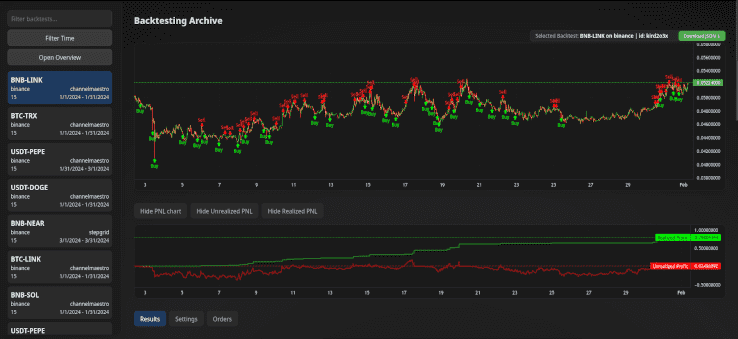
The backtesting archive provides a dedicated viewer for Gunbot-generated backtest reports. This intuitive interface makes it easy to analyze your backtesting results in detail. Each backtest includes a download option that has all needed settings to run your crypto trading bot in the exact same way.

Chart viewer

Visualize and Compare Results

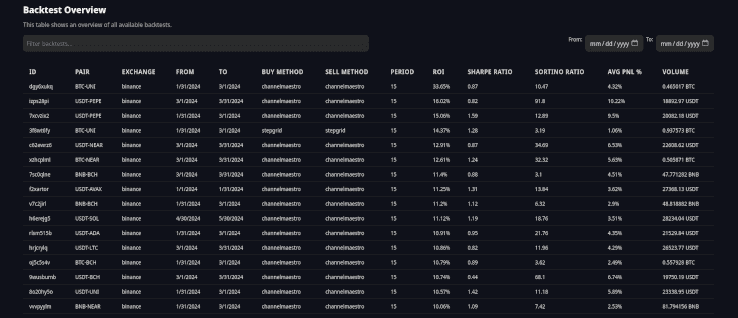
Our detailed charts allow you to visualize all your backtesting results at a glance. The overview table lets you easily compare performance metrics across various strategies and timeframes to identify what works best.

Overview viewer

Contribute to the Backtesting Archive

Join the Community Effort

The Gunbot backtesting archive will thrive on contributions from traders like you. By sharing your backtesting results, you help build a richer, more diverse database that benefits the entire community.

How to Submit Your Data

Contributing is simple. You can submit your backtesting results in two ways:

Each submission goes through a review process for quality and accuracy. While it might take some time, your valuable insights will soon be part of this collective resource.

What’s Inside a Backtest Report?

Here’s a sneak peek at the kind of data you can look at in the backtesting archive:

  • Pair: BTC-SOL
  • Exchange: Binance
  • Fee Percentage: 0.1%
  • Time Period: From June 7, 2024, to February 24, 2056

Key Performance Metrics

  • Starting Funds: 0.1 BTC
  • Realized PnL: 0.003594 BTC
  • ROI: 3.59%
  • Sharpe Ratio: 0.56
  • Sortino Ratio: 9.72
  • Realized Profit: 0.005393 BTC
  • Realized Loss: -0.001798 BTC
  • Average PnL %: 1.78%
  • Average Profit %: 1.93%
  • Average Loss %: -5.66%
  • Volume: 0.663889 BTC
  • Buy Volume: 0.339088 BTC
  • Sell Volume: 0.324801 BTC
  • Buys: 47
  • Sells: 51
  • Trades with Profit: 50
  • Trades with Loss: 1
  • Fees Paid: 0.000663 BTC

Strategy Settings

Review the detailed settings used in backtests, such as:

  • Initial Funds: 0.1 BTC
  • Buy Method: channelmaestro
  • Sell Method: channelmaestro
  • Profit Target %: 7.5
  • Use Auto Gain: true
  • Buy Enabled: true
  • Sell Enabled: true

These settings allow you to see exactly how strategies are configured and how they perform under different conditions.

Bonus: Guide to Mass Backtest Runs with Gunbot on Linux

This guide will help you set up and run a mass backtest script for Gunbot on a Linux system.

Prerequisites

  1. Gunbot: Make sure you have Gunbot installed and configured.
  2. Python 3.10: Make sure Python 3.10 is installed.
  3. Required Python Libraries: Install the necessary Python libraries by running:
    pip install subprocess time os signal shutil json re itertools multiprocessing

Script Setup

  1. Download the Script: Save the provided script as mass_backtest.py in your working directory.
  2. Set Up Working Directories: Make sure you have the following directory structure:
    /home/user/dev/backtesting-runs/
    ├── 1/
    ├── 2/
    └── 3/
    Each directory should contain:
    • A complete Gunbot installation
    • A unique GUI port set for each instance
    • A config.js file with "BACKFESTER": true in the bot section and preconfigured starting balances for simulator.

Configuration

Modify Paths

Adjust the paths in the script if your directory structure is different.

Trading Pairs and Months

Customize the trading_pairs and months variables according to your needs.

Pair Overrides and Trading Limit

The script will override the configuration for each pair for proper backtesting. It updates:

  • BF_SINCE and BF_UNTIL: The start and end timestamps for the backtest period.
  • TRADING_LIMIT: Calculated as the available balance divided by 30.
  • MIN_VOLUME_TO_SELL: Set as 30% of the trading limit.
  • Other strategy-specific settings.

These overrides keep each backtest on consistent parameters.

Using RAM Disk

Importance of RAM Disk

Using a RAM disk can significantly speed up the backtesting process by reducing read/write times. The script copies necessary files to the RAM disk, performs the backtest, and then copies the results back to the main storage.

Check Available RAM Disk Volume

Before running the script, make sure you have sufficient space in your RAM disk (/dev/shm). Check the available volume with the following command:

df -h /dev/shm

Make sure you have enough space to handle the data for your backtests. If necessary, adjust your system's RAM disk size in your system settings.

Running the Script

  1. Navigate to the Script Directory:
    cd /path/to/your/script
  2. Run the Script:
    python3 mass_backtest.py

Script Workflow

Initial Setup

The script starts by clearing any existing temporary backtesting directories in the RAM disk (/dev/shm). It then loads or initializes the task queue with all trading pairs and date ranges.

Managing Tasks

The task queue manages which trading pairs and date ranges need to be processed. The script uses a worker directory queue to handle different working directories where backtests will be run.

Running Backtests

The script launches multiple worker processes to perform backtests concurrently. Each worker:

  • Copies necessary files to the RAM disk
  • Executes the backtest using Gunbot
  • Monitors the output for completion
  • Terminates the process upon completion
  • Copies the backtesting results back to the main storage
  • Marks the task as done and updates the completed tasks file

Completion

The script waits for all worker processes to finish. It periodically saves the state of the task queue to a file, allowing you to resume if the script is interrupted.

Increasing Process Count

To increase the number of processes running backtests concurrently:

  1. Create Enough Working Directories:

    • You need one working directory per process. For example, if you want to run 5 processes concurrently, you should have 5 working directories:
      /home/pim/dev/backtesting-runs/
      ├── 1/
      ├── 2/
      ├── 3/
      ├── 4/
      └── 5/
    • Each directory must have a complete Gunbot installation with a unique GUI port and a config.js file.
  2. Update the Number of Processes:

    • Open the mass_backtest.py script.
    • Locate the section where the processes are started:
      processes = []
      for _ in range(3): # 3 processes
      p = Process(target=worker, args=(task_queue, working_directory_queue))
      p.start()
      processes.append(p)
    • Change the number 3 to the desired number of processes. For example, to run 5 processes concurrently, change it to:
      processes = []
      for _ in range(5): # 5 processes
      p = Process(target=worker, args=(task_queue, working_directory_queue))
      p.start()
      processes.append(p)
  3. Update the Working Directories List:

    • Update the working_directories list at the beginning of the script to match the number of processes. For example, if you want to run 5 processes, you need 5 working directories. You should update the range to range(1, 6) to match the folder count:
      working_directories = [os.path.join(base_working_directory, str(i)) for i in range(1, 6)] # 5 working directories
    • The number 6 here is one more than the actual count because the range function in Python is inclusive of the start value but exclusive of the end value. So, range(1, 6) creates a list from 1 to 5.

Considerations

  • System Resources: Make sure your system has enough CPU and RAM to handle the increased process count. Running too many processes can lead to resource contention and slow down the overall performance.
  • RAM Disk Space: Verify that your RAM disk (/dev/shm) has enough space to accommodate the additional processes.

Monitoring Progress

  • Console Logs: The script prints logs to the console, showing the progress of each backtest.
  • Completion Reports: Backtesting reports are saved back to the respective working directories.

Script source

mass_backtest.py

import subprocess
import time
import os
import signal
import shutil
import json
import re
from multiprocessing import Process, Queue, current_process
from queue import Empty

# Define the base working directory
base_working_directory = '/home/user/dev/backtesting-runs'
working_directories = [os.path.join(base_working_directory, str(i)) for i in range(1, 4)] # 3 working directories
command = ['./gunthy-linux']

# Static list of pairs and timeframes to use
trading_pairs = [
"USDT-BTC", "USDT-ETH", "USDT-BNB", "USDT-SOL", "USDT-XRP", "USDT-DOGE", "USDT-ADA", "USDT-TRX",
"USDT-AVAX", "USDT-SHIB", "USDT-DOT", "USDT-LINK", "USDT-BCH", "USDT-NEAR", "USDT-MATIC", "USDT-LTC",
"USDT-UNI", "USDT-PEPE", "BTC-ETH", "BTC-BNB", "BTC-SOL", "BTC-XRP", "BTC-DOGE", "BTC-ADA", "BTC-TRX",
"BTC-AVAX", "BTC-DOT", "BTC-LINK", "BTC-BCH", "BTC-NEAR", "BTC-MATIC", "BTC-LTC", "BTC-UNI", "BNB-SOL",
"BNB-XRP", "BNB-ADA", "BNB-TRX", "BNB-AVAX", "BNB-DOT", "BNB-LINK", "BNB-BCH", "BNB-NEAR", "BNB-MATIC",
"BNB-LTC", "ETH-BNB", "ETH-XRP", "ETH-SOL", "ETH-ADA", "ETH-TRX", "ETH-AVAX"
]

months = [
(1704067200000, 1706659199000), # Jan 2024
(1706659200000, 1709251199000), # Feb 2024
(1709251200000, 1711843199000), # Mar 2024
(1711843200000, 1714435199000), # Apr 2024
(1714435200000, 1717027199000), # May 2024
(1717027200000, 1719619199000), # Jun 2024
]

def transform_pair(pair):
if pair.endswith('BTC'):
return f"BTC-{pair[:-3]}"
elif pair.endswith('ETH'):
return f"ETH-{pair[:-3]}"
elif pair.endswith('USDT'):
return f"USDT-{pair[:-4]}"
elif pair.endswith('BNB'):
return f"BNB-{pair[:-3]}"
return pair

def clear_ramdisk():
ramdisk_base = '/dev/shm/'
for item in os.listdir(ramdisk_base):
item_path = os.path.join(ramdisk_base, item)
if os.path.isdir(item_path) and item.startswith('backtesting_'):
shutil.rmtree(item_path)
print(f"Cleared RAM disk directory: {item_path}")

def delete_folders(working_directory):
json_folder = os.path.join(working_directory, 'json')
backtesting_folder = os.path.join(working_directory, 'backtesting')

if os.path.exists(json_folder):
shutil.rmtree(json_folder)
print(f"Deleted folder: {json_folder}")
if os.path.exists(backtesting_folder):
shutil.rmtree(backtesting_folder)
print(f"Deleted folder: {backtesting_folder}")

def read_config(working_directory):
config_path = os.path.join(working_directory, 'config.js')
with open(config_path, 'r') as file:
config_data = file.read()
config_data = re.sub(r'^module\.exports\s*=\s*', '', config_data)
config_data = re.sub(r';\s*$', '', config_data)
return json.loads(config_data)

def write_config(config, working_directory):
config_path = os.path.join(working_directory, 'config.js')
config_data = json.dumps(config, indent=4)
with open(config_path, 'w') as file:
file.write(config_data)

def ensure_pair_config(config, pair):
exchange = 'binance'
if exchange not in config['pairs']:
config['pairs'][exchange] = {}

config['pairs'][exchange] = {}
if pair not in config['pairs'][exchange]:
config['pairs'][exchange][pair] = {
"strategy": "channelmaestro",
"enabled": True,
"override": {
"INITIAL_FUNDS": "500",
"BUY_METHOD": "channelmaestro",
"SELL_METHOD": "channelmaestro",
"COMPOUND_RATIO": "1",
"COMPOUND_PROFITS_SINCE": "0",
"USE_STOP_AFTER_PROFIT": False,
"PROFIT_TARGET_PCT": "7.5",
"USE_AUTO_GAIN": True,
"GAIN_PARTIAL": "0.5",
"GAIN": "2",
"BUY_ENABLED": True,
"SELL_ENABLED": True,
"STOP_AFTER_SELL": False,
"MIN_VOLUME_TO_SELL": 10,
"MAX_INVESTMENT": "999999999999999",
"PERIOD": "5",
"PERIOD_MEDIUM": "15",
"PERIOD_LONG": "30",
"IGNORE_TRADES_BEFORE": "0",
"BF_SINCE": 0,
"BF_UNTIL": 0,
"USE_EXPERIMENTS": False
}
}

def update_config(config, pair, start, end):
if not config['bot']['BACKFESTER']:
config['bot']['BACKFESTER'] = True

base, quote = pair.split('-')[0], pair.split('-')[1]
balance = float(config['bot']['simulatorBalances']['binance'][base])

trading_limit = balance / 30
min_volume_to_sell = trading_limit * 0.3

ensure_pair_config(config, pair)

config['pairs']['binance'][pair]['override']['BF_SINCE'] = start
config['pairs']['binance'][pair]['override']['BF_UNTIL'] = end
config['pairs']['binance'][pair]['override']['TRADING_LIMIT'] = trading_limit
config['pairs']['binance'][pair]['override']['MIN_VOLUME_TO_SELL'] = min_volume_to_sell
config['pairs']['binance'][pair]['override']['INITIAL_FUNDS'] = balance

def copy_to_ram(working_directory, ram_directory):
print(f"Copying {working_directory} to {ram_directory}")
if os.path.exists(ram_directory):
shutil.rmtree(ram_directory)
shutil.copytree(working_directory, ram_directory)

def copy_backtesting_reports_from_ram(working_directory, ram_directory):
print(f"Copying backtestingReports from {ram_directory} back to {working_directory}")
ram_backtesting_reports = os.path.join(ram_directory, 'backtestingReports')
main_backtesting_reports = os.path.join(working_directory, 'backtestingReports')
if os.path.exists(ram_backtesting_reports):
if os.path.exists(main_backtesting_reports):
shutil.rmtree(main_backtesting_reports)
shutil.copytree(ram_backtesting_reports, main_backtesting_reports)

def launch_and_kill_process(command, working_directory, ram_directory):
copy_to_ram(working_directory, ram_directory)
process = subprocess.Popen(command, cwd=ram_directory, stdout=subprocess.PIPE, stderr=subprocess.PIPE, text=True)
print(f"Process {process.pid} started in {ram_directory}.")

last_output_time = time.time()

try:
while True:
output = process.stdout.readline()
if output == '' and process.poll() is not None:
break
if output:
last_output_time = time.time()
print(output.strip())
if 'Backtesting report created successfully' in output:
break
if 'Backtester completed the job: your data will be available soon on your GUI' in output:
time.sleep(3)
break
if time.time() - last_output_time > 8:
print(f"No log output for 8 seconds, restarting process {process.pid}")
os.kill(process.pid, signal.SIGTERM)
process.wait()
process = subprocess.Popen(command, cwd=ram_directory, stdout=subprocess.PIPE, stderr=subprocess.PIPE, text=True)
last_output_time = time.time()
finally:
if process.poll() is None:
os.kill(process.pid, signal.SIGTERM)
print(f"Process {process.pid} in {ram_directory} has been terminated.")
copy_backtesting_reports_from_ram(working_directory, ram_directory)
delete_folders(ram_directory)

def run_backtest(pair, start, end, working_directory, ram_directory, queue):
config = read_config(working_directory)
update_config(config, pair, start, end)
write_config(config, working_directory)
launch_and_kill_process(command, working_directory, ram_directory)
time.sleep(1) # Wait for 1 second before the next run
queue.put(working_directory) # Indicate that this working directory is free

def save_queue(task_queue, filename='task_queue.json'):
with open(filename, 'w') as file:
tasks = []
while not task_queue.empty():
tasks.append(task_queue.get())
json.dump(tasks, file)
for task in tasks:
task_queue.put(task)

def load_queue(filename='task_queue.json'):
task_queue = Queue()
if os.path.exists(filename):
with open(filename, 'r') as file:
tasks = json.load(file)
for task in tasks:
task_queue.put(tuple(task))
else:
for pair in trading_pairs:
for start, end in months:
task_queue.put((pair, start, end))
return task_queue

def worker(task_queue, working_directory_queue, completed_tasks_filename='completed_tasks.json'):
completed_tasks = []

if os.path.exists(completed_tasks_filename):
with open(completed_tasks_filename, 'r') as file:
completed_tasks = json.load(file)

while True:
try:
pair, start, end = task_queue.get(timeout=5) # timeout added to allow graceful shutdown
except Empty:
break

if (pair, start, end) in completed_tasks:
continue

working_directory = working_directory_queue.get()
ram_directory = os.path.join('/dev/shm', f'backtesting_{current_process().pid}')

print(f"Worker {current_process().pid} processing {pair} from {start} to {end} in {working_directory}")
run_backtest(pair, start, end, working_directory, ram_directory, working_directory_queue)

completed_tasks.append((pair, start, end))
with open(completed_tasks_filename, 'w') as file:
json.dump(completed_tasks, file)

if __name__ == "__main__":
clear_ramdisk()

task_queue = load_queue()
working_directory_queue = Queue()
save_queue(task_queue)

for wd in working_directories:
working_directory_queue.put(wd)

processes = []
for i in range(3): # 3 processes
p = Process(target=worker, args=(task_queue, working_directory_queue))
p.start()
processes.append(p)
time.sleep(0.5) # Introduce a small time offset of 0.5 seconds before starting the next process

for p in processes:
p.join()

save_queue(task_queue)

Conclusion

The new backtesting archive on Gunbot.com helps you refine strategies with better data. By using and contributing to this resource, you can improve your trading methods and share useful findings with the Gunbot community. Start with the backtesting archive and keep improving from there.

Gunbot Now Supports Spot Trading on BingX

@boekenbox
@boekenbox
Gunbot Now Supports Spot Trading on BingX

Gunbot now supports spot trading on BingX. After initial testing, this integration is available to the wider community and gives you another exchange option for automated spot trading.

BingX also has launch promotions available. Check the details below.

What is Spot Trading?

Spot trading involves buying and selling assets for immediate delivery. It’s a fundamental trading method widely used by both beginners and experienced traders. In spot trading, transactions are settled "on the spot," meaning that the trade is executed and settled immediately, as opposed to futures or options trading, where the settlement takes place at a later date.

Spot trading is useful if you prefer straightforward, transparent trading. Prices in the spot market are determined by supply and demand dynamics in real-time, offering traders the ability to react quickly to market movements and take advantage of price fluctuations.

Benefits of Using Gunbot for Spot Trading on BingX

Gunbot's integration with BingX for spot trading brings several key benefits:

  • Automated Trading Strategies: Gunbot allows users to automate their trading strategies, maximizing efficiency and potential profits. By using Gunbot’s advanced algorithms, traders can set up automated trades based on predefined conditions, reducing the need for constant monitoring and manual execution.

  • Smooth Integration: The integration with BingX’s reliable trading platform keeps trading smooth and efficient. You get BingX market access with Gunbot strategy automation.

  • Promising Results: Initial feedback from our testing phase has been overwhelmingly positive. Users have reported efficient trade execution and reliable performance, highlighting the potential for improved trading outcomes with this new feature.

BingX Launch Promotions

To celebrate the launch, BingX is introducing some interesting promotions that users can take advantage of. Check out the event page for full details and participation.

  • KYC Verification: Complete "Advanced Identity Verification" to get 1 draw entry.
  • Sign Up: Create a BingX account to get 1 draw entry.
  • Total Deposit: Deposit ≥ 50 USDT to get 1 draw entry.
  • Spot Trading Volume: Achieve a Spot trading volume of 10 USDT to get 1 draw entry, with more entries for higher volumes (up to 6 entries).

Event Details:

  • Period: 2024-06-28 00:00 to 2024-07-18 00:00 (UTC+8)
  • Participants: Invited users only (those who trade using Gunbot)
  • Conditions: Complete tasks to earn draw entries. Rewards are issued instantly, with bonus vouchers unlocked after meeting the specified trading volume requirement.

Notes:

  • BingX reserves the right to final interpretation of the event. Users involved in unfair activities will be disqualified.

Follow BingX on X for the latest updates.

Detailed Overview of the Testing Phase

During the initial testing phase, a select group of users were given access to the spot trading feature on BingX through Gunbot. The primary goal was to assess the functionality, performance, and overall user experience. Here are some key insights from the testing phase:

  • Trade Execution: The execution of trades was smooth and efficient, with minimal latency. Users were able to place and execute trades quickly, benefiting from real-time price updates and market data. It's likely that edge cases will soon be found out when more users start with Gunbot on BingX, within a few iterations we should reach a pretty stable status.

  • User Interface: While the core functionality performed well, some minor visual issues were identified. These issues are currently being addressed by our development team to provide a polished and user-friendly interface before the official launch.

Future Plans and Improvements

As we prepare for launch of the spot trading feature on BingX, our team is actively working on addressing the minor visual issues identified during testing. We are committed to delivering a smooth and high-quality user experience, and these refinements are an important part of our final preparations.

In addition to resolving visual issues, we are also improving the overall functionality based on user feedback. Our goal is to provide a reliable BingX trading bot that meets the diverse needs of our users. We look forward to continuing to improve your trading experience with practical features and steady performance.

More Gunbot updates will follow.

Gunbot Now Supports Automated Trading on dYdX v4 Protocol

@boekenbox
@boekenbox
Gunbot Now Supports Automated Trading on dYdX v4 Protocol

We’re excited to announce that Gunbot now lets you automate trades on the dYdX v4 protocol, offering you a fully decentralized way to trade. With this integration, you get the chance to bring your trading strategies into a transparent, secure environment where you stay in full control. This isn’t just a new feature; it’s a meaningful step toward trading freedom.

What is dYdX v4?

The dYdX v4 protocol is all about decentralization. It’s an open-source platform designed to take the middleman out of trading. Everything runs through smart contracts, so there’s no central authority. Users can help shape and govern the platform, making it a trading space run by the community, for the community. This setup means more control for you and a trustless system where security is baked in.

Key Features of dYdX v4

Here’s what dYdX v4 brings to the table:

  • Full Decentralization: The platform is entirely managed by smart contracts and community governance, with no single point of control.
  • Community Governance: You have a voice. Users actively participate in decisions and can vote on important changes.
  • Advanced Trading Tools: A range of trading options with strong security and efficiency.

Why Gunbot with dYdX v4 is Worth Trying

With Gunbot’s new support for dYdX v4, you can automate your trading in a space where trust and transparency are built into the foundation. Here’s what that looks like for you:

  • Automated, Decentralized Trading: Take advantage of Gunbot’s trading strategies on dYdX v4, where trades are automatically executed in a decentralized system that you can count on.
  • Security You Can See: Because every transaction happens on-chain, you get a clear view of your trading activity, reducing the risk of hacks and fraud.
  • Fair and Transparent Trading: With decentralized trading, there’s no room for hidden moves or unexpected changes. You see exactly what’s happening, every step of the way.

To get started with automated trading on dYdX v4 using Gunbot, follow these steps:

  1. Update Gunbot: Make sure you’re on the latest version of Gunbot that includes the dYdX v4 integration.
  2. Connect Your Wallet: Link your dYdX wallet to Gunbot. You’ll need to use dYdX’s “export secret phrase” option to connect. In Gunbot, this exchange is simply called dydx4.
  3. Set Up Your Strategies: Configure your trading strategies in Gunbot to start automating your trades on dYdX v4.
  4. Monitor and Adjust: Use Gunbot’s performance tracking tools to optimize your strategies and adjust as needed.

For more on how to get started or to read the details, check out our dydx trading bot.

Wrapping Up

Gunbot’s integration with dYdX v4 opens up new options for automated, secure, and fully decentralized trading. We’re looking forward to seeing how you put these tools to use, and we’re here to help if you have any questions. Give it a try and see how decentralization can make your trading even better.

v26 release

@boekenbox
@boekenbox
v26 release

Gunbot v26 adds new tools for strategy prototyping, faster development, charting, AI support, and webhook workflows. Here is what changed in this stable channel update.

Image shows new charting capabilities for custom strategies in Gunbot v26.

💹 New Charting Capabilities

Good trading often depends on reading market data clearly and acting on it. Gunbot v26 improves charting and lets you create custom strategies with multi-point shape drawing on charts. You can mark support zones, add annotations, and make the chart reflect how you plan trades.

🤖 Embrace the Power of AI with Gunbot AI

Possibly the most significant addition to this version is the inclusion of Gunbot AI. With the integration of the GPT engine, Gunbot AI can generate custom strategy code based purely on description text. This new feature effectively bridges the gap between your trading ideas and their execution. Got a trading idea? Prototype it in seconds.

🔄 MEXC and Bybit Support

Staying true to our commitment of keeping Gunbot universally applicable, we have added support for MEXC v3 API and Bybit's v5 API in this version. These additions widen the horizons of trading platforms that Gunbot can smoothly integrate with, further improving user flexibility and market reach.

🔐 Improved Security with MetaMask Integration

Security matters in digital asset trading. Gunbot v26 now supports MetaMask login, adding another layer of account protection.

🗒️ Text Notes and Webhook Alerts

With the new webhook alert options, Gunbot eliminates any need for coding in Pinescript. You can now create alerts based on indicators right from your TradingView chart, improving the crypto bot's user-friendliness significantly.

If you're a trader who relies on external alerts, life just got easier.

Keeping Track with Text Notes 📝

To help you keep track of important information, we've introduced an option to save text notes per pair/exchange. These notes can be viewed on the chart sidebar or a dedicated page, serving as handy reminders.

📈 Referral Program and Setup Page Improvements

Gunbot v26 introduces a referral program with individual referral links. Alongside this, we've added several new options to the setup page, including the ability to hide open order lines on the chart and skip API key validation, making the Gunbot experience even more user-centric and intuitive.

💰 Strategy Improvements

Sghedge and Sgsfutures strategies have been improved to offer separate settings for the short side and a max loss stop-loss option. These improvements make these strategies more flexible and effective.

To top it all, numerous bug fixes and performance improvements have been implemented, contributing to an overall smoother and more stable user experience.

These are some of the features and improvements introduced in Gunbot v26. For a complete overview of changes, we recommend visiting the official release notes.

Gunbot Adds Support for Bybit's Unified Trading Account (UTA)

@boekenbox
@boekenbox
Gunbot Adds Support for Bybit's Unified Trading Account (UTA)

We're delighted to share that Gunbot now supports Unified Trading Account (UTA) on Bybit. As we continue to innovate and keep pace with the latest trading technologies, this new compatibility offers our users strong trading possibilities! 🚀

Bybit's UTA is an all-in-one account mode. You can adjust your trading setup, manage risk, and handle funds without switching between different instrument accounts.

info

This feature is currently available in preview releases (v25) and will be included in our next stable Gunbot release.

Bybit's Unified Trading Account: A Closer Look 👀

Bybit describes UTA as an 'all-in-one' account mode. It gives you a single place to manage risk and funds across instrument types.

Benefits of Upgrading to UTA

  1. Simplified Trading: Consolidate Spot, Derivatives, and Options into one account.
  2. Improved Capital Efficiency: Collateralize over 70 cryptocurrencies for cross-margin trading, and open new positions with unrealized profits.
  3. Diversified Strategy: Choose from three margin modes - Isolated Margin, Cross Margin, and Portfolio Margin, to fit your trading strategies.

UTA Features at a Glance

  1. One-Click Access: Engage in Spot Trading, Margin Trading, USDT Perpetual, USDC Perpetual, USDC Options, and USDC Futures conveniently.
  2. Improved Capital Efficiency: Use up to 10x for Margin Trading on Spot and an interest-free loan quota of up to 70,000 USDT on your UTA.
  3. Improved Portfolio Management: Protect trading positions and minimize losses in uncertain markets with Hedge Mode, and offset profit and loss across different product positions.
  4. Custom Position Modes: Choose from Isolated Margin (for beginners), Cross Margin (for experienced traders), and Portfolio Margin (for professional traders).

For more details on Bybit's UTA, check out their official page.

What Does This Mean For Gunbot Users? 🤔

For Gunbot users with existing 'normal' accounts on Bybit, nothing changes. Users with a Bybit Unified Trading Account can now fully use it with Gunbot.

Although we remain neutral about how traders can use this new feature, the integration of Bybit's UTA into Gunbot offers the potential for expanded capabilities and personalized trading strategies.

Importantly, this is not an endorsement of any particular strategy or feature offered by Bybit's UTA. As always, we urge you to research thoroughly, consider your own needs and trading strategies, and make informed decisions.

Stay tuned for more improvements as we continue to innovate and evolve!

API Trading on dYdX Exchange: A Detailed Guide with Gunbot

@boekenbox
@boekenbox
API Trading on dYdX Exchange: A Detailed Guide with Gunbot

Get started with dYdX and Gunbot with our easy-to-follow guide. We'll introduce you to API trading on a decentralized exchange using automated trading software. By the end of it, you'll feel confident to venture into dYdX trading using Gunbot.

See how to trade dYdX Decentralized Layer 2 Perpetuals with Gunbot automation.

About dYdX and Its Unique Layer 2 Perpetuals

dYdX is a decentralized exchange (DEX) known for its Decentralized Layer 2 (L2) Perpetuals and low trading fees. While it operates like a Centralized Limit Order Book exchange, it maintains the benefits of decentralization, making it ideal for crypto bot trading.

These DeFi L2 Perpetuals use a 'roll-over' system, keeping positions open indefinitely until the trader decides to close them. They offer efficient tools for diverse trading strategies, whether long-term or short-term. Trading on dYdX allows you to retain control over your positions and funds, even when the exchange faces issues.

Overcoming Unforeseen Events: Forced Withdrawals & Position Closure

dYdX lets traders preemptively exit their positions and access their funds, even if the exchange is offline or unavailable. Here's how it works:

  • Forced Withdrawals: If the exchange encounters issues or becomes inaccessible, traders can rely on the smart contract-powered architecture of dYdX to perform smooth forced withdrawals. This lets traders retrieve their funds and maintain control over their assets.

  • Forced Closing of Positions: dYdX also allows for the forced closing of positions on L2, enabling traders to proactively close open positions before executing a withdrawal.

With these functionalities in mind, let's look at how Gunbot can improve your trading experience on dYdX.

Using Gunbot with dYdX Exchange

Gunbot, a leading automated trading software that runs from your own device, supports trading Perpetual Futures on dYdX. This feature provides an alternative to trading on centralized futures exchanges. If you want the market-specific product summary first, check the dYdX trading bot overview. Here's how to get started:

Getting Your API Credentials for Bot Trading

  1. Begin by connecting your wallet to dYdX. This process is the web3 equivalent of 'creating an account' on centralized exchanges.
  2. During this process, make sure you select the 'remember me' option.
  3. No need to create an API key; it's automatically generated for you.
  4. Store your API Key and Secret securely as they're essential for Gunbot setup.

🔒 Security Tip: Guard your API secrets rigorously, never share them. Gunbot only stores API secrets on your local device.

For detailed steps, refer to our full guide on retrieving the dYdX API credentials in the official documentation.

Setting up Gunbot Using the sgsfutures Strategy

With your API credentials ready, you can set up your preferred trading strategy. Here’s how to implement the sgsfutures strategy:

  1. Access your Gunbot user interface.
  2. Go to 'Trading Settings' and add a new trading pair for the DeFi market you wish to trade. Use the correct pair name format, such as USD-ETH.
  3. Choose sgsfutures as the strategy.
  4. In the Balance settings category, adjust the following:
    • Trading limit (amount in USD)
    • Max open contracts (amount in ETH)
    • Max loss (amount in USD) These settings define the default amount per buy order, maximum position size, and the trigger for stop loss, respectively.
  5. Fine-tune the rest of the strategy parameters according to your trading preferences. To start with an unrestricted grid, disable the restrictive options listed here.
  6. Save your settings and start trading.

✅ Congratulations! You've successfully implemented the sgsfutures strategy for automated trading on the dYdX Exchange.

Typical sgsfutures Trading Behavior

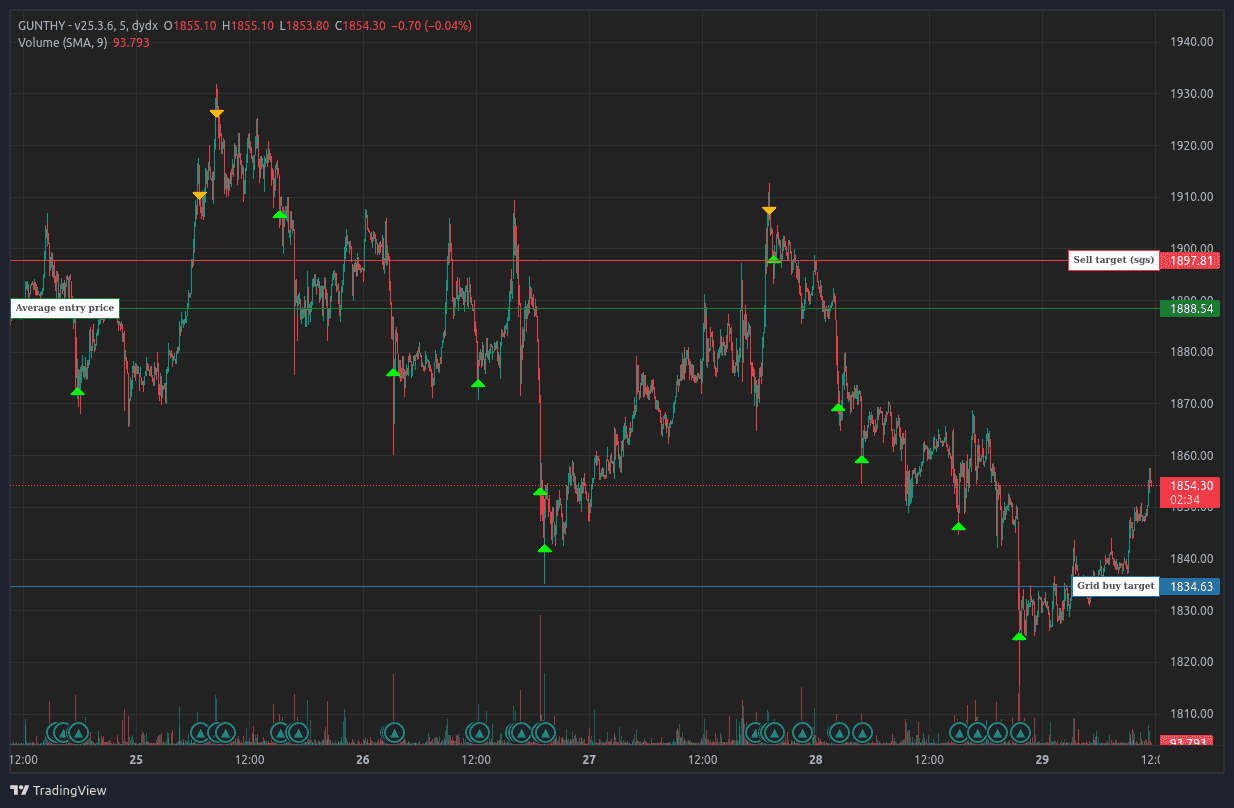
Typical sgsfutures trading behavior on dYdX crypto markets

Info: sgsfutures is a versatile strategy that adapts to market phases. It monitors trends, momentum, and more across multiple timeframes, alternating between various trading styles like grid trading, scalping, and support trading.

Learn and Grow with dYdX and Gunbot

Gunbot gives you a practical way to automate trading on dYdX. By combining Gunbot automation with dYdX markets, you can manage risk, test strategies, and keep control over your trading setup.

With this guide, you are now equipped to start trading on dYdX using Gunbot. While Gunbot is a proprietary trading software, the broader dYdX ecosystem includes open-source documentation and tools available on GitHub, which can help you learn more about decentralized trading mechanics and API integrations. Use dYdX's platform features to improve your trading strategies while keeping control of your crypto investments.