Bollinger RSI ADX Scalp Spot Trading Strategy
Bollinger RSI ADX Scalp is a spot mean-reversion strategy. It waits for price to test the lower Bollinger Band, RSI to recover from an oversold level, and ADX to show that the market is not trending too strongly.
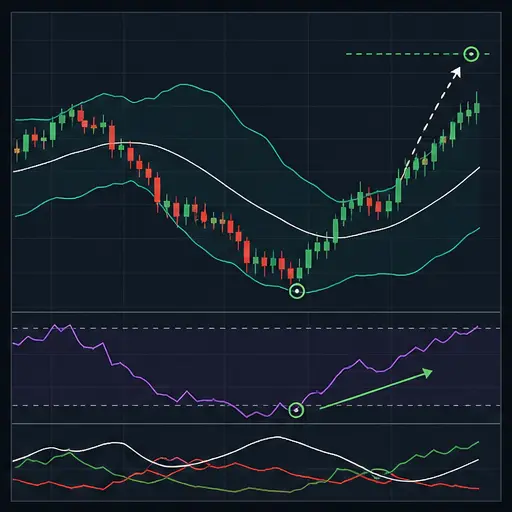
The strategy is designed around short range trades. Its default one-minute period, narrow spread limits, and EST session windows make execution quality especially important.
warning
ADX measures trend strength, not direction. A value below the configured maximum helps avoid strong trends, but it cannot guarantee that a lower-band move will reverse.
Trading behavior
Entry
A buy setup requires all of the following:
- The current low touches the current lower Bollinger Band, or the previous close was at or below the previous lower band.
- The current close is back inside the Bollinger Bands.
- RSI crosses upward through
BRADX_RSI_BUY_LEVEL. - ADX is below
BRADX_ADX_MAX. - The optional EST session filter permits entries.
- Spread, news, balance, order minimum, and cooldown checks pass.
This is a recovery entry. Price must not only reach the lower band; it must close back inside while RSI crosses upward.
The strategy places one buy for the configured value and stores the entry candle's low for optional stop handling. It does not DCA.
Exit modes
BRADX_EXIT_MODE accepts four practical values:
| Value | Target behavior |
|---|---|
first | Exits at the first eligible level: fixed fee-aware target, middle band, or upper band. This normally produces the closest target. |
middle | Targets the Bollinger middle band, but never below the fee-aware minimum. |
opposite | Targets the upper Bollinger Band, but never below the fee-aware minimum. |
pips | Uses only the configured fixed target: pips in pip mode or percentage otherwise. |
The fixed target uses BRADX_TARGET_PCT in percentage mode or BRADX_TARGET_PIPS × BRADX_PIP_SIZE in pip mode. Every exit mode respects estimated fees and BRADX_MIN_NET_GAIN_PCT.
tip
first is the conservative mean-reversion choice. opposite asks price to cross the whole Bollinger envelope and can keep positions open much longer.
Opposite signal
The bearish setup requires an upper-band touch, a close back inside the bands, RSI crossing down through the sell level, and ADX below its maximum.
With BRADX_EXIT_ON_SHORT_SIGNAL enabled, it can close an open position—but only at or above break-even. It does not act as a loss stop.
Stop behavior
When BRADX_STOP_ENABLED is enabled, the strategy can close below break-even.
The distance stop is:
BRADX_STOP_PCTbelow average entry in percentage mode.BRADX_STOP_PIPS × BRADX_PIP_SIZEbelow entry in pip mode.
When BRADX_USE_ENTRY_BAR_STOP is enabled, the entry candle low is also considered. The strategy uses whichever of the entry low and distance stop is closer to entry. This creates the tighter stop, not the wider one.
EST sessions and news block
The session windows use New York time and automatically follow its daylight-saving changes. The defaults are:
02:00-05:00,08:00-12:00,19:30-22:00
They restrict entries only. Open positions remain managed outside these windows.
The news block is manual and also pauses entries only.
Good market conditions
Bollinger RSI ADX Scalp is best suited to:
- Liquid, sideways markets with repeated Bollinger reversion.
- Temporary lower-band excursions followed by an inside-band close.
- Low or moderate ADX.
- Sessions with reliable volume and a consistently small spread.
It is a weaker fit for:
- Strong trends with high ADX.
- Early breakouts before ADX has had time to rise.
- Narrow ranges that cannot cover fees.
- Thin one-minute markets with isolated wicks.
The ADX filter is lagging. A sudden new trend can still enter while ADX remains below its threshold, so tests should include the beginning of strong selloffs.
How to create the strategy
- Create a new spot strategy in the advanced strategy editor.
- Select
bbrsiadxscalpas both buy and sell method. - Use a highly liquid pair for the default one-minute period.
- Align the general and BRADX order-size fields.
- Check the absolute spread limit against the pair's price scale.
- Choose and enter the intended exit mode.
- Translate the EST windows if you want different sessions.
- Backtest ranges, breakouts, and falling markets.
A practical tuning workflow
Tune the market-regime filter first. Lower BRADX_ADX_MAX to demand quieter ranges; raise it only if valid reversals are being excluded.
Then tune entry depth:
- Higher Bollinger deviation creates fewer, more distant band touches.
- Lower RSI buy level demands a deeper oversold reading before recovery.
- Shorter RSI reacts faster but crosses more often.
Choose the exit mode before adjusting target size. A middle- or opposite-band target can dominate the fixed percentage setting.
Test entry-bar stops carefully. A long lower wick on the signal candle may create a looser stop than the percentage distance; a shallow entry low may create a very tight one.
Core settings
| Label | Config parameter | Default | Description |
|---|---|---|---|
| Buy enabled | BUY_ENABLED | true | Allows new lower-band recovery entries. |
| Sell enabled | SELL_ENABLED | true | Allows target, opposite-signal, and stop exits. |
| Period | PERIOD | 1 | Candle period in minutes. |
| Trading limit | TRADING_LIMIT | 100 | Compatibility fallback only. It is ignored while the strategy-specific trading limit is positive; the two values do not need to match. For USDT-BTC, this value is in USDT. |
| Funds reserve | FUNDS_RESERVE | 0 | For USDT-BTC, the amount of USDT the bot must leave unused. |
| Amount retained from sells | KEEP_QUOTE | 0 | For USDT-BTC, the amount of BTC the strategy must not sell. |
| Min volume to buy | MIN_VOLUME_TO_BUY | 10 | General minimum buy value. Keep it aligned with BRADX_MIN_ORDER_VALUE. For USDT-BTC, this value is in USDT. |
| Min volume to sell | MIN_VOLUME_TO_SELL | 10 | General minimum sell value. Keep it aligned with BRADX_MIN_SELL_VALUE. For USDT-BTC, this value is in USDT. |
| Gain | GAIN | 0.25 | General target value. Keep the intended value explicit in BRADX_TARGET_PCT. |
Execution and session settings
| Label | Config parameter | Default | Description |
|---|---|---|---|
| BRADX trading limit | BRADX_TRADING_LIMIT | 100 | For USDT-BTC, the amount of USDT used for the single buy. |
| BRADX min order value | BRADX_MIN_ORDER_VALUE | 10 | Minimum value required for a buy. For USDT-BTC, this value is in USDT. |
| BRADX min sell value | BRADX_MIN_SELL_VALUE | 10 | Minimum position value required for a sell. For USDT-BTC, this value is in USDT. |
| BRADX cooldown ms | BRADX_COOLDOWN_MS | 15000 | Minimum milliseconds between live actions. |
| BRADX max spread % | BRADX_MAX_SPREAD_PCT | 0.04 | Maximum spread as a percentage of midpoint. |
| BRADX max spread absolute | BRADX_MAX_SPREAD_ABSOLUTE | 0.0001 | Maximum spread in pair price units. Set 0 to disable this additional limit. For USDT-BTC, this value is in USDT. |
| Use session filter | BRADX_USE_SESSION_FILTER | true | Restricts entries to the configured New York-time windows. |
| Entry windows EST | BRADX_ENTRY_WINDOWS_EST | 02:00-05:00,08:00-12:00,19:30-22:00 | Comma-separated entry windows interpreted in America/New_York time. |
Indicator settings
| Label | Config parameter | Default | Description |
|---|---|---|---|
| BB length | BRADX_BB_LENGTH | 20 | Bollinger lookback. |
| BB deviation | BRADX_BB_DEVIATION | 2 | Standard-deviation width of the bands. |
| RSI length | BRADX_RSI_LENGTH | 7 | RSI lookback. |
| RSI buy level | BRADX_RSI_BUY_LEVEL | 30 | Entry requires RSI to cross upward through this level. |
| RSI sell level | BRADX_RSI_SELL_LEVEL | 70 | Opposite signal requires RSI to cross downward through this level. |
| ADX length | BRADX_ADX_LENGTH | 14 | ADX trend-strength lookback. |
| ADX max | BRADX_ADX_MAX | 32 | Entries and opposite signals require ADX below this value. |
Exit and risk settings
| Label | Config parameter | Default | Description |
|---|---|---|---|
| Exit mode | BRADX_EXIT_MODE | first | Selects first, middle, opposite, or pips target behavior. |
| Exit on short signal | BRADX_EXIT_ON_SHORT_SIGNAL | true | Allows an upper-band bearish setup to sell at or above break-even. |
| Use pips | BRADX_USE_PIPS | false | Uses pip target and distance stop instead of percentages. |
| Pip size | BRADX_PIP_SIZE | 0.0001 | Pair-price value of one pip. For USDT-BTC, this value is in USDT. |
| Target pips | BRADX_TARGET_PIPS | 6 | Fixed target distance in pip mode. |
| Target % | BRADX_TARGET_PCT | 0.25 | Fixed target distance above entry in percentage mode. |
| Minimum net gain % | BRADX_MIN_NET_GAIN_PCT | 0.1 | Minimum gain above estimated fee-adjusted break-even. |
| Stop enabled | BRADX_STOP_ENABLED | false | Allows a planned loss exit. |
| Stop pips | BRADX_STOP_PIPS | 7 | Distance stop in pip mode. |
| Stop % | BRADX_STOP_PCT | 0.3 | Distance stop below entry in percentage mode. |
| Use entry bar stop | BRADX_USE_ENTRY_BAR_STOP | true | Also considers the entry candle low and uses the tighter valid stop. |
News and backtesting
| Label | Config parameter | Default | Description |
|---|---|---|---|
| News block | BRADX_NEWS_BLOCK | false | Manually pauses entries. |
| News block until | BRADX_NEWS_BLOCK_UNTIL | 0 | Timestamp until which entries remain blocked. |
| Backtest since | BF_SINCE | 0 | Optional backtest start boundary. |
| Backtest until | BF_UNTIL | 0 | Optional backtest end boundary. |
| Deep testing | DEEP_TESTING | false | Enables deeper backtesting without changing live signals. |
Important limitations
- The strategy opens one position and does not DCA.
- ADX is lagging and does not identify direction.
- Opposite signals do not realize a loss.
- Only an enabled stop makes a planned loss exit.
- Session and news filters affect entries only.
- Absolute spread must be adjusted for the pair's price scale.
Mean reversion works until a range becomes a trend. Use the ADX gate as one filter, but rely on broad backtesting and sensible position size for the transition it cannot predict.