Extreme Scalp Modified
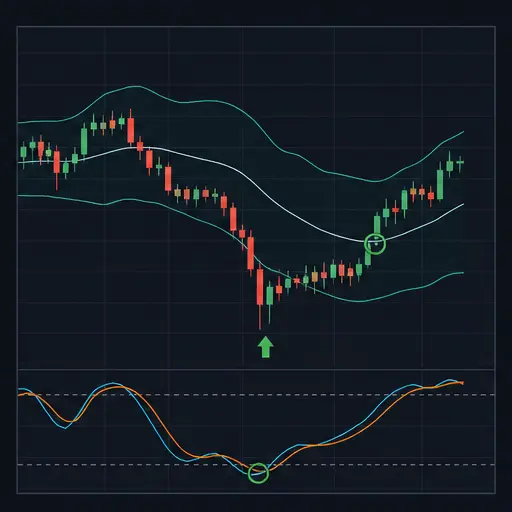
Extreme Scalp Modified combines a fast momentum oscillator with several trend filters. DSS Bressert times a change in momentum, while a Gann Hi-Lo line, two Carmen-style moving averages, and an LSMA determine whether price is on the bullish side of the larger structure.
The strategy is selective by design. A bullish DSS signal alone is not enough: price must also be above every enabled trend reference. Once in a position, it can use a fixed profit target, an optional protective stop, and several break-even-aware indicator exits.
This strategy is most suitable for liquid markets where an established bullish structure produces short momentum resets and resumptions. It is less suitable for flat markets in which the filters overlap or for strong declines where oversold momentum can remain oversold.
warning
Scalping results are highly sensitive to spread, fees, and slippage. Test the same pair, period, exchange fees, and order size you intend to use live. Protection is disabled by default.
Entry setup
A long entry combines three parts.
DSS momentum
DSS Bressert is a smoothed oscillator. Its direction is treated as green when it is rising and red when it is falling.
With ESM_REQUIRE_DSS_COLOR_CHANGE enabled, the strategy waits for DSS to change into a rising, green direction. This catches the turn rather than accepting any candle on which DSS is already rising.
When ESM_REQUIRE_DSS_EXTREME is also enabled, the bullish turn must occur at or below ESM_DSS_BUY_LEVEL. This restricts entries to recoveries from a low oscillator reading. With the extreme requirement disabled, a bullish DSS change can qualify at any level.
If color-change confirmation is disabled, a rising DSS direction is enough. With the extreme requirement enabled in this mode, the current DSS value must still be at or below the buy level.
Gann Hi-Lo confirmation
The Gann period creates a short trend reference from recent highs and lows. A long setup requires price to be above its active Gann line and above the smoothed low reference.
A shorter ESM_GANN_PERIOD reacts more quickly and flips direction more often. A longer period filters more noise but confirms changes later.
Carmen and LSMA filters
Price must close above:
- the faster Carmen-style EMA;
- the slower Carmen-style EMA;
- the LSMA.
This keeps long entries aligned with multiple trend horizons. The slow Carmen length is always treated as slower than the fast length, so use clearly separated values.
When ESM_BLOCK_NO_TRADE_ZONE is enabled, price is also blocked while it sits between the two Carmen averages. This avoids the transition area where the fast and slow filters do not give a clean directional structure.
The strategy holds one position and does not average down.
Exit behavior
Every entry receives a fixed target. The target is defined in pips when ESM_USE_PIPS is enabled and as a percentage when it is disabled. Estimated round-trip fees and ESM_MIN_NET_GAIN_PCT can raise the effective target.
Three optional indicator exits can close a profitable or break-even position early:
ESM_EXIT_ON_DSS_CHANGEexits when DSS changes to a falling direction.ESM_EXIT_ON_GANN_FLIPexits when price closes below the active Gann line.ESM_EXIT_ON_FILTER_BREAKexits when price is no longer above all Carmen and LSMA filters, or moves into the Carmen no-trade zone.
A complete bearish setup can also close the position. This requires falling DSS momentum and price below the Gann and all trend filters.
These signal-driven exits are break-even protected. They will not deliberately sell below the fee-aware break-even area. This prevents a small indicator wobble from forcing a loss, but it also means a losing position can remain open after the bullish structure has failed.
Enable ESM_USE_PROTECTION when you want a defined loss exit. The protective stop uses ESM_STOP_PIPS in pip mode or ESM_STOP_PCT in percentage mode.
Good market conditions
Extreme Scalp Modified generally performs best when:
- the pair is liquid and the spread is consistently small;
- price is above stable or rising medium- and long-term filters;
- DSS cycles down and then turns upward without the larger trend breaking;
- the Gann line provides a clean distinction between bullish and bearish price action;
- normal movement is large enough to reach the target after trading costs.
A healthy setup often looks like a rising market that pauses, lets DSS cool, and then resumes upward while price remains above the Carmen and LSMA filters.
Poor conditions include tightly tangled averages, frequent Gann flips, flat LSMA behavior, or a steep sell-off in which DSS remains near its lower extreme. During those phases, a momentum “turn” may be brief and the filter structure may change before a viable target is reached.
Creating the strategy
Create a spot strategy and choose Extreme Scalp Modified as both the buy and sell method. Begin with backtesting or paper trading.
A useful setup sequence is:
- Select a liquid pair and realistic short chart period.
- Keep the default trend lengths for the first tests.
- Decide whether DSS must make a fresh color change.
- Decide whether entries must come from the lower DSS extreme.
- Keep the Carmen no-trade zone enabled while evaluating signal quality.
- Set a target that comfortably covers spread, fees, and slippage.
- Decide whether indicator exits alone are acceptable or a protective stop is needed.
- Test both orderly uptrends and difficult ranging or falling samples.
Strategy settings
Trading and order size
| Setting | Description |
|---|---|
BUY_ENABLED | Enables new buy orders. Disable it to stop new entries. |
SELL_ENABLED | Enables strategy sell orders, including target, signal, and protective exits. |
PERIOD | Candle period used for DSS and all trend calculations. |
TRADING_LIMIT | Compatibility fallback only. It is ignored while the strategy-specific trading limit contains a positive value. Configure the strategy-specific setting for normal use. For USDT-BTC, this value is in USDT. |
ESM_TRADING_LIMIT | For USDT-BTC, the amount of USDT Extreme Scalp Modified attempts to use for an entry. |
FUNDS_RESERVE | For USDT-BTC, the amount of USDT the bot must leave unused. |
KEEP_QUOTE | For USDT-BTC, the amount of BTC the strategy must not sell. |
MIN_VOLUME_TO_BUY | General minimum buy value. For USDT-BTC, this value is in USDT. |
MIN_VOLUME_TO_SELL | General minimum sell value. For USDT-BTC, this value is in USDT. |
ESM_MIN_ORDER_VALUE | Strategy-specific minimum entry value. For USDT-BTC, this value is in USDT. |
ESM_MIN_SELL_VALUE | Strategy-specific minimum exit value. For USDT-BTC, this value is in USDT. |
The exchange’s own minimum order requirements still apply.
Execution filters
| Setting | Description |
|---|---|
ESM_COOLDOWN_MS | Minimum live-trading delay in milliseconds between strategy actions. |
ESM_MAX_SPREAD_PCT | Maximum permitted bid/ask spread as a percentage. |
ESM_MAX_SPREAD_ABSOLUTE | Optional maximum spread in USDT for a pair such as USDT-BTC. Set 0 to disable the absolute limit. |
ESM_NEWS_BLOCK | Manually blocks new entries while allowing management of an existing position. |
ESM_NEWS_BLOCK_UNTIL | Keeps entries blocked until the configured time. |
The cooldown is a live execution guard and is not applied in backtests. Absolute spread values need pair-specific tuning.
DSS settings
| Setting | Description |
|---|---|
ESM_DSS_STOCH_PERIOD | Lookback used for the stochastic part of DSS. Shorter values react faster. |
ESM_DSS_SMOOTH_PERIOD | Smoothing applied to DSS. Higher values reduce noise but delay turns. |
ESM_DSS_BUY_LEVEL | Lower oscillator threshold used when extreme confirmation is required. |
ESM_DSS_SELL_LEVEL | Upper threshold used to recognize extreme bearish turns and complete bearish signals. |
ESM_REQUIRE_DSS_COLOR_CHANGE | Requires a fresh change into the required DSS direction instead of accepting an already rising or falling oscillator. |
ESM_REQUIRE_DSS_EXTREME | Restricts momentum triggers to the configured buy or sell extreme. |
The sell level contributes to bearish signal recognition; the dedicated DSS-change exit itself responds to a fresh bearish color change and does not require the sell extreme.
Trend filters
| Setting | Description |
|---|---|
ESM_GANN_PERIOD | Lookback for the Gann Hi-Lo price-action reference. |
ESM_CARMEN_M1_LENGTH | Length of the faster Carmen-style EMA. |
ESM_CARMEN_M5_LENGTH | Length of the slower Carmen-style EMA. Keep it greater than the M1 length. |
ESM_LSMA_LENGTH | Length of the least-squares moving average trend filter. |
ESM_BLOCK_NO_TRADE_ZONE | Blocks entries while price is between the two Carmen averages. |
Shorter filters create earlier and more frequent changes. Longer filters are steadier but can enter after more of the move has passed.
Indicator exits
| Setting | Description |
|---|---|
ESM_EXIT_ON_DSS_CHANGE | Enables a break-even-or-better exit when DSS changes to a falling direction. |
ESM_EXIT_ON_GANN_FLIP | Enables a break-even-or-better exit when price falls below the active Gann line. |
ESM_EXIT_ON_FILTER_BREAK | Enables a break-even-or-better exit when the bullish Carmen/LSMA filter structure breaks or price enters the Carmen transition zone. |
These settings do not replace a protective stop because they cannot deliberately exit a losing position.
Target and protection
| Setting | Description |
|---|---|
GAIN | General gain fallback retained in the strategy configuration. The ESM_ target setting is normally used. |
ESM_USE_PIPS | Uses pip distances for the target and stop instead of percentages. |
ESM_PIP_SIZE | For USDT-BTC, the USDT value represented by one pip. |
ESM_TARGET_PIPS | Profit target in pips when pip mode is enabled. |
ESM_STOP_PIPS | Protective stop distance in pips when pip mode is enabled. |
ESM_TARGET_PCT | Profit target percentage when pip mode is disabled. |
ESM_STOP_PCT | Protective stop percentage when pip mode is disabled. |
ESM_USE_PROTECTION | Activates the configured loss stop. |
ESM_MIN_NET_GAIN_PCT | Minimum intended gain beyond estimated round-trip fee break-even. It can raise the actual target. |
Verify ESM_PIP_SIZE for each market. A pip value copied from a forex-style pair can be inappropriate for a differently quoted asset.
Backtesting range
| Setting | Description |
|---|---|
BF_SINCE | Start of the selected backtesting period. |
BF_UNTIL | End of the selected backtesting period. |
DEEP_TESTING | Enables the deeper backtesting mode offered by the editor. |
Practical tuning directions
For earlier momentum entries, disable the color-change requirement or shorten the DSS periods. This increases opportunities but can repeatedly accept the same noisy upswing.
For more selective recovery entries, enable both ESM_REQUIRE_DSS_COLOR_CHANGE and ESM_REQUIRE_DSS_EXTREME. The strategy then waits for a fresh bullish turn near the configured lower threshold while the trend filters remain bullish.
For a smoother trend filter, lengthen the Carmen and LSMA settings. For quicker response, shorten them, while preserving a meaningful gap between the fast and slow Carmen lengths.
If positions frequently remain open after a failed setup, review the distinction between indicator exits and loss protection. Enabling more signal exits does not solve underwater trades; only ESM_USE_PROTECTION supplies a defined stop.
Important limitations
- DSS can remain extreme during a strong directional move.
- Multiple filters reduce weak signals but also add delay.
- Signal exits are unavailable below break-even.
- Disabling protection leaves losing positions without a fixed loss exit.
- The no-trade zone only covers the space between the Carmen averages; it does not identify every ranging market.
- Pip size and absolute spread limits are specific to the market’s price scale (USDT per BTC on
USDT-BTC). - Backtests cannot fully reproduce live spread changes, slippage, latency, or order-book depth.
Extreme Scalp Modified works best as a trend-aligned timing system. Judge it by whether DSS turns occur inside a clean bullish structure, not merely by how often the oscillator changes color.