Keltner Scalp
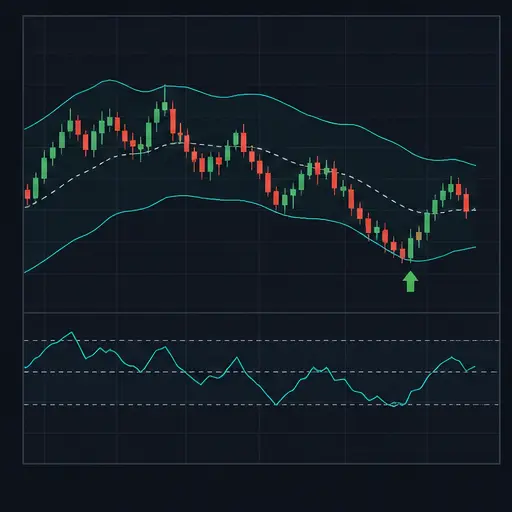
Keltner Scalp looks for a bullish pullback that is beginning to turn upward. It combines a Keltner Channel, an 89-period SMA, fast and slow MACD views, and a short stochastic-momentum reading. A very long EMA and divergence checks help the strategy handle price that temporarily moves outside the channel.
The strategy can manage trades in two different ways:
- Scalp mode aims for a fixed, fee-aware profit target.
- Trend mode ignores that fixed target and manages the position with the 89 SMA, the lower Keltner band, and an optional protective stop.
This method is best suited to liquid markets with an identifiable bullish structure and orderly pullbacks. It is not intended to buy every move below a Keltner Channel.
warning
The default strategy does not enable loss protection. In trend mode, technical exits are also break-even protected, so a losing position may remain open unless protection is enabled.
Entry setup
A long entry requires several conditions on the same candle.
Price relative to the 89 SMA
Price must be above the SMA, or close enough to count as testing it. KSS_TEST_MA_PIPS controls that tolerance in pip mode.
When percentage mode is selected, this tolerance is fixed at approximately 0.02% of the current price. In that mode, changing KSS_TEST_MA_PIPS does not change the test distance.
Keltner location
Price normally needs to be inside or near the Keltner Channel. KSS_PROXIMITY_PIPS extends the acceptable zone just outside the bands in pip mode. In percentage mode, the near-band allowance is fixed at approximately 0.02% of price.
A move below the lower allowance can still qualify when either:
- positive price-versus-MACD divergence is found over
KSS_DIVERGENCE_LOOKBACK; - price is testing the 89 SMA;
- price is testing the long EMA.
This exception is intended to recognize an overshoot into support, not to make every deep channel break valid.
Fast MACD turn
The fast MACD line must cross upward through its own moving average while rising. Its histogram must still be below zero. This asks for an early bullish turn during a pullback rather than momentum that is already extended.
KSS_MACD_CROSS_MA_LENGTH controls the smoothing line used for this cross. It is separate from the MACD signal length.
Stochastic momentum
The stochastic-momentum reading must be at or below KSS_STOCH_BUY_LEVEL.
With KSS_ALLOW_STOCH_APPROACH enabled, it may also qualify within KSS_STOCH_APPROACH_MARGIN of that level while moving downward. This allows the setup to prepare near the extreme instead of requiring an exact threshold touch.
The strategy’s stochastic momentum is centered around zero and ranges roughly from -100 to +100. Negative buy and positive sell levels are therefore expected.
Optional slow MACD trend
When KSS_REQUIRE_SLOW_MACD_TREND is enabled, the slow MACD histogram must be improving for a long entry. This adds broader momentum confirmation and usually reduces signals.
The strategy opens one position at a time and does not average down.
Scalp and trend exits
Set KSS_EXIT_MODE to scalp or trend.
Scalp mode
Scalp mode exits when the fixed target is reached. The target uses KSS_TARGET_PIPS in pip mode or KSS_TARGET_PCT in percentage mode. It is raised if necessary to satisfy estimated fee break-even and KSS_MIN_NET_GAIN_PCT.
KSS_TARGET_PIPS_MIN and KSS_TARGET_PIPS_MAX constrain the requested pip target. They do not create a changing target range.
Trend mode
Trend mode does not take the fixed profit target. Instead:
KSS_TREND_EXIT_ON_MA89_BREAKcan exit after price closes below the 89 SMA.KSS_TREND_TRAIL_WITH_KELTNERcan raise an enabled stop to the lower Keltner band and can exit after price closes below that band.
Both trend signal exits require the position to be at break-even or better. The Keltner trail only moves upward and only operates when KSS_USE_PROTECTION is enabled.
Short-signal exit
KSS_EXIT_ON_SHORT_SIGNAL can exit in either mode when the opposite setup appears. The short setup mirrors the long logic: price is below or testing the 89 SMA, fast MACD turns down while above zero, stochastic momentum is high, and any enabled slow-MACD confirmation agrees.
This exit is also break-even protected.
Protective stop
Enable KSS_USE_PROTECTION to activate the stop.
In percentage mode, KSS_STOP_PCT defines its maximum distance below the entry. In pip mode, KSS_STOP_MAX_PIPS defines the maximum distance.
The initial stop may be placed closer when the lower Keltner band, 89 SMA, or long EMA provides nearby support below the entry. KSS_STOP_OUTSIDE_BAND_PIPS places the stop slightly beyond that selected reference. This offset is expressed in pip-size units in both pip and percentage target modes.
The stop is never placed farther away than the configured maximum.
Good market conditions
Keltner Scalp generally works best when:
- the market is liquid with a tight spread;
- the 89 SMA is acting as support rather than repeatedly being crossed;
- pullbacks remain within or only briefly below the Keltner Channel;
- fast MACD turns up from below zero;
- stochastic momentum has cooled toward its lower region;
- there is enough movement to cover fees and reach the selected exit.
Scalp mode suits markets that offer repeatable short rebounds. Trend mode is more appropriate when pullbacks can develop into sustained moves and the lower Keltner band rises behind price.
Poor conditions include persistent trading below a falling 89 SMA, frequent channel whipsaws, or rapidly expanding downside volatility. Positive divergence can appear before a decline is finished, so the exception for deep channel breaks should not be treated as proof of reversal.
Creating the strategy
Create a spot strategy and choose Keltner Scalp as the buy and sell method. Begin with backtesting or paper trading.
A practical setup order is:
- Choose a liquid pair and realistic candle period.
- Keep the default channel and moving-average lengths initially.
- Decide whether you want a fixed-target scalp or a trend-managed position.
- Test whether slow-MACD confirmation improves the pair’s signals.
- Review exact stochastic entries versus the approach allowance.
- Set pair-appropriate spread, pip-size, and proximity values.
- Decide explicitly whether to enable loss protection.
- Test falling and ranging periods, not only clean bullish samples.
Strategy settings
Trading and execution
| Setting | Description |
|---|---|
BUY_ENABLED | Enables new buy orders. |
SELL_ENABLED | Enables all strategy exits. |
PERIOD | Candle period used for all calculations. |
TRADING_LIMIT | Compatibility fallback only. It is ignored while the strategy-specific trading limit contains a positive value. Configure the strategy-specific setting for normal use. For USDT-BTC, this value is in USDT. |
KSS_TRADING_LIMIT | For USDT-BTC, the amount of USDT used for a Keltner Scalp entry. |
FUNDS_RESERVE | For USDT-BTC, the amount of USDT the bot must leave unused. |
KEEP_QUOTE | For USDT-BTC, the amount of BTC the strategy must not sell. |
MIN_VOLUME_TO_BUY | General minimum buy value. For USDT-BTC, this value is in USDT. |
MIN_VOLUME_TO_SELL | General minimum sell value. For USDT-BTC, this value is in USDT. |
KSS_MIN_ORDER_VALUE | Strategy-specific minimum buy value. For USDT-BTC, this value is in USDT. |
KSS_MIN_SELL_VALUE | Strategy-specific minimum sell value. For USDT-BTC, this value is in USDT. |
KSS_COOLDOWN_MS | Minimum live-trading delay in milliseconds between actions. It is not applied during backtests. |
KSS_MAX_SPREAD_PCT | Maximum permitted bid/ask spread as a percentage. |
KSS_MAX_SPREAD_ABSOLUTE | Optional maximum spread in USDT for a pair such as USDT-BTC. 0 disables it. |
KSS_NEWS_BLOCK | Manually blocks new entries while existing positions remain manageable. |
KSS_NEWS_BLOCK_UNTIL | Blocks entries until the configured time. |
Channel and moving averages
| Setting | Description |
|---|---|
KSS_SMA_LENGTH | Length of the main trend SMA, 89 by default. |
KSS_KELTNER_LENGTH | Lookback for the Keltner middle line and volatility calculation. |
KSS_KELTNER_ATR_MULTIPLIER | Controls channel width. A larger multiplier creates wider bands. |
KSS_EMA_LONG_LENGTH | Length of the long support EMA, 445 by default. Keep it longer than the SMA. |
KSS_PROXIMITY_PIPS | Acceptable distance outside the channel in pip mode. Percentage mode uses a fixed proportional allowance. |
KSS_TEST_MA_PIPS | Distance used to recognize an SMA or long-EMA test in pip mode. Percentage mode uses a fixed proportional allowance. |
KSS_DIVERGENCE_LOOKBACK | Number of recent candles considered when looking for price-versus-fast-MACD divergence outside the channel. |
Fast and slow MACD
| Setting | Description |
|---|---|
KSS_MACD_FAST_FAST | Fast EMA length of the responsive MACD. |
KSS_MACD_FAST_SLOW | Slow EMA length of the responsive MACD; keep it above the fast length. |
KSS_MACD_FAST_SIGNAL | Signal smoothing length for the responsive MACD histogram. |
KSS_MACD_SLOW_FAST | Fast EMA length of the broader MACD view. |
KSS_MACD_SLOW_SLOW | Slow EMA length of the broader MACD; keep it above its fast length. |
KSS_MACD_SLOW_SIGNAL | Signal smoothing length for the broader MACD histogram. |
KSS_MACD_CROSS_MA_LENGTH | Moving-average length applied to the fast MACD line for the entry and short-signal cross. |
KSS_REQUIRE_SLOW_MACD_TREND | Requires the slow histogram to improve for longs and weaken for short signals. |
The fast MACD signal length shapes the histogram, while the cross-MA length shapes the separate line-cross trigger. They are not interchangeable.
Stochastic momentum
| Setting | Description |
|---|---|
KSS_STOCH_LENGTH | Base lookback for stochastic momentum. |
KSS_STOCH_K_SMOOTH | First smoothing stage. |
KSS_STOCH_D_SMOOTH | Second smoothing stage. |
KSS_STOCH_BUY_LEVEL | Lower threshold used for long pullbacks. |
KSS_STOCH_SELL_LEVEL | Upper threshold used for opposite short signals. |
KSS_ALLOW_STOCH_APPROACH | Allows a reading near the threshold to qualify when it is still moving toward the extreme. |
KSS_STOCH_APPROACH_MARGIN | Width of the permitted approach zone around the buy or sell threshold. |
Targets
| Setting | Description |
|---|---|
GAIN | General gain fallback retained in the configuration. The strategy normally uses its own target setting. |
KSS_USE_PIPS | Uses pip distances for target and proximity calculations instead of percentage target mode. |
KSS_PIP_SIZE | For USDT-BTC, the USDT value represented by one pip. |
KSS_TARGET_PIPS | Requested target in pip mode. |
KSS_TARGET_PIPS_MIN | Lowest permitted pip target. |
KSS_TARGET_PIPS_MAX | Highest permitted pip target. |
KSS_TARGET_PCT | Fixed target percentage in non-pip scalp mode. |
KSS_MIN_NET_GAIN_PCT | Minimum intended gain beyond estimated round-trip fee break-even. |
The fixed target is active only in scalp mode. Trend mode uses its trend exits instead.
Protection and exit mode
| Setting | Description |
|---|---|
KSS_USE_PROTECTION | Activates the protective stop and allows the Keltner stop trail to move it. |
KSS_STOP_MAX_PIPS | Maximum initial stop distance in pip mode. |
KSS_STOP_OUTSIDE_BAND_PIPS | Offset beyond the selected Keltner or moving-average support reference. |
KSS_STOP_PCT | Maximum initial stop distance in percentage mode. |
KSS_EXIT_ON_SHORT_SIGNAL | Enables a break-even-or-better exit on the complete opposite setup in either exit mode. |
KSS_EXIT_MODE | Selects scalp fixed-target behavior or trend management. |
KSS_TREND_EXIT_ON_MA89_BREAK | In trend mode, enables a break-even-or-better exit below the 89 SMA. |
KSS_TREND_TRAIL_WITH_KELTNER | In trend mode, enables a lower-band exit and raises an enabled protective stop with the lower channel. |
Backtesting range
| Setting | Description |
|---|---|
BF_SINCE | Start of the backtesting period. |
BF_UNTIL | End of the backtesting period. |
DEEP_TESTING | Enables the deeper backtesting mode available in the editor. |
Practical tuning directions
For faster pullback signals, shorten the fast MACD and stochastic lengths. Expect more false turns. For greater selectivity, enable slow-MACD confirmation and use smoother settings.
Widening the Keltner Channel reduces ordinary outside-band exceptions but may move structural stops farther away. Narrowing it creates more band interaction and more sensitivity to noise.
Use scalp mode when your research supports consistent, short rebounds. Use trend mode only when you are comfortable replacing a known target with break-even-aware structural exits.
If using pip mode, verify KSS_PIP_SIZE, proximity, MA-test distance, target, and stop together. They all depend on the same definition of a pip.
Important limitations
- A MACD turn below zero can fail and resume downward.
- Divergence is a permission for an outside-channel setup, not a guaranteed reversal.
- Percentage mode does not use the configurable pip proximity and MA-test distances.
- Trend mode disables the fixed profit-target exit.
- Technical and short-signal exits do not deliberately close below break-even.
- The Keltner stop trail requires protection to be enabled.
- The stop’s outside-band offset remains pip-based even when targets use percentages.
- Backtests cannot fully reproduce live spread changes, slippage, latency, or liquidity.
Keltner Scalp is strongest when several independent signs describe the same event: a bullish structure, a controlled pullback, and momentum beginning to turn upward. If those elements do not appear together, loosening every filter usually changes the method more than it improves it.