PSAR Trend Scalper
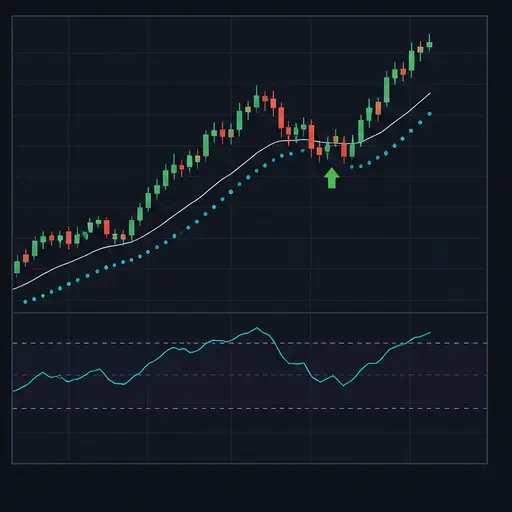
PSAR Trend Scalper combines Parabolic SAR, a long EMA, and MACD to enter bullish trend continuations. Price must be above the EMA, Parabolic SAR must be bullish and below price, and MACD must be positive. A selectable trigger decides whether the strategy acts on a new PSAR upturn, a MACD change, or either.
The strategy uses a fixed fee-aware target and can optionally protect the position with a stop below Parabolic SAR. Several break-even-aware exits respond when the bullish structure weakens.
This method is best suited to liquid markets with clear directional movement and relatively clean trend transitions. It is less effective when price repeatedly crosses the EMA and PSAR dots flip from side to side.
warning
The protective stop is disabled by default. Technical exits require a profitable price, so they may not close an underwater position after the trend fails.
Entry setup
A long entry always requires:
- price above the configured EMA;
- a bullish Parabolic SAR state, with the SAR value below price;
- MACD above zero;
- a qualifying trigger selected by
PST_ENTRY_TRIGGER.
When PST_REQUIRE_MACD_COLOR is enabled, the MACD histogram must also be non-negative. This avoids buying while the MACD line is positive but its shorter-term momentum has already turned negative.
Entry trigger choices
PST_ENTRY_TRIGGER accepts:
psar— requires a fresh change into a bullish PSAR state;macd— requires MACD to cross above zero or continue positively while its histogram improves;psar_or_macd— accepts either of those events.
The trigger does not replace the other confirmations. For example, a PSAR flip still needs price above the EMA and positive MACD; a MACD trigger still needs a bullish PSAR state.
The combined mode usually finds more entries. PSAR-only mode emphasizes trend-state changes, while MACD-only mode can enter later during an already bullish PSAR phase when momentum renews.
The strategy opens one position at a time and does not average down.
Indicator settings
Parabolic SAR
PST_PSAR_STEP controls how quickly SAR accelerates toward price. PST_PSAR_MAX limits that acceleration and must be at least as large as the step.
Higher values generally make PSAR more responsive and produce more frequent flips. Lower values give trends more room but react later. The default step and maximum are both 0.01, creating a deliberately slow, constant acceleration profile.
EMA trend filter
PST_EMA_LENGTH sets the long trend reference. A longer EMA filters more short-term noise but confirms the trend later. A shorter EMA admits more changes in direction.
Long entries always require price above this EMA. PST_SHORT_EMA_FILTER changes only the mirrored short setup used by an optional exit:
belowrequires price below the EMA;aboverequires price above the EMA;noneremoves the EMA-side requirement from the short setup.
MACD
PST_MACD_FAST, PST_MACD_SLOW, and PST_MACD_SIGNAL define the MACD. Keep the slow length above the fast length.
The relatively long default MACD periods aim to filter noise on the default five-minute chart. Shortening them creates faster zero crosses and momentum changes, but also more false turns.
Target and exits
The position target uses PST_TARGET_PIPS in pip mode or PST_TARGET_PCT in percentage mode. It is raised when necessary to satisfy estimated fee break-even and PST_MIN_NET_GAIN_PCT.
PST_TARGET_PIPS_MIN and PST_TARGET_PIPS_MAX constrain the requested pip target. They do not create a changing target.
Technical exits
The following exits require the position to have reached the fee-aware profitable level:
PST_EXIT_ON_SHORT_SIGNALexits on a complete bearish setup using the selected trigger and short EMA filter.PST_EXIT_ON_PSAR_FLIPexits whenever PSAR is in a bearish state above price. It does not require the flip to have happened on that exact candle.PST_EXIT_ON_MACD_ZEROexits when the MACD line reaches zero or below.PST_EXIT_ON_EMA_FLIPexits when price closes below the trend EMA.
These switches let you decide whether a partial trend failure is enough to exit or whether the fixed target should remain the main objective. None is a loss-taking stop.
Protective stop
Enable PST_USE_PROTECTION to activate the stop.
The stop is placed below the entry-time Parabolic SAR value by PST_STOP_BELOW_PSAR_PIPS. It is also compared with a fallback based on:
- the same pip distance below entry in pip mode;
PST_STOP_PCTbelow entry in percentage mode.
The lower of the PSAR-based and fallback levels is used so the stop remains below both references. Consequently, PST_STOP_PCT is not a guaranteed maximum loss when the PSAR-based level is farther away. Inspect the resulting stop distance in tests before live use.
The PSAR offset always uses PST_PIP_SIZE, including when the target uses percentage mode.
Good market conditions
PSAR Trend Scalper generally works best when:
- the pair is liquid and spread remains small;
- price holds clearly above a stable or rising trend EMA;
- PSAR maintains sustained bullish phases instead of frequent flips;
- MACD crosses or improves above zero with room for continuation;
- normal movement is large enough to cover fees and the selected target.
A healthy setup may begin with price reclaiming the EMA, followed by a bullish PSAR flip and strengthening positive MACD.
Avoid choppy ranges where PSAR alternates sides every few candles, and avoid late entries after an extended vertical move. A bullish PSAR state is trailing evidence of trend, not a guarantee that the remaining upside is sufficient.
Creating the strategy
Create a spot strategy and choose PSAR Trend Scalper as the buy and sell method. Begin with backtesting or paper trading.
A practical setup process is:
- Select a liquid pair and review behavior on the default five-minute period.
- Keep the EMA and MACD defaults for the first test.
- Compare PSAR-only, MACD-only, and combined triggers.
- Decide whether MACD histogram color should be required.
- Set pair-appropriate spread and pip values.
- Choose which technical failures should permit a profitable early exit.
- Inspect the actual PSAR-based stop distance before enabling protection.
- Test ranging and falling samples as well as successful trends.
Strategy settings
Trading and execution
| Setting | Description |
|---|---|
BUY_ENABLED | Enables new buy orders. |
SELL_ENABLED | Enables target, technical, and protective sell orders. |
PERIOD | Candle period used for all indicator calculations; the default is five minutes. |
TRADING_LIMIT | Compatibility fallback only. It is ignored while the strategy-specific trading limit contains a positive value. Configure the strategy-specific setting for normal use. For USDT-BTC, this value is in USDT. |
PST_TRADING_LIMIT | For USDT-BTC, the amount of USDT used for an entry. |
FUNDS_RESERVE | For USDT-BTC, the amount of USDT the bot must leave unused. |
KEEP_QUOTE | For USDT-BTC, the amount of BTC the strategy must not sell. |
MIN_VOLUME_TO_BUY | General minimum buy value. For USDT-BTC, this value is in USDT. |
MIN_VOLUME_TO_SELL | General minimum sell value. For USDT-BTC, this value is in USDT. |
PST_MIN_ORDER_VALUE | Strategy-specific minimum entry value. For USDT-BTC, this value is in USDT. |
PST_MIN_SELL_VALUE | Strategy-specific minimum exit value. For USDT-BTC, this value is in USDT. |
PST_COOLDOWN_MS | Minimum delay in milliseconds between strategy actions. |
PST_ENFORCE_COOLDOWN_IN_BACKTEST | Applies the cooldown during backtests as well as live trading. |
PST_MAX_SPREAD_PCT | Maximum permitted bid/ask spread as a percentage. |
PST_MAX_SPREAD_ABSOLUTE | Optional maximum spread in USDT for a pair such as USDT-BTC. Set 0 to disable it. |
PST_NEWS_BLOCK | Manually blocks new entries while existing positions remain manageable. |
PST_NEWS_BLOCK_UNTIL | Blocks new entries until the configured time. |
Trend and trigger
| Setting | Description |
|---|---|
PST_PSAR_STEP | Parabolic SAR acceleration step. Higher values react faster. |
PST_PSAR_MAX | Maximum Parabolic SAR acceleration; keep it at or above the step. |
PST_EMA_LENGTH | Length of the trend EMA required for every long entry. |
PST_MACD_FAST | Fast EMA length of MACD. |
PST_MACD_SLOW | Slow EMA length of MACD; keep it above the fast length. |
PST_MACD_SIGNAL | MACD signal-line smoothing length. |
PST_ENTRY_TRIGGER | Selects psar, macd, or psar_or_macd as the event that activates an otherwise confirmed setup. |
PST_REQUIRE_MACD_COLOR | Requires histogram direction to agree with the positive or negative MACD line. |
PST_SHORT_EMA_FILTER | Chooses below, above, or none for the EMA side required by the mirrored short setup. It does not alter long entries. |
Target and protection
| Setting | Description |
|---|---|
GAIN | General gain fallback retained in the configuration. The strategy normally uses its own target setting. |
PST_USE_PIPS | Uses a pip target and pip fallback stop instead of percentage distances. |
PST_PIP_SIZE | For USDT-BTC, the USDT value represented by one pip; also used for the PSAR stop offset. |
PST_TARGET_PIPS | Requested target in pip mode. |
PST_TARGET_PIPS_MIN | Lowest permitted pip target. |
PST_TARGET_PIPS_MAX | Highest permitted pip target. |
PST_TARGET_PCT | Target percentage when pip mode is disabled. |
PST_MIN_NET_GAIN_PCT | Minimum intended gain beyond estimated round-trip fee break-even. |
PST_STOP_BELOW_PSAR_PIPS | Pip-sized distance placed below the entry-time PSAR value. |
PST_STOP_PCT | Percentage fallback stop in percentage mode; it does not cap a farther PSAR-based stop. |
PST_USE_PROTECTION | Activates the configured protective stop. |
Technical exits
| Setting | Description |
|---|---|
PST_EXIT_ON_SHORT_SIGNAL | Enables a profitable exit when the complete mirrored bearish setup occurs. |
PST_EXIT_ON_PSAR_FLIP | Enables a profitable exit while PSAR is bearish and above price. |
PST_EXIT_ON_MACD_ZERO | Enables a profitable exit when the MACD line is zero or negative. |
PST_EXIT_ON_EMA_FLIP | Enables a profitable exit when price closes below the trend EMA. |
Backtesting range
| Setting | Description |
|---|---|
BF_SINCE | Start of the selected backtesting period. |
BF_UNTIL | End of the selected backtesting period. |
DEEP_TESTING | Enables deeper backtesting mode in the editor. |
Practical tuning directions
For early trend changes, use the PSAR trigger and a more responsive PSAR. For momentum continuation entries, use the MACD trigger. The combined mode accepts both and usually trades more often.
Keep MACD color confirmation enabled when you want the histogram to agree with the MACD line. Disable it only after testing whether positive-line but negative-histogram setups are useful on the selected pair.
If profitable positions exit too early, disable individual technical exits one at a time and compare the result. If losing positions remain open, changing those exits will not solve the issue because they are profit protected; review PST_USE_PROTECTION.
Important limitations
- PSAR is sensitive to ranges and can flip frequently.
- Long EMA and MACD periods introduce delay.
- Technical exits do not deliberately realize a loss.
- The PSAR exit responds to an ongoing bearish state, not only the first flip candle.
PST_SHORT_EMA_FILTERaffects mirrored short signals only.- The percentage stop is not a hard maximum when the PSAR-based stop is lower.
- PSAR stop offsets remain pip-based in both target modes.
- Backtests cannot perfectly reproduce live spread, slippage, latency, and liquidity.
PSAR Trend Scalper works best when the EMA, SAR, and MACD describe one coherent bullish phase. The trigger decides when to act inside that phase; it does not make weak trend context acceptable.