TSSL (futures)
Price trailing sets a range for buying and selling and follows price movement to identify entry or exit points. This can help avoid trading while prices are still trending in the same direction.
To implement price trailing with Gunbot, set a percentage-based trailing range that triggers the bot to begin monitoring prices. Once the threshold is met, Gunbot tracks prices and adjusts its buy/sell orders accordingly.
How to work with this strategy
Gunbot opens one position, either long or short, and closes it when the target is reached. If the stop is hit before a profitable close, Gunbot places a stop order at a loss. After closing a position, Gunbot looks to open a new long or short position. Gunbot does not add to existing open positions.
info
Using tssl (futures) is only meaningful with MEAN_REVERSION enabled.
The info below assumes you have set this.
The examples below show how the basic triggers for tssl work. you can use confirming indicators and settings like ROE trailing.
Buy method conditions
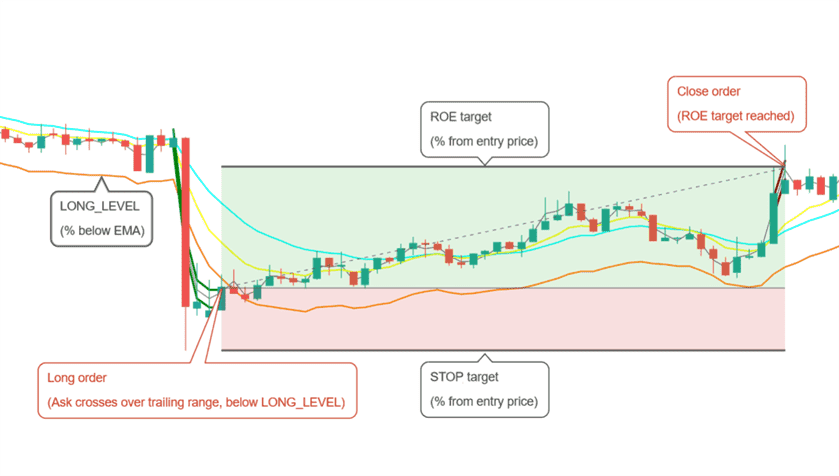
Opening a long position is allowed when buy trailing finishes below LONG_LEVEL.
Sell method conditions
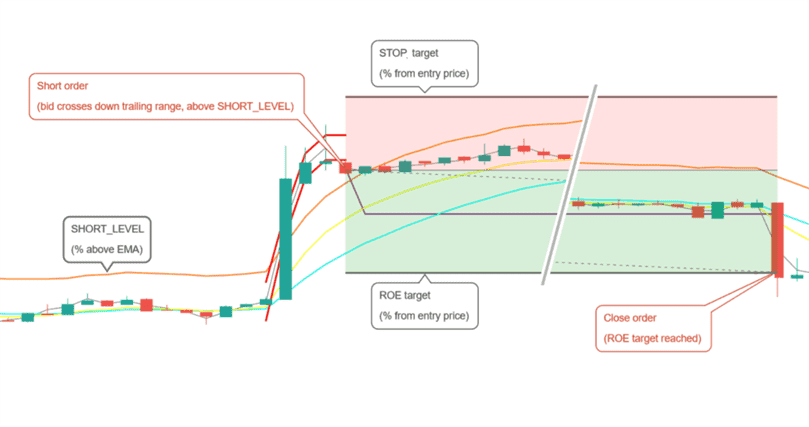
Opening a short position is allowed when sell trailing finishes above SHORT_LEVEL.
Conditions to close
Position is closed when the target ROE (return on equity) is reached. This is a percentage from the entry point, taking leverage into account.
Conditions to stop
A position is closed at loss when negative ROE reaches the STOP_LIMIT target.
Strategy settings for TSSL (futures)
Long settings
| Label | Config Parameter | Default Value | Detailed Description |
|---|---|---|---|
| Buy enabled | BUY_ENABLED | true | Enables or disables buy (long) orders. When set to true, buy orders are allowed. |
| Long level | LONG_LEVEL | 1 | Determines the percentage distance from the Exponential Moving Average (EMA) at which long orders can be placed. |
| Buy range | BUY_RANGE | 0.3 | Defines the buy trailing range as a percentage. This is the trailing distance for buy orders following the price down before placing a buy. |
Short settings
| Label | Config Parameter | Default Value | Detailed Description |
|---|---|---|---|
| Sell enabled | SELL_ENABLED | true | Enables or disables sell (short) orders. When enabled, sell orders can be placed. |
| Short level | SHORT_LEVEL | 1 | The percentage distance from the EMA where short orders are allowed. This sets the threshold for entering short positions relative to the EMA. |
| Sell range | SELL_RANGE | 0.3 | Sets the sell range as a percentage, defining how much the price should move up before initiating a trailing sell order. |
Indicators
| Label | Config Parameter | Default Value | Detailed Description |
|---|---|---|---|
| Period | PERIOD | 15 | Defines the timeframe of the candlesticks used in indicator calculations, in minutes. Ensure the value is supported by your exchange. |
| Medium EMA | EMA1 | 16 | Specifies the number of candles used to calculate the medium Exponential Moving Average (EMA). |
| Fast EMA | EMA2 | 8 | Adjusts the number of candles used to calculate a faster, more responsive EMA. |
| Mean reversion | MEAN_REVERSION | true | Uses the mean reversion variant for your selected buy and sell methods, to trade price returns to a mean value. |