PingPong Spot Trading Strategy
Info
The PingPong strategy is designed for markets that are trading sideways or within a defined range. It operates by setting fixed buy and sell price points, executing trades as the market price "pings" off the lower (buy) price and "pongs" off the upper (sell) price.
PingPong is a fixed-price approach for trading pairs that stay within a range. You define specific buy and sell prices, and Gunbot executes trades when those prices are met or surpassed.
Ping pong trading is intentionally simple: buy near a defined lower level and sell near a defined higher level. It works best when the range is realistic and the order sizes match the account balance.
You can add confirming indicators (like RSI or MACD) for buy and/or sell. For example, buy at your specified price only if RSI is at or below 30.
If you set the fixed buy (PP_BUY) and sell (PP_SELL) prices to unattainable levels (e.g., very low for buy, very high for sell), the strategy can trade based solely on your confirming indicators and ignore the fixed price points.
How It Works
Buy Conditions:
A buy order is triggered when the market price is at or below PP_BUY (and any confirming indicators are met, if configured).
tip
Normal constraints like "buy once, sell once" don't apply to this strategy: each time buying criteria occur, Gunbot will place a buy order as high as set in your balance settings.
Sell Conditions:
A sell order is triggered when the market price is at or above PP_SELL (and any confirming indicators are met, if configured).
info
Gain protection is optional for this strategy. This can lead to sell orders below your break-even point.
When you want to allow sell orders at loss, set a negative value for GAIN.
Trading Example
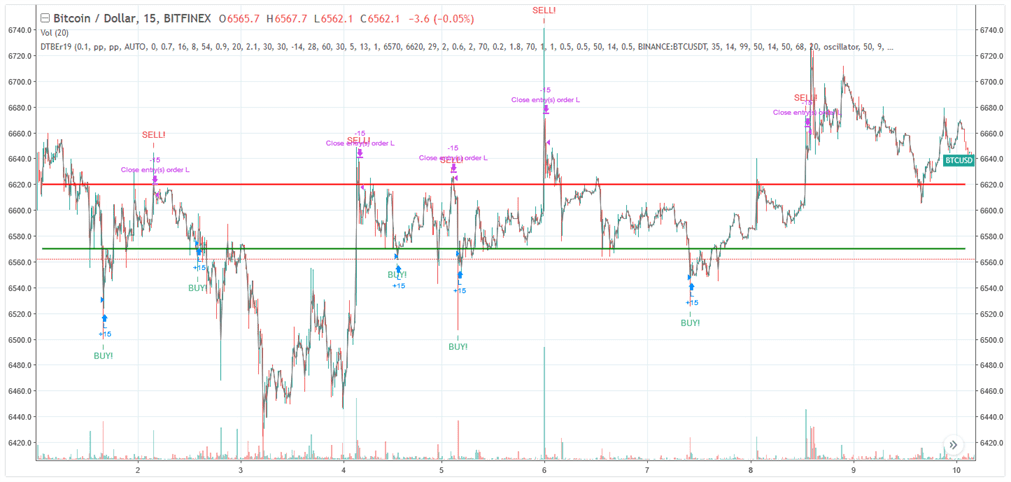
Example of potential PingPong strategy performance. Details and settings
Related Strategy Alternatives
If you want adaptive grid behavior instead of fixed ping/pong prices, compare with StepGrid strategy reference and StepGridScalp strategy reference.
PingPong Strategy Settings
Buy Settings
| Label | Config Parameter | Default Value | Detailed Description |
|---|---|---|---|
| Buy enabled | BUY_ENABLED | true | Enable or disable buy (long) orders for the strategy. |
| Pingpong buy | PP_BUY | 1000 | Fixed price at which a buy order is placed. The default of 1000 is illustrative; set this to your target buy price for the pair. |
Sell Settings
| Label | Config Parameter | Default Value | Detailed Description |
|---|---|---|---|
| Sell enabled | SELL_ENABLED | true | Enable or disable sell (short) orders for the strategy. |
| Pingpong sell | PP_SELL | 1000 | Fixed price at which a sell order is placed. The default of 1000 is illustrative; set this to your target sell price for the pair. |
| Count sell | COUNT_SELL | 9999 | Disables trading for the pair after the specified number of sell orders. |
Indicators
| Label | Config Parameter | Default Value | Detailed Description |
|---|---|---|---|
| Period | PERIOD | 15 | Candlestick period (e.g., 15 minutes) used for any confirming indicators. Ensure the value is supported by your exchange. |
Overview of Effects on Different Order Types
| Config Parameter | Affected Order Types | Not Affected Order Types |
|---|---|---|
| Buy Enabled | Strategy buy, DCA buy, RT buy, RT buyback | Strategy sell, Stop limit, Close, RT sell |
| PP Buy | Strategy buy | Strategy sell, Stop limit, Close, RT sell, DCA buy, RT buy, RT buyback |
| Sell Enabled | Strategy sell, Stop limit, RT sell | Strategy buy, RT buy, RT buyback, Close, DCA buy |
| PP Sell | Strategy sell | Strategy buy, Stop limit, Close, RT sell, DCA buy, RT buy, RT buyback |
| Gain | Strategy sell | Strategy buy, RT buy, RT buyback, RT sell, Close, DCA buy, Stop limit |