Gridbots Spot Trading Strategy
Gridbots maintains a ladder of spot limit buy orders below the market and limit sell orders above it. You choose the amount per order, grid spacing, and number of active orders on each side. As orders fill, the bot manages the ladder using the available cash and coin balances.
The strategy suits a market that repeatedly moves through nearby price levels. A sustained decline can leave you holding more coin at a lower market value; a sustained rise can sell down your inventory. Evaluate both the trading profit and the value of the remaining holdings.
How the grid trades
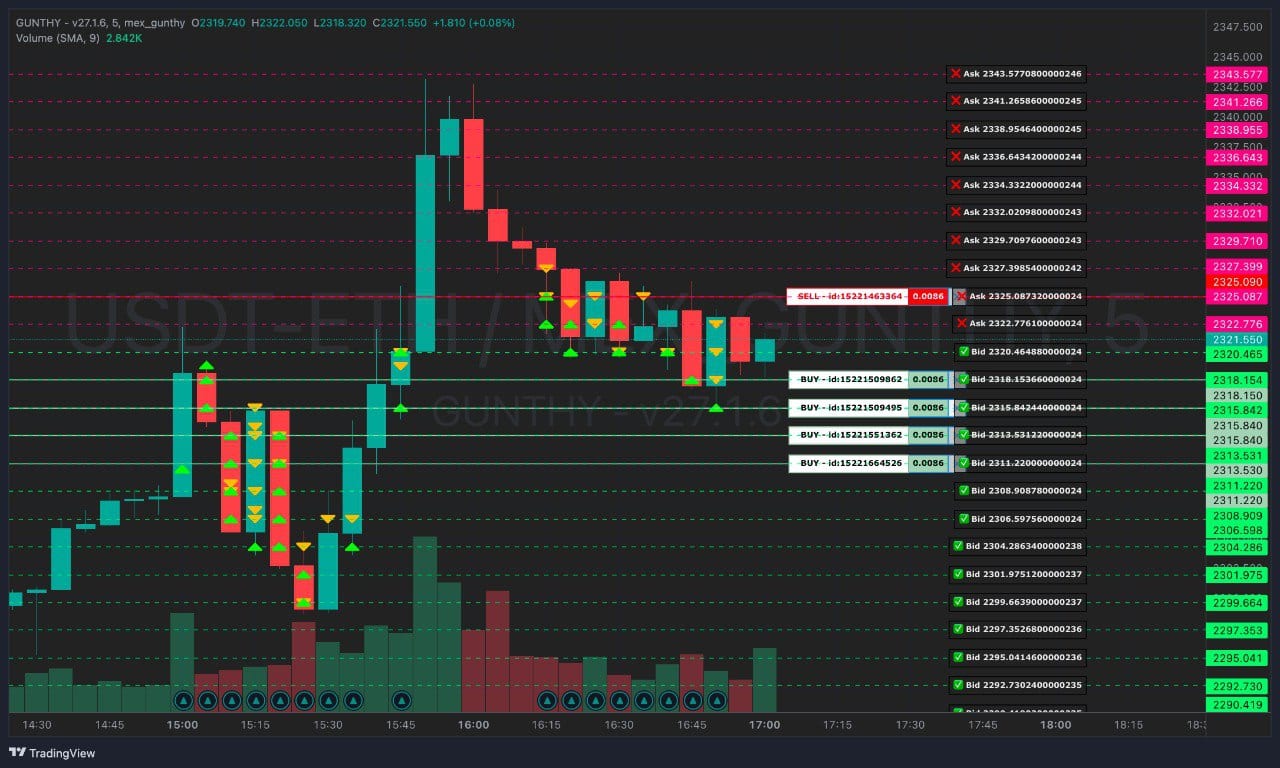
The chart shows the two sides of the grid: buy orders below the market and sell orders above it. Each line is a pending order; a trade happens when an order fills.
- Build the ladder. The bot calculates grid levels and selects nearby prices on each side of the market.
- Fund the orders. Buy orders reserve the spending currency. Sell orders reserve the coin being traded. The number of orders actually placed depends on the available balances and enabled trading sides.
- Process fills. A buy adds coin inventory; a sell returns spending currency. The next set of orders is evaluated against the updated balances and grid levels.
- Maintain the grid. Orders that no longer match the active levels can be canceled and replaced. The grid reference and automatic interval are recalculated over time.
The bot manages a shared inventory. A filled buy does not create a separate deal with its own guaranteed take-profit order, and a sell can use coin you already owned before starting the bot.
Grid spacing and trading range
Set Steps % to a positive percentage for manual spacing, or use auto for an interval based on Average True Range (ATR), a measure of recent price movement. Manual spacing is converted into a price distance at the grid's reference price. For example, 1 at a reference price of 100 USDT corresponds to a 1 USDT interval; successive levels use that price distance.
The active ladder is maintained around the market. The standard Gridbot editor does not offer user-defined upper and lower range boundaries. Review the current order levels on the chart when the market moves or you change the configuration.
Wider spacing means price must travel farther between levels. Tighter spacing can create more fills, but leaves less room to cover trading fees and execution costs. Grid spacing alone does not guarantee a profitable sell relative to the cost of your inventory.
Plan the funding first
For the USDT-BTC market, you spend USDT to buy BTC. In Gunbot's configuration terminology, USDT is the base currency used to fund buys and measure order value; BTC is the quote currency held and sold. This naming convention matters when reading the settings below.
Both sides need funding. You can start with cash and existing coin, or enable Use rebalance to let the bot acquire inventory for sells. With rebalancing disabled and no coin available, the bot can place buys, but sell orders must wait until it has inventory.
Example: 20 USDT per order, five orders per side
| Allocation | Amount before fees |
|---|---|
| Five buy orders | 5 × 20 = 100 USDT of cash |
| Coin inventory for roughly five full-size sell orders | Approximately 100 USDT worth of coin at the funding price |
| Cash reserve | Your chosen reserve, in addition to the order funding |
If rebalancing is enabled, an inventory purchase can spend TRADING_LIMIT × MAX_GRID_ORDERS at once: 100 USDT in this example. Budget for that purchase as well as the buy ladder, fees, and reserve. Exact sell quantities depend on the sell prices.
Max grid orders controls the active ladder on each side. It does not limit the total number of buys over the lifetime of the bot. As orders fill and the grid is maintained, more buys can follow. Set a deliberate investment limit and review the total coin exposure separately.
Set up a Gridbot
- Open Trading settings, select a spot market, and choose Gridbot. In the advanced strategy configuration, use
gridbotfor bothBUY_METHODandSELL_METHOD. - Choose Invest per buy order and Max grid orders together, using the funding calculation above. Check the exchange's minimum order value and quantity for both buys and sells.
- Choose manual Steps % or
auto. Set the candle Period used by the strategy. - Set Max invested base, Funds reserve, and whether the bot may rebalance into coin inventory.
- Review existing coin holdings, pending exchange orders, buy/sell permissions, and the stop-loss setting before enabling the pair.
- Backtest the configuration, then observe it in simulator mode before using live funds.
Keep the setup disabled while configuring
On a running bot, a newly saved pair can begin trading immediately. Prepare and review the configuration with the bot stopped or the pair disabled.
Gridbot settings
These are the settings exposed by the standard Gridbot strategy editor. Defaults describe a new strategy; an existing strategy or pair override can use different values.
Order size and funding
| Setting | Default | What it controls |
|---|---|---|
Invest per buy orderTRADING_LIMIT | 20 | Spending-currency value of each grid buy. On USDT-BTC, 20 allocates 20 USDT per buy. Coin quantity is calculated from the order price. |
Max invested baseMAX_INVESTMENT | 999999999999999 | Intended ceiling on investment in the pair, expressed in the spending currency. The large default provides no practical cap. Choose a limit that reflects your planned exposure; see the backtesting limitation below. |
Funds reserveFUNDS_RESERVE | 0 | Spending-currency balance to leave unused by new buys and rebalancing. Reserved funds do not protect the market value of coin already held. |
Use rebalanceUSE_REBALANCE | false | Allows an inventory buy when there are no open sell orders and too little free coin for a normal sell. The purchase size is the trading limit multiplied by max grid orders, subject to funding checks. It can occur again if inventory becomes depleted. |
Grid layout
| Setting | Default | What it controls |
|---|---|---|
Steps %gbInterval | auto | Manual grid interval as a percentage of the reference price, or auto for ATR-based spacing. Enter 1.2 for 1.2%. |
Max grid ordersMAX_GRID_ORDERS | 5 | Target maximum of active orders on each side: five buys and five sells at the default. Available cash, coin, and trading permissions can produce fewer orders. |
PeriodPERIOD | 15 | Candle timeframe in minutes for chart data and volatility calculations. Changing the timeframe changes the price history used for automatic spacing. |
Trading permissions and risk
| Setting | Default | What it controls |
|---|---|---|
Buy enabledBUY_ENABLED | true | Permits new grid buys and rebalance purchases. Disabling it does not liquidate holdings. |
Sell enabledSELL_ENABLED | true | Permits new grid sell orders. Disabling it leaves coin exposure in the account. |
Stop lossSTOP_LIMIT | 99999 | Live editor setting for a percentage loss threshold below break-even. For example, 10 requests an exit at a 10% loss relative to break-even. The default is effectively inactive. The current Gridbot backtester does not simulate this exit. |
Ignore trades beforeIGNORE_TRADES_BEFORE | 0 | Millisecond timestamp for excluding older trades from live trade-history calculations. 0 keeps the available history. Changing it affects accounting history, not your exchange balances, and it is not applied by the current Gridbot backtester. |
When pausing a grid, inspect the exchange's pending orders as well as the bot's permissions. In the backtester, orders already posted can still fill after new buys or sells are disabled. Turning off a trading side is not an instruction to close the position or cancel every existing order.
Gridbot and Gridbot Advanced
The two variants expose the same standard editor settings. Select and test the variant you intend to run.
In the current backtesting engines, classic Gridbot selects sell levels above the market without filtering them against average inventory cost. It can therefore sell at a loss relative to the coin's acquisition cost. Gridbot Advanced filters new sell levels against a fee-adjusted average buy price with an additional buffer. That can leave inventory waiting for a recovery while buy orders continue, subject to funding controls.
Neither behavior guarantees that total wallet value will increase. A profitable sell can coexist with a larger unrealized loss on the remaining coin.
Backtest and review the results
Run the setup through Backtesting using several market conditions: a sideways period, a sustained decline, and a sustained rise. Compare spacing and order-count changes with the same market, dates, balance, and fee assumptions.
The backtest setup supplies trading fees, starting balance, and date range separately. Fees are a percentage per trade; use assumptions appropriate to the exchange you intend to trade on.
Review these together:
- Final wallet value and drawdown: how cash plus remaining coin performed throughout the run.
- Realized profit and remaining inventory: what the bot actually sold, and the exposure still held at the end.
- Order funding: how much cash and coin were reserved in pending orders, and whether the reserve left enough room to operate.
- Rebalance trades: whether inventory purchases used more cash than you expected.
- Trade sizes and frequency: whether fills would be viable after fees and exchange minimums.
What the current Gridbot backtest does not establish
Keep these modeling limits in mind when interpreting a run:
- Stop-loss behavior:
STOP_LIMITis not passed to the Gridbot engines. A successful run does not validate your live stop-loss exit. - Investment ceiling: classic Gridbot's simulated
MAX_INVESTMENTchecks include free cash and current coin value, rather than consistently enforcing a cap on held inventory cost. Gridbot Advanced checks held inventory cost plus a proposed buy, but does not include all pending buy commitments in that check. Inspect actual exposure and confirm the live limit in simulator mode. - Starting inventory: the current Gridbot setup initializes cash at half the entered starting balance and adds 0.01 units of the traded coin. Check the report's initial wallet value and holdings when comparing runs; those coins can fund sells even with rebalancing disabled.
- Automatic spacing: the current engines apply a minimum automatic interval of 1% of the reference price, and a minimum interval of 0.1% for manual spacing. ATR lookback lengths are fixed inside these engines; adding
ATR_PERIODdoes not customize them. - Limit-order fills: fills are evaluated against candle closing prices. Intracandle touches, order-book queues, partial fills, spread, and slippage are not fully reproduced.
The self-hosted strategy editor also exposes legacy backtesting fields: BF_SINCE and BF_UNTIL for start/end timestamps in milliseconds, and DEEP_TESTING for its trade-history testing mode. These belong to the self-hosted backtesting workflow. Gunbot Live's Gridbot backtester uses the date range and candle data selected in Backtesting instead.
Common setup problems
| What you see | What to check |
|---|---|
| Buy orders appear but no sells | Available coin, SELL_ENABLED, inventory already reserved in sell orders, and whether rebalancing is allowed. For Advanced backtests, also check whether sell levels clear the inventory-cost threshold. |
| Fewer orders than max grid orders | Free balances after reserves, pending orders, investment checks, and exchange minimums. The configured count is not a guarantee that both sides can be fully funded. |
| A large buy soon after starting | USE_REBALANCE: an inventory purchase can be several trading limits in one trade. |
| Many fills but little net profit | Grid spacing, fees, trade sizes, and the cost of inventory being sold. More trades alone do not establish a better result. |
| Realized profit rises while wallet value falls | Unrealized losses on remaining inventory. Review total equity and exposure alongside completed sells. |
| Coin accumulates during a decline | Continuing buy fills, the investment budget, available cash, and your exit plan. The active order count does not cap lifetime accumulation. |
Use the chart to review the working ladder and exchange orders, and keep a written allocation and exit plan for each pair. For strategies with different inventory and execution behavior, see StepGrid and SpotGrid.