Available Methods and Modules for Custom Strategies
In a Gunbot custom strategy, you can place or cancel orders and fetch additional OHLCV (Open, High, Low, Close, Volume) data using built-in methods. Call them directly if you do not need to wait for completion, or await the Promise they return to ensure an operation completes before proceeding. You can also create a promise chain using the .then() method for more complex asynchronous workflows.
The gb.method.require function lets you use additional JavaScript modules, such as those available on NPM (Node Package Manager). For instance, with the Tulind module, you can calculate technical indicator values beyond those pre-calculated by Gunbot.
Gunbot Snippets Extension for VSCode
Easily create custom trading strategies for Gunbot with the official Visual Studio Code extension. It includes pre-built snippets for all supported methods, accelerating your development process.
Info
A JavaScript Promise represents the eventual completion (or failure) of an asynchronous operation and its resulting value. Using await pauses the execution of an async function until the Promise is settled.
Overview of Common Methods and Built-in Modules
The following table provides an overview of the most commonly used methods available under the gb.method namespace and other relevant utilities.
| Method Signature | Returns | Description |
|---|---|---|
gb.method.buyMarket(amount, pair, exchange) | Promise | Places a market buy order. amount is in the quote currency (e.g., for BTC-USDT, amount is in BTC). exchange is optional and defaults to the current pair's exchange. |
gb.method.sellMarket(amount, pair, exchange) | Promise | Places a market sell order. amount is in the quote currency. exchange is optional. |
gb.method.buyLimit(amount, price, pair, exchange) | Promise | Places a limit buy order. amount is in quote currency, price is the limit price. exchange is optional. |
gb.method.sellLimit(amount, price, pair, exchange) | Promise | Places a limit sell order. amount is in quote currency, price is the limit price. exchange is optional. |
gb.method.buyLimitPostOnly(amount, price, pair, exchange) | Promise | Places a "post-only" limit buy order. This ensures the order is added to the order book as a maker order and not executed immediately as a taker. amount in quote, price is limit price. exchange is optional. |
gb.method.sellLimitPostOnly(amount, price, pair, exchange) | Promise | Places a "post-only" limit sell order. amount in quote, price is limit price. exchange is optional. |
gb.method.closeMarket(pair, amount, exchange) | Promise | Places a market order to close a futures position. amount is in quote currency. exchange is optional. |
gb.method.closeLimit(price, pair, amount, exchange) | Promise | Places a limit order to close a futures position. price is the limit price, amount in quote. exchange is optional. |
gb.method.cancelOrder(orderId, pair, exchange) | Promise | Cancels a specified open order using its orderId. It is generally discouraged to await the promise for this method, as exchange confirmation can sometimes be slow. exchange is optional. |
gb.method.getLedger(pair, exchange) | Object | Retrieves the pair state (ledger data) for other trading pairs active in Gunbot. The returned data is similar to the content of pair state JSON files. exchange is optional. |
gb.method.getCandles(count, period, pair, exchange) | Promise | Fetches additional OHLCV candle data. count is the number of candles, period is the candle interval in minutes (e.g., 5 for 5m, 60 for 1h).Best called using await. See example strategies for usage.Caution: Frequent calls can lead to exceeding exchange API rate limits. |
gb.method.getTrend(pair, exchange, version) | Promise | Returns an object with trend data, similar to that used by Gunbot's built-in stepGridHybrid or stepGridHedge strategies. Can only be called for pairs that are actively cycling.This method can cause significant additional API usage as it requests candle data for 15m, 1h, and 4h timeframes. Trend and candle data are also stored in the Gunbot pair state. The version property is optional and defaults to v2. Using v3 returns trend data similar to the stepGridScalp strategy. For v3, define analysis timeframes using overrides: PERIOD (or PERIOD_SHORT), PERIOD_MEDIUM, and PERIOD_LONG. |
gb.method.setTimeScaleMark(pair, exchange, message, timestampMs) | (None) | Adds a timescale mark to the chart's X-axis. By default, these marks show details for filled orders. This method lets you display any custom string. If multiple messages are stored for the same candle, they will be shown together. When timestampMs is omitted, the timestamp is set automatically. When provided, pass a Unix timestamp in milliseconds to place the mark at a specific time in the past.Parameters pair and exchange are optional and default to the current pair's context. |
gb.method.tulind.indicators.<indicatorName>.indicator([inputs], [options], callback) | (via callback) | Access over 100 technical indicators via the Tulind library. You can use available OHLCV data (e.g., gb.data.candlesClose) or provide your own input arrays.Refer to the example strategies and Tulind documentation for specific usage and parameters for each indicator. |
gb.method.require(modulePath) | Object | Function | Loads external JavaScript modules (CommonJS format). This is Node.js's standard require function, scoped to the user_modules directory.To use an external module (e.g., from NPM): - Install the module in a temporary directory (e.g., npm install lodash).- Copy the module's folder (e.g., lodash) from node_modules into the user_modules folder in your Gunbot root directory.- Require it in your strategy: const _ = gb.method.require(gb.modulesPath + '/lodash'); (adjust path separator for Windows if necessary: \).gb.modulesPath resolves to the absolute path of your user_modules folder. |
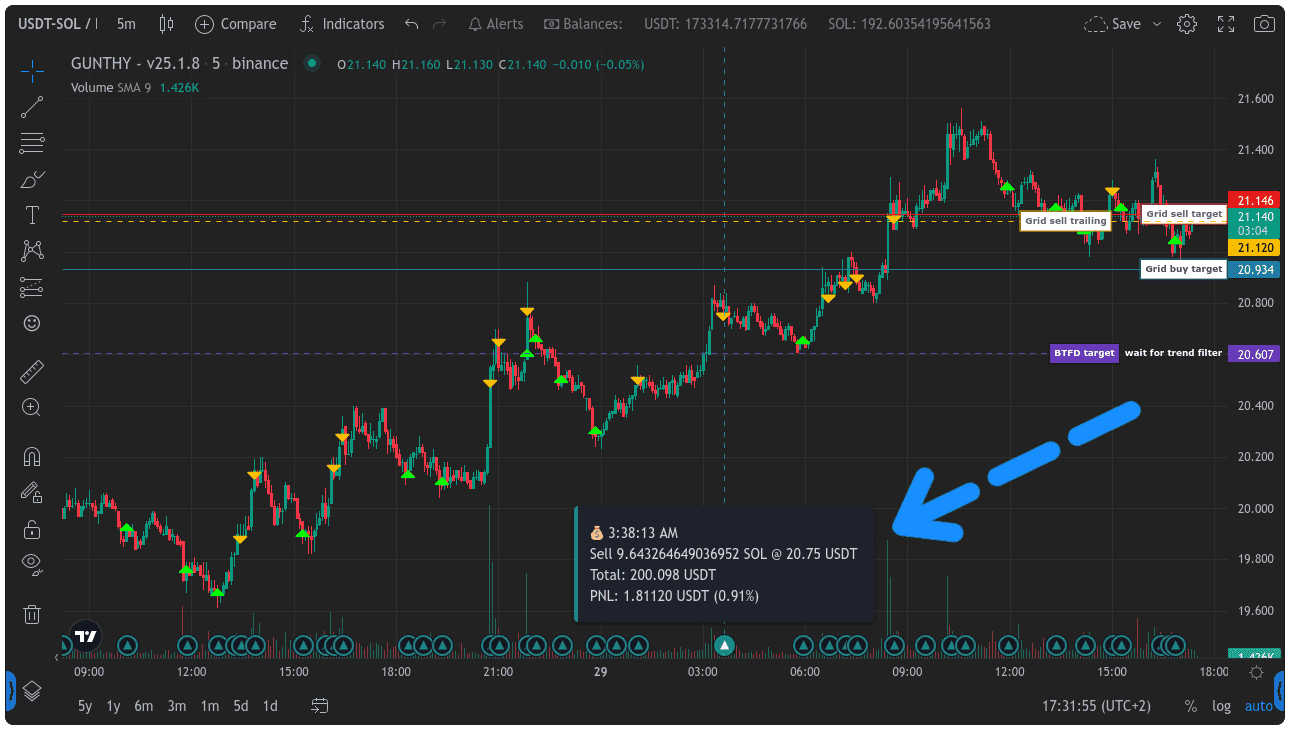
gb.method.setTimeScaleMark().Exchange-Specific Methods (Binance / Binance Futures)
The following methods are specific to Binance and Binance Futures, providing access to advanced order types. Parameters like symbol, volume, price, stopPrice, callbackRate, activationPrice, and tpPrice should be provided as per the exchange's API requirements. userExchange is optional and defaults to the current pair's exchange. All these methods return a Promise.
STOP_LOSS_Buy
- Syntax:
gb.method.STOP_LOSS_Buy(symbol, volume, price, stopPrice, userExchange) - Description: Places a stop-loss buy order. The order is executed as a market order when the market price reaches the
stopPrice.priceis typically ignored for market execution type stop loss but might be needed by API.
STOP_LOSS_LIMIT_Buy
- Syntax:
gb.method.STOP_LOSS_LIMIT_Buy(symbol, volume, price, stopPrice, userExchange) - Description: Places a stop-loss limit buy order. This order triggers when the market price reaches
stopPrice, and then places a limit order at the specifiedprice.
TAKE_PROFIT_Buy
- Syntax:
gb.method.TAKE_PROFIT_Buy(symbol, volume, price, stopPrice, userExchange) - Description: Places a take-profit buy order. The order is executed as a market order when the market price reaches
stopPrice(trigger price for take profit).priceis typically ignored.
TAKE_PROFIT_LIMIT_Buy
- Syntax:
gb.method.TAKE_PROFIT_LIMIT_Buy(symbol, volume, price, stopPrice, userExchange) - Description: Places a take-profit limit buy order. Triggers at
stopPriceand places a limit order atprice.
TRAILING_STOP_MARKET_Buy
- Syntax:
gb.method.TRAILING_STOP_MARKET_Buy(symbol, volume, price, callbackRate, userExchange, activationPrice) - Description: Sets a trailing stop-market buy order.
callbackRatedefines the trailing percentage.activationPrice(optional) is the price at which the trailing stop activates.priceis typically ignored.
STOP_LOSS_Sell
- Syntax:
gb.method.STOP_LOSS_Sell(symbol, volume, price, stopPrice, userExchange) - Description: Places a stop-loss sell order (market execution type).
STOP_LOSS_LIMIT_Sell
- Syntax:
gb.method.STOP_LOSS_LIMIT_Sell(symbol, volume, price, stopPrice, userExchange) - Description: Places a stop-loss limit sell order.
TAKE_PROFIT_Sell
- Syntax:
gb.method.TAKE_PROFIT_Sell(symbol, volume, price, stopPrice, userExchange) - Description: Places a take-profit sell order (market execution type).
TAKE_PROFIT_LIMIT_Sell
- Syntax:
gb.method.TAKE_PROFIT_LIMIT_Sell(symbol, volume, price, stopPrice, userExchange) - Description: Places a take-profit limit sell order.
TRAILING_STOP_MARKET_Sell
- Syntax:
gb.method.TRAILING_STOP_MARKET_Sell(symbol, volume, price, callbackRate, userExchange, activationPrice) - Description: Sets a trailing stop-market sell order.
createOCOBuyOrder
- Syntax:
gb.method.createOCOBuyOrder(symbol, volume, price, stopPrice, tpPrice, userExchange) - Description: Creates an OCO (One-Cancels-the-Other) buy order. It combines a stop-loss limit order (triggered by
stopPrice, limit atprice) with a take-profit limit order (triggered and limited attpPrice). Check Binance documentation for exact parameter interpretation for OCO buy side.volumeis amount of asset to buy.
createOCOSellOrder
- Syntax:
gb.method.createOCOSellOrder(symbol, volume, price, stopPrice, tpPrice, userExchange) - Description: Creates an OCO sell order. Combines a stop-loss limit order (triggered by
stopPrice, limit atprice) with a take-profit limit order (triggered and limited attpPrice).volumeis amount of asset to sell.