Set Up a Custom Infura Fallback Key
Gunbot connects to blockchain data without any additional configuration. You can optionally add your own Infura API key to provide extra redundancy during a public node or Etherscan service interruption.
Prerequisites
- A MetaMask browser extension
Get a Free Infura API Key
- Go to Infura and select Sign In.
- Select Continue with MetaMask, then connect your MetaMask browser extension.
- In the Infura dashboard, find your default project under API Keys.
- Copy the API key.
Add the Key in the Gunbot Interface
- In the Gunbot interface, open Settings.
- Select Notifications & integrations.
- Scroll to the Infura section at the bottom of the page.
- Paste your key into Infura API key (optional).
- Select Save.
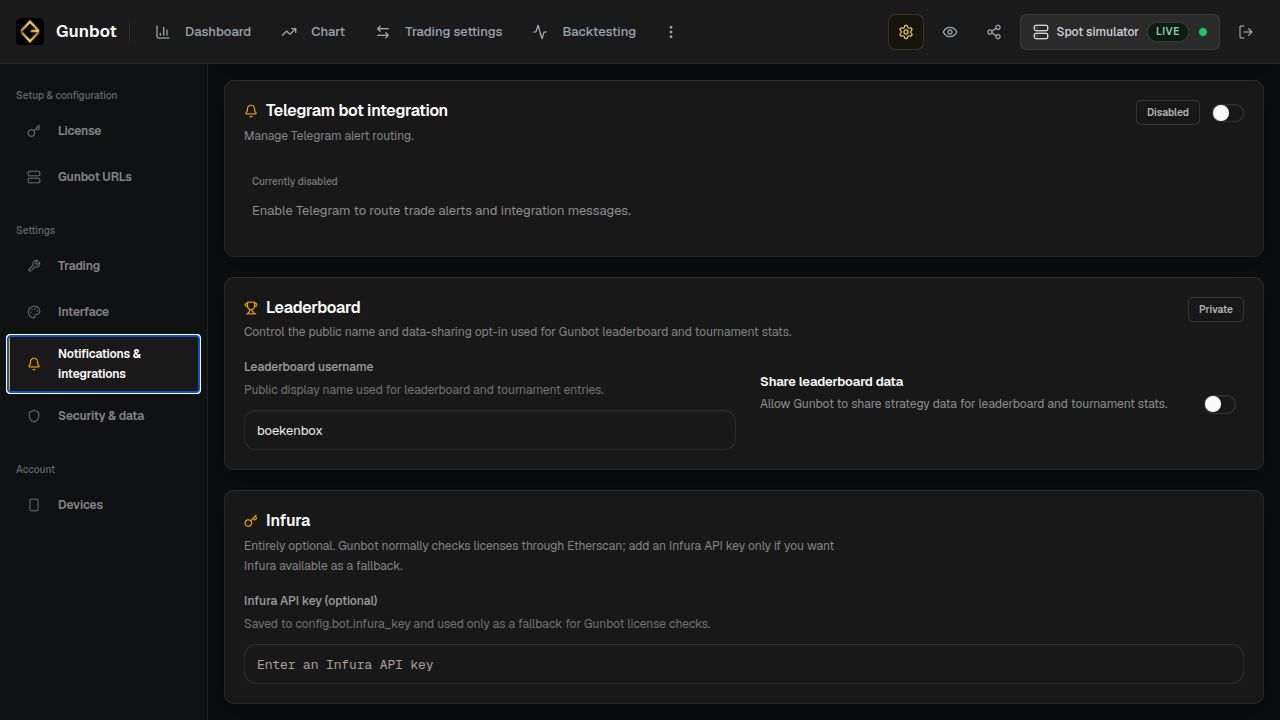
The interface saves the key to config.bot.infura_key automatically.
caution
Keep your Infura API key private. Do not publish or share it, or your config.js file.
How the Fallback Works
Gunbot continues to use its normal blockchain data connection during regular operation. If the primary service becomes unavailable, Gunbot switches to your custom Infura endpoint and logs:
etherscan is down using infura.