How to Update Gunbot
Use these steps to update Gunbot while keeping your historical data intact.
Info
Keep your software updated for security and performance. Always back up your configuration before performing an update.
Major Version Upgrade (e.g., v25 to v27)
Upgrading from one major version to another (for example, v25 to v27) involves the following steps:
- Download the Latest Version: Obtain the latest Gunbot version from the Gunbot downloads page.
- Stop Gunbot: Ensure Gunbot is not running.
- Unzip the Downloaded File: Extract the contents to a temporary folder.
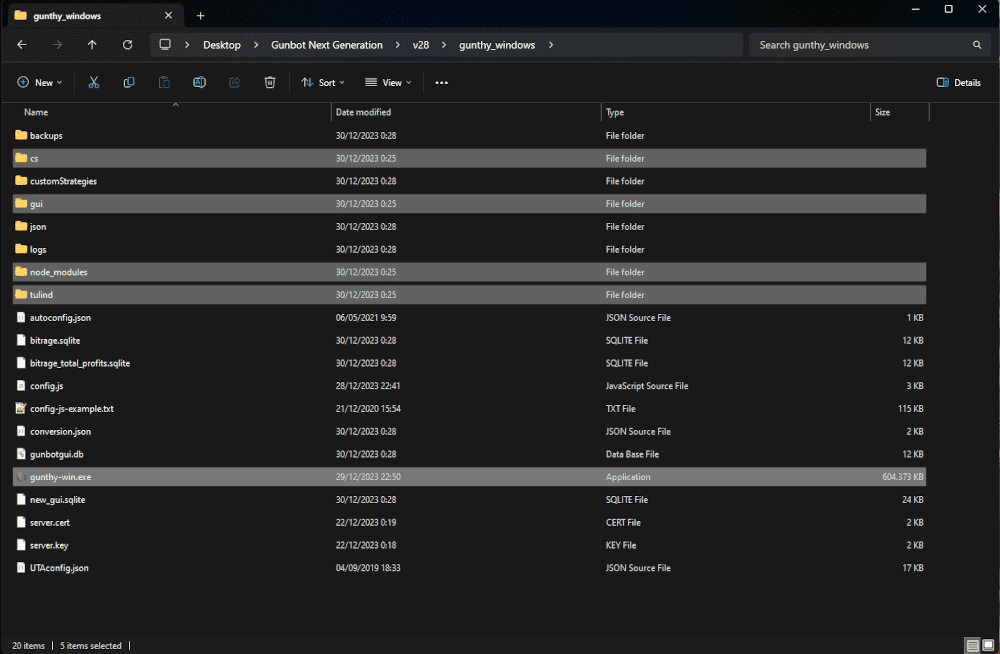
- Overwrite Specific Files and Folders:
- From the temporary folder, copy the
cs,gui,node_modules,tulindfolders, and thegunthy-executable (e.g.,gunthy-linux,gunthy-win). - Paste these files and folders into your main Gunbot installation folder, replacing existing ones with the same names.
- From the temporary folder, copy the
Minor Version Upgrade (e.g., v21.0.1 to v21.0.2)
For minor updates within the same major version:
- Download the Update: Get the updated executable from the Gunbot downloads page.
- Stop Gunbot: Make sure Gunbot is completely off.
- Unzip the Downloaded File: Extract the contents to a temporary folder.
- Overwrite the Executable:
- Copy the
gunthy-executable (e.g.,gunthy-linux,gunthy-win) from the temporary folder. - Replace the existing executable in your main Gunbot installation folder with the copied one.
- Copy the
Special Instructions
Occasionally, updates include instructions similar to a major version upgrade. Always check the update notes and follow any extra steps listed there.
info
It may be needed to remove the customStratEditor.json file to see settings for all strategies from community devs. If you have pre-existing custom editor templates in that file, merge those after Gunbot has created a new customStratEditor.json file.