Creating a Binance Futures API Key for Your Crypto Trading Bot
This guide shows each step to set up a secure Binance Futures API key for automated trading.
Use this Binance API futures guide for live Futures credentials. Binance Futures testnet uses separate testnet keys, so do not mix them with the API key you create here for a real Gunbot setup.
Info
Binance Futures is a platform for trading cryptocurrency derivatives with leverage. API keys allow bots to trade on your behalf.
Step-by-Step Guide to Create Your Binance Futures API Key
-
Log into Binance: Access your Binance account and ensure your account meets security requirements and verifications.
-
Go to API Management: Navigate to the API Management section, usually found under your profile settings or a security tab.
-
Create a New API Key: Select 'Create API' (or a similar option like 'Create new key') and choose 'System Generated' if prompted.
-
Label Your Key: Add a clear, descriptive name for your API key (for example, "Gunbot_Futures_StrategyX") to track configurations.
-
Set the Right API Permissions: Configure these essential permissions:
- Enable Futures
- Enable Spot & Margin Trading (often required even for futures-only bots for certain data access or if the bot supports both) These settings allow your bot to execute trades and monitor positions. Do not enable withdrawals unless absolutely necessary for a trusted application and you understand the risks.
-
Secure Your API Key: Enhance security by:
- Enabling IP whitelisting. Add your bot's static IP address to restrict access.
- Keeping withdrawal permissions disabled. This is a critical security measure.
- Using all available security features Binance offers, such as 2FA for API key creation and management. These measures help protect your trading account from unauthorized access.
-
Finalize API Key Creation: Complete the process by clicking 'Create API' (or 'Save'). You may need to verify this action through security prompts, such as 2FA codes (Google Authenticator, YubiKey) or email confirmation. Securely store your API Key and Secret Key; the Secret Key is often shown only once.
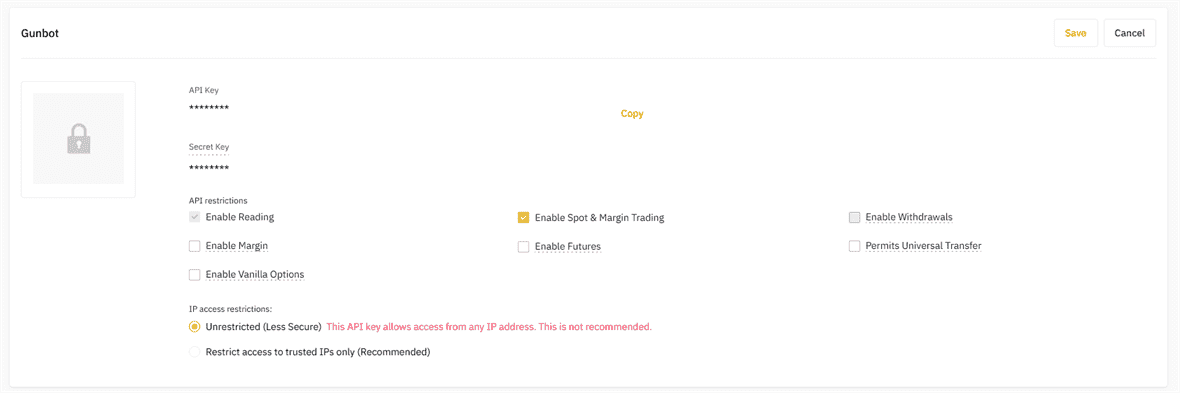
For quick access to your API settings, visit the Binance API Management page.
Double-check all settings to prevent trading interruptions and maintain account security.
Ready to Start a Binance Futures Trading Bot?
Transform your trading approach with Gunbot's automated strategies for Binance Futures. Learn more about our specialized Binance Futures Trading Bot and how it can help optimize your trading performance.