Creating a Binance US API Key for Your Crypto Trading Bot
This guide walks you through creating an API key on Binance.US for automated trading with a focus on secure bot operation.
Info
Binance.US is a cryptocurrency exchange for residents of the United States. API keys allow trading bots to execute trades programmatically on your behalf.
Step-by-Step Guide to API Key Creation
-
Log into Binance.US: Access your Binance.US account and confirm your account has completed all verification requirements for API access.
-
Open API Management: Find 'API Management', typically located in your account profile menu or security settings.
-
Create Your API Key: Select 'Create API' followed by 'System Generated' (if this option is presented). This generates the API Key and Secret Key your trading bot needs.
-
Label Your API Key: Create a clear, meaningful label for your key (e.g., "Gunbot_Spot_Trading_US") to manage multiple keys.
-
IP Restriction (Security Best Practice): Implement these security measures for IP whitelisting:
- Add your bot's static IP address to the whitelist. Using a dynamic IP is less secure and may lead to access issues.
- Keep your IP whitelist updated if your bot's IP address changes. This step helps prevent unauthorized API access.
-
Set API Key Permissions: Configure your permissions carefully:
- Enable only the specific permissions needed for trading (e.g., "Enable Spot & Margin Trading").
- Keep withdrawal permissions disabled for security unless absolutely necessary and you understand the risks.
- Double-check enabled permissions before proceeding. Minimal permissions reduce security risks while ensuring trading functionality.
-
Finalize the API Key Setup: Complete these final steps:
- Review all configured settings, especially IP restrictions and permissions.
- Verify security measures are in place.
- Complete any required 2FA (Two-Factor Authentication) or email verifications to authorize the key.
- Securely store your API Key and Secret Key. The Secret Key is typically shown only once.
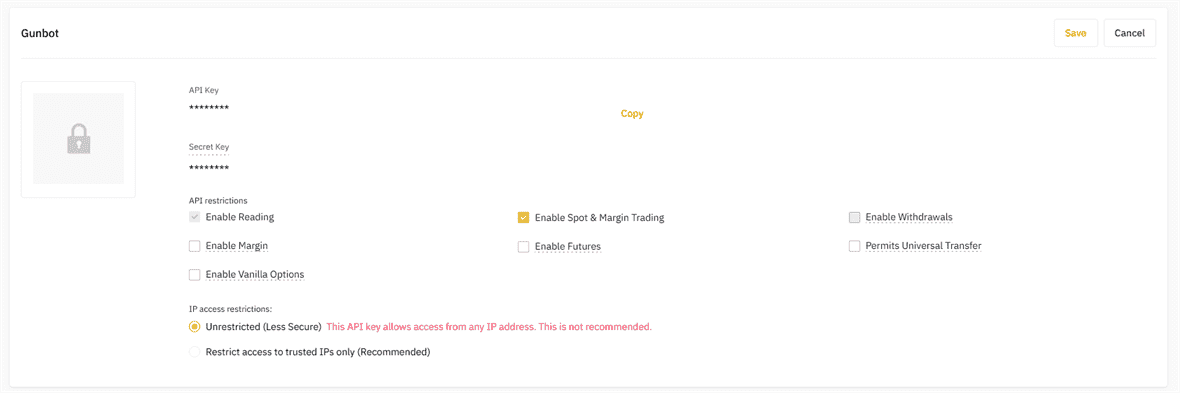
You can usually access your API settings directly through the Binance.US API Management page.
Review API settings regularly to maintain account security. Never share your API credentials and use secure channels when configuring your trading bot.
Ready to Start Automated Trading on Binance.US?
Optimize your trading strategy with automated solutions designed specifically for Binance.US. Learn more about our Binance.US Trading Bot features.