Creating a Bitget API Key for Your Crypto Trading Bot
This guide helps you create and configure a Bitget API key for automated trading and secure bot access.
Bitget API passphrase handling is part of the credential check, not an optional label. Bitget testnet API credentials are separate from live trading keys, so keep the two environments clearly separated.
Step-by-Step Guide to Create Your Bitget API Key
-
Log into Bitget: Access your Bitget account and confirm your account meets verification requirements.
-
Navigate to API Management: Find 'API Keys' under your profile or account settings, then click 'Create API Key'.
-
Select Key Generation Method: If offered, choose 'System-generated' (recommended for most users) or 'User-generated' for advanced customization.
Info
An API Passphrase, if required by Bitget, is an additional password specifically for your API key, separate from your account password. It enhances the security of your API connection.
-
Label Your API Key and Set Passphrase: Choose a clear label. If Bitget requires an API Passphrase, create a strong, unique one and store it with the API Key and Secret Key.
-
Configure API Key Permissions: Enable 'Spot Trading' or 'Futures Trading' (as applicable) and 'Read' account information. Ensure 'Withdraw' or 'Transfer' permissions are disabled. Enable only what your bot needs.
-
Secure Your API Key: Enable IP whitelisting and add your bot's static IP address(es). If Bitget offers trading limits for API keys, consider configuring them.
-
Finalize API Key Creation: Review settings, complete any required two-factor authentication (2FA), and store your API Key, Secret Key, and Passphrase (if applicable) in a secure location.
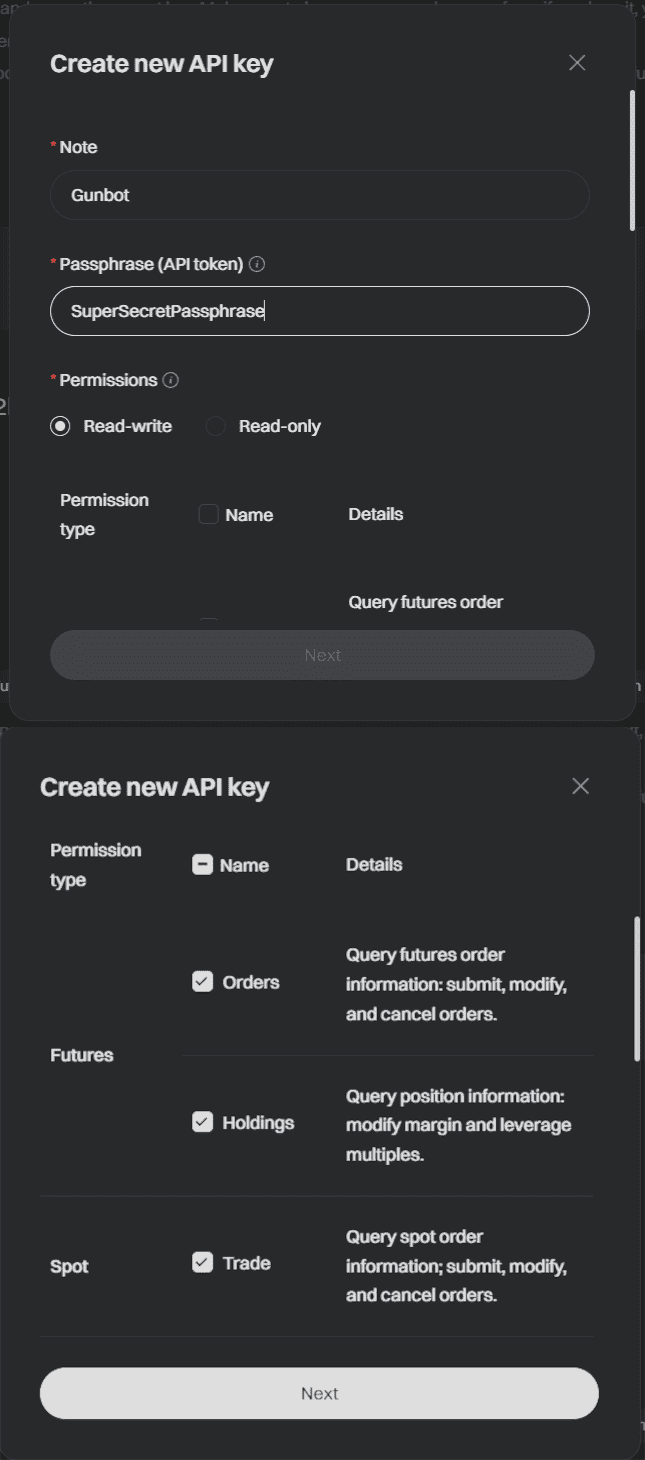
Access your API settings directly through Bitget API Management.
A properly configured API key supports reliable automated trading. Review API settings regularly and keep your API credentials and passphrase private.
Ready to Start Automated Trading on Bitget?
Explore our Bitget Trading Bot features for automated strategies.