Using AutoConfig to Add and Remove Trading Pairs in Gunbot
This guide covers a workflow for adding, evaluating, and removing trading pairs with AutoConfig.
Before You Start
- Ensure AutoConfig is enabled in your Gunbot setup.
- Adjust the settings and save them in
autoconfig.json. The visual editor can create jobs, but a code editor is usually simpler. If you plan to use AutoConfig often, get comfortable with JSON syntax. - Your Gunbot setup should already include a
stepgridstrategy for theaddPairsjob to function correctly. If it does not, add a pair with defaultstepgridsettings via the Gunbot interface, save changes, then remove the pair.
Info
AutoConfig in Gunbot allows for the automation of adding and removing trading pairs based on predefined criteria and market conditions, helping to maintain an optimized set of trading pairs.
The Plan
To build a self-optimizing system for pair selection and rotation, set up four AutoConfig jobs:
- A job that scans the markets for volatile pairs and regularly adds new trading pairs if new 'slots' become free.
- A job that gathers stats about realized and unrealized profits for each pair and stores them in a way that another AutoConfig job can use the data for identifying the worst-performing pair.
- A job that marks a pair for deletion because it performs the worst.
- A job that removes the worst-performing pair.
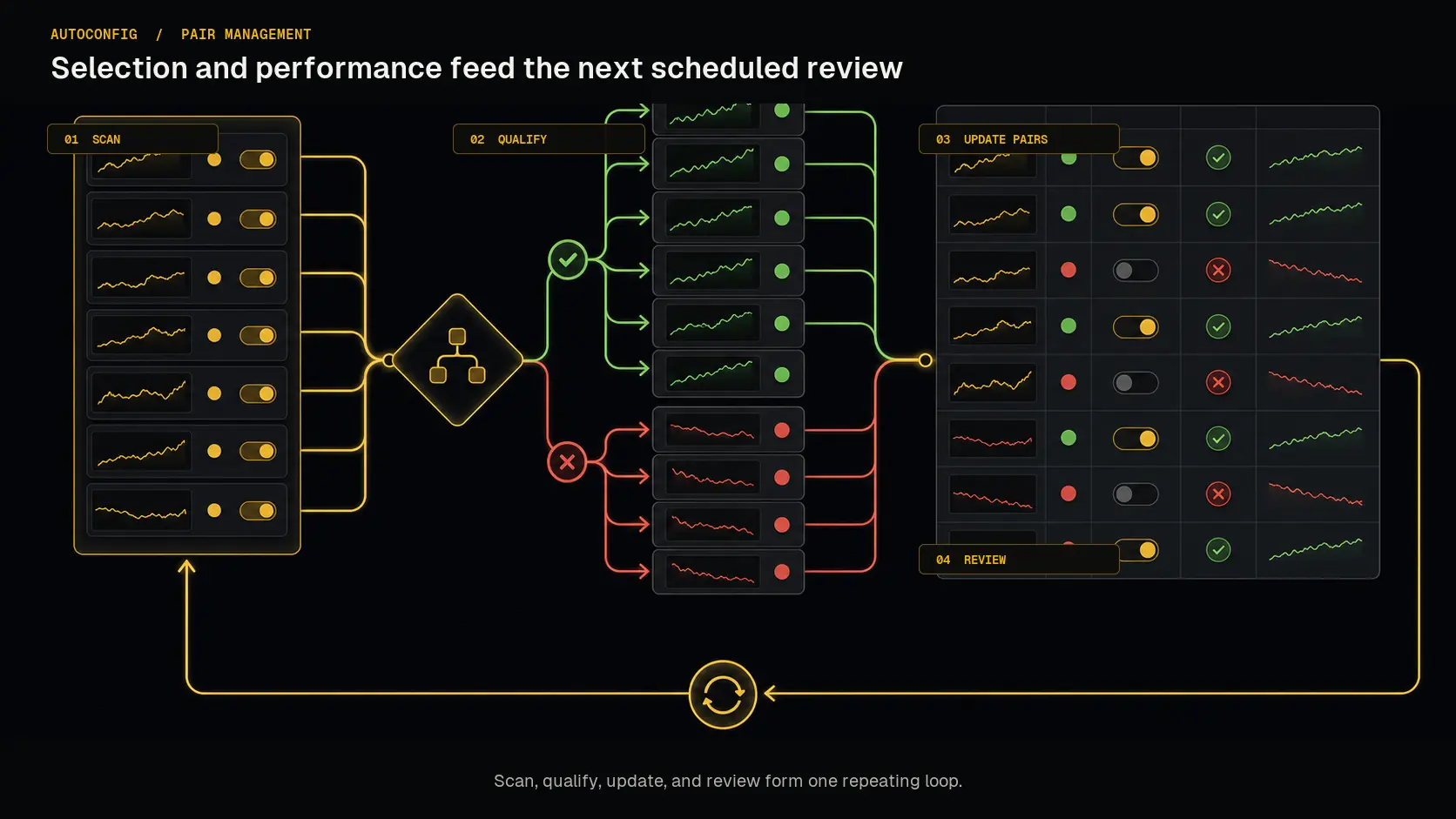 The four jobs form a feedback loop: current market and performance data can change which pairs qualify on the next run.
Step 1: Rule-Based Adding of Trading Pairs
The following job looks for volatile pairs with acceptable spread and volume. It adds pairs using the stepgrid strategy, which provides grid-like behavior with automatic targets and built-in trailing.
Breakdown of Key Filters
stdv: TheminStandardDevPctIntervalfilter makes sure that the pair has a standard deviation (expressed as a percentage of the price) of at least 0.3% during the last hour. This helps identify volatile pairs.price: TheminPricePctChangeIntervalfilter checks that the price is currently at least 1% higher than the average price in the last hour. This helps find pairs with significant price movements.spread: ThemaxSpreadPctfilter makes sure that the bid and ask have a spread of at most 0.2%. This helps select pairs with acceptable market liquidity.volume: TheaboveMedianVolumefilter checks that the pair has an above-median trading volume compared to all other USDT pairs on the exchange. This helps identify pairs with sufficient market activity.
These ticker filters work together to select pairs that meet the volatility, price movement, spread, and volume criteria. The addPairs job scans regularly and adds up to 5 pairs.
{
    "addPairs_binance": {
        "pairs": {
            "exclude": "",
            "include": "USDT-",
            "maxPairs": "5",
            "noCrossOver": true,
            "exchange": "binance"
        },
        "filters": {
            "stdv": {
                "type": "minStandardDevPctInterval",
                "target": "0.3"
            },
            "price": {
                "type": "minPricePctChangeInterval",
                "target": "1"
            },
            "spread": {
                "type": "maxSpreadPct",
                "max": "0.2"
            },
            "volume": {
                "type": "aboveMedianVolume"
            }
        },
        "overrides": {
            "TRADING_LIMIT": 50,
            "BUY_METHOD": "stepgrid",
            "SELL_METHOD": "stepgrid",
            "MAX_BUY_COUNT": "40",
            "MIN_VOLUME_TO_SELL": 0.05,
            "MAX_INVESTMENT": "2000",
            "PERIOD": 15,
            "AUTO_STEP_SIZE": true,
            "STEP_SIZE": "500",
            "ENFORCE_STEP": false,
            "unit_cost": true,
            "STOP_AFTER_SELL": false,
            "FOREVER_BAGS": false,
            "BUY_ENABLED": true,
            "SELL_ENABLED": true,
            "PROTECT_PARTIAL_SELL": true,
            "SMAPERIOD": "50",
            "ATR_PERIOD": "50",
            "KEEP_QUOTE": "0",
            "IGNORE_TRADES_BEFORE": "0"
        },
        "schedule": "*/5 * * * *",
        "type": "addPairs",
        "strategy": "stepgrid",
        "snapshots": "12",
        "setITB": false,
        "resume": true,
        "debug": false,
        "muteTG": true,
        "enabled": true
    }
}
Breakdown of Key Components
pairs: Targets all Binance pairs containing a "-" sign.filters: Define the properties that potential new pairs must have to get added, such as minimum standard deviation, price change, spread, and trading volume.overrides: Sets strategy parameters for newly added pairs, in this case, the default list ofstepgridparameters.schedule: The job runs every 5 minutes, as specified by the cron notation*/5 * * * *.snapshots: The last 12 ticker snapshots are kept internally, so that we have a rolling data cache for the timespan of one hour, used for filtering.type: TheaddPairsjob type is suitable for adding new trading pairs.
Step 2: Storing Performance Data
To track the worst-performing pair and replace it later, store performance data in pairVariables, which is shared between AutoConfig jobs.
{
    "storePerformanceData_binance": {
        "pairs": {
            "exclude": "",
            "include": "USDT-",
            "exchange": "binance"
        },
        "filters": {
            "alwaysPasses": {
                "type": "custom",
                "target": " true"
            }
        },
        "setPairVariable": {
            "realizedPnl": " this.pair.orders.filter(order => order.time > (this.pair.whatstrat.timestamp * 1000)).reduce((acc, order) => acc + order.pnl, 0)",
            "unrealizedPnl": " ((this.pair?.quoteBalance * this.pair?.Bid) - (this.pair?.quoteBalance * this.pair?.ABP)) || 0"
        },
        "overrides": {},
        "clearOverrides": false,
        "schedule": "* * * * *",
        "type": "manageOverrides",
        "debug": false,
        "enabled": true
    }
}
Breakdown of Key Components
pairs: Targets all Binance pairs containing a "-" sign.filters: A single custom filter that always passes sopairVariablesare set every time the job runs.overrides: This job sets no overrides.schedule: The job runs every minute, as specified by the cron notation* * * * *.type: ThemanageOverridesjob type is used to process some logic without direct effects on trading behavior or configuration.setPairVariable: Stores data, such as realized and unrealized profits, to a location that can be accessed by all AutoConfig jobs.
Explanation of the Custom Code
- The
realizedPnlcode calculates realized profit and loss by filtering orders to those made after the pair was last added (usingthis.pair.whatstrat.timestamp) and summing theirpnlvalues. - The
unrealizedPnlcode calculates the unrealized profit and loss for the pair by taking the current quote balance, multiplying it by the current bid price, and subtracting the average buy price multiplied by the quote balance. This gives the current unrealized profit or loss.
This identifies the pair with the lowest combined realized and unrealized profit and makes the data available to other AutoConfig jobs via pairVariables.
Step 3: Marking the Worst Performing Pair
Using the data collected in the previous step, this job sets the STOP_AFTER_SELL pair setting to false for the worst-performing pair. This makes sure that the pair continues trading, but only until it manages to perform a full sell.
{
    "identifyWorstPerformer_binance": {
        "pairs": {
            "exclude": "",
            "include": "USDT-",
            "exchange": "binance"
        },
        "filters": {
            "Sanity checks": {
                "type": "custom",
                "target": " this.pairVariables"
            }
        },
        "overrides": {
            "STOP_AFTER_SELL": " Object.entries(this.pairVariables.binance).filter(([_, v]) => v.realizedPnl !== undefined && v.unrealizedPnl !== undefined && v.timestamp !== undefined).sort(([_, a], [__, b]) => (a.realizedPnl + a.unrealizedPnl) - (b.realizedPnl + b.unrealizedPnl))[0][0] === this.pairName"
        },
        "clearOverrides": false,
        "schedule": "* * * * *",
        "type": "manageOverrides",
        "debug": false,
        "enabled": true
    }
}
Breakdown of Key Components
pairs: Targets all Binance pairs containing a "-" sign.filters: Only has a single custom filter that checks if there is apairVariablesobject to work with.overrides: This job sets one override with a dynamic value. Only one of the pairs at a time can get a value oftrue.schedule: The job runs every minute, as specified by the cron notation* * * * *.type: ThemanageOverridesjob type is commonly used to analyze internal bot data and change the assigned settings (also called overrides) for a trading pair.
Explanation of the Custom Code
- The code first filters the
pairVariables.binanceobject to only include pairs that have validrealizedPnl,unrealizedPnl, andtimestampvalues. - It then sorts the filtered pairs by the sum of
realizedPnlandunrealizedPnl, ascending (the lowest total profit/loss is first). - Finally, it checks whether the current pair (
this.pairName) matches the lowest total profit/loss pair. If so, it sets theSTOP_AFTER_SELLoverride totrue, marking it for deletion.
This marks the worst overall performer (lowest combined realized and unrealized profit) for removal in the next step.
Step 4: Removing the Worst Performing Pair
The final job removes the marked pair so the trading setup keeps only the remaining pairs.
{
    "removePairs_binance": {
        "pairs": {
            "exclude": "",
            "noBag": true,
            "removeDisabled": false,
            "notRemoveBefore": 720,
            "exchange": "binance",
            "include": "USDT-"
        },
        "filters": {
            "status": {
                "type": "custom",
                "target": " this.pair.whatstrat.STOP_AFTER_SELL === true"
            }
        },
        "schedule": "* * * * *",
        "type": "removePairs2",
        "debug": false,
        "muteTG": true,
        "enabled": true
    }
}
Breakdown of Key Components
pairs: Targets all Binance pairs containing a "-" sign.noBag: truemeans only pairs that fully sold their assets are eligible for removal.notRemoveBefore: 720means pairs must have traded for 12 hours (720 minutes) before removal.filters: Only has a single custom filter that checks if the pair has itsSTOP_AFTER_SELLoverride set totrue, our signal for deletion.schedule: The job runs every minute, as specified by the cron notation* * * * *.type: TheremovePairs2job type is used for removing trading pairs without additional API overhead; it only uses data already collected by Gunbot core.
Conclusion
This guide outlines a basic strategy for managing trading pairs automatically in Gunbot using AutoConfig.
Use these steps as a baseline and adjust filters, schedules, and thresholds to match your own criteria.
Full autoconfig.json
You can copy the full combined AutoConfig setup below.
{
    "addPairs_binance": {
        "pairs": {
            "exclude": "",
            "include": "USDT-",
            "maxPairs": "5",
            "noCrossOver": true,
            "exchange": "binance"
        },
        "filters": {
            "stdv": {
                "type": "minStandardDevPctInterval",
                "target": "0.3"
            },
            "price": {
                "type": "minPricePctChangeInterval",
                "target": "1"
            },
            "spread": {
                "type": "maxSpreadPct",
                "max": "0.2"
            },
            "volume": {
                "type": "aboveMedianVolume"
            }
        },
        "overrides": {
            "TRADING_LIMIT": 50,
            "BUY_METHOD": "stepgrid",
            "SELL_METHOD": "stepgrid",
            "MAX_BUY_COUNT": "40",
            "MIN_VOLUME_TO_SELL": 0.05,
            "MAX_INVESTMENT": "2000",
            "PERIOD": 15,
            "AUTO_STEP_SIZE": true,
            "STEP_SIZE": "500",
            "ENFORCE_STEP": false,
            "unit_cost": true,
            "STOP_AFTER_SELL": false,
            "FOREVER_BAGS": false,
            "BUY_ENABLED": true,
            "SELL_ENABLED": true,
            "PROTECT_PARTIAL_SELL": true,
            "SMAPERIOD": "50",
            "ATR_PERIOD": "50",
            "KEEP_QUOTE": "0",
            "IGNORE_TRADES_BEFORE": "0"
        },
        "schedule": "*/5 * * * *",
        "type": "addPairs",
        "strategy": "stepgrid",
        "snapshots": "12",
        "setITB": false,
        "resume": true,
        "debug": false,
        "muteTG": true,
        "enabled": true
    },
    "storePerformanceData_binance": {
        "pairs": {
            "exclude": "",
            "include": "USDT-",
            "exchange": "binance"
        },
        "filters": {
            "alwaysPasses": {
                "type": "custom",
                "target": " true"
            }
        },
        "setPairVariable": {
            "realizedPnl": " this.pair.orders.filter(order => order.time > (this.pair.whatstrat.timestamp * 1000)).reduce((acc, order) => acc + order.pnl, 0)",
            "unrealizedPnl": " ((this.pair?.quoteBalance * this.pair?.Bid) - (this.pair?.quoteBalance * this.pair?.ABP)) || 0"
        },
        "overrides": {},
        "clearOverrides": false,
        "schedule": "* * * * *",
        "type": "manageOverrides",
        "debug": false,
        "enabled": true
    },
    "identifyWorstPerformer_binance": {
        "pairs": {
            "exclude": "",
            "include": "USDT-",
            "exchange": "binance"
        },
        "filters": {
            "Sanity checks": {
                "type": "custom",
                "target": " this.pairVariables"
            }
        },
        "overrides": {
            "STOP_AFTER_SELL": " Object.entries(this.pairVariables.binance).filter(([_, v]) => v.realizedPnl !== undefined && v.unrealizedPnl !== undefined && v.timestamp !== undefined).sort(([_, a], [__, b]) => (a.realizedPnl + a.unrealizedPnl) - (b.realizedPnl + b.unrealizedPnl))[0][0] === this.pairName"
        },
        "clearOverrides": false,
        "schedule": "* * * * *",
        "type": "manageOverrides",
        "debug": false,
        "enabled": true
    },
    "removePairs_binance": {
        "pairs": {
            "exclude": "",
            "noBag": true,
            "removeDisabled": false,
            "notRemoveBefore": 720,
            "exchange": "binance",
            "include": "USDT-"
        },
        "filters": {
            "status": {
                "type": "custom",
                "target": " this.pair.whatstrat.STOP_AFTER_SELL === true"
            }
        },
        "schedule": "* * * * *",
        "type": "removePairs2",
        "debug": false,
        "muteTG": true,
        "enabled": true
    }
}