SpotGridAdvanced Trading Strategy
A grid-like strategy with dynamic trading targets and integrated trailing for buying and selling.
Based on SpotGrid, with extra configuration options, trend detection, and Continuous Trading.
Regular Trading Behavior
When you run SpotGridAdvanced on a pair in an uptrend, this is the kind of trading behavior to expect:
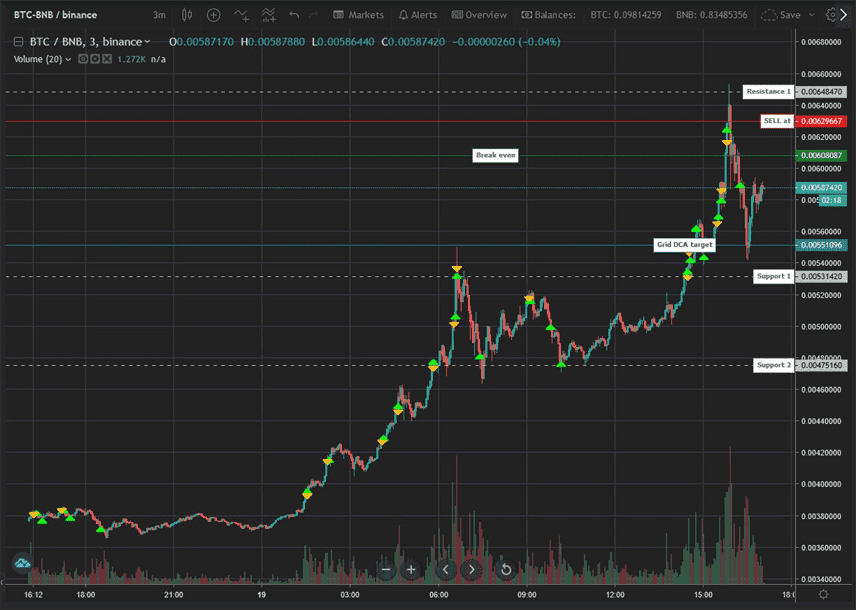
Let's break down what happens:
- When the strategy first runs and there is no balance to sell, it immediately places a market buy order.
- If the price goes down and exceeds the SpotGrid line in the chart, buy trailing is activated. When trailing finishes, a buy order is placed and the break-even price drops.
- If the price reaches the Sell target on the chart, sell trailing is activated and the complete position is sold at profit when trailing finishes.
- After selling, the strategy immediately starts buy trailing. If the price goes up it will quickly open a new position; if the price goes down it will place a buy order below the last sell rate.
The first few buy orders happen quickly when the price starts dropping. After a few trades, the distance between buy orders grows. All targets are set automatically.
When the market goes down, the strategy accumulates units at lower prices:
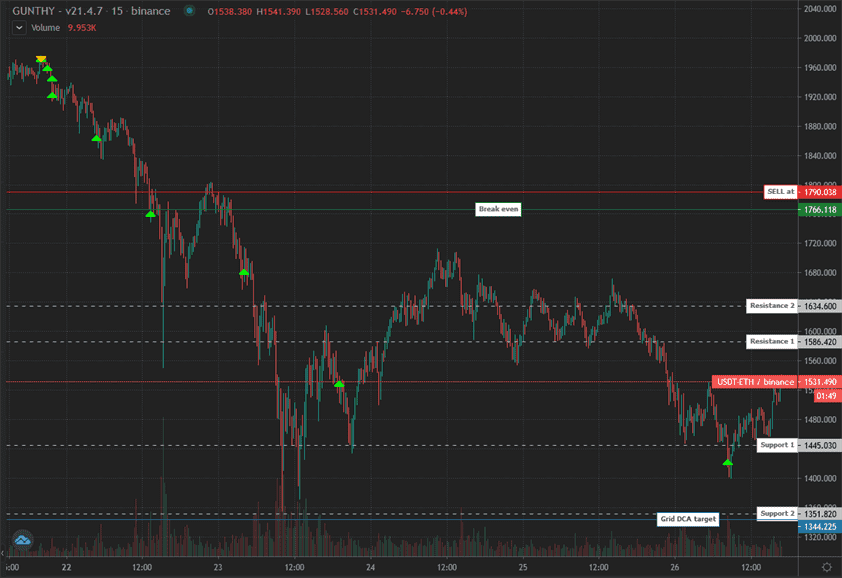
The bot continues to accumulate until the max buy count is hit or it runs out of available funds. Each new buy order lowers the break-even price. As soon as the price hits the sell target and finishes trailing above break-even, a sell order is placed.
Balance management is important; make sure you can afford the planned number of buy orders.
Grid trading places a series of buy and sell orders at predefined intervals around a set price. Trailing orders protect gains by keeping trades open while price moves in your favor.
The next trading targets are always visible on the chart.
Keep in mind the target lines move over time; they represent the current targets.
Continuous Trading Behavior
CT (Continuous Trading) keeps trading even when the current price is far below the overall break-even price.
If the price is above the last buy order, up to the number of units bought in that trade can be sold for a small profit in base and quote. Base profits are kept; quote profits can help reduce the overall break-even price.
CT lets the strategy follow price more closely and can fit in more DCA trades in one price range, rather than waiting for lower prices.
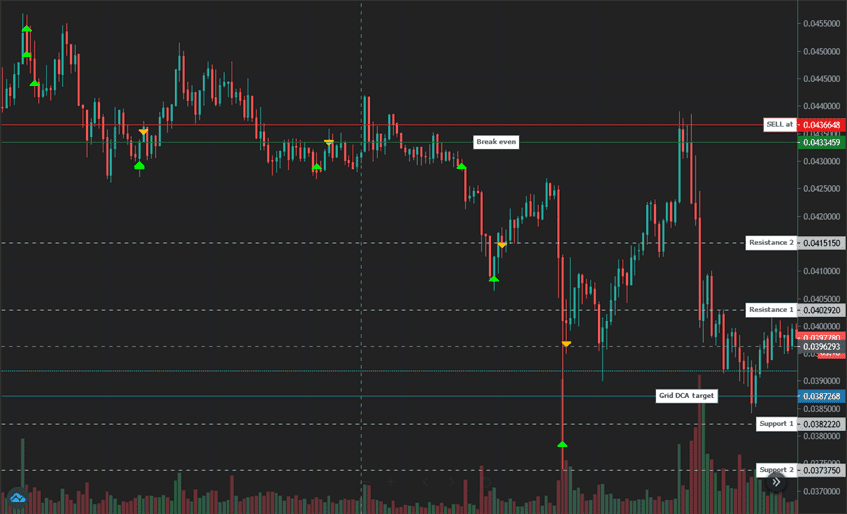
The chart above shows several CT trades. Each sell order only uses the units bought in the previous buy order. The number of units to CT sell is configurable with the continuous trading limit multiplier: 1 sells roughly the same number of units as last bought, 0.5 sells about half.
What Happens When?
Assuming your settings allow CT orders:
- When the price goes down after a DCA order: another DCA order is placed when the grid DCA target is hit.
- When the price goes up after a DCA order: a CT sell target is set above the last buy rate using Gain or Auto Gain. When the target is reached, a CT sell order is placed.
- When the price goes down after a CT sell order: if the grid DCA target is reached, a CT buy order is placed for about the same number of units as the CT sell order. The position size after this order is roughly the same as before the CT sell order.
- When the price goes down after a CT buy order: a normal DCA order is placed when the DCA target hits.
- When the price goes up after a CT sell order: if the price is below break-even and the distance between the last sell rate and current price is more than the distance between first support and resistance, a new CT buy order is placed.
Manual trading or changing settings related to Trading Limit can disrupt continuous trading.
If you use CT, only change Trading Limit settings after a complete sell order.
SpotGridAdvanced Settings
Balance Settings
| Label | Config Parameter | Default Value | Detailed Description |
|---|---|---|---|
| Trading limit | TRADING_LIMIT | 20 | Amount invested per buy order. This is the base amount for the first buy order when using a trading limit multiplier. |
| Trading limit multiplier | TL_MULTIPLIER | 1 | Scales the invested amount with each consecutive buy. Example with a trading limit of 100 USDT and max buy count of 3: - 1: 100, 100, 100 USDT. - 1.5: 100, 150, 225 USDT. - 2: 100, 200, 400 USDT. |
| Max buy count | MAX_BUY_COUNT | 15 | Maximum number of buy orders to prevent overexposure. A value of 15 caps position size at 15x trading limit. The trading limit multiplier affects how quickly this cap is reached. |
| Min volume to sell | MIN_VOLUME_TO_SELL | 10 | Minimum notional value that can be sold. Verify the actual minimum order value on your exchange. |
| Max invested base | MAX_INVESTMENT | 999999999999999 | Cap on total investment in the base currency. Example: 1000 USDT on a USDT-BTC pair. |
| Funds reserve | FUNDS_RESERVE | 0 | Amount of base currency reserved and not used in trading. Trading stops if available funds fall below this value. |
Customize Targets
| Label | Config Parameter | Default Value | Detailed Description |
|---|---|---|---|
| Period | PERIOD | 15 | Candle period used to calculate auto step size and trailing ranges. Lower values increase trading frequency and risk. |
| Auto Gain | AUTO_GAIN | true | Dynamic profit target based on support/resistance distance, with a minimum of twice trading fees. Overrides manual gain. |
| Gain | GAIN | 0.5 | Fixed profit target (%) above break-even. A sell triggers when price reaches this level. |
| Grid Multiplier | GRID_MULTIPLIER | 1 | Spacing between buy orders relative to preset levels. 1.5 widens by 50%; 0.5 halves the spacing. |
| Trailing Range Multiplier | TRAILING_MULTIPLIER | 1 | Adjusts the trailing range. 1 uses the standard range, 1.5 increases by 50%, 0.5 decreases by 50%. |
| Unit Cost | unit_cost | true | Break-even calculation: enabled uses average cost per unit remaining; disabled uses the full order sequence. |
Trend Options
| Label | Config Parameter | Default Value | Detailed Description |
|---|---|---|---|
| Trend Open | TREND_OPEN | false | Only opens new positions when the 4h and 15m charts are both bullish. Requires candle data from the exchange. |
| Dynamic DCA Block | TREND_BLOCK_DCA | false | Only allows DCA trades when the 4h and 15m charts are bullish. Requires candle data from the exchange. |
| Dynamic DCA Distance | TREND_LOWER_DCA | false | Doubles DCA distance when the 4h and/or 15m charts are not bullish. Requires candle data from the exchange. |
| Trend CT Multiplier | TREND_CT_MULTIPLIER | 2 | Adjusts the buy target distance during non-bullish trends when using Dynamic DCA Distance. |
| Trend Grid Multiplier | TREND_GRID_MULTIPLIER | 2 | Modifies the next DCA target distance during non-bullish trends when using Dynamic DCA Distance. |
Advanced
| Label | Config Parameter | Default Value | Detailed Description |
|---|---|---|---|
| Stop After Next Sell | STOP_AFTER_SELL | false | Stops trading after selling current holdings. |
| Buy Enabled | BUY_ENABLED | true | Controls whether buy orders can be placed. |
| Sell Enabled | SELL_ENABLED | true | Controls whether sell orders can be placed. |
| CT TL Limit Multiplier | CT_TL_MULTIPLIER | 0.5 | Sets the CT order size as a ratio of the last DCA buy. Example: 0.5 uses half the last DCA amount. |
| Start CT | START_CONT_TRADING | 3 | Continuous trading starts once position size reaches this multiple of Trading Limit. |
| CT Restart Multiplier | CT_RESTART_MULTIPLIER | 1 | Controls CT re-entry after a CT sell. A value of 1 places the buy target just above the last sell rate. |
| SMA Period | SMAPERIOD | 50 | Number of candles used for support/resistance and trailing ranges. |
| Keep Quote | KEEP_QUOTE | 0 | Minimum amount of quote currency to keep and not sell (e.g., 0.01 BTC). |
| Ignore Trades Before | IGNORE_TRADES_BEFORE | 0 | Timestamp (ms) before which trades are ignored. You can generate a timestamp at [currentmillis.com](https://currentmillis.com/). |
Other Parameters
Watch Mode is respected.
Besides settings mentioned on this page, no other strategy setting has any effect on SpotGridAdvanced.