StepGrid Spot Trading Strategy
A grid-like strategy that trades when price moves more than a defined step size. You can use auto step size or set a manual step size. Trailing is automatic on every step up or down.
StepGrid aims to trade every meaningful price move. Even below the overall break-even price, it can sell parts of a bag at rates profitable compared to the corresponding buy orders.
tip
This strategy is different from most other Gunbot strategies: there are only a handful of options and no confirming indicators.
Trading behavior
When you run stepgrid with auto step size, this is the kind of trading behavior to expect:
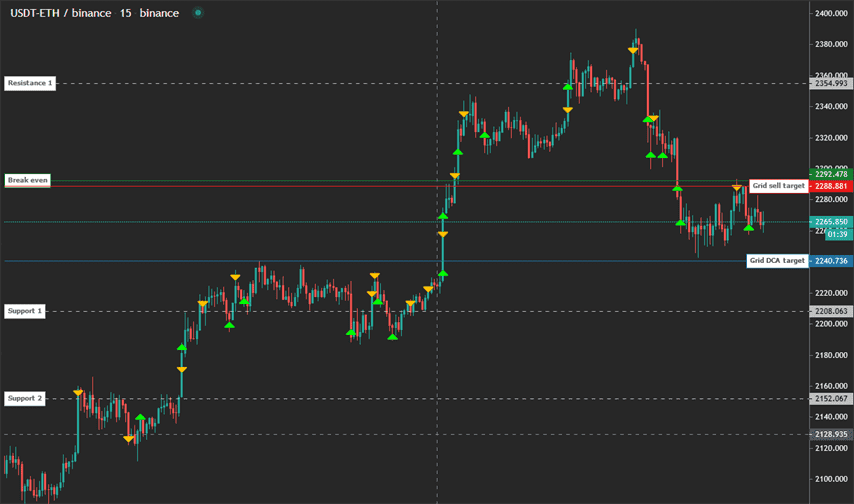
Let's break down what happens:
- Steps up and down are placed around the last order rate. If the pair has never traded before, the reference price is the price at strategy start.
- If price moves down a step, buy trailing starts and a buy order for 1x trading limit is placed when trailing finishes.
- If price moves up a step while below break-even, sell trailing starts and a sell order is placed when trailing finishes. Below break-even, each sell order is 1x trading limit in size.
- If price is above break-even, the behavior is the same but order quantities can exceed 1x trading limit. If price reaches a full step above break-even, it closes a bag at once.
- If price increases enough that the next buy step is above break-even, the buy step acts as a stop-in-profit for positions larger than 4x trading limit.
When in no position, the bot buys again when either the next buy or sell step is reached.
The bot continues to accumulate until max buy count is hit or it runs out of available funds. Each new buy order lowers break-even.
Balance management is important; make sure you can afford the planned number of buy orders.
The easiest way to start running stepgrid is by not owning any of the coins it is about to buy: starting with an existing balance is not recommended.
tip
The next trading targets are always visible on the chart.
Keep in mind the target lines move over time; they represent the current targets.
How to create a stepgrid strategy
Using the advanced strategy editor: create a new strategy and select stepgrid as buy and sell method.
StepGrid settings
Balance settings
| Label | Config Parameter | Default Value | Detailed Description |
|---|---|---|---|
| Trading limit | TRADING_LIMIT | 20 | Amount you can invest for each buy order. This is the base USDT amount used per order in a pair like USDT-BTC. |
| Max buy count | MAX_BUY_COUNT | 40 | Maximum position size. When reached, the strategy executes sells only. A value of 40 caps the position at 40x trading limit. |
| Min volume to sell | MIN_VOLUME_TO_SELL | 10 | Minimum notional value for sell orders. Verify with your exchange minimum order size. |
| Max invested base | MAX_INVESTMENT | 999999999999999 | Cap on total investment in the base currency (e.g., USDT in USDT-BTC). |
Customize grid
| Label | Config Parameter | Default Value | Detailed Description |
|---|---|---|---|
| Period | PERIOD | 15 | Time period of candles used to calculate auto step size and trailing range. Lower values increase trading frequency and risk. |
| Auto step size | AUTO_STEP_SIZE | True | Automatically determines step size based on current volatility. |
| Step size | STEP_SIZE | 500 | Manual step size for buy and sell orders when auto step size is disabled. Example: 500 on USDT-BTC trades every 500 USDT move. |
| Enforce step size | ENFORCE_STEP | False | Ensures the set step size is strictly followed, preventing orders at worse prices than the grid step. |
| Unit cost | unit_cost | True | Break-even uses the average cost per unit remaining, instead of the full order sequence. |
Advanced
| Label | Config Parameter | Default Value | Detailed Description |
|---|---|---|---|
| Stop after next sell | STOP_AFTER_SELL | False | Stops trading after all current holdings are sold. |
| Forever bags | FOREVER_BAGS | False | Ignores break-even and places each buy and sell order at the trading limit. This can maximize gains in bullish trends but does not use max buy count. |
| Buy enabled | BUY_ENABLED | True | Controls whether buy orders can be placed. |
| Sell enabled | SELL_ENABLED | True | Controls whether sell orders can be placed. |
| Protect partial sell | PROTECT_PARTIAL_SELL | True | Prevents partial sells that do not cover accumulated buy costs. Requires complete transaction history. |
| SMA period | SMAPERIOD | 50 | Number of candles used to calculate support and resistance for trailing ranges. |
| ATR period | ATR_PERIOD | 50 | Number of candles used to calculate ATR for automatic grid steps. |
| Keep quote | KEEP_QUOTE | 0 | Amount of quote currency to keep and not sell (e.g., 0.01 BTC in a USDT-BTC pair). |
| Ignore trades before | IGNORE_TRADES_BEFORE | 0 | Timestamp (ms) before which trades are ignored, useful when restarting or changing strategies. |