StepGridHybrid Spot Trading Strategy
This strategy borrows grid logic from the StepGrid strategy and combines it with a trend monitor that evaluates the market on 15m, 1h, and 4h timeframes.
Info
Grid trading places orders above and below a set price, creating a grid of incrementally higher and lower prices. Trend monitoring analyzes market data across multiple timeframes to identify price direction.
Besides offering many customization options, StepGridHybrid has:
- Trading modes that control when to start and stop trading a pair.
- The ability to track how much unsold buy volume remains below the current price.
- Automatic grid step skipping, for example when price drops out of a recently traded range.
- Additional orders based on trend triggers alongside grid orders.
- Compatibility with manual trades on the same pair.
Trading Behavior
In its pure form, StepGridHybrid is like StepGrid with one difference: sell amounts are based on remaining buy volume below the current price. This makes it possible to skip buy steps; when trading resumes at a lower level, it will not sell units bought at higher rates unless overall break-even is reached.
The integrated trend module can:
- Control when new trades are allowed.
- Place extra buy orders during a pump.
- Skip buy steps when price action is negative.
- Increase sell targets and trailing ranges when price action is positive.
When you run stepgridhybrid, this is the kind of trading behavior to expect:
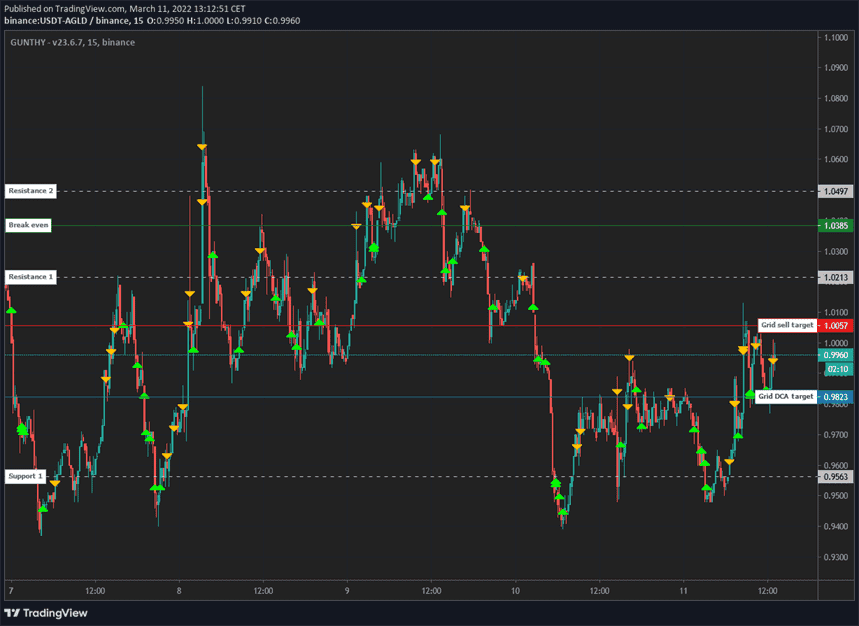
Let's break down what happens:
- Most trades follow the same logic as the StepGrid strategy.
- Sell amounts are not static; each sell order sells the remaining volume bought at lower prices times the Partial Sell Ratio.
- When price moves down rapidly, some buy steps are skipped to preserve funds for later buys.
- When in no position, the bot buys again when either the next buy or sell step is reached, as long as the trading mode allows new trades.
Skipping Steps
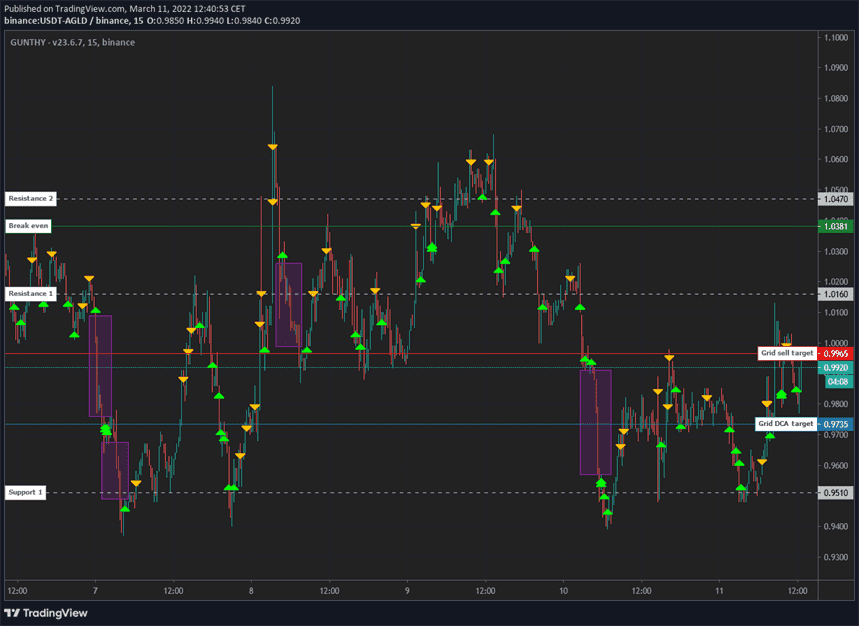
The marked zones are intentionally skipped buy steps. Some triggers are configurable; others are hardcoded.
Non-Grid Orders
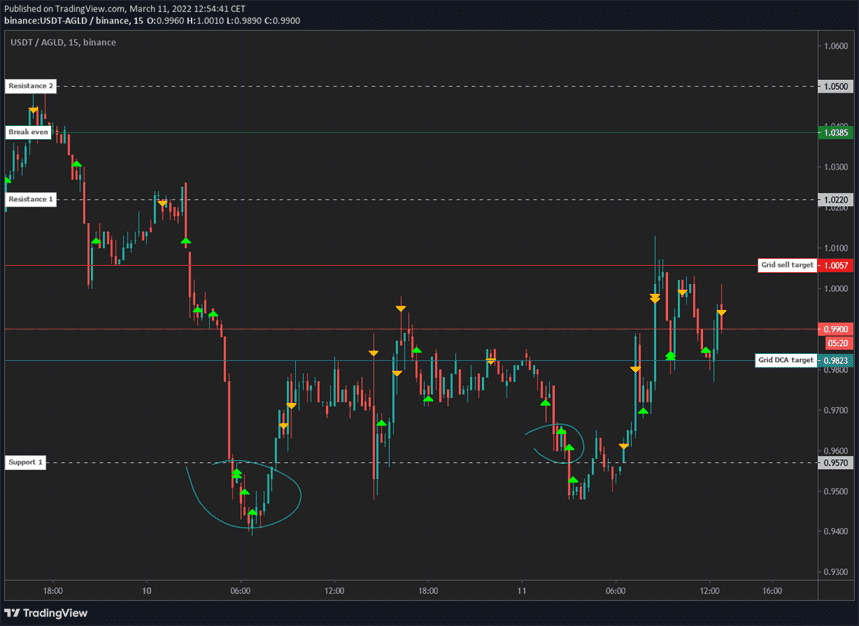
The marked zones are additional buy orders triggered by trend module conditions. These orders do not move the active grid targets.
Trading Modes
Trading modes define when to start and stop grid trading. By default, the strategy is unrestricted and can open new trades anytime.
Using a mode restricts opening new trades based on its entry and exit criteria. Once all assets are sold, a new trade can only open when the mode allows it.
Modes are meant to be used one at a time; enabling multiple modes on one pair can lead to unexpected behavior.
info
Trading modes can be extremely restrictive. Sometimes there can be several weeks or more between two entry signals on the same pair.
Manual Trading Range Mode
Manually set a price range in which new trades are allowed. Optionally, use a stop limit price.
TA Mode
Starts trading when the entry conditions for one of a collection of TA fractals is detected; stops opening new trades when exit scenarios are detected. Think of fractals as bullish reversal pattern detection.
This mode includes an optional stop-loss trigger.
Volatility Mode
Looks for pairs in an uptrend on the 4h timeframe and in the lower area of a volatility zone. Allows trading from near the bottom to the top of an expected volatility range.
This mode includes a stop-in-profit mechanism near the top of the zone and an optional stop-loss trigger.
Pullback Mode
When a pullback scenario is detected on the 4h timeframe, new trades are allowed until 15 minutes after the scenario loses validity.
This mode automatically increases the invested amount for the first few trades.
StepGridHybrid Settings
Balance Settings
| Label | Config Parameter | Default Value | Detailed Description |
|---|---|---|---|
| Trading limit | TRADING_LIMIT | 80 | Base amount per buy order is 80 USDT. With multipliers, orders can range from 20 to 160 USDT. |
| Trading limit multiplier | TL_MULTIPLIER | 1 | Scales the invested amount per buy. Example with 100 USDT: 1.0 keeps 100; 1.5 yields 100, 150, 225; 2 yields 100, 200, 400. |
| Auto TL ratio | USE_TLR | false | Dynamically adjusts buy amount based on price, between 0.25x and 1x trading limit. |
| Auto Partial sell ratio | USE_PSR | false | Adjusts partial sell ratio based on price. Lower prices use a higher ratio; higher prices use a lower ratio. |
| Partial sell ratio | PARTIAL_SELL_RATIO | 0.95 | Percentage of previously bought volume that can be sold at each sell step. Example: 200 units * 0.4 = 80 units sold. |
| Use partial sell cap | PARTIAL_SELL_CAP | false | Limits the maximum quantity of a partial sell order. |
| Partial sell cap ratio | PARTIAL_SELL_CAP_RATIO | 1 | Maximum partial sell size as a multiple of Trading Limit. |
| Max buy count | MAX_BUY_COUNT | 40 | Caps total position size at 40x trading limit; when reached, only sells are placed. |
| Min volume to sell | MIN_VOLUME_TO_SELL | 10 | Minimum order value that can be sold; verify with your exchange minimums. |
| Max invested base | MAX_INVESTMENT | 999999999999999 | Cap on total base currency invested. Example: 1000 USDT in USDT-BTC. |
tip
Dynamic Invest Per Order
Invest per buy order is not static.
The Trading Limit is the base amount for several multipliers; deviations between 0.3x and 2x Trading Limit are possible.
Customize Grid
| Label | Config Parameter | Default Value | Detailed Description |
|---|---|---|---|
| Period | PERIOD | 15 | Candle period used for auto-calculating step size and trailing range. Lower values increase trading frequency and risk; 1h and 4h are also used for trend analysis. |
| Auto Step Size | AUTO_STEP_SIZE | true | Automatically selects a grid step size based on current volatility. |
| Minimum Step Pct | MIN_STEP_PCT | 0 | Minimum percentage step size, overriding auto steps smaller than this value. |
| Step Size | STEP_SIZE | 500 | Manual grid step size for buys and sells when auto step size is disabled. Can be a fiat value or a percentage when Pct Step Size is enabled. |
| Pct Step Size | PCT_STEP_SIZE | false | Interprets Step Size as a percentage of the current price. |
| Enforce Step Size | ENFORCE_STEP | false | Only executes orders if the price aligns with the grid step size. |
| Unit Cost | unit_cost | true | Break-even calculation: enabled uses average cost per unit remaining; disabled uses full-sequence break-even. |
| Dynamic Exit Logic | DYNAMIC_EXIT_LOGIC | false | In uptrends, exit target is Unit Cost; otherwise uses overall break-even. Requires Unit Cost disabled. |
| Partial Sell Gain | GAIN_PARTIAL | 0.5 | Minimum profit target (%) for partial sells, requiring buys at least 0.5% below current price after fees. |
| Gain | GAIN | 1 | Minimum profit target (%) above break-even or Unit Cost before a full sell. |
Customize Trailing
| Label | Config Parameter | Default Value | Detailed Description |
|---|---|---|---|
| Pct Buy Trailing Range | PCT_TRAILING_RANGE | false | Uses a custom percentage to define buy trailing range instead of the automatic range. |
| Custom Buy Trailing Range | CUSTOM_TRAILING_RANGE | 0.3 | Buy trailing range (%) when Pct Buy Trailing Range is enabled. |
| Pct Sell Trailing Range | PCT_SELL_TRAILING_RANGE | false | Uses a custom percentage to define sell trailing range. |
| Custom Sell Trailing Range | CUSTOM_SELL_TRAILING_RANGE | 0.3 | Sell trailing range (%) when Pct Sell Trailing Range is enabled. |
Trend Options
| Label | Config Parameter | Default Value | Detailed Description |
|---|---|---|---|
| Trend Sync | TREND_SYNC | false | Restricts new trades to periods when 4h and 1h trends align; does not affect DCA trades. |
| Trend Basic | TREND_BASIC | true | Adjusts behavior based on market conditions, such as increasing sell steps and trailing ranges, and allowing immediate buys during strong uptrends. |
| Trend Plus | TREND_PLUS | true | Enhances dynamic trading by enabling immediate buys during short-term opportunities and increasing partial sell ratios after those buys. |
| Trend Orders | TREND_ORDERS | true | Controls whether Trend Basic and Trend Plus initiated orders are allowed. |
| Auto Trend Orders | AUTO_TREND_ORDERS | true | Only allows trend-initiated orders during a 4h uptrend. |
| Trailing Range Multiplier | TRAILING_MULTIPLIER | 2 | Multiplier applied to trailing range when Trend Basic or Trend Plus calls for a larger range. Also affects custom PCT ranges. |
| Sell Step Multiplier | SELL_STEP_MULTIPLIER | 1.2 | Increases sell step size in trend-identified conditions. |
| Trend Trailing | TREND_TRAILING | true | Adjusts buy trailing ranges in bearish conditions to avoid premature buys. |
| Trend Trailing Multiplier (Small) | TREND_TRAILING_MULTIPLIER | 1 | Buy trailing multiplier when 4h trend is bullish but 15m trend is bearish. |
| Trend Trailing Multiplier (Big) | TREND_TRAILING_BEARISH_MULTIPLIER | 2 | Buy trailing multiplier when both 4h and 15m trends are bearish. |
Trading Modes
| Label | Config Parameter | Default Value | Detailed Description |
|---|---|---|---|
| Custom Trading Range | CUSTOM_TRADING_RANGE_MODE | false | Only opens new trades within a defined price range. DCA can occur at any price, but if price falls below 7000 USDT, all holdings are sold. |
| Trading Range Low | TRADING_RANGE_LOW | 8000 | Lower limit of the custom trading range. |
| Trading Range High | TRADING_RANGE_HIGH | 10000 | Upper limit of the custom trading range. |
| Trading Range Stop | TRADING_RANGE_STOP | 7000 | Stop-loss target; if the opening rate of the latest candle falls below this level, all holdings are sold. |
| Trading Range DCA Stop | TRADING_RANGE_DCA_STOP | 7500 | Lower limit for placing DCA orders within the custom range. |
| Pullback Mode | PULLBACK_MODE | false | Restricts new trades to times when a pullback occurs, primarily on 4h charts. |
| Volatility Mode | VOLATILITY_MODE | false | Limits trading to bullish pairs within a controlled volatility range, with a stop mechanism to limit losses on the final sell. |
| TA Mode | TA_MODE | false | Restricts trading to bullish pairs that meet specific TA fractals. |
| Dynamic Stop Loss | DYNAMIC_SL | false | Dynamic stop loss target when used with Volatility or TA mode; hidden until triggered. |
Advanced
| Label | Config Parameter | Default Value | Detailed Description |
|---|---|---|---|
| Stop After Next Sell | STOP_AFTER_SELL | false | Stops trading after current holdings are fully sold. |
| Forever Bags | FOREVER_BAGS | false | Ignores break-even price to hold for longer-term gains. |
| Buy Enabled | BUY_ENABLED | true | Controls whether buy orders can be placed. |
| Sell Enabled | SELL_ENABLED | true | Controls whether sell orders can be placed. |
| SMA Period | SMAPERIOD | 50 | Number of candles used to calculate support/resistance for trailing ranges. |
| ATR Period | ATR_PERIOD | 50 | Number of candles used to calculate ATR for Auto Step Size. |
| Keep Quote | KEEP_QUOTE | 0 | Amount of quote currency to keep and not sell (e.g., 0.01 BTC). |
| Ignore Trades Before | IGNORE_TRADES_BEFORE | 0 | Unix timestamp before which trades are ignored for strategy resets. |
tip
Other Parameters
Besides settings mentioned on this page, no other strategy setting has any effect on StepGridHybrid.