StepGridScalp Spot Trading Strategy
This strategy is the next iteration of StepGridHybrid and its trend module. It balances scalping (quick, small trades with high win probability) and grid trading (DCA in predictable steps). The trend module builds on existing concepts but adds user-set timeframes.
Key Features:
- multi-timeframe: user-configurable low, medium, and high timeframes for trend changes, momentum, and more. Example: trade on 5m while monitoring 15m and 4h.
- Different trading styles used automatically when opportune:
- Normal grid trading
- Cautious scalping in upper ranges: smaller buy orders, stricter buydowns for DCA, and very cautious sell trailing to exit with no or small bags.
- Trade supports: when the market looks very bad, grid buy trading stops and the strategy places limit orders at higher timeframe supports.
- Different sell trailing styles used automatically when opportune:
- Regular trailing with dynamic ranges.
- Candle low trailing to trail larger moves upward.
- Micro stop-loss style to start sell trailing quickly after riskier buys, accepting a tiny loss.
- Better at selling more volume at higher prices via the partial sell ratio cap and improved sell trailing.
- Quick detection of trend direction changes.
- Can be very cautious about opening new trades.
info
Cancel orders must be disabled in the global bot settings when you use the trade supports option (you can do that on the setup page).
About the Trend Module
The trend options set this strategy apart. Exact details are not public to protect the author's work, but the data usage is more transparent than previous black-box approaches.
Info
Scalping aims to profit from small price changes after a trade becomes profitable. Grid trading places buy and sell orders at predefined intervals above and below a set price, creating a grid.
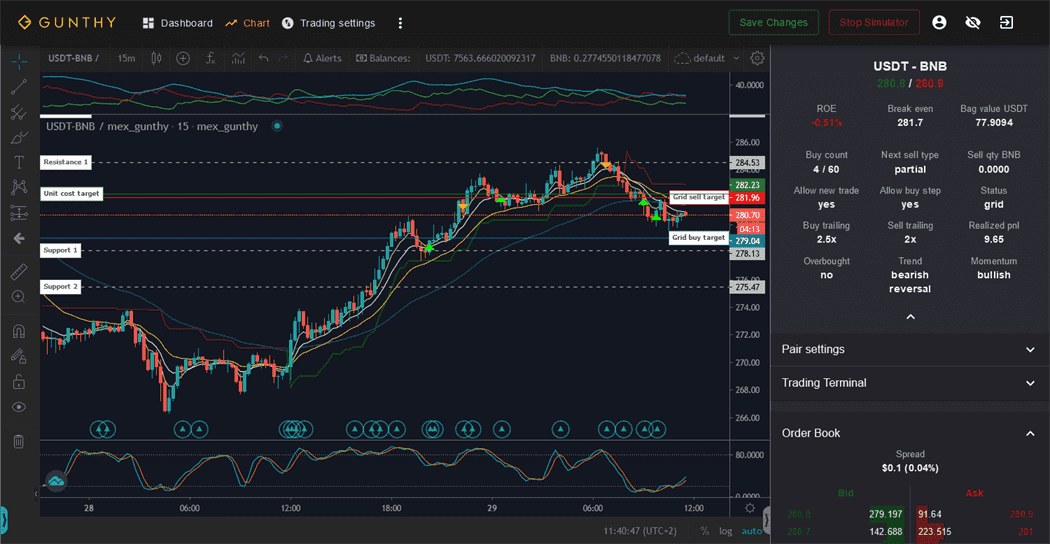 All data mentioned below is visible in the right sidebar on the chart page.
Phase System
Using data from three configurable timeframes, one of six phases is recognized at any time:
1: Very Bearish 2: Bullish Reversal 3: Bullish 4: Very Bullish 5: Bearish Reversal 6: Bearish
Trend Sync uses the phase system to determine if any of the following is allowed:
- Opening new trades when there is no balance to sell.
- Grid trading.
- Pausing grid trading and placing limit orders at higher timeframe supports.
Trend Plus uses the phase system to apply dynamic trailing ranges, for example, increasing the sell trailing range in a very bullish market.
Trend Scalping uses the phase system to enter scalping mode when the market is bullish or very bullish. This mode uses more careful sell trailing (including tiny, partial stop losses) and reduces the number of high buy orders while buying more on slight pullbacks.
All trend options cangether or individually.
Overbought Status and Momentum
By monitoring higher timeframes to determine if (and how much) the market is overbought and if momentum is bullish or bearish, the strategy can be more careful with new trades or extend trailing ranges to aim for more profit.
The Strict Entry and Strict DCA options depend heavily on longer-term momentum status.
Overview of Restrictions
This strategy offers settings that restrict when new trades may open and when DCA is allowed; most can be combined.
When all restrictions are disabled, the strategy behaves like a more configurable StepGrid with small hardcoded limits on repeated buy orders in the same price zone and improved sell trailing.
The overview below describes the main impact of each restrictive setting.
| Setting | Restrictions on New Trades | Restrictions on Any Buy Order |
|---|---|---|
| Price Action Analysis | - New trades not allowed in phases 'Very Bearish' and 'Bearish'. | - Grid buy trades not allowed in phases 'Very Bearish' and 'Bearish'. |
| Strict Entry | - New trades not allowed when money flow, momentum, and volatility are not favorable on the upper timeframe. | - None. |
| Strict DCA | - None. | - Grid buy trades not allowed when momentum is not favorable on the upper timeframe. |
| Exhaustion Sensitivity | - None. | - Grid buy trades not allowed when any of the timeframes is overbought, up to the specified timeframe (none, short, medium, or long). For example, when exhaustion sensitivity is set to 'medium', then buy orders are not allowed while the short, medium, or both of these timeframes are overbought. |
| Trade Supports | - None. | - Grid buy trades not allowed in phases 'Very Bearish' and 'Bearish'. During this time, limit orders are placed at medium or long-term supports. |
| Trend Scalping | - New trades not allowed on upper step when in phases 'Bullish' or 'Very Bullish' and short-term trend is bullish. | - Enforce additional grid buydown in phases 'Bullish' and 'Very Bullish'. |
| Custom Trading Range | - New trades not allowed when price is not between 'Trading Range Low' and 'Trading Range High'. | - Grid buy trades not allowed when price is below 'Trading Range DCA Stop'. |
Examples for Different Restrictions
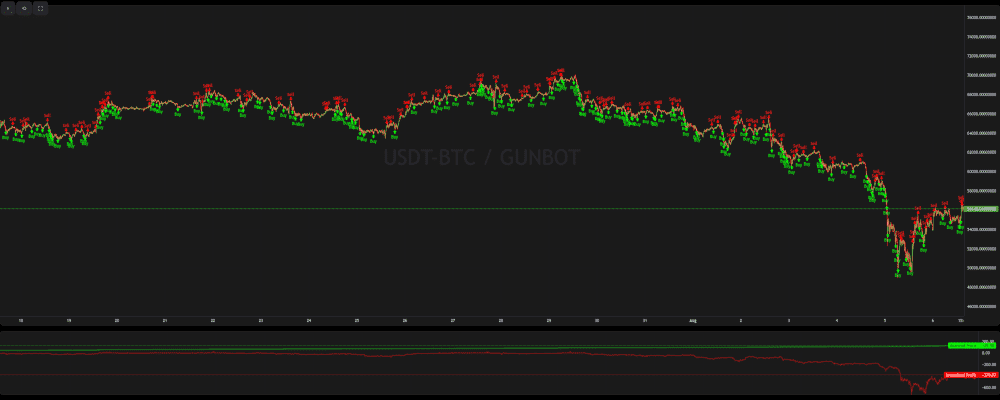
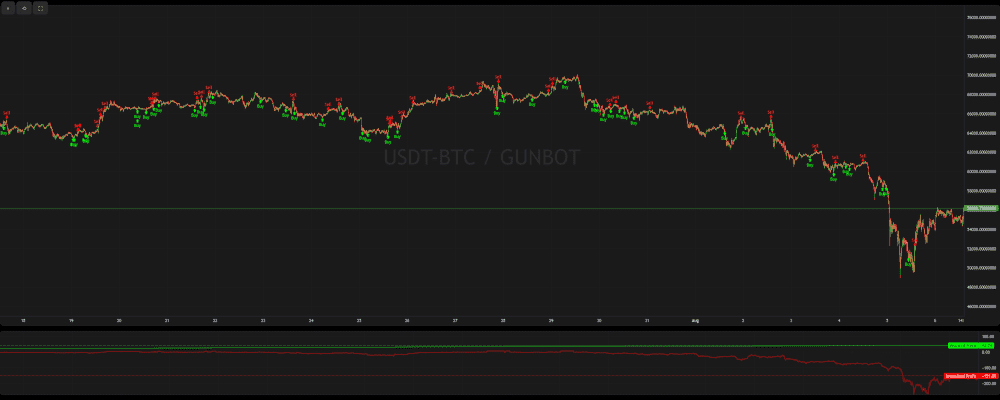
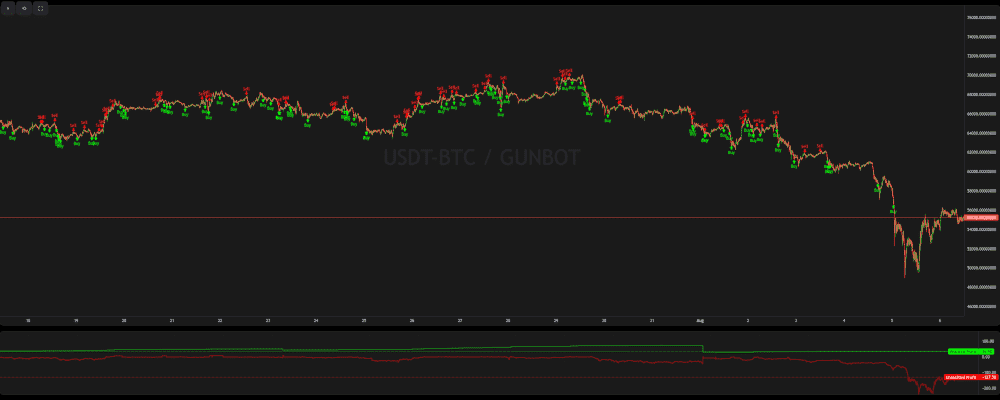
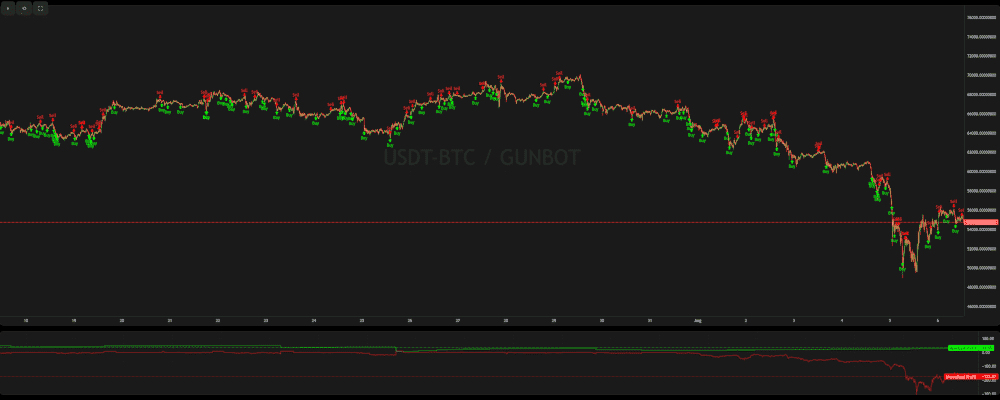
These examples show how the strategy performs under different restrictive settings. Charts for each backtest are included.
Check the detailed test result links for interactive charts.
Variation 1: Unrestricted
All restrictive settings are disabled. The strategy behaves like a more configurable StepGrid with minor limits on repeated buy orders in the same price zone and enhanced sell trailing.
Search for backtest ID: 471g8xv5
Variation 2: Strict DCA
Strict DCA restricts grid buys when momentum is not favorable on the upper timeframe, avoiding additional exposure during unfavorable conditions.
Search for backtest ID: e1olikxj
Variation 3: Trade Support + Trend Scalping
Grid buys are not allowed in phases 'Very Bearish' and 'Bearish'; limit orders are placed at medium or long-term supports. New trades are also blocked on the upper step during 'Bullish' or 'Very Bullish' phases if the short-term trend is bullish.
Search for backtest ID: 11fi1ds0
Variation 4: Trade Support + Price Action Analysis + Trend Scalping
New trades are not allowed in phases 'Very Bearish' and 'Bearish', and grid buys are similarly restricted. Trend Scalping blocks new trades on the upper step during 'Bullish' or 'Very Bullish' phases if the short-term trend is bullish.
Search for backtest ID: lkrbxyf6
StepGridScalp Settings
Balance Settings
| Label | Config Parameter | Default Value | Detailed Description |
|---|---|---|---|
| Trading limit | TRADING_LIMIT | 40 | Base amount used for each regular buy order and for calculating buy count. |
| Trading limit multiplier | TL_MULTIPLIER | 1 | Scales the invested amount for each consecutive buy. Example with a 100 USDT trading limit and max buy count of 3: 1.5 results in 100, 150, and 225 USDT buys. |
| Always use TL multiplier | ALWAYS_USE_TL_MULTIPLIER | false | Applies the TL multiplier to the base amount used in all TL ratio calculations. If disabled, TL ratios use the absolute trading limit multiplied by the ratio. |
| Max buy count | MAX_BUY_COUNT | 40 | Limits maximum position size except in BTFD mode. A value of 40 caps the position at 40x trading limit, accounting for TL multiplier increases. |
| Min volume to sell | MIN_VOLUME_TO_SELL | 10 | Minimum notional value for sells; verify with your exchange minimum order size. |
| Max invested base | MAX_INVESTMENT | 999999999999999 | Cap on total base currency invested (e.g., USDT in USDT-BTC). Example: 1000 USDT. |
Profit Settings
| Label | Config Parameter | Default Value | Detailed Description |
|---|---|---|---|
| Gain | GAIN | 1 | Minimum gain target (%) above unit cost or break-even before a full sell is placed. |
| Partial Sell Gain | GAIN_PARTIAL | 0.5 | Minimum gain target (%) for partial sells, requiring buys to be at least 0.5% (plus fees) below the current price. |
| Partial Sell Ratio | PARTIAL_SELL_RATIO | 0.95 | Portion of volume bought below current price that can be sold. Example: 200 units bought below and ratio 0.4 sells 80 units. |
| Use Partial Sell Cap | PARTIAL_SELL_CAP | false | Sets an upper limit on partial sell quantity per sell step. |
| Partial Sell Cap Ratio | PARTIAL_SELL_CAP_RATIO | 1 | Maximum partial sell volume per step, expressed as a multiple of Trading Limit. |
| Unit Cost | unit_cost | true | Break-even calculation: enabled uses average cost per unit remaining; disabled uses the full trade sequence. |
| Dynamic Exit Logic | DYNAMIC_EXIT_LOGIC | false | In uptrends, exit target is unit cost; otherwise targets full-sequence break-even. Requires Unit Cost to be disabled. |
Period Settings
| Label | Config Parameter | Default Value | Detailed Description |
|---|---|---|---|
| Period | PERIOD | 5 | Main timeframe in minutes for short-term analysis. |
| Period Medium | PERIOD_MEDIUM | 15 | Medium-term timeframe in minutes. |
| Period Long | PERIOD_LONG | 60 | Long-term timeframe in minutes. |
Customize Grid
| Label | Config Parameter | Default Value | Detailed Description |
|---|---|---|---|
| Auto Step Size | AUTO_STEP_SIZE | ATR | Auto step sizing based on volatility. Options: None (manual), ATR, or CandleSize. |
| Minimum Step Pct | MIN_STEP_PCT | 0.3 | Minimum step size (%) to override smaller auto steps. |
| Step Size | STEP_SIZE | 500 | Fixed step size when auto is disabled. With Pct Step Size enabled, this value is a percentage. |
| Pct Step Size | PCT_STEP_SIZE | false | Converts Step Size to a percentage of the current price. |
| Enforce Step Size | ENFORCE_STEP | false | Only executes orders if trailing completes at a rate better than the target step. |
Customize Trailing
| Label | Config Parameter | Default Value | Detailed Description |
|---|---|---|---|
| Pct Buy Trailing Range | PCT_TRAILING_RANGE | false | Uses a custom percentage trailing range for buy and sell operations instead of automatic ranges. |
| Custom Buy Trailing Range | CUSTOM_TRAILING_RANGE | 0.3 | Custom buy trailing range (%) when Pct Buy Trailing Range is enabled. |
| Pct Sell Trailing Range | PCT_SELL_TRAILING_RANGE | false | Custom percentage sell trailing range. |
| Custom Sell Trailing Range | CUSTOM_SELL_TRAILING_RANGE | 0.3 | Custom sell trailing range (%) when Pct Sell Trailing Range is enabled. |
IRIS-Trend | Price Action
| Label | Config Parameter | Default Value | Detailed Description |
|---|---|---|---|
| Price Action Analysis | TREND_SYNC | false | Uses trend data to decide when to open trades and adjust trailing ranges based on price action. |
| Price Action TL Ratio | PRICE_ACTION_TL_RATIO | 1 | Adjusts Trading Limit for buy orders during positive price action. Example: 2 doubles Trading Limit. |
| Price Action Threshold | PRICE_ACTION_THRESHOLD | 0 | ATR percentage rank threshold used with a green candle signal to trigger the price action multiplier. |
| Strict Entry | STRICT_ENTRY | false | More conservative criteria for opening new trades, avoiding overbought conditions. |
| Strict DCA | STRICT_DCA | false | Prevents DCA trades when upper timeframe momentum is bearish. |
| Exhaustion Sensitivity | EXHAUSTION_SENSITIVITY | MEDIUM | Timeframe exhaustion check before new DCA buys: NONE, SHORT, MEDIUM, or LONG. |
IRIS-Trend | Trade Supports
| Label | Config Parameter | Default Value | Detailed Description |
|---|---|---|---|
| Trade Supports | TRADE_SUPPORTS | true | Uses trend data to place limit orders at medium or long-term supports when grid trading is unfavorable. |
| S1 TL Ratio | SUPPORT_TL_RATIO | 2 | Buy order size multiplier for S1 support targets. |
| S2 TL Ratio | SUPPORT2_TL_RATIO | 2 | Buy order size multiplier for S2 support targets. |
IRIS-Trend | Micro Scalping
| Label | Config Parameter | Default Value | Detailed Description |
|---|---|---|---|
| Micro Scalping | TREND_SCALPING | true | Uses short, medium, and long-term trend data to manage trades during micro scalping phases. |
| Micro Scalp TL Ratio | SCALP_TL_RATIO | 0.625 | Adjusts buy and sell amounts during micro scalping as a ratio of Trading Limit. |
| Initial Buy Step Multiplier | SCALP_INIT_BUY_MULTIPLIER | 0.6 | Reduces initial buy step size when entering without a position during scalping phases. |
| Dynamic Stop Loss | DYNAMIC_SL | false | Dynamic stop loss for smaller positions in higher price zones, allowing a controlled small loss. |
IRIS-Trend | Multiple Timeframes
| Label | Config Parameter | Default Value | Detailed Description |
|---|---|---|---|
| Multi Timeframes Mode | MULTIPLE_TIMEFRAMES_MODE | false | Switches to lower timeframes during bullish reversals to increase trading frequency. |
| Multi Timeframes Mode TL Ratio | MTF_TL_RATIO | 1 | Trading Limit for buys when using lower timeframes. |
| Lower Set Low Period | LOWER_PERIOD_LOW | 5 | Low period for the lower timeframe set. |
| Lower Set Medium Period | LOWER_PERIOD_MEDIUM | 15 | Medium period for the lower timeframe set. |
| Lower Set High Period | LOWER_PERIOD_HIGH | 30 | High period for the lower timeframe set. |
IRIS-Trend | Accumulation Cycle
| Label | Config Parameter | Default Value | Detailed Description |
|---|---|---|---|
| Accumulation Cycle | ACCUMULATION_CYCLE | false | Only allows full sells when gain target is reached and the upper timeframe is exhausted. Disallows partial sells below break-even and opens new trades only during bullish reversals. |
IRIS-Trend | Advanced Trailing
| Label | Config Parameter | Default Value | Detailed Description |
|---|---|---|---|
| Advanced Trailing | TREND_PLUS | true | Uses trend data across timeframes to adjust trailing ranges based on detected phases. |
| Buy Multiplier Small | TREND_PLUS_BUY_MULTIPLIER_SMALL | 1 | Smallest buy trailing multiplier; 1 means no adjustment. |
| Buy Multiplier Medium | TREND_PLUS_BUY_MULTIPLIER_MEDIUM | 2 | Medium buy trailing multiplier. |
| Buy Multiplier Large | TREND_PLUS_BUY_MULTIPLIER_LARGE | 5 | Largest buy trailing multiplier for high volatility or strong trends. |
| Sell Multiplier Small | TREND_PLUS_SELL_MULTIPLIER_SMALL | 0.5 | Smallest sell trailing multiplier to capture profit faster in weaker moves. |
| Sell Multiplier Medium | TREND_PLUS_SELL_MULTIPLIER_MEDIUM | 2 | Medium sell trailing multiplier. |
| Sell Multiplier Large | TREND_PLUS_SELL_MULTIPLIER_LARGE | 5 | Largest sell trailing multiplier for strong trends. |
IRIS-Trend | BTFD Mode
| Label | Config Parameter | Default Value | Detailed Description |
|---|---|---|---|
| BTFD Mode | BTFD_MODE | false | Places a series of limit buys below predefined or dynamic targets to buy dips when no orders are open. |
| Use Trend Filter | BTFD_TREND_FILTER | false | Allows BTFD only with confirmed bearish sentiment, high sell volume on upper timeframes, and elevated volatility. |
| BTFD Dip Target | BTFD_DIP_TARGET | 0 | Manual price target to trigger BTFD when price drops below it and no orders are open. |
| BTFD Max Dip Target | BTFD_MAX_DIP_TARGET | 0 | Lowest price at which BTFD operates; no buys are placed below this level. |
| BTFD Use Automatic Targets | BTFD_AUTO_TARGET | none | Uses automatic dip targets based on market conditions, especially with Trade Supports. |
| BTFD TL Ratio | BTFD_TL_RATIO | 1 | Adjusts the buy amount for BTFD orders as a ratio of Trading Limit. |
| BTFD Max Buy Count | BTFD_MAX_BUY_COUNT | 25 | Maximum position size during BTFD mode, accounting for Trading Limit multipliers. |
| BTFD Max Dip Orders | BTFD_MAX_ORDERS | 5 | Maximum number of sequential dip buy orders. |
| BTFD Gain | BTFD_GAIN | 1 | Gain target (%) above the last order rate for sell targets in BTFD mode. |
| BTFD Auto Step Size | BTFD_AUTO_STEP_SIZE | ATR | Auto step sizing in BTFD mode: ATR, CandleSize, or None for manual steps. |
| BTFD Step Size | BTFD_STEP_SIZE | 500 | Manual grid step size for BTFD buy orders when auto step sizing is disabled. |
| BTFD Pct Step Size | BTFD_PCT_STEP_SIZE | false | Converts BTFD step size to a percentage of the current price. |
Custom Trading Range
| Label | Config Parameter | Default Value | Detailed Description |
|---|---|---|---|
| Custom Trading Range | CUSTOM_TRADING_RANGE_MODE | false | Allows trading only within specified price boundaries, with an optional stop target to sell all holdings if price drops below a set point. |
| Trading Range Low | TRADING_RANGE_LOW | 8000 | Lower limit for opening new trades. |
| Trading Range High | TRADING_RANGE_HIGH | 10000 | Upper limit for opening new trades. |
| Trading Range Stop | TRADING_RANGE_STOP | 7000 | Stop-loss target; if price falls below this level, all positions are sold. |
| Trading Range DCA Stop | TRADING_RANGE_DCA_STOP | 7500 | Lower boundary for DCA orders; no additional DCA below this level. |
| Stop Loss Ratio | TRADING_RANGE_STOP_RATIO | 1 | Partial stop-loss ratio triggered by the DCA stop target (e.g., 0.5 sells half the quote balance). |
Advanced
| Label | Config Parameter | Default Value | Detailed Description |
|---|---|---|---|
| Buy Enabled | BUY_ENABLED | true | Controls whether buy orders can be placed. |
| Sell Enabled | SELL_ENABLED | true | Controls whether sell orders can be placed. |
| Stop After Next Sell | STOP_AFTER_SELL | false | Stops trading after the current holdings are sold. |
| ATR Period | ATR_PERIOD | 50 | Number of candles used to calculate ATR for step sizes and trailing ranges. |
| Forever Bags | FOREVER_BAGS | false | Skips standard break-even/profit targets to hold positions for longer-term gains. |
| Keep Quote | KEEP_QUOTE | 0 | Amount of quote asset to retain and not sell (e.g., 0.01 BTC in USDT-BTC). |
| Ignore Trades Before | IGNORE_TRADES_BEFORE | 0 | Timestamp (ms) before which trades are ignored for a clean strategy start. |
tip
Other Parameters
Besides settings mentioned on this page, no other strategy setting has any effect on StepGridScalp.