Alert settings
To run Gunbot with the TradingView add-on, only the settings below apply. Standard strategy and pair settings are ignored unless TV_GB is enabled.
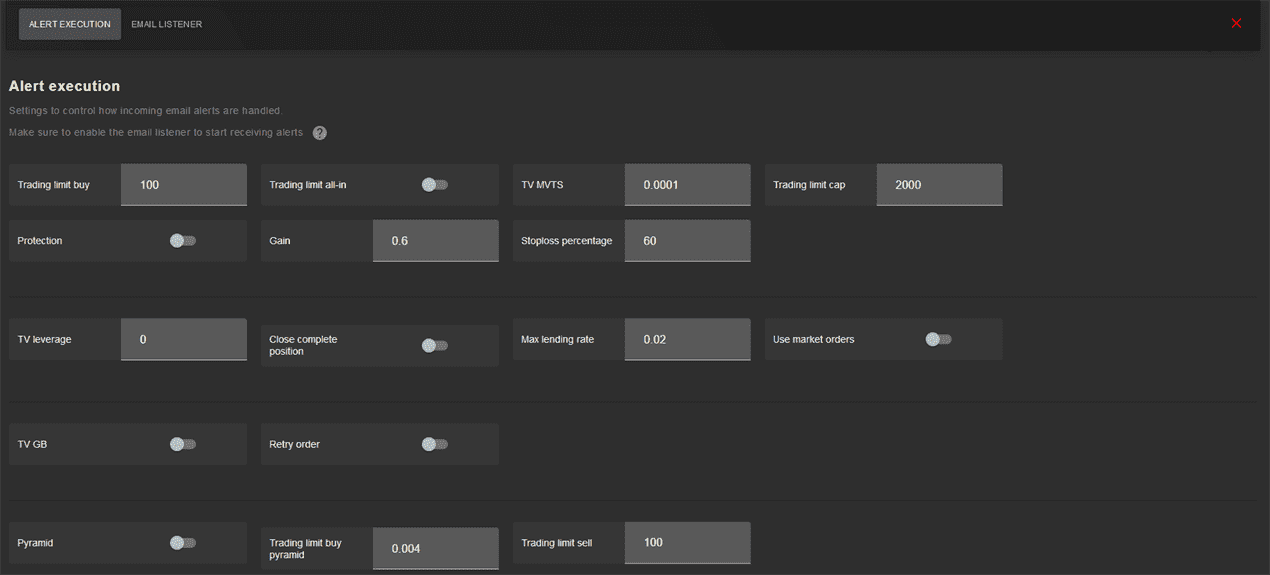
Trading limits for buy orders come from configuration settings, but you can override them by including a trading limit in the alert message.
Orders placed by the TradingView add-on are market orders by default to ensure fills. You can optionally send limit orders instead.
Webhooks
Add at least one pair for each exchange where you want to execute alerts. This establishes exchange connectivity.
This can be any pair; the add-on will not use it. Only with TV_GB enabled will pairs also cycle and process strategy settings.
Emails
Add all pairs you want to execute alerts on. Only with TV_GB enabled will pairs also cycle and process strategy settings.
Gain
Set the minimum gain (%) that TradingView-initiated trades must meet when TV_PROTECTION is enabled.
If a TradingView sell alert would yield lower gain than this value, Gunbot will not place the order. Use this to prevent selling at a loss.
Only works for spot trading.
Values: numerical, represents a percentage.
Default value: 0.6
Parameter name in config.js: TV_GAIN
Market orders
Orders are sent as market orders by default.
Disable this option to send limit orders instead. Buy orders use the best bid price in the order book; sell orders use the best ask price.
Values: true or false
Default value: true
Parameter name in config.js: TV_MARKET_ORDERS
Trading Limit Buy
Defines the trading limit for each buy order placed through the add-on.
The default value of 0.002 places orders of 0.002 BTC on a BTC-x pair.
When not using TV_PYRAMID, a sell alert places a sell order for the full quote balance held.
Bitmex: enter the desired number of contracts
Other margin exchanges: enter an amount in quote currency
Values: numerical – represents an amount in base currency.
Default value: 0.002
Parameter name in config.js: TV_TRADING_LIMIT_BUY
Trading Limit Buy Pyramid
Defines the trading limit for each pyramid buy order placed through the add-on.
The default value of 0.002 places orders of 0.002 BTC on a BTC-x pair.
Bitmex: enter the desired number of contracts
Other margin exchanges: enter an amount in quote currency
Values: numerical – represents an amount in base currency.
Default value: 0.002
Parameter name in config.js: TV_TRADING_LIMIT_BUY_PYRAMID
Pyramid
Set to true to enable pyramid trading. The amount for each pyramid order is defined by TV_TRADING_LIMIT_SELL or TV_TRADING_LIMIT_BUY_PYRAMID.
Values: true or false
Default value: false
Parameter name in config.js: TV_PYRAMID
Trading Limit Sell
Defines the trading limit for sell orders when TV_PYRAMID is enabled.
The default value of 0.002 places orders of 0.002 BTC on a BTC-x pair.
Bitmex: enter the desired number of contracts
Other margin exchanges: enter an amount in quote currency
Values: numerical – represents an amount in base currency.
Default value: 0.002
Parameter name in config.js: TV_TRADING_LIMIT_SELL
Protection
When set to true, Gunbot checks for overall profit before selling, as specified in TV_GAIN.
When set to false, Gunbot executes all TradingView alerts without interfering with a custom strategy.
Only works for spot trading.
Values: true or false
Default value: false
Parameter name in config.js: TV_PROTECTION
Close all
When enabled, an entire position is closed on a close command, even if the position exceeds the set trading limits.
Only works for margin trading.
Values: numerical – represents an amount in base currency.
Default value: false
Parameter name in config.js: TV_CLOSE_ALL
Trading Limit Cap
Maximum amount of base currency to invest in a pair.
Only works for spot trading
Values: numerical – represents an amount in base currency.
Default value: 0.0001
Parameter name in config.js: TV_TRADING_LIMIT_CAP
Stoploss Percentage
Percentage below average bought price at which a sell signal overrides TV_PROTECTION and sells in a stop-loss manner.
Values: numerical – represents a percentage.
Default value: 60
Parameter name in config.js: TV_STOPLOSS_PERCENTAGE
Trading Limit All-In
When set to true, each buy order uses all available base currency balance.
Values: true or false
Default value: false
Parameter name in config.js: TV_TRADING_LIMIT_ALLIN
Retry Order
Enable this if you have problems receiving multiple alerts. Gunbot will retry processing orders for 15 minutes.
Values: true or false
Default value: false
Parameter name in config.js: RETRY_TV_ORDER
TV MVTS
Sets a threshold for sell orders. If you own less than the set amount, sell orders are skipped and the TradingView bot returns to buying mode.
Values: numerical – represents the total value of a coins holdings in base currency.
Default value: 0.001
Parameter name in config.js: TV_MVTS
TV GB
Enable this to run Gunbot strategies alongside the TradingView add-on, mixing strategy trades with TradingView alerts.
The IMAP listener must be enabled to use this option.
Values: true or false
Default value: false
Parameter name in config.js: TV_GB
TV Leverage
For margin trading only. Sets leverage for opening any position. Setting 0 uses cross margin if your exchange supports cross leverage.
Use values supported by your exchange only.
On some exchanges you may need to set leverage on the exchange itself. Always test that this works as expected.
Values: numerical – between 0 and 100
Default value: 0
Parameter name in config.js: TV_LEVERAGE
TV Lending
Sets the maximum acceptable lending rate when opening a position. The default of 0.02 stands for 2% interest per day.
Only works on Poloniex.
Values: numerical
Default value: 0.02
Parameter name in config.js: TV_LENDING