Gunbot API - All Endpoints This document provides a combined overview of all Gunbot REST API endpoints in one page.
Authentication
Authentication is required to access protected endpoints in the Gunbot API. This section covers /api/v1/auth/login for obtaining a JSON Web Token (JWT) and /api/v1/auth/status for validating authentication.
Obtain a JWT through the login endpoint, then include it when calling protected endpoints.
Info
JSON Web Token (JWT) is an open standard (RFC 7519) that defines a compact and self-contained way for securely transmitting information between parties as a JSON object. This information can be verified and trusted because it is digitally signed.
Gunbot uses password encryption during authentication. Sample code snippets for encrypting passwords in different environments are provided below.
Login to Get JWT
Method: POSTEndpoint: /api/v1/auth/loginDescription: Authenticate a user and obtain a JSON Web Token (JWT) to access secured API endpoints.
Parameters
Examples
cURL
curl -X POST https://your-gunbot-instance.com:3001/api/v1/auth/login \
  -H "Content-Type: application/json" \
  -H "Authorization: Bearer YOUR_BEARER_TOKEN" \
  -d '{"password": "your_encrypted_password"}'
JavaScript (fetch API)
fetch ( 'https://your-gunbot-instance.com:3001/api/v1/auth/login' , {
method : 'POST' ,
headers : {
'Content-Type' : 'application/json' ,
'Authorization' : 'Bearer YOUR_BEARER_TOKEN'
} ,
body : JSON . stringify ( { password : 'your_encrypted_password' } ) ,
} )
. then ( response => response . json ( ) )
. then ( data => console . log ( data . token ) ) ;
Python (requests library)
import requests
url = 'https://your-gunbot-instance.com:3001/api/v1/auth/login'
data = { 'password' : 'your_encrypted_password' }
headers = {
'Content-Type' : 'application/json' ,
'Authorization' : 'Bearer YOUR_BEARER_TOKEN'
}
response = requests . post ( url , json = data , headers = headers )
print ( response . json ( ) [ 'token' ] )
Response
Success (200)
{
"status" : "success" ,
"token" : "eyJ0eXAiOiJKV1QiLCJhbGciOiJIUzI1NiJ9.eyJleHAiOjE4MTEwNjM4NTIsImlhdCI6MTczMzMXAwSnRyVi5JWmEwd0Vrc3lULnVCOVYxWXRObjAwRVB6NXlwTWo4UjRPblJoOFl1WGhxIn0.h1QiXh3EGl_LCqh0cgBTBle2ALgjSNhZPN9uwpvug6c"
}
Check Authentication Status
Method: GETEndpoint: /api/v1/auth/statusDescription: Validate the authentication status of the current session by checking the provided token.
Parameters
Examples
cURL
curl -X GET https://your-gunbot-instance.com:3001/api/v1/auth/status \
  -H "Authorization: Bearer your_token"
JavaScript (fetch API)
fetch ( 'https://your-gunbot-instance.com:3001/api/v1/auth/status' , {
headers : { 'Authorization' : 'Bearer your_token' }
} )
. then ( response => response . json ( ) )
. then ( data => console . log ( data . status ) ) ;
Python (requests library)
import requests
url = 'https://your-gunbot-instance.com:3001/api/v1/auth/status'
headers = { 'Authorization' : 'Bearer your_token' }
response = requests . get ( url , headers = headers )
print ( response . json ( ) [ 'status' ] )
Response
Success (200)
{
"code" : 200 ,
"isDemo" : false ,
"isRegistered" : true ,
"isTwoFA" : false ,
"metamask" : false ,
"status" : "success" ,
"message" : "Authenticated"
}
Password Encryption Helpers
Below are code snippets to help you encrypt your Gunbot password for authentication requests.
JavaScript - Browser Environment
async function encryptPassword ( password , key ) {
const encoder = new TextEncoder ( ) ;
const data = encoder . encode ( password ) ;
const encodedKey = encoder . encode ( key ) . slice ( 0 , 16 ) ;
const iv = encodedKey ;
const cryptoKey = await window . crypto . subtle . importKey (
'raw' ,
encodedKey ,
{ name : 'AES-CBC' } ,
false ,
[ 'encrypt' ]
) ;
const encryptedBuffer = await window . crypto . subtle . encrypt (
{ name : 'AES-CBC' , iv } ,
cryptoKey ,
data
) ;
const encryptedBytes = new Uint8Array ( encryptedBuffer ) ;
const encryptedBase64 = btoa ( String . fromCharCode ( ... encryptedBytes ) ) ;
return ` ENC: ${ encryptedBase64 } ` ;
}
JavaScript - Node.js Environment
const crypto = require ( 'crypto' ) ;
function encryptPassword ( password , key ) {
const encryptionKey = Buffer . from ( key ) . slice ( 0 , 16 ) ;
const iv = encryptionKey ;
const cipher = crypto . createCipheriv ( 'aes-128-cbc' , encryptionKey , iv ) ;
const encrypted = Buffer . concat ( [ cipher . update ( password , 'utf8' ) , cipher . final ( ) ] ) ;
return 'ENC:' + encrypted . toString ( 'base64' ) ;
}
Bash (Using OpenSSL)
Requirements:
openssl must be installed on your system.This script uses no salt and ensures binary output before Base64 encoding.
#!/usr/bin/env bash

PASSWORD="your_password"
KEY="value for config.bot.gunthy_wallet"

# Truncate key to 16 bytes
KEY_TRUNC=$(echo -n "$KEY" | head -c 16)

# Convert key and IV to hex
KEY_HEX=$(echo -n "$KEY_TRUNC" | xxd -p)
IV_HEX=$KEY_HEX

# Encrypt using openssl (no salt)
# -nosalt to prevent adding salt bytes
ENCRYPTED_BASE64=$(echo -n "$PASSWORD" | openssl enc -aes-128-cbc -K "$KEY_HEX" -iv "$IV_HEX" -nosalt -base64)

# Add prefix
echo "ENC:${ENCRYPTED_BASE64}"
Note: If you find a difference in output compared to the browser result, ensure no extra newline or whitespace is affecting the Base64 output. You can add the -A option to openssl enc to avoid line wrapping if necessary.
Python (Using OpenSSL via Subprocess)
import subprocess
password = 'your_password'
key = 'value for config.bot.gunthy_wallet'
key_trunc = key [ : 16 ]
key_hex = key_trunc . encode ( 'utf-8' ) . hex ( )
iv_hex = key_hex
res = subprocess . run ( [
'openssl' , 'enc' , '-aes-128-cbc' ,
'-K' , key_hex ,
'-iv' , iv_hex ,
'-nosalt' ,
'-base64'
] , input = password . encode ( 'utf-8' ) , stdout = subprocess . PIPE , stderr = subprocess . PIPE , check = True )
encrypted_base64 = res . stdout . decode ( ) . strip ( )
print ( f"ENC: { encrypted_base64 } " )
Note: Ensure openssl is installed on your system for the Bash and Python examples to function correctly.
Balances, Assets, and Trading Pairs
The API provides endpoints to retrieve information about balances, asset values, and trading pairs on supported exchanges. This section outlines how to use these endpoints to monitor your account's asset balances, track historical values, and explore trading pairs available for trading.
Get Asset Balances
Method : POSTEndpoint : /api/v1/balancesDescription : Retrieve the balances of assets across exchanges for the authenticated user.
Parameters
This endpoint does not require any parameters in the request body.
Examples
cURL
curl -X POST "https://your-gunbot-instance.com:3001/api/v1/balances" \
  -H "Content-Type: application/json" \
  -H "Authorization: Bearer YOUR_ACCESS_TOKEN"
JavaScript (fetch API)
fetch ( 'https://your-gunbot-instance.com:3001/api/v1/balances' , {
method : 'POST' ,
headers : {
'Authorization' : 'Bearer YOUR_ACCESS_TOKEN'
}
} )
. then ( response => response . json ( ) )
. then ( data => console . log ( data ) )
. catch ( error => console . error ( 'Error:' , error ) ) ;
Python (requests library)
import requests
url = 'https://your-gunbot-instance.com:3001/api/v1/balances'
headers = {
'Authorization' : 'Bearer YOUR_ACCESS_TOKEN'
}
response = requests . post ( url , headers = headers )
print ( response . json ( ) )
Response
[
{
"Asset" : "USDT" ,
"Exchange" : "binance" ,
"Available Qty" : "442.84477668" ,
"On Order" : "0.00000000"
} ,
{
"Asset" : "PEPE" ,
"Exchange" : "binance" ,
"Available Qty" : "15837566.43915128" ,
"On Order" : "0.00000000"
} ,
{
"Asset" : "XRP" ,
"Exchange" : "binance" ,
"Available Qty" : "548.11945544" ,
"On Order" : "0.00000000"
}
]
Get Total Asset Value History
Method : POSTEndpoint : /api/v1/assets/totalDescription : Retrieve the historical total value of assets in the specified base currency over a time range.
Parameters
Examples
cURL
curl -X POST "https://your-gunbot-instance.com:3001/api/v1/assets/total" \
  -H "Content-Type: application/json" \
  -H "Authorization: Bearer YOUR_ACCESS_TOKEN" \
  -d '{
    "exchange": "binance",
    "base": "USDT",
    "start": 0,
    "end": 1733307452718
}'
JavaScript (fetch API)
const data = {
exchange : 'binance' ,
base : 'USDT' ,
start : 0 ,
end : Date . now ( )
} ;
fetch ( 'https://your-gunbot-instance.com:3001/api/v1/assets/total' , {
method : 'POST' ,
headers : {
'Authorization' : 'Bearer YOUR_ACCESS_TOKEN' ,
'Content-Type' : 'application/json'
} ,
body : JSON . stringify ( data )
} )
. then ( response => response . json ( ) )
. then ( data => console . log ( data ) )
. catch ( error => console . error ( 'Error:' , error ) ) ;
Python (requests library)
import requests
import time
url = 'https://your-gunbot-instance.com:3001/api/v1/assets/total'
headers = {
'Authorization' : 'Bearer YOUR_ACCESS_TOKEN' ,
'Content-Type' : 'application/json'
}
data = {
"exchange" : "binance" ,
"base" : "USDT" ,
"start" : 0 ,
"end" : int ( time . time ( ) * 1000 )
}
response = requests . post ( url , headers = headers , json = data )
print ( response . json ( ) )
Response
[
{
"id" : 44 ,
"base_key" : "binance/USDT" ,
"amount" : 26.361644 ,
"timestamp" : 1732789800000
} ,
{
"id" : 85 ,
"base_key" : "binance/USDT" ,
"amount" : 26.131644 ,
"timestamp" : 1732797000000
}
]
Get Available Trading Pairs
Method : GETEndpoint : /api/v1/pairsDescription : Retrieve a list of trading pairs available on the specified exchange.
Parameters
Examples
cURL
curl -G "https://your-gunbot-instance.com:3001/api/v1/pairs" \
  --data-urlencode "exchange=binance%233" \
  -H "Authorization: Bearer YOUR_ACCESS_TOKEN"
JavaScript (fetch API)
const params = new URLSearchParams ( {
exchange : 'binance#3'
} ) ;
fetch ( ` https://your-gunbot-instance.com:3001/api/v1/pairs? ${ params . toString ( ) } ` , {
method : 'GET' ,
headers : {
'Authorization' : 'Bearer YOUR_ACCESS_TOKEN'
}
} )
. then ( response => response . json ( ) )
. then ( data => console . log ( data ) )
. catch ( error => console . error ( 'Error:' , error ) ) ;
Python (requests library)
import requests
url = 'https://your-gunbot-instance.com:3001/api/v1/pairs'
params = {
'exchange' : 'binance#3'
}
headers = {
'Authorization' : 'Bearer YOUR_ACCESS_TOKEN'
}
response = requests . get ( url , headers = headers , params = params )
print ( response . json ( ) )
Response
{
"status" : "success" ,
"pairList" : [
"BTC-ETH" ,
"BTC-LTC" ,
"BTC-BNB" ,
"BTC-NEO" ,
"ETH-QTUM" ,
"ETH-EOS" ,
"ETH-SNT"
]
}
Method : GETEndpoint : /api/v1/pairs/detailedDescription : Retrieve detailed information about trading pairs available on the specified exchange.
Parameters
Examples
cURL
curl -G "https://your-gunbot-instance.com:3001/api/v1/pairs/detailed" \
  --data-urlencode "exchange=binance%233" \
  -H "Authorization: Bearer YOUR_ACCESS_TOKEN"
JavaScript (fetch API)
const params = new URLSearchParams ( {
exchange : 'binance#3'
} ) ;
fetch ( ` https://your-gunbot-instance.com:3001/api/v1/pairs/detailed? ${ params . toString ( ) } ` , {
method : 'GET' ,
headers : {
'Authorization' : 'Bearer YOUR_ACCESS_TOKEN'
}
} )
. then ( response => response . json ( ) )
. then ( data => console . log ( data ) )
. catch ( error => console . error ( 'Error:' , error ) ) ;
Python (requests library)
import requests
url = 'https://your-gunbot-instance.com:3001/api/v1/pairs/detailed'
params = {
'exchange' : 'binance#3'
}
headers = {
'Authorization' : 'Bearer YOUR_ACCESS_TOKEN'
}
response = requests . get ( url , headers = headers , params = params )
print ( response . json ( ) )
Response
{
"status" : "success" ,
"pairList" : {
"BTC" : [
{
"pairName" : "BTC-ETH" ,
"volume" : 2448.96 ,
"low" : "0.0371999999" ,
"high" : "0.0387800000" ,
"change" : "2.05"
} ,
{
"pairName" : "BTC-LTC" ,
"volume" : 204.38 ,
"low" : "0.0012870000" ,
"high" : "0.0014160000" ,
"change" : "-2.53"
}
]
}
}
Configuration and File Management
The Configuration and File Management API endpoints provide tools to manage application settings, trading pairs, strategies, and related files. These endpoints allow you to retrieve, update, add, or remove configurations, as well as manage different file types such as backup files, AutoConfig variables, and custom strategies.
The following sections detail the available endpoints, parameters, request examples, and sample responses, enabling precise control and efficient management of Gunbot's configuration and file system.
Get Full Configuration
Method: GETEndpoint: /api/v1/config/fullDescription: Retrieve the entire configuration settings of the application.
Parameters
This endpoint does not require any parameters.
Examples
cURL
curl -X GET "http://localhost:5051/api/v1/config/full" \
     -H "Authorization: Bearer YOUR_TOKEN"
JavaScript (fetch API)
fetch ( 'http://localhost:5051/api/v1/config/full' , {
method : 'GET' ,
headers : {
'Authorization' : 'Bearer YOUR_TOKEN'
}
} )
. then ( response => response . json ( ) )
. then ( data => console . log ( data ) ) ;
Python (requests library)
import requests
url = 'http://localhost:5051/api/v1/config/full'
headers = {
'Authorization' : 'Bearer YOUR_TOKEN'
}
response = requests . get ( url , headers = headers )
print ( response . json ( ) )
Response
{
"status" : "success" ,
"config" : {
"pairs" : {
"binance" : {
"USDT-PEPE" : {
"strategy" : "channelmaestro" ,
"enabled" : true ,
"override" : {
"ADX_ENABLED" : false ,
"ADX_LEVEL" : 25 ,
"ATRX" : 0.5 ,
"ATR_PERIOD" : "14" ,
}
}
}
}
}
}
Update Full Configuration
Method: POSTEndpoint: /api/v1/config/updateDescription: Update the entire configuration with a new configuration object.
Parameters
Examples
cURL
curl -X POST "http://localhost:5051/api/v1/config/update" \
     -H "Authorization: Bearer YOUR_TOKEN" \
     -H "Content-Type: application/json" \
     -d '{
           "data": {
             // Your new configuration data
           }
         }'
JavaScript (fetch API)
fetch ( 'http://localhost:5051/api/v1/config/update' , {
method : 'POST' ,
headers : {
'Authorization' : 'Bearer YOUR_TOKEN' ,
'Content-Type' : 'application/json'
} ,
body : JSON . stringify ( {
data : {
}
} )
} )
. then ( response => response . json ( ) )
. then ( data => console . log ( data ) ) ;
Python (requests library)
import requests
url = 'http://localhost:5051/api/v1/config/update'
headers = {
'Authorization' : 'Bearer YOUR_TOKEN' ,
'Content-Type' : 'application/json'
}
payload = {
'data' : {
}
}
response = requests . post ( url , headers = headers , json = payload )
print ( response . json ( ) )
Response
{
"status" : "success" ,
"config" : {
}
}
Add Trading Pair
Method: POSTEndpoint: /api/v1/config/pair/addDescription: Add a new trading pair to the configuration.
Parameters
Examples
cURL
curl -X POST "http://localhost:5051/api/v1/config/pair/add" \
     -H "Authorization: Bearer YOUR_TOKEN" \
     -H "Content-Type: application/json" \
     -d '{
           "pair": "USDT-PEPE",
           "exchange": "binance",
           "settings": {}
         }'
JavaScript (fetch API)
fetch ( 'http://localhost:5051/api/v1/config/pair/add' , {
method : 'POST' ,
headers : {
'Authorization' : 'Bearer YOUR_TOKEN' ,
'Content-Type' : 'application/json'
} ,
body : JSON . stringify ( {
pair : 'USDT-PEPE' ,
exchange : 'binance' ,
settings : { }
} )
} )
. then ( response => response . json ( ) )
. then ( data => console . log ( data ) ) ;
Python (requests library)
import requests
url = 'http://localhost:5051/api/v1/config/pair/add'
headers = {
'Authorization' : 'Bearer YOUR_TOKEN' ,
'Content-Type' : 'application/json'
}
payload = {
'pair' : 'USDT-PEPE' ,
'exchange' : 'binance' ,
'settings' : { }
}
response = requests . post ( url , headers = headers , json = payload )
print ( response . json ( ) )
Response
Remove Trading Pair
Method: POSTEndpoint: /api/v1/config/pair/removeDescription: Remove an existing trading pair from the configuration.
Parameters
Examples
cURL
curl -X POST "http://localhost:5051/api/v1/config/pair/remove" \
     -H "Authorization: Bearer YOUR_TOKEN" \
     -H "Content-Type: application/json" \
     -d '{
           "pair": "USDT-PEPE",
           "exchange": "binance"
         }'
JavaScript (fetch API)
fetch ( 'http://localhost:5051/api/v1/config/pair/remove' , {
method : 'POST' ,
headers : {
'Authorization' : 'Bearer YOUR_TOKEN' ,
'Content-Type' : 'application/json'
} ,
body : JSON . stringify ( {
pair : 'USDT-PEPE' ,
exchange : 'binance'
} )
} )
. then ( response => response . json ( ) )
. then ( data => console . log ( data ) ) ;
Python (requests library)
import requests
url = 'http://localhost:5051/api/v1/config/pair/remove'
headers = {
'Authorization' : 'Bearer YOUR_TOKEN' ,
'Content-Type' : 'application/json'
}
payload = {
'pair' : 'USDT-PEPE' ,
'exchange' : 'binance'
}
response = requests . post ( url , headers = headers , json = payload )
print ( response . json ( ) )
Response
Add Trading Strategy
Method: POSTEndpoint: /api/v1/config/strategy/addDescription: Add a new trading strategy to the configuration.
Parameters
Examples
cURL
curl -X POST "http://localhost:5051/api/v1/config/strategy/add" \
     -H "Authorization: Bearer YOUR_TOKEN" \
     -H "Content-Type: application/json" \
     -d '{
           "name": "myStrategy",
           "settings": {}
         }'
JavaScript (fetch API)
fetch ( 'http://localhost:5051/api/v1/config/strategy/add' , {
method : 'POST' ,
headers : {
'Authorization' : 'Bearer YOUR_TOKEN' ,
'Content-Type' : 'application/json'
} ,
body : JSON . stringify ( {
name : 'myStrategy' ,
settings : { }
} )
} )
. then ( response => response . json ( ) )
. then ( data => console . log ( data ) ) ;
Python (requests library)
import requests
url = 'http://localhost:5051/api/v1/config/strategy/add'
headers = {
'Authorization' : 'Bearer YOUR_TOKEN' ,
'Content-Type' : 'application/json'
}
payload = {
'name' : 'myStrategy' ,
'settings' : { }
}
response = requests . post ( url , headers = headers , json = payload )
print ( response . json ( ) )
Response
Remove Trading Strategy
Method: POSTEndpoint: /api/v1/config/strategy/removeDescription: Remove an existing trading strategy from the configuration.
Parameters
Examples
cURL
curl -X POST "http://localhost:5051/api/v1/config/strategy/remove" \
     -H "Authorization: Bearer YOUR_TOKEN" \
     -H "Content-Type: application/json" \
     -d '{"name": "myStrategy"}'
JavaScript (fetch API)
fetch ( 'http://localhost:5051/api/v1/config/strategy/remove' , {
method : 'POST' ,
headers : {
'Authorization' : 'Bearer YOUR_TOKEN' ,
'Content-Type' : 'application/json'
} ,
body : JSON . stringify ( {
name : 'myStrategy'
} )
} )
. then ( response => response . json ( ) )
. then ( data => console . log ( data ) ) ;
Python (requests library)
import requests
url = 'http://localhost:5051/api/v1/config/strategy/remove'
headers = {
'Authorization' : 'Bearer YOUR_TOKEN' ,
'Content-Type' : 'application/json'
}
payload = {
'name' : 'myStrategy'
}
response = requests . post ( url , headers = headers , json = payload )
print ( response . json ( ) )
Response
List AutoConfig Variable Files
Method: GETEndpoint: /api/v1/files/acvarDescription: List filenames of available AutoConfig variable files.
Parameters
This endpoint does not require any parameters.
Examples
cURL
curl -X GET "http://localhost:5051/api/v1/files/acvar" \
     -H "Authorization: Bearer YOUR_TOKEN"
JavaScript (fetch API)
fetch ( 'http://localhost:5051/api/v1/files/acvar' , {
method : 'GET' ,
headers : {
'Authorization' : 'Bearer YOUR_TOKEN'
}
} )
. then ( response => response . json ( ) )
. then ( data => console . log ( data ) ) ;
Python (requests library)
import requests
url = 'http://localhost:5051/api/v1/files/acvar'
headers = {
'Authorization' : 'Bearer YOUR_TOKEN'
}
response = requests . get ( url , headers = headers )
print ( response . json ( ) )
Response
{
"status" : "success" ,
"result" : [
"autoconfig-pairVariables.json" ,
"autoconfig-variables.json"
]
}
Get AutoConfig Variable File
Method: POSTEndpoint: /api/v1/files/acvar/getDescription: Retrieve the contents of a specified AutoConfig variable file.
Parameters
Examples
cURL
curl -X POST "http://localhost:5051/api/v1/files/acvar/get" \
     -H "Authorization: Bearer YOUR_TOKEN" \
     -H "Content-Type: application/json" \
     -d '{"filename": "autoconfig-variables.json"}'
JavaScript (fetch API)
fetch ( 'http://localhost:5051/api/v1/files/acvar/get' , {
method : 'POST' ,
headers : {
'Authorization' : 'Bearer YOUR_TOKEN' ,
'Content-Type' : 'application/json'
} ,
body : JSON . stringify ( {
filename : 'autoconfig-variables.json'
} )
} )
. then ( response => response . json ( ) )
. then ( data => console . log ( data ) ) ;
Python (requests library)
import requests
url = 'http://localhost:5051/api/v1/files/acvar/get'
headers = {
'Authorization' : 'Bearer YOUR_TOKEN' ,
'Content-Type' : 'application/json'
}
payload = {
'filename' : 'autoconfig-variables.json'
}
response = requests . post ( url , headers = headers , json = payload )
print ( response . json ( ) )
Response
{
"this" : 0.1855499735435755 ,
"pnd" : false
}
Write AutoConfig File
Method: POSTEndpoint: /api/v1/files/autoconfig/writeDescription: Write content to the autoconfig.json file.
Parameters
Examples
cURL
curl -X POST "http://localhost:5051/api/v1/files/autoconfig/write" \
     -H "Authorization: Bearer YOUR_TOKEN" \
     -H "Content-Type: application/json" \
     -d '{
           "document": {
             "key": "value"
           }
         }'
JavaScript (fetch API)
fetch ( 'http://localhost:5051/api/v1/files/autoconfig/write' , {
method : 'POST' ,
headers : {
'Authorization' : 'Bearer YOUR_TOKEN' ,
'Content-Type' : 'application/json'
} ,
body : JSON . stringify ( {
document : {
key : 'value'
}
} )
} )
. then ( response => response . json ( ) )
. then ( data => console . log ( data ) ) ;
Python (requests library)
import requests
url = 'http://localhost:5051/api/v1/files/autoconfig/write'
headers = {
'Authorization' : 'Bearer YOUR_TOKEN' ,
'Content-Type' : 'application/json'
}
payload = {
'document' : {
'key' : 'value'
}
}
response = requests . post ( url , headers = headers , json = payload )
print ( response . json ( ) )
Response
List Backup Files
Method: POSTEndpoint: /api/v1/files/backupDescription: List available backup files.
Parameters
This endpoint does not require any parameters.
Examples
cURL
curl -X POST "http://localhost:5051/api/v1/files/backup" \
     -H "Authorization: Bearer YOUR_TOKEN" \
     -H "Content-Type: application/json"
JavaScript (fetch API)
fetch ( 'http://localhost:5051/api/v1/files/backup' , {
method : 'POST' ,
headers : {
'Authorization' : 'Bearer YOUR_TOKEN' ,
'Content-Type' : 'application/json'
}
} )
. then ( response => response . json ( ) )
. then ( data => console . log ( data ) ) ;
Python (requests library)
import requests
url = 'http://localhost:5051/api/v1/files/backup'
headers = {
'Authorization' : 'Bearer YOUR_TOKEN' ,
'Content-Type' : 'application/json'
}
response = requests . post ( url , headers = headers )
print ( response . json ( ) )
Response
{
"status" : "success" ,
"result" : [
"autoconfig.json.1623252417412" ,
"autoconfig.json.1623252547918" ,
"autoconfig.json.1623312859755" ,
]
}
Get Backup File
Method: POSTEndpoint: /api/v1/files/backup/getDescription: Retrieve the contents of a specified backup file.
Parameters
Examples
cURL
curl -X POST "http://localhost:5051/api/v1/files/backup/get" \
     -H "Authorization: Bearer YOUR_TOKEN" \
     -H "Content-Type: application/json" \
     -d '{"filename": "autoconfig.json.1624608048720"}'
JavaScript (fetch API)
fetch ( 'http://localhost:5051/api/v1/files/backup/get' , {
method : 'POST' ,
headers : {
'Authorization' : 'Bearer YOUR_TOKEN' ,
'Content-Type' : 'application/json'
} ,
body : JSON . stringify ( {
filename : 'autoconfig.json.1624608048720'
} )
} )
. then ( response => response . json ( ) )
. then ( data => console . log ( data ) ) ;
Python (requests library)
import requests
url = 'http://localhost:5051/api/v1/files/backup/get'
headers = {
'Authorization' : 'Bearer YOUR_TOKEN' ,
'Content-Type' : 'application/json'
}
payload = {
'filename' : 'autoconfig.json.1624608048720'
}
response = requests . post ( url , headers = headers , json = payload )
print ( response . json ( ) )
Response
{
"manageOverrides_binance" : {
"pairs" : {
"exclude" : "UP,DOWN,1L,2L,3L,1S,2S,3S" ,
"include" : "USDT-" ,
"exchange" : "binances" ,
"maxPairs" : 6
} ,
"filters" : { } ,
"overrides" : { } ,
}
}
Get Custom Strategy Editor File
Method: POSTEndpoint: /api/v1/files/custom-editor/getDescription: Retrieve the contents of the custom strategy editor file.
Parameters
This endpoint does not require any parameters.
Examples
cURL
curl -X POST "http://localhost:5051/api/v1/files/custom-editor/get" \
     -H "Authorization: Bearer YOUR_TOKEN" \
     -H "Content-Type: application/json"
JavaScript (fetch API)
fetch ( 'http://localhost:5051/api/v1/files/custom-editor/get' , {
method : 'POST' ,
headers : {
'Authorization' : 'Bearer YOUR_TOKEN' ,
'Content-Type' : 'application/json'
}
} )
. then ( response => response . json ( ) )
. then ( data => console . log ( data ) ) ;
Python (requests library)
import requests
url = 'http://localhost:5051/api/v1/files/custom-editor/get'
headers = {
'Authorization' : 'Bearer YOUR_TOKEN' ,
'Content-Type' : 'application/json'
}
response = requests . post ( url , headers = headers )
print ( response . json ( ) )
Response
Write Custom Strategy Editor File
Method: POSTEndpoint: /api/v1/files/custom-editor/writeDescription: Write content to the custom strategy editor file.
Parameters
Examples
cURL
curl -X POST "http://localhost:5051/api/v1/files/custom-editor/write" \
     -H "Authorization: Bearer YOUR_TOKEN" \
     -H "Content-Type: application/json" \
     -d '{
           "document": {
             // Your custom strategy data
           }
         }'
JavaScript (fetch API)
fetch ( 'http://localhost:5051/api/v1/files/custom-editor/write' , {
method : 'POST' ,
headers : {
'Authorization' : 'Bearer YOUR_TOKEN' ,
'Content-Type' : 'application/json'
} ,
body : JSON . stringify ( {
document : {
}
} )
} )
. then ( response => response . json ( ) )
. then ( data => console . log ( data ) ) ;
Python (requests library)
import requests
url = 'http://localhost:5051/api/v1/files/custom-editor/write'
headers = {
'Authorization' : 'Bearer YOUR_TOKEN' ,
'Content-Type' : 'application/json'
}
payload = {
'document' : {
}
}
response = requests . post ( url , headers = headers , json = payload )
print ( response . json ( ) )
Response
List State Files
Method: GETEndpoint: /api/v1/files/stateDescription: List filenames of available state files.
Parameters
This endpoint does not require any parameters.
Examples
cURL
curl -X GET "http://localhost:5051/api/v1/files/state" \
     -H "Authorization: Bearer YOUR_TOKEN"
JavaScript (fetch API)
fetch ( 'http://localhost:5051/api/v1/files/state' , {
method : 'GET' ,
headers : {
'Authorization' : 'Bearer YOUR_TOKEN'
}
} )
. then ( response => response . json ( ) )
. then ( data => console . log ( data ) ) ;
Python (requests library)
import requests
url = 'http://localhost:5051/api/v1/files/state'
headers = {
'Authorization' : 'Bearer YOUR_TOKEN'
}
response = requests . get ( url , headers = headers )
print ( response . json ( ) )
Response
{
"status" : "success" ,
"result" : [
"binance-USDT-ETHFI-state.json" ,
"binance-USDT-PEPE-state.json" ,
"binance-USDT-XRP-state.json"
]
}
Get State File
Method: POSTEndpoint: /api/v1/files/state/getDescription: Retrieve the contents of a specific state file. (See individual file management page for more details).
Parameters
Examples
cURL
curl -X POST "http://localhost:5051/api/v1/files/state/get" \
     -H "Authorization: Bearer YOUR_TOKEN" \
     -H "Content-Type: application/json" \
     -d '{"filename": "binance-USDT-XRP-state.json"}'
JavaScript (fetch API)
fetch ( 'http://localhost:5051/api/v1/files/state/get' , {
method : 'POST' ,
headers : {
'Authorization' : 'Bearer YOUR_TOKEN' ,
'Content-Type' : 'application/json'
} ,
body : JSON . stringify ( {
filename : 'binance-USDT-XRP-state.json'
} )
} )
. then ( response => response . json ( ) )
. then ( data => console . log ( data ) ) ;
Python (requests library)
import requests
url = 'http://localhost:5051/api/v1/files/state/get'
headers = {
'Authorization' : 'Bearer YOUR_TOKEN' ,
'Content-Type' : 'application/json'
}
payload = {
'filename' : 'binance-USDT-XRP-state.json'
}
response = requests . post ( url , headers = headers , json = payload )
print ( response . json ( ) )
Response
{
"orders" : [
{
"time" : 1733307452789 ,
"pair" : "USDT-XRP" ,
"type" : "sell" ,
"rate" : 2.3 ,
"amount" : 0.1 ,
"id" : 357044 ,
"cost" : 0.22999999999999998
}
] ,
"balances" : {
}
}
List Custom Strategy Files
Method: GETEndpoint: /api/v1/files/strategyDescription: List filenames of available custom strategy files. (See individual file management page for more details).
Parameters
This endpoint does not require any parameters.
Examples
cURL
curl -X GET "http://localhost:5051/api/v1/files/strategy" \
     -H "Authorization: Bearer YOUR_TOKEN"
JavaScript (fetch API)
fetch ( 'http://localhost:5051/api/v1/files/strategy' , {
method : 'GET' ,
headers : {
'Authorization' : 'Bearer YOUR_TOKEN'
}
} )
. then ( response => response . json ( ) )
. then ( data => console . log ( data ) ) ;
Python (requests library)
import requests
url = 'http://localhost:5051/api/v1/files/strategy'
headers = {
'Authorization' : 'Bearer YOUR_TOKEN'
}
response = requests . get ( url , headers = headers )
print ( response . json ( ) )
Response
{
"status" : "success" ,
"result" : [
"ema-rsi-gain-sl_strategy.js" ,
"trend.js" ,
"stoch-supports_strategy.js"
]
}
Get Custom Strategy File
Method: POSTEndpoint: /api/v1/files/strategy/getDescription: Retrieve the contents of a specific custom strategy file. (See individual file management page for more details).
Parameters
Examples
cURL
curl -X POST "http://localhost:5051/api/v1/files/strategy/get" \
     -H "Authorization: Bearer YOUR_TOKEN" \
     -H "Content-Type: application/json" \
     -d '{"filename": "best_strategy.js"}'
JavaScript (fetch API)
fetch ( 'http://localhost:5051/api/v1/files/strategy/get' , {
method : 'POST' ,
headers : {
'Authorization' : 'Bearer YOUR_TOKEN' ,
'Content-Type' : 'application/json'
} ,
body : JSON . stringify ( {
filename : 'best_strategy.js'
} )
} )
. then ( response => response . json ( ) )
. then ( data => console . log ( data ) ) ;
Python (requests library)
import requests
url = 'http://localhost:5051/api/v1/files/strategy/get'
headers = {
'Authorization' : 'Bearer YOUR_TOKEN' ,
'Content-Type' : 'application/json'
}
payload = {
'filename' : 'best_strategy.js'
}
response = requests . post ( url , headers = headers , json = payload )
print ( response . json ( ) )
Response
Write Custom Strategy File
Method: POSTEndpoint: /api/v1/files/strategy/writeDescription: Write content to a specific custom strategy file. (See individual file management page for more details).
Parameters
Examples
cURL
curl -X POST "http://localhost:5051/api/v1/files/strategy/write" \
     -H "Authorization: Bearer YOUR_TOKEN" \
     -H "Content-Type: application/json" \
     -d '{
           "filename": "best_strategy.js",
           "document": "// Test Strategy"
         }'
JavaScript (fetch API)
fetch ( 'http://localhost:5051/api/v1/files/strategy/write' , {
method : 'POST' ,
headers : {
'Authorization' : 'Bearer YOUR_TOKEN' ,
'Content-Type' : 'application/json'
} ,
body : JSON . stringify ( {
filename : 'best_strategy.js' ,
document : '// Test Strategy'
} )
} )
. then ( response => response . json ( ) )
. then ( data => console . log ( data ) ) ;
Python (requests library)
import requests
url = 'http://localhost:5051/api/v1/files/strategy/write'
headers = {
'Authorization' : 'Bearer YOUR_TOKEN' ,
'Content-Type' : 'application/json'
}
payload = {
'filename' : 'best_strategy.js' ,
'document' : '// Test Strategy'
}
response = requests . post ( url , headers = headers , json = payload )
print ( response . json ( ) )
Response
Delete Custom Strategy File
Method: POST (Note: The HTTP method is POST as shown in the example code, although a DELETE method might be logically expected for this operation.) Endpoint: /api/v1/files/strategy/deleteDescription: Delete a specific custom strategy file. (See individual file management page for more details).
Parameters
Examples
cURL
curl -X POST "http://localhost:5051/api/v1/files/strategy/delete" \
     -H "Authorization: Bearer YOUR_TOKEN" \
     -H "Content-Type: application/json" \
     -d '{"filename": "best_strategy.js"}'
JavaScript (fetch API)
fetch ( 'http://localhost:5051/api/v1/files/strategy/delete' , {
method : 'POST' ,
headers : {
'Authorization' : 'Bearer YOUR_TOKEN' ,
'Content-Type' : 'application/json'
} ,
body : JSON . stringify ( {
filename : 'best_strategy.js'
} )
} )
. then ( response => response . json ( ) )
. then ( data => console . log ( data ) ) ;
Python (requests library)
import requests
url = 'http://localhost:5051/api/v1/files/strategy/delete'
headers = {
'Authorization' : 'Bearer YOUR_TOKEN' ,
'Content-Type' : 'application/json'
}
payload = {
'filename' : 'best_strategy.js'
}
response = requests . post ( url , headers = headers , json = payload )
print ( response . json ( ) )
Response
Gunbot REST API Introduction
The Gunbot REST API enables you to programmatically interact with Gunbot, allowing automation and integration with your own applications and services. It provides a single API to control trading operations on many exchanges. (See individual introduction page for more details).
Base URL
All API endpoints use the following base URL:
http://your-gunbot-instance.com:3001/api/v1/
https://your-gunbot-instance.com:3001/api/v1/
Replace your-gunbot-instance.com with the actual domain or IP address of your Gunbot instance. The port is identical to the GUI port for your Gunbot instance.
When not using the API on localhost, make sure to configure HTTPS.
Authentication
The API uses token-based authentication. Before accessing protected endpoints, you must authenticate and obtain a token. (See main Authentication section for login details).
The API accepts and returns data in JSON (JavaScript Object Notation) format.
It uses standard HTTP response codes to indicate request outcomes.
Response Codes
200 OK400 Bad Request401 Unauthorized500 Internal Server Error
Gunbot Workflow
To automate trading for any trading pair using the API, follow these steps, which are similar to using Gunbot in any other way:
Add the trading pair to the configuration with a valid strategy.Start the core to activate trading operations.
After completing these steps, you can access API endpoints for market data and trading actions. Gunbot will actively monitor and execute strategies for the specified pairs.
Except for API endpoints that place orders or fetch pair lists, the returned data comes from Gunbot core directly.
Market, Chart, and Strategy Data
The Market, Chart, and Strategy Data endpoints provide access to market data collected by Gunbot for active trading pairs. These endpoints allow you to retrieve historical market candles, order book details, and data from core memory snapshots. (See individual Market, Chart, and Strategy Data page for more details).
Endpoints in this category provide market data already collected by Gunbot for active trading pairs.
Get Historical Candles (OHLCV)
Method: GETEndpoint: /api/v1/market/candlesDescription: Retrieve historical candle data in OHLCV format for a specific trading pair.
Parameters
Examples
cURL
curl -X GET "https://your-gunbot-instance.com:3001/api/v1/market/candles?key=binance%2FUSDT-PEPE" \
-H "Authorization: Bearer YOUR_TOKEN"
JavaScript (fetch API)
const params = new URLSearchParams ( {
key : 'binance/USDT-PEPE' ,
} ) ;
fetch ( ` https://your-gunbot-instance.com:3001/api/v1/market/candles? ${ params . toString ( ) } ` , {
method : 'GET' ,
headers : {
'Authorization' : 'Bearer YOUR_TOKEN' ,
} ,
} )
. then ( response => response . json ( ) )
. then ( data => console . log ( data ) ) ;
Python (requests library)
import requests
url = 'https://your-gunbot-instance.com:3001/api/v1/market/candles'
params = {
'key' : 'binance/USDT-PEPE' ,
}
headers = {
'Authorization' : 'Bearer YOUR_TOKEN' ,
}
response = requests . get ( url , params = params , headers = headers )
data = response . json ( )
print ( data )
Response
{
"data" : {
"close" : [
] ,
"high" : [
] ,
"low" : [
] ,
"volume" : [
] ,
"open" : [
]
}
}
Get Order Book Data
Method: GETEndpoint: /api/v1/market/orderbookDescription: Retrieve the current order book data (bids and asks) for a specific trading pair.
Parameters
Examples
cURL
curl -X GET "https://your-gunbot-instance.com:3001/api/v1/market/orderbook?key=binance%2FUSDT-PEPE" \
-H "Authorization: Bearer YOUR_TOKEN"
JavaScript (fetch API)
const params = new URLSearchParams ( {
key : 'binance/USDT-PEPE' ,
} ) ;
fetch ( ` https://your-gunbot-instance.com:3001/api/v1/market/orderbook? ${ params . toString ( ) } ` , {
method : 'GET' ,
headers : {
'Authorization' : 'Bearer YOUR_TOKEN' ,
} ,
} )
. then ( response => response . json ( ) )
. then ( data => console . log ( data ) ) ;
Python (requests library)
import requests
url = 'https://your-gunbot-instance.com:3001/api/v1/market/orderbook'
params = {
'key' : 'binance/USDT-PEPE' ,
}
headers = {
'Authorization' : 'Bearer YOUR_TOKEN' ,
}
response = requests . get ( url , params = params , headers = headers )
data = response . json ( )
print ( data )
Response
{
"data" : {
"ask" : [
] ,
"bid" : [
]
}
}
Get Raw Core Memory Data for Pair
Method: POSTEndpoint: /api/v1/coremem/rawDescription: Retrieves raw core memory data for a specific trading pair.
Parameters
Examples
cURL
curl -X POST "https://your-gunbot-instance.com:3001/api/v1/coremem/raw" \
  -H "Content-Type: application/json" \
  -H "Authorization: Bearer YOUR_TOKEN_HERE" \
  -d '{
    "exchange": "binance",
    "pair": "BTC-ADA",
    "elements": ["ABP", "Bid"]
  }'
JavaScript (fetch API)
const body = {
exchange : 'binance' ,
pair : 'BTC-ADA' ,
elements : [ 'ABP' , 'Bid' ]
} ;
fetch ( 'https://your-gunbot-instance.com:3001/api/v1/coremem/raw' , {
method : 'POST' ,
headers : {
'Authorization' : 'Bearer YOUR_TOKEN_HERE' ,
'Content-Type' : 'application/json'
} ,
body : JSON . stringify ( body )
} )
. then ( response => response . json ( ) )
. then ( data => console . log ( data ) ) ;
Python (requests library)
import requests
data = {
'exchange' : 'binance' ,
'pair' : 'BTC-ADA' ,
'elements' : [ 'ABP' , 'Bid' ]
}
headers = {
'Authorization' : 'Bearer YOUR_TOKEN_HERE' ,
'Content-Type' : 'application/json'
}
response = requests . post ( 'https://your-gunbot-instance.com:3001/api/v1/coremem/raw' , json = data , headers = headers )
print ( response . json ( ) )
Response
When specific elements are requested:
{
"ABP" : 0.000012009454969475356 ,
"Bid" : 0.00001137
}
When no elements are specified, the response includes all core memory data for the specified trading pair:
{
"ABP" : 0.000012009454969475356 ,
"Bid" : 0.00001137 ,
"..." : "All other core memory key-value pairs for the trading pair"
}
Get Core Memory Snapshot (All Pairs)
Method: POSTEndpoint: /api/v1/corememDescription: Retrieve a snapshot of relevant core memory data for all active trading pairs.
Parameters
This endpoint does not require any parameters.
Examples
cURL
curl -X POST "https://your-gunbot-instance.com:3001/api/v1/coremem" \
  -H "Content-Type: application/json" \
  -H "Authorization: Bearer YOUR_TOKEN"
JavaScript (fetch API)
fetch ( 'https://your-gunbot-instance.com:3001/api/v1/coremem' , {
method : 'POST' ,
headers : {
'Authorization' : 'Bearer YOUR_TOKEN' ,
'Content-Type' : 'application/json'
} ,
} )
. then ( response => response . json ( ) )
. then ( data => console . log ( data ) ) ;
Python (requests library)
import requests
url = 'https://your-gunbot-instance.com:3001/api/v1/coremem'
headers = {
'Authorization' : 'Bearer YOUR_TOKEN' ,
'Content-Type' : 'application/json'
}
response = requests . post ( url , headers = headers )
data = response . json ( )
print ( data )
Response
Get Core Memory Snapshot (Single Pair)
Method: POSTEndpoint: /api/v1/coremem/singleDescription: Retrieve a snapshot of relevant core memory data for a single active trading pair.
Parameters
Examples
cURL
curl -X POST "https://your-gunbot-instance.com:3001/api/v1/coremem/single" \
  -H "Content-Type: application/json" \
  -H "Authorization: Bearer YOUR_TOKEN" \
  -d '{
  "exchange": "binance",
  "pair": "USDT-XRP"
}'
JavaScript (fetch API)
const data = {
exchange : 'binance' ,
pair : 'USDT-XRP' ,
} ;
fetch ( 'https://your-gunbot-instance.com:3001/api/v1/coremem/single' , {
method : 'POST' ,
headers : {
'Authorization' : 'Bearer YOUR_TOKEN' ,
'Content-Type' : 'application/json' ,
} ,
body : JSON . stringify ( data ) ,
} )
. then ( response => response . json ( ) )
. then ( data => console . log ( data ) ) ;
Python (requests library)
import requests
url = 'https://your-gunbot-instance.com:3001/api/v1/coremem/single'
headers = {
'Authorization' : 'Bearer YOUR_TOKEN' ,
'Content-Type' : 'application/json' ,
}
data = {
'exchange' : 'binance' ,
'pair' : 'USDT-XRP' ,
}
response = requests . post ( url , headers = headers , json = data )
data = response . json ( )
print ( data )
Response
Get Chart Data (Candles and Indicators)
Method: POSTEndpoint: /api/v1/chart/dataDescription: Retrieve chart data, including candles and indicators, for a specific trading pair.
Parameters
Examples
cURL
curl -X POST "https://your-gunbot-instance.com:3001/api/v1/chart/data" \
  -H "Content-Type: application/json" \
  -H "Authorization: Bearer YOUR_TOKEN" \
  -d '{
  "exchange": "binance",
  "pair": "USDT-XRP"
}'
JavaScript (fetch API)
const data = {
exchange : 'binance' ,
pair : 'USDT-XRP' ,
} ;
fetch ( 'https://your-gunbot-instance.com:3001/api/v1/chart/data' , {
method : 'POST' ,
headers : {
'Authorization' : 'Bearer YOUR_TOKEN' ,
'Content-Type' : 'application/json' ,
} ,
body : JSON . stringify ( data ) ,
} )
. then ( response => response . json ( ) )
. then ( data => console . log ( data ) ) ;
Python (requests library)
import requests
url = 'https://your-gunbot-instance.com:3001/api/v1/chart/data'
headers = {
'Authorization' : 'Bearer YOUR_TOKEN' ,
'Content-Type' : 'application/json' ,
}
data = {
'exchange' : 'binance' ,
'pair' : 'USDT-XRP' ,
}
response = requests . post ( url , headers = headers , json = data )
data = response . json ( )
print ( data )
Response
Get Chart Timescale Marks (Annotations)
Method: GETEndpoint: /api/v1/chart/marksDescription: Retrieve chart timescale marks (annotations), such as buy/sell trigger info, for a specific trading pair and time interval.
Parameters
Examples
cURL
curl -X GET "https://your-gunbot-instance.com:3001/api/v1/chart/marks?exchange=binance&pair=USDT-XRP&interval=15&startTime=0&endTime=2114377200" \
-H "Authorization: Bearer YOUR_TOKEN"
JavaScript (fetch API)
const params = new URLSearchParams ( {
exchange : 'binance' ,
pair : 'USDT-XRP' ,
interval : '15' ,
startTime : '0' ,
endTime : '2114377200' ,
} ) ;
fetch ( ` https://your-gunbot-instance.com:3001/api/v1/chart/marks? ${ params . toString ( ) } ` , {
method : 'GET' ,
headers : {
'Authorization' : 'Bearer YOUR_TOKEN' ,
} ,
} )
. then ( response => response . json ( ) )
. then ( data => console . log ( data ) ) ;
Python (requests library)
import requests
url = 'https://your-gunbot-instance.com:3001/api/v1/chart/marks'
params = {
'exchange' : 'binance' ,
'pair' : 'USDT-XRP' ,
'interval' : '15' ,
'startTime' : '0' ,
'endTime' : '2114377200' ,
}
headers = {
'Authorization' : 'Bearer YOUR_TOKEN' ,
}
response = requests . get ( url , params = params , headers = headers )
data = response . json ( )
print ( data )
Response
[
{
"exchange" : "binance" ,
"pair" : "USDT-PEPE" ,
"id" : "3313" ,
"time" : 1733391240 ,
"color" : "rgba(38, 166, 154, 0.8)" ,
"label" : "▲" ,
"tooltip" : [
"" ,
"🟩 1733391279657 convert" ,
"Buy 9083536.00028041 PEPE" ,
"@ 0.00002162 USDT" ,
"Total: 196.386 USDT"
]
} ,
{
"exchange" : "binance" ,
"pair" : "USDT-PEPE" ,
"id" : "3314" ,
"time" : 1733391300 ,
"color" : "rgba(38, 166, 154, 0.8)" ,
"label" : "▲" ,
"tooltip" : [
"" ,
"🟦 1733391324904 convert" ,
"Buy step skipped 0.00002157: order blocked by trend module"
]
} ,
]
Profit and Loss (PNL)
The Profit and Loss (PNL) API endpoints provide tools to retrieve detailed financial performance metrics for trading keys and exchanges. (See individual PNL page for more details).
Get PNL Overview
Method: POSTEndpoint: /api/v1/pnl/overviewDescription: Retrieves an overview of Profit and Loss (PNL) data.
Parameters
Examples
cURL
curl -X POST "https://your-gunbot-instance.com:3001/api/v1/pnl/overview" \
  -H "Authorization: Bearer YOUR_TOKEN_HERE" \
  -H "Content-Type: application/json" \
  -d '{
    "timezone": "Europe/Amsterdam",
    "keys": ["All"],
    "dateRange": { "startDate": 1733743909461, "endDate": 1734348709461 }
  }'
JavaScript (fetch API)
const body = {
timezone : 'Europe/Amsterdam' ,
keys : [ 'All' ] ,
dateRange : { startDate : 1733743909461 , endDate : 1734348709461 }
} ;
fetch ( 'https://your-gunbot-instance.com:3001/api/v1/pnl/overview' , {
method : 'POST' ,
headers : {
'Authorization' : 'Bearer YOUR_TOKEN_HERE' ,
'Content-Type' : 'application/json'
} ,
body : JSON . stringify ( body )
} )
. then ( response => response . json ( ) )
. then ( data => console . log ( data ) ) ;
Python (requests library)
import requests
data = {
'timezone' : 'Europe/Amsterdam' ,
'keys' : [ 'All' ] ,
'dateRange' : { 'startDate' : 1733743909461 , 'endDate' : 1734348709461 }
}
headers = {
'Authorization' : 'Bearer YOUR_TOKEN_HERE' ,
'Content-Type' : 'application/json'
}
response = requests . post ( 'https://your-gunbot-instance.com:3001/api/v1/pnl/overview' , json = data , headers = headers )
print ( response . json ( ) )
Response
{
"today" : {
"pnl" : 0 ,
"perPair" : { }
} ,
"yesterday" : {
"pnl" : 0
} ,
"weekAgo" : {
"pnl" : 13.966174729957487
} ,
"monthAgo" : {
"pnl" : 172.26520619518234
} ,
"yearAgo" : {
"pnl" : 172.26520619518234 ,
"perPair" : {
"binance/BTC-ADA" : { ... } ,
"binance/BTC-DOGE" : { ... }
}
} ,
"total" : {
"pnl" : 172.26520619518234 ,
"numberOfTrades" : 106 ,
"heroTrade" : {
"pnl" : 43.28911255406681 ,
"time" : 1733099150422
} ,
"fuckupTrade" : {
"pnl" : -2.1478359571630734 ,
"time" : 1732896563996
} ,
"averagePnl" : 1.6251434546715315 ,
"sellCount" : 21 ,
"buyCount" : 85 ,
"winning" : 6 ,
"losing" : 0 ,
"breakeven" : 8 ,
"winRate" : "100.0" ,
"buyPnl" : 0 ,
"sellPnl" : 172.26520619518234 ,
"buyBaseValue" : 4270.679722132944 ,
"sellBaseValue" : 3291.7711708390443
} ,
"lastYear" : {
"pnl" : 0
} ,
"dailyHistory" : [
{
"date" : "2024-11-22" ,
"numberOfTrades" : 1 ,
"totalVolume" : 39.113713719480394 ,
"pnl" : 0 ,
"cumulativePnl" : 0 ,
"cumulativePnlPercent" : 0
} ,
...
] ,
"pnlsPerPair" : [
{
"key" : "binance/BTC-ADA" ,
"pnl" : 120.91196932835516
} ,
{
"key" : "binance/BTC-DOGE" ,
"pnl" : 51.35323686682719
}
] ,
"detailedPerPair" : [
{
"strategy" : "stepgrid" ,
"cumulative_pnl" : 0.001224695617080708 ,
"cumulative_profit" : 0.0012591197692164793 ,
"cumulative_loss" : -0.00003442415213577119 ,
"cumulative_fees" : 0.000052610508000000016 ,
"cumulative_costproceed_wins" : 0.022683785508000005 ,
"cumulative_costproceed_losses" : 0.0010369140480000001 ,
"profit_count" : 17 ,
"loss_count" : 2 ,
"unique_profit_count" : 7 ,
"unique_loss_count" : 0 ,
"buy_count" : 55 ,
"sell_count" : 19 ,
"unique_buy_count" : 55 ,
"unique_sell_count" : 7 ,
"cumulative_buy_value" : 0.028866064000000004 ,
"cumulative_sell_value" : 0.023744444 ,
"daily_pnl_per_thousand" : "16.74" ,
"unrealized_pnl" : -0.0003144618476607431 ,
"key" : "binance/BTC-ADA"
} ,
...
] ,
"unit" : "USDT"
}
Get Daily PNL
Method: GETEndpoint: /api/v1/pnl/dailyDescription: Retrieves daily Profit and Loss (PNL) data for a specific trading key.
Parameters
Examples
cURL
curl -X GET "https://your-gunbot-instance.com:3001/api/v1/pnl/daily?key=binance%2FUSDT-XRP&startTimestamp=0&endTimestamp=1733307452623" \
  -H "Authorization: Bearer YOUR_TOKEN_HERE"
JavaScript (fetch API)
const params = new URLSearchParams ( {
key : 'binance/USDT-XRP' ,
startTimestamp : 0 ,
endTimestamp : Date . now ( )
} ) ;
fetch ( ` https://your-gunbot-instance.com:3001/api/v1/pnl/daily? ${ params . toString ( ) } ` , {
method : 'GET' ,
headers : {
'Authorization' : 'Bearer YOUR_TOKEN_HERE'
}
} )
. then ( response => response . json ( ) )
. then ( data => console . log ( data ) ) ;
Python (requests library)
import requests
params = {
'key' : 'binance/USDT-XRP' ,
'startTimestamp' : 0 ,
'endTimestamp' : 1733307452623
}
headers = {
'Authorization' : 'Bearer YOUR_TOKEN_HERE'
}
response = requests . get ( 'https://your-gunbot-instance.com:3001/api/v1/pnl/daily' , params = params , headers = headers )
print ( response . json ( ) )
Response
{
"dateRangeDailyHistory" : [ ] ,
"unmatchedBaseValuePerDateRange" : 0
}
Get Paginated Daily PNL
Method: GETEndpoint: /api/v1/pnl/daily/paginatedDescription: Retrieves paginated daily PNL data for a specific trading key.
Parameters
Examples
cURL
curl -X GET "https://your-gunbot-instance.com:3001/api/v1/pnl/daily/paginated?key=binance%2FUSDT-XRP&pageNum=1&pageSize=10&endTime=1733307452649" \
  -H "Authorization: Bearer YOUR_TOKEN_HERE"
JavaScript (fetch API)
const params = new URLSearchParams ( {
key : 'binance/USDT-XRP' ,
pageNum : 1 ,
pageSize : 10 ,
endTime : Date . now ( )
} ) ;
fetch ( ` https://your-gunbot-instance.com:3001/api/v1/pnl/daily/paginated? ${ params . toString ( ) } ` , {
method : 'GET' ,
headers : {
'Authorization' : 'Bearer YOUR_TOKEN_HERE'
}
} )
. then ( response => response . json ( ) )
. then ( data => console . log ( data ) ) ;
Python (requests library)
import requests
params = {
'key' : 'binance/USDT-XRP' ,
'pageNum' : 1 ,
'pageSize' : 10 ,
'endTime' : 1733307452649
}
headers = {
'Authorization' : 'Bearer YOUR_TOKEN_HERE'
}
response = requests . get ( 'https://your-gunbot-instance.com:3001/api/v1/pnl/daily/paginated' , params = params , headers = headers )
print ( response . json ( ) )
Response
{
"totalSize" : 0 ,
"data" : [ ]
}
Get PNL Sum for Exchange
Method: GETEndpoint: /api/v1/pnl/sumDescription: Retrieves the total sum of PNL and investment for a specific exchange.
Parameters
Examples
cURL
curl -X GET "https://your-gunbot-instance.com:3001/api/v1/pnl/sum?exchange=binance%2FUSDT-XRP&startTimestamp=0&endTimestamp=1733307452649" \
  -H "Authorization: Bearer YOUR_TOKEN_HERE"
JavaScript (fetch API)
const params = new URLSearchParams ( {
exchange : 'binance/USDT-XRP' ,
startTimestamp : 0 ,
endTimestamp : Date . now ( )
} ) ;
fetch ( ` https://your-gunbot-instance.com:3001/api/v1/pnl/sum? ${ params . toString ( ) } ` , {
method : 'GET' ,
headers : {
'Authorization' : 'Bearer YOUR_TOKEN_HERE'
}
} )
. then ( response => response . json ( ) )
. then ( data => console . log ( data ) ) ;
Python (requests library)
import requests
params = {
'exchange' : 'binance/USDT-XRP' ,
'startTimestamp' : 0 ,
'endTimestamp' : 1733307452649
}
headers = {
'Authorization' : 'Bearer YOUR_TOKEN_HERE'
}
response = requests . get ( 'https://your-gunbot-instance.com:3001/api/v1/pnl/sum' , params = params , headers = headers )
print ( response . json ( ) )
Response
{
"tournamentData" : {
"sommaPnl" : "0.00000000" ,
"invested" : "0.00000000"
} ,
"data" : [ ]
}
Get Total PNL for Trading Key
Method: GETEndpoint: /api/v1/pnl/totalDescription: Retrieves the total PNL for a specific trading key.
Parameters
Examples
cURL
curl -X GET "https://your-gunbot-instance.com:3001/api/v1/pnl/total?key=binance%2FUSDT-XRP" \
  -H "Authorization: Bearer YOUR_TOKEN_HERE"
JavaScript (fetch API)
const params = new URLSearchParams ( {
key : 'binance/USDT-XRP'
} ) ;
fetch ( ` https://your-gunbot-instance.com:3001/api/v1/pnl/total? ${ params . toString ( ) } ` , {
method : 'GET' ,
headers : {
'Authorization' : 'Bearer YOUR_TOKEN_HERE'
}
} )
. then ( response => response . json ( ) )
. then ( data => console . log ( data ) ) ;
Python (requests library)
import requests
params = {
'key' : 'binance/USDT-XRP'
}
headers = {
'Authorization' : 'Bearer YOUR_TOKEN_HERE'
}
response = requests . get ( 'https://your-gunbot-instance.com:3001/api/v1/pnl/total' , params = params , headers = headers )
print ( response . json ( ) )
Response
Note: Replace YOUR_TOKEN_HERE with your actual authorization token in the headers. Make sure that all query parameters are properly URL-encoded, especially if they contain special characters like / or #.
System, Status, and License Management
The System, Status, and License Management API endpoints provide tools to control Gunbot's system operations and manage license configurations. (See individual System and License Management page for more details).
Start System
Method: POSTEndpoint: /api/v1/system/startDescription: Starts the system.
Headers:
Parameters
This endpoint does not require any request parameters.
Examples
cURL
curl -X POST "https://your-gunbot-instance.com:3001/api/v1/system/start" \
  -H "Content-Type: application/json" \
  -H "Authorization: Bearer YOUR_BEARER_TOKEN"
JavaScript (fetch API)
fetch ( 'https://your-gunbot-instance.com:3001/api/v1/system/start' , {
method : 'POST' ,
headers : {
'Authorization' : 'Bearer YOUR_BEARER_TOKEN' ,
'Content-Type' : 'application/json'
}
} )
. then ( response => response . json ( ) )
. then ( data => console . log ( data ) )
. catch ( error => console . error ( 'Error:' , error ) ) ;
Python (requests library)
import requests
url = 'https://your-gunbot-instance.com:3001/api/v1/system/start'
headers = {
'Authorization' : 'Bearer YOUR_BEARER_TOKEN' ,
'Content-Type' : 'application/json'
}
response = requests . post ( url , headers = headers )
print ( response . json ( ) )
Response
Stop System
Method: POSTEndpoint: /api/v1/system/stopDescription: Stops the system.
Headers:
Parameters
This endpoint does not require any request parameters.
Examples
cURL
curl -X POST "https://your-gunbot-instance.com:3001/api/v1/system/stop" \
  -H "Content-Type: application/json" \
  -H "Authorization: Bearer YOUR_BEARER_TOKEN"
JavaScript (fetch API)
fetch ( 'https://your-gunbot-instance.com:3001/api/v1/system/stop' , {
method : 'POST' ,
headers : {
'Authorization' : 'Bearer YOUR_BEARER_TOKEN' ,
'Content-Type' : 'application/json'
}
} )
. then ( response => response . json ( ) )
. then ( data => console . log ( data ) )
. catch ( error => console . error ( 'Error:' , error ) ) ;
Python (requests library)
import requests
url = 'https://your-gunbot-instance.com:3001/api/v1/system/stop'
headers = {
'Authorization' : 'Bearer YOUR_BEARER_TOKEN' ,
'Content-Type' : 'application/json'
}
response = requests . post ( url , headers = headers )
print ( response . json ( ) )
Response
Get Server Time
Method: GETEndpoint: /api/v1/timeDescription: Retrieves the current server time.
Headers:
Parameters
This endpoint does not require any request parameters.
Examples
cURL
curl -X GET "https://your-gunbot-instance.com:3001/api/v1/time" \
  -H "Authorization: Bearer YOUR_BEARER_TOKEN"
JavaScript (fetch API)
fetch ( 'https://your-gunbot-instance.com:3001/api/v1/time' , {
method : 'GET' ,
headers : {
'Authorization' : 'Bearer YOUR_BEARER_TOKEN'
}
} )
. then ( response => response . json ( ) )
. then ( data => console . log ( data ) )
. catch ( error => console . error ( 'Error:' , error ) ) ;
Python (requests library)
import requests
url = 'https://your-gunbot-instance.com:3001/api/v1/time'
headers = {
'Authorization' : 'Bearer YOUR_BEARER_TOKEN'
}
response = requests . get ( url , headers = headers )
print ( response . json ( ) )
Response
{
"serverTime" : 1733307452501
}
Edit License Keys
Method: POSTEndpoint: /api/v1/license/keys/editDescription: Edits license keys associated with a wallet.
Parameters
Examples
cURL
curl -X POST "https://your-gunbot-instance.com:3001/api/v1/license/keys/edit" \
  -H "Content-Type: application/json" \
  -H "Authorization: Bearer YOUR_BEARER_TOKEN" \
  -d '{
        "wallet": "0xYourWalletAddress",
        "newLicenses": {},
        "verifyExchange": "binance"
      }'
JavaScript (fetch API)
const data = {
wallet : '0xYourWalletAddress' ,
newLicenses : {
} ,
verifyExchange : 'binance'
} ;
fetch ( 'https://your-gunbot-instance.com:3001/api/v1/license/keys/edit' , {
method : 'POST' ,
headers : {
'Authorization' : 'Bearer YOUR_BEARER_TOKEN' ,
'Content-Type' : 'application/json'
} ,
body : JSON . stringify ( data )
} )
. then ( response => response . json ( ) )
. then ( data => console . log ( data ) )
. catch ( error => console . error ( 'Error:' , error ) ) ;
Python (requests library)
import requests
url = 'https://your-gunbot-instance.com:3001/api/v1/license/keys/edit'
headers = {
'Authorization' : 'Bearer YOUR_BEARER_TOKEN' ,
'Content-Type' : 'application/json'
}
data = {
"wallet" : "0xYourWalletAddress" ,
"newLicenses" : {
} ,
"verifyExchange" : "binance"
}
response = requests . post ( url , headers = headers , json = data )
print ( response . json ( ) )
Response
Trading and Orders
The Trading and Orders API endpoints allow you to execute different trading actions such as placing buy and sell orders, canceling existing orders, and retrieving historical order information. (See individual Trading and Orders page for more details).
To place an order for any pair, at least one trading pair on that exchange must be actively cycling in Gunbot Core.
Place Limit Buy Order
Method: POSTEndpoint: /api/v1/trade/buyDescription: Place a limit buy order.
Parameters
Examples
cURL
curl -X POST https://your-gunbot-instance.com:3001/api/v1/trade/buy \
-H "Content-Type: application/json" \
-H "Authorization: Bearer YOUR_TOKEN" \
-d '{
  "data": {
    "exch": "binance",
    "pair": "USDT-BTC",
    "amt": 1.0,
    "price": 50000
  }
}'
JavaScript (fetch API)
fetch ( 'https://your-gunbot-instance.com:3001/api/v1/trade/buy' , {
method : 'POST' ,
headers : {
'Content-Type' : 'application/json' ,
'Authorization' : 'Bearer YOUR_TOKEN'
} ,
body : JSON . stringify ( {
data : {
exch : 'binance' ,
pair : 'USDT-BTC' ,
amt : 1.0 ,
price : 50000
}
} )
} )
. then ( response => response . json ( ) )
. then ( data => console . log ( data ) )
. catch ( error => console . error ( error ) ) ;
Python (requests library)
import requests
url = 'https://your-gunbot-instance.com:3001/api/v1/trade/buy'
headers = {
'Content-Type' : 'application/json' ,
'Authorization' : 'Bearer YOUR_TOKEN'
}
data = {
'data' : {
'exch' : 'binance' ,
'pair' : 'USDT-BTC' ,
'amt' : 1.0 ,
'price' : 50000
}
}
response = requests . post ( url , json = data , headers = headers )
print ( response . json ( ) )
Response
{
"status" : "success" ,
"message" : "Order sent"
}
Place Market Buy Order
Method: POSTEndpoint: /api/v1/trade/buy/marketDescription: Place a market buy order.
Parameters
Examples
cURL
curl -X POST https://your-gunbot-instance.com:3001/api/v1/trade/buy/market \
-H "Content-Type: application/json" \
-H "Authorization: Bearer YOUR_TOKEN" \
-d '{
  "data": {
    "exch": "binance",
    "pair": "USDT-BTC",
    "amt": 1.0
  }
}'
JavaScript (fetch API)
fetch ( 'https://your-gunbot-instance.com:3001/api/v1/trade/buy/market' , {
method : 'POST' ,
headers : {
'Content-Type' : 'application/json' ,
'Authorization' : 'Bearer YOUR_TOKEN'
} ,
body : JSON . stringify ( {
data : {
exch : 'binance' ,
pair : 'USDT-BTC' ,
amt : 1.0
}
} )
} )
. then ( response => response . json ( ) )
. then ( data => console . log ( data ) )
. catch ( error => console . error ( error ) ) ;
Python (requests library)
import requests
url = 'https://your-gunbot-instance.com:3001/api/v1/trade/buy/market'
headers = {
'Content-Type' : 'application/json' ,
'Authorization' : 'Bearer YOUR_TOKEN'
}
data = {
'data' : {
'exch' : 'binance' ,
'pair' : 'USDT-BTC' ,
'amt' : 1.0
}
}
response = requests . post ( url , json = data , headers = headers )
print ( response . json ( ) )
Response
{
"status" : "success" ,
"message" : "Order sent"
}
Place Limit Sell Order
Method: POSTEndpoint: /api/v1/trade/sellDescription: Place a limit sell order.
Parameters
Examples
cURL
curl -X POST https://your-gunbot-instance.com:3001/api/v1/trade/sell \
-H "Content-Type: application/json" \
-H "Authorization: Bearer YOUR_TOKEN" \
-d '{
  "data": {
    "exch": "binance",
    "pair": "USDT-BTC",
    "amt": 1.0,
    "price": 52500
  }
}'
JavaScript (fetch API)
fetch ( 'https://your-gunbot-instance.com:3001/api/v1/trade/sell' , {
method : 'POST' ,
headers : {
'Content-Type' : 'application/json' ,
'Authorization' : 'Bearer YOUR_TOKEN'
} ,
body : JSON . stringify ( {
data : {
exch : 'binance' ,
pair : 'USDT-BTC' ,
amt : 1.0 ,
price : 52500
}
} )
} )
. then ( response => response . json ( ) )
. then ( data => console . log ( data ) )
. catch ( error => console . error ( error ) ) ;
Python (requests library)
import requests
url = 'https://your-gunbot-instance.com:3001/api/v1/trade/sell'
headers = {
'Content-Type' : 'application/json' ,
'Authorization' : 'Bearer YOUR_TOKEN'
}
data = {
'data' : {
'exch' : 'binance' ,
'pair' : 'USDT-BTC' ,
'amt' : 1.0 ,
'price' : 52500
}
}
response = requests . post ( url , json = data , headers = headers )
print ( response . json ( ) )
Response
{
"status" : "success" ,
"message" : "Order sent"
}
Place Market Sell Order
Method: POSTEndpoint: /api/v1/trade/sell/marketDescription: Place a market sell order.
Parameters
Examples
cURL
curl -X POST https://your-gunbot-instance.com:3001/api/v1/trade/sell/market \
-H "Content-Type: application/json" \
-H "Authorization: Bearer YOUR_TOKEN" \
-d '{
  "data": {
    "exch": "binance",
    "pair": "USDT-BTC",
    "amt": 1.0
  }
}'
JavaScript (fetch API)
fetch ( 'https://your-gunbot-instance.com:3001/api/v1/trade/sell/market' , {
method : 'POST' ,
headers : {
'Content-Type' : 'application/json' ,
'Authorization' : 'Bearer YOUR_TOKEN'
} ,
body : JSON . stringify ( {
data : {
exch : 'binance' ,
pair : 'USDT-BTC' ,
amt : 1.0
}
} )
} )
. then ( response => response . json ( ) )
. then ( data => console . log ( data ) )
. catch ( error => console . error ( error ) ) ;
Python (requests library)
import requests
url = 'https://your-gunbot-instance.com:3001/api/v1/trade/sell/market'
headers = {
'Content-Type' : 'application/json' ,
'Authorization' : 'Bearer YOUR_TOKEN'
}
data = {
'data' : {
'exch' : 'binance' ,
'pair' : 'USDT-BTC' ,
'amt' : 1.0
}
}
response = requests . post ( url , json = data , headers = headers )
print ( response . json ( ) )
Response
{
"status" : "success" ,
"message" : "Order sent"
}
Cancel Order
Method: POSTEndpoint: /api/v1/trade/cancelDescription: Cancel an existing order.
Parameters
Examples
cURL
curl -X POST https://your-gunbot-instance.com:3001/api/v1/trade/cancel \
-H "Content-Type: application/json" \
-H "Authorization: Bearer YOUR_TOKEN" \
-d '{
  "data": {
    "exch": "binance",
    "pair": "USDT-BTC",
    "id": "357044",
    "price": 50000,
    "type": "limit"
  }
}'
JavaScript (fetch API)
fetch ( 'https://your-gunbot-instance.com:3001/api/v1/trade/cancel' , {
method : 'POST' ,
headers : {
'Content-Type' : 'application/json' ,
'Authorization' : 'Bearer YOUR_TOKEN'
} ,
body : JSON . stringify ( {
data : {
exch : 'binance' ,
pair : 'USDT-BTC' ,
id : '357044' ,
price : 50000 ,
type : 'limit'
}
} )
} )
. then ( response => response . json ( ) )
. then ( data => console . log ( data ) )
. catch ( error => console . error ( error ) ) ;
Python (requests library)
import requests
url = 'https://your-gunbot-instance.com:3001/api/v1/trade/cancel'
headers = {
'Content-Type' : 'application/json' ,
'Authorization' : 'Bearer YOUR_TOKEN'
}
data = {
'data' : {
'exch' : 'binance' ,
'pair' : 'USDT-BTC' ,
'id' : '357044' ,
'price' : 50000 ,
'type' : 'limit'
}
}
response = requests . post ( url , json = data , headers = headers )
print ( response . json ( ) )
Response
{
"status" : "success" ,
"message" : "Order sent"
}
Get All Local Order History
Method: GETEndpoint: /api/v1/ordersDescription: Retrieve all locally stored order history for a specified trading pair.
Parameters
Examples
cURL
curl -G https://your-gunbot-instance.com:3001/api/v1/orders \
-H "Authorization: Bearer YOUR_TOKEN" \
--data-urlencode "key=binance/USDT-XRP"
JavaScript (fetch API)
const params = new URLSearchParams ( {
key : 'binance/USDT-XRP'
} ) ;
fetch ( ` https://your-gunbot-instance.com:3001/api/v1/orders? ${ params . toString ( ) } ` , {
method : 'GET' ,
headers : {
'Authorization' : 'Bearer YOUR_TOKEN'
}
} )
. then ( response => response . json ( ) )
. then ( data => console . log ( data ) )
. catch ( error => console . error ( error ) ) ;
Python (requests library)
import requests
url = 'https://your-gunbot-instance.com:3001/api/v1/orders'
headers = {
'Authorization' : 'Bearer YOUR_TOKEN'
}
params = {
'key' : 'binance/USDT-XRP'
}
response = requests . get ( url , headers = headers , params = params )
print ( response . json ( ) )
Response
{
"data" : [
{
"time" : 1731617894238 ,
"pair" : "USDT-BTC" ,
"type" : "buy" ,
"rate" : 87740.105 ,
"amount" : 0.0007884042071927771 ,
"id" : 166132 ,
"cost" : 69.17466792153601 ,
"toCancel" : true ,
"fees" : 0.06917466792153601 ,
"baseValue" : 69.24384258945754 ,
"costProceed" : -69.24384258945754 ,
"averagePrice" : 87827.84510499999 ,
"pnlPrice" : 62265.7632540246 ,
"balance" : 0.0018547712531865415 ,
"baseBalance" : 5199.37490001808 ,
"inventory_cost" : 89053.68482887851 ,
"ABP" : 89885.66715497107 ,
"pnl" : 0
} ,
{
"time" : 1731596553416 ,
"pair" : "USDT-BTC" ,
"type" : "sell" ,
"rate" : 88888.03 ,
"amount" : 0.0005572244556575904 ,
"id" : 448165 ,
"cost" : 49.53058413122556 ,
"fees" : 0.04953058413122556 ,
"baseValue" : 49.481053547094334 ,
"costProceed" : 49.481053547094334 ,
"averagePrice" : 85700.7154144933 ,
"pnlPrice" : 61279.0778096541 ,
"balance" : 0.0010663670459937643 ,
"baseBalance" : 5268.549567939615 ,
"inventory_cost" : 89697.41560740759 ,
"ABP" : 90864.57035248159 ,
"pnl" : 0.17646695031266005
} ,
{
"time" : 1731596480207 ,
"pair" : "USDT-BTC" ,
"type" : "buy" ,
"rate" : 88392.70000000001 ,
"amount" : 0.0005572244556575904 ,
"id" : 826436 ,
"cost" : 49.25457414160469 ,
"toCancel" : true ,
"fees" : 0.049254574141604696 ,
"baseValue" : 49.3038287157463 ,
"costProceed" : -49.3038287157463 ,
"averagePrice" : 87665.81682479104 ,
"pnlPrice" : 62257.51727031601 ,
"balance" : 0.0016235915016513548 ,
"baseBalance" : 5219.01898380839 ,
"inventory_cost" : 89710.661199906 ,
"ABP" : 90267.99857431499 ,
"pnl" : 0
} ,
{
"time" : 1731595106491 ,
"pair" : "USDT-BTC" ,
"type" : "buy" ,
"rate" : 90399.035 ,
"amount" : 0.000515321047902929 ,
"id" : 613198 ,
"cost" : 46.58452544561356 ,
"toCancel" : true ,
"fees" : 0.04658452544561356 ,
"baseValue" : 46.631109971059175 ,
"costProceed" : -46.631109971059175 ,
"averagePrice" : 88781.90272859199 ,
"pnlPrice" : 63166.40338265961 ,
"balance" : 0.0010663670459937645 ,
"baseBalance" : 5268.273557949994 ,
"inventory_cost" : 90167.15161602566 ,
"ABP" : 90864.26884252609 ,
"pnl" : 0
}
]
}
Get Orders for Current Day (Multiple Pairs/Exchanges)
Method: GETEndpoint: /api/v1/orders/dayDescription: Retrieve orders from the current day for multiple trading pairs and exchanges.
Parameters
Examples
cURL
curl -G https://your-gunbot-instance.com:3001/api/v1/orders/day \
-H "Authorization: Bearer YOUR_TOKEN" \
--data-urlencode "timezone=America/New_York" \
--data-urlencode "keys[]=binance/USDT-XRP" \
--data-urlencode "keys[]=mex_gunthy/USDT-DOGE"
JavaScript (fetch API)
const params = new URLSearchParams ( {
timezone : 'America/New_York'
} ) ;
[ 'binance/USDT-XRP' , 'mex_gunthy/USDT-DOGE' ] . forEach ( key => params . append ( 'keys[]' , key ) ) ;
fetch ( ` https://your-gunbot-instance.com:3001/api/v1/orders/day? ${ params . toString ( ) } ` , {
method : 'GET' ,
headers : {
'Authorization' : 'Bearer YOUR_TOKEN'
}
} )
. then ( response => response . json ( ) )
. then ( data => console . log ( data ) )
. catch ( error => console . error ( error ) ) ;
Python (requests library)
import requests
url = 'https://your-gunbot-instance.com:3001/api/v1/orders/day'
headers = {
'Authorization' : 'Bearer YOUR_TOKEN'
}
params = [
( 'timezone' , 'America/New_York' ) ,
( 'keys[]' , 'binance/USDT-XRP' ) ,
( 'keys[]' , 'mex_gunthy/USDT-DOGE' )
]
response = requests . get ( url , headers = headers , params = params )
print ( response . json ( ) )
Response
{
"days" : [ ] ,
"orders" : [ ] ,
"closeOrders" : [ ]
}
Get Paginated Orders (Single Pair)
Method: GETEndpoint: /api/v1/orders/pageDescription: Retrieve paginated orders for a specified trading pair.
Parameters
Examples
cURL
curl -G https://your-gunbot-instance.com:3001/api/v1/orders/page \
-H "Authorization: Bearer YOUR_TOKEN" \
--data-urlencode "key=binance/USDT-XRP" \
--data-urlencode "page=0" \
--data-urlencode "pageSize=10"
JavaScript (fetch API)
const params = new URLSearchParams ( {
key : 'binance/USDT-XRP' ,
page : '0' ,
pageSize : '10'
} ) ;
fetch ( ` https://your-gunbot-instance.com:3001/api/v1/orders/page? ${ params . toString ( ) } ` , {
method : 'GET' ,
headers : {
'Authorization' : 'Bearer YOUR_TOKEN'
}
} )
. then ( response => response . json ( ) )
. then ( data => console . log ( data ) )
. catch ( error => console . error ( error ) ) ;
Python (requests library)
import requests
url = 'https://your-gunbot-instance.com:3001/api/v1/orders/page'
headers = {
'Authorization' : 'Bearer YOUR_TOKEN'
}
params = {
'key' : 'binance/USDT-XRP' ,
'page' : '0' ,
'pageSize' : '10'
}
response = requests . get ( url , headers = headers , params = params )
print ( response . json ( ) )
Response
{
"total" : 0 ,
"page" : 0 ,
"data" : [ ]
}
Get Paginated Orders (Multiple Pairs/Exchanges)
Method: GETEndpoint: /api/v1/orders/page/multiDescription: Retrieve paginated orders for multiple trading pairs and exchanges.
Parameters
Examples
cURL
curl -G https://your-gunbot-instance.com:3001/api/v1/orders/page/multi \
-H "Authorization: Bearer YOUR_TOKEN" \
--data-urlencode "page=0" \
--data-urlencode "pageSize=10" \
--data-urlencode "keys[]=binance/USDT-XRP" \
--data-urlencode "keys[]=mex_gunthy/USDT-DOGE"
JavaScript (fetch API)
const params = new URLSearchParams ( {
page : '0' ,
pageSize : '10'
} ) ;
[ 'binance/USDT-XRP' , 'mex_gunthy/USDT-DOGE' ] . forEach ( key => params . append ( 'keys[]' , key ) ) ;
fetch ( ` https://your-gunbot-instance.com:3001/api/v1/orders/page/multi? ${ params . toString ( ) } ` , {
method : 'GET' ,
headers : {
'Authorization' : 'Bearer YOUR_TOKEN'
}
} )
. then ( response => response . json ( ) )
. then ( data => console . log ( data ) )
. catch ( error => console . error ( error ) ) ;
Python (requests library)
import requests
url = 'https://your-gunbot-instance.com:3001/api/v1/orders/page/multi'
headers = {
'Authorization' : 'Bearer YOUR_TOKEN'
}
params = [
( 'page' , '0' ) ,
( 'pageSize' , '10' ) ,
( 'keys[]' , 'binance/USDT-XRP' ) ,
( 'keys[]' , 'mex_gunthy/USDT-DOGE' )
]
response = requests . get ( url , headers = headers , params = params )
print ( response . json ( ) )
Response
{
"total" : 0 ,
"totalCount" : 0 ,
"page" : 0 ,
"data" : [ ]
}
Binance Specific Endpoints
Place Stop-Limit Buy Order (Binance)
Method: POSTEndpoint: /api/v1/trade/buy/stoplimitDescription: Place a stop-limit buy order on Binance.
Parameters
Examples
cURL
curl -X POST https://your-gunbot-instance.com:3001/api/v1/trade/buy/stoplimit \
-H "Content-Type: application/json" \
-H "Authorization: Bearer YOUR_TOKEN" \
-d '{
"data": {
"exch": "binance",
"pair": "USDT-BTC",
"amt": 1.0,
"stopPrice": 49900,
"limitPrice": 49850
}
}'
JavaScript (fetch API)
fetch ( 'https://your-gunbot-instance.com:3001/api/v1/trade/buy/stoplimit' , {
method : 'POST' ,
headers : {
'Content-Type' : 'application/json' ,
'Authorization' : 'Bearer YOUR_TOKEN'
} ,
body : JSON . stringify ( {
data : {
exch : 'binance' ,
pair : 'USDT-BTC' ,
amt : 1.0 ,
stopPrice : 49900 ,
limitPrice : 49850
}
} )
} )
. then ( response => response . json ( ) )
. then ( data => console . log ( data ) )
. catch ( error => console . error ( error ) ) ;
Python (requests library)
import requests
url = 'https://your-gunbot-instance.com:3001/api/v1/trade/buy/stoplimit'
headers = {
'Content-Type' : 'application/json' ,
'Authorization' : 'Bearer YOUR_TOKEN'
}
data = {
'data' : {
'exch' : 'binance' ,
'pair' : 'USDT-BTC' ,
'amt' : 1.0 ,
'stopPrice' : 49900 ,
'limitPrice' : 49850
}
}
response = requests . post ( url , json = data , headers = headers )
print ( response . json ( ) )
Response
{
"status" : "success" ,
"message" : "Order sent"
}
Place Stop-Limit Sell Order (Binance)
Method: POSTEndpoint: /api/v1/trade/sell/stoplimitDescription: Place a stop-limit sell order on Binance.
Parameters
Examples
cURL
curl -X POST https://your-gunbot-instance.com:3001/api/v1/trade/sell/stoplimit \
-H "Content-Type: application/json" \
-H "Authorization: Bearer YOUR_TOKEN" \
-d '{
"data": {
"exch": "binance",
"pair": "USDT-BTC",
"amt": 1.0,
"stopPrice": 50100,
"limitPrice": 50150
}
}'
JavaScript (fetch API)
fetch ( 'https://your-gunbot-instance.com:3001/api/v1/trade/sell/stoplimit' , {
method : 'POST' ,
headers : {
'Content-Type' : 'application/json' ,
'Authorization' : 'Bearer YOUR_TOKEN'
} ,
body : JSON . stringify ( {
data : {
exch : 'binance' ,
pair : 'USDT-BTC' ,
amt : 1.0 ,
stopPrice : 50100 ,
limitPrice : 50150
}
} )
} )
. then ( response => response . json ( ) )
. then ( data => console . log ( data ) )
. catch ( error => console . error ( error ) ) ;
Python (requests library)
import requests
url = 'https://your-gunbot-instance.com:3001/api/v1/trade/sell/stoplimit'
headers = {
'Content-Type' : 'application/json' ,
'Authorization' : 'Bearer YOUR_TOKEN'
}
data = {
'data' : {
'exch' : 'binance' ,
'pair' : 'USDT-BTC' ,
'amt' : 1.0 ,
'stopPrice' : 50100 ,
'limitPrice' : 50150
}
}
response = requests . post ( url , json = data , headers = headers )
print ( response . json ( ) )
Response
{
"status" : "success" ,
"message" : "Order sent"
}
Place Trailing Stop Buy Order (Binance)
Method: POSTEndpoint: /api/v1/trade/buy/trailingstopDescription: Place a trailing stop buy order on Binance.
Parameters
Examples
cURL
curl -X POST https://your-gunbot-instance.com:3001/api/v1/trade/buy/trailingstop \
-H "Content-Type: application/json" \
-H "Authorization: Bearer YOUR_TOKEN" \
-d '{
"data": {
"exch": "binance",
"pair": "USDT-BTC",
"amt": 1.0,
"price": 50000,
"stopPrice": 49900
}
}'
JavaScript (fetch API)
fetch ( 'https://your-gunbot-instance.com:3001/api/v1/trade/buy/trailingstop' , {
method : 'POST' ,
headers : {
'Content-Type' : 'application/json' ,
'Authorization' : 'Bearer YOUR_TOKEN'
} ,
body : JSON . stringify ( {
data : {
exch : 'binance' ,
pair : 'USDT-BTC' ,
amt : 1.0 ,
price : 50000 ,
stopPrice : 49900
}
} )
} )
. then ( response => response . json ( ) )
. then ( data => console . log ( data ) )
. catch ( error => console . error ( error ) ) ;
Python (requests library)
import requests
url = 'https://your-gunbot-instance.com:3001/api/v1/trade/buy/trailingstop'
headers = {
'Content-Type' : 'application/json' ,
'Authorization' : 'Bearer YOUR_TOKEN'
}
data = {
'data' : {
'exch' : 'binance' ,
'pair' : 'USDT-BTC' ,
'amt' : 1.0 ,
'price' : 50000 ,
'stopPrice' : 49900
}
}
response = requests . post ( url , json = data , headers = headers )
print ( response . json ( ) )
Response
{
"status" : "success" ,
"message" : "Order sent"
}
Place Trailing Stop Sell Order (Binance)
Method: POSTEndpoint: /api/v1/trade/sell/trailingstopDescription: Place a trailing stop sell order on Binance.
Parameters
Examples
cURL
curl -X POST https://your-gunbot-instance.com:3001/api/v1/trade/sell/trailingstop \
-H "Content-Type: application/json" \
-H "Authorization: Bearer YOUR_TOKEN" \
-d '{
"data": {
"exch": "binance",
"pair": "USDT-BTC",
"amt": 1.0,
"price": 52500,
"stopPrice": 52550
}
}'
JavaScript (fetch API)
fetch ( 'https://your-gunbot-instance.com:3001/api/v1/trade/sell/trailingstop' , {
method : 'POST' ,
headers : {
'Content-Type' : 'application/json' ,
'Authorization' : 'Bearer YOUR_TOKEN'
} ,
body : JSON . stringify ( {
data : {
exch : 'binance' ,
pair : 'USDT-BTC' ,
amt : 1.0 ,
price : 52500 ,
stopPrice : 52550
}
} )
} )
. then ( response => response . json ( ) )
. then ( data => console . log ( data ) )
. catch ( error => console . error ( error ) ) ;
Python (requests library)
import requests
url = 'https://your-gunbot-instance.com:3001/api/v1/trade/sell/trailingstop'
headers = {
'Content-Type' : 'application/json' ,
'Authorization' : 'Bearer YOUR_TOKEN'
}
data = {
'data' : {
'exch' : 'binance' ,
'pair' : 'USDT-BTC' ,
'amt' : 1.0 ,
'price' : 52500 ,
'stopPrice' : 52550
}
}
response = requests . post ( url , json = data , headers = headers )
print ( response . json ( ) )
Response
{
"status" : "success" ,
"message" : "Order sent"
}
Place OCO Buy Order (Binance)
Method: POSTEndpoint: /api/v1/trade/buy/ocoDescription: Place a one-cancels-the-other (OCO) buy order on Binance.
Parameters
Examples
cURL
curl -X POST https://your-gunbot-instance.com:3001/api/v1/trade/buy/oco \
-H "Content-Type: application/json" \
-H "Authorization: Bearer YOUR_TOKEN" \
-d '{
"data": {
"exch": "binance",
"pair": "USDT-BTC",
"amt": 1.0,
"price": 50000,
"stopPrice": 49900,
"limit": 49850
}
}'
JavaScript (fetch API)
fetch ( 'https://your-gunbot-instance.com:3001/api/v1/trade/buy/oco' , {
method : 'POST' ,
headers : {
'Content-Type' : 'application/json' ,
'Authorization' : 'Bearer YOUR_TOKEN'
} ,
body : JSON . stringify ( {
data : {
exch : 'binance' ,
pair : 'USDT-BTC' ,
amt : 1.0 ,
price : 50000 ,
stopPrice : 49900 ,
limit : 49850
}
} )
} )
. then ( response => response . json ( ) )
. then ( data => console . log ( data ) )
. catch ( error => console . error ( error ) ) ;
Python (requests library)
import requests
url = 'https://your-gunbot-instance.com:3001/api/v1/trade/buy/oco'
headers = {
'Content-Type' : 'application/json' ,
'Authorization' : 'Bearer YOUR_TOKEN'
}
data = {
'data' : {
'exch' : 'binance' ,
'pair' : 'USDT-BTC' ,
'amt' : 1.0 ,
'price' : 50000 ,
'stopPrice' : 49900 ,
'limit' : 49850
}
}
response = requests . post ( url , json = data , headers = headers )
print ( response . json ( ) )
Response
{
"status" : "success" ,
"message" : "Order sent"
}
Place OCO Sell Order (Binance)
Method: POSTEndpoint: /api/v1/trade/sell/ocoDescription: Place a one-cancels-the-other (OCO) sell order on Binance.
Parameters
Examples
cURL
curl -X POST https://your-gunbot-instance.com:3001/api/v1/trade/sell/oco \
-H "Content-Type: application/json" \
-H "Authorization: Bearer YOUR_TOKEN" \
-d '{
"data": {
"exch": "binance",
"pair": "USDT-BTC",
"amt": 1.0,
"price": 52500,
"stopPrice": 52550,
"limit": 52600
}
}'
JavaScript (fetch API)
fetch ( 'https://your-gunbot-instance.com:3001/api/v1/trade/sell/oco' , {
method : 'POST' ,
headers : {
'Content-Type' : 'application/json' ,
'Authorization' : 'Bearer YOUR_TOKEN'
} ,
body : JSON . stringify ( {
data : {
exch : 'binance' ,
pair : 'USDT-BTC' ,
amt : 1.0 ,
price : 52500 ,
stopPrice : 52550 ,
limit : 52600
}
} )
} )
. then ( response => response . json ( ) )
. then ( data => console . log ( data ) )
. catch ( error => console . error ( error ) ) ;
Python (requests library)
import requests
url = 'https://your-gunbot-instance.com:3001/api/v1/trade/sell/oco'
headers = {
'Content-Type' : 'application/json' ,
'Authorization' : 'Bearer YOUR_TOKEN'
}
data = {
'data' : {
'exch' : 'binance' ,
'pair' : 'USDT-BTC' ,
'amt' : 1.0 ,
'price' : 52500 ,
'stopPrice' : 52550 ,
'limit' : 52600
}
}
response = requests . post ( url , json = data , headers = headers )
print ( response . json ( ) )
Response
{
"status" : "success" ,
"message" : "Order sent"
}
Bybit Specific Endpoints
Close Position at Limit Price (Bybit Futures)
Method: POSTEndpoint: /api/v1/trade/closeDescription: Close an open position at a specified limit price on Bybit (futures).
Parameters
Examples
cURL
curl -X POST https://your-gunbot-instance.com:3001/api/v1/trade/close \
-H "Content-Type: application/json" \
-H "Authorization: Bearer YOUR_TOKEN" \
-d '{
"data": {
"exch": "bybit",
"pair": "USDT-BTC-LONG",
"amt": 1.0,
"price": 51000
}
}'
JavaScript (fetch API)
fetch ( 'https://your-gunbot-instance.com:3001/api/v1/trade/close' , {
method : 'POST' ,
headers : {
'Content-Type' : 'application/json' ,
'Authorization' : 'Bearer YOUR_TOKEN'
} ,
body : JSON . stringify ( {
data : {
exch : 'bybit' ,
pair : 'USDT-BTC-LONG' ,
amt : 1.0 ,
price : 51000
}
} )
} )
. then ( response => response . json ( ) )
. then ( data => console . log ( data ) )
. catch ( error => console . error ( error ) ) ;
Python (requests library)
import requests
url = 'https://your-gunbot-instance.com:3001/api/v1/trade/close'
headers = {
'Content-Type' : 'application/json' ,
'Authorization' : 'Bearer YOUR_TOKEN'
}
data = {
'data' : {
'exch' : 'bybit' ,
'pair' : 'USDT-BTC-LONG' ,
'amt' : 1.0 ,
'price' : 51000
}
}
response = requests . post ( url , json = data , headers = headers )
print ( response . json ( ) )
Response
{
"status" : "success" ,
"message" : "Order sent"
}
Close Position at Market Price (Bybit Futures)
Method: POSTEndpoint: /api/v1/trade/close/marketDescription: Close an open position at the current market price on Bybit (futures).
Parameters
Examples
cURL
curl -X POST https://your-gunbot-instance.com:3001/api/v1/trade/close/market \
-H "Content-Type: application/json" \
-H "Authorization: Bearer YOUR_TOKEN" \
-d '{
"data": {
"exch": "bybit",
"pair": "USDT-BTC-LONG",
"amt": 1.0
}
}'
JavaScript (fetch API)
fetch ( 'https://your-gunbot-instance.com:3001/api/v1/trade/close/market' , {
method : 'POST' ,
headers : {
'Content-Type' : 'application/json' ,
'Authorization' : 'Bearer YOUR_TOKEN'
} ,
body : JSON . stringify ( {
data : {
exch : 'bybit' ,
pair : 'USDT-BTC-LONG' ,
amt : 1.0
}
} )
} )
. then ( response => response . json ( ) )
. then ( data => console . log ( data ) )
. catch ( error => console . error ( error ) ) ;
Python (requests library)
import requests
url = 'https://your-gunbot-instance.com:3001/api/v1/trade/close/market'
headers = {
'Content-Type' : 'application/json' ,
'Authorization' : 'Bearer YOUR_TOKEN'
}
data = {
'data' : {
'exch' : 'bybit' ,
'pair' : 'USDT-BTC-LONG' ,
'amt' : 1.0
}
}
response = requests . post ( url , json = data , headers = headers )
print ( response . json ( ) )
Response
{
"status" : "success" ,
"message" : "Order sent"
}
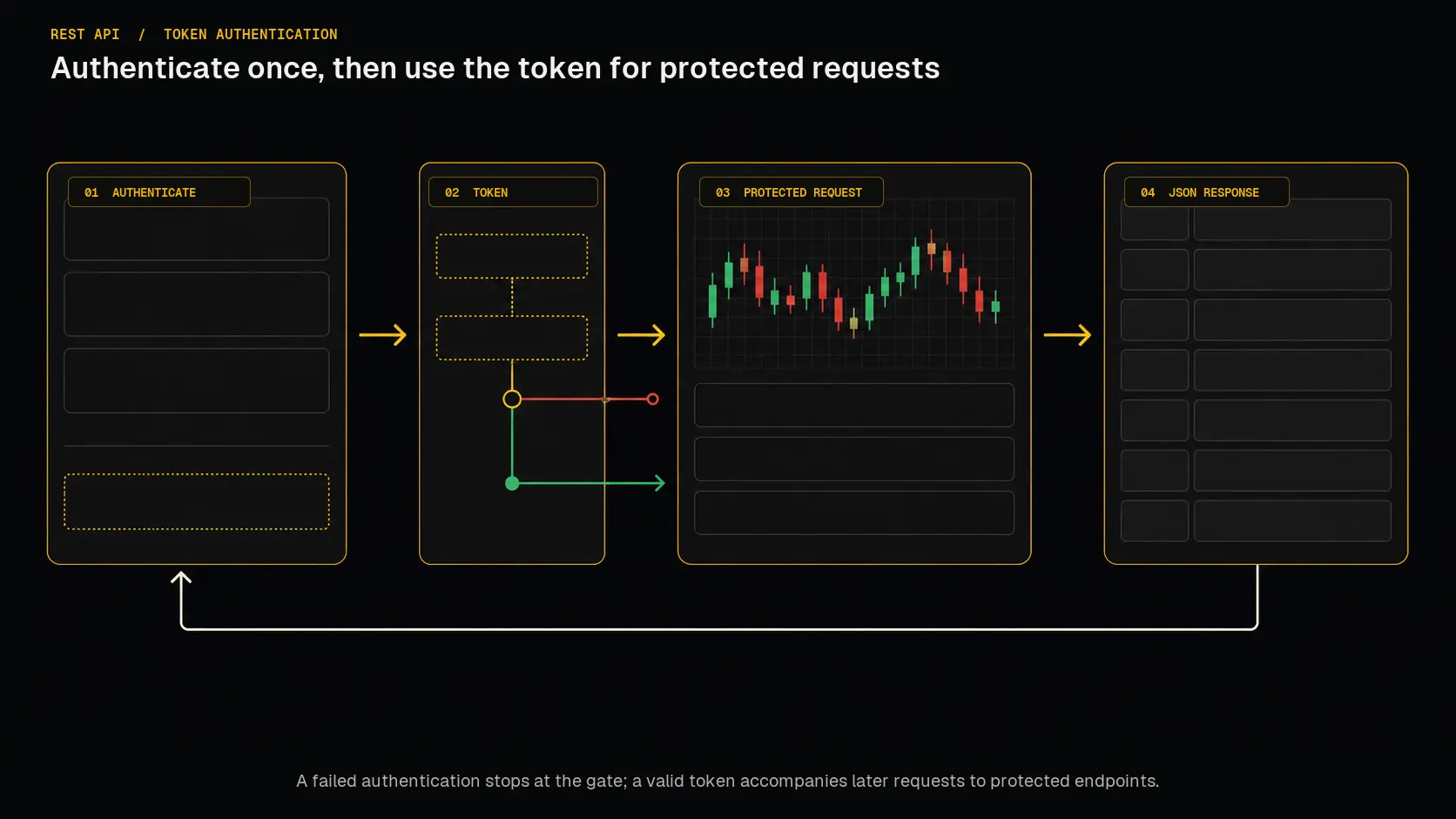 Obtain a JWT through the login endpoint, then include it when calling protected endpoints.