What Are Custom Trading Strategies in Gunbot?
Gunbot custom strategies let you write your own JavaScript for spot and futures trading while Gunbot handles exchange connectivity and market data plumbing. For broader context, review the custom strategy feature overview.
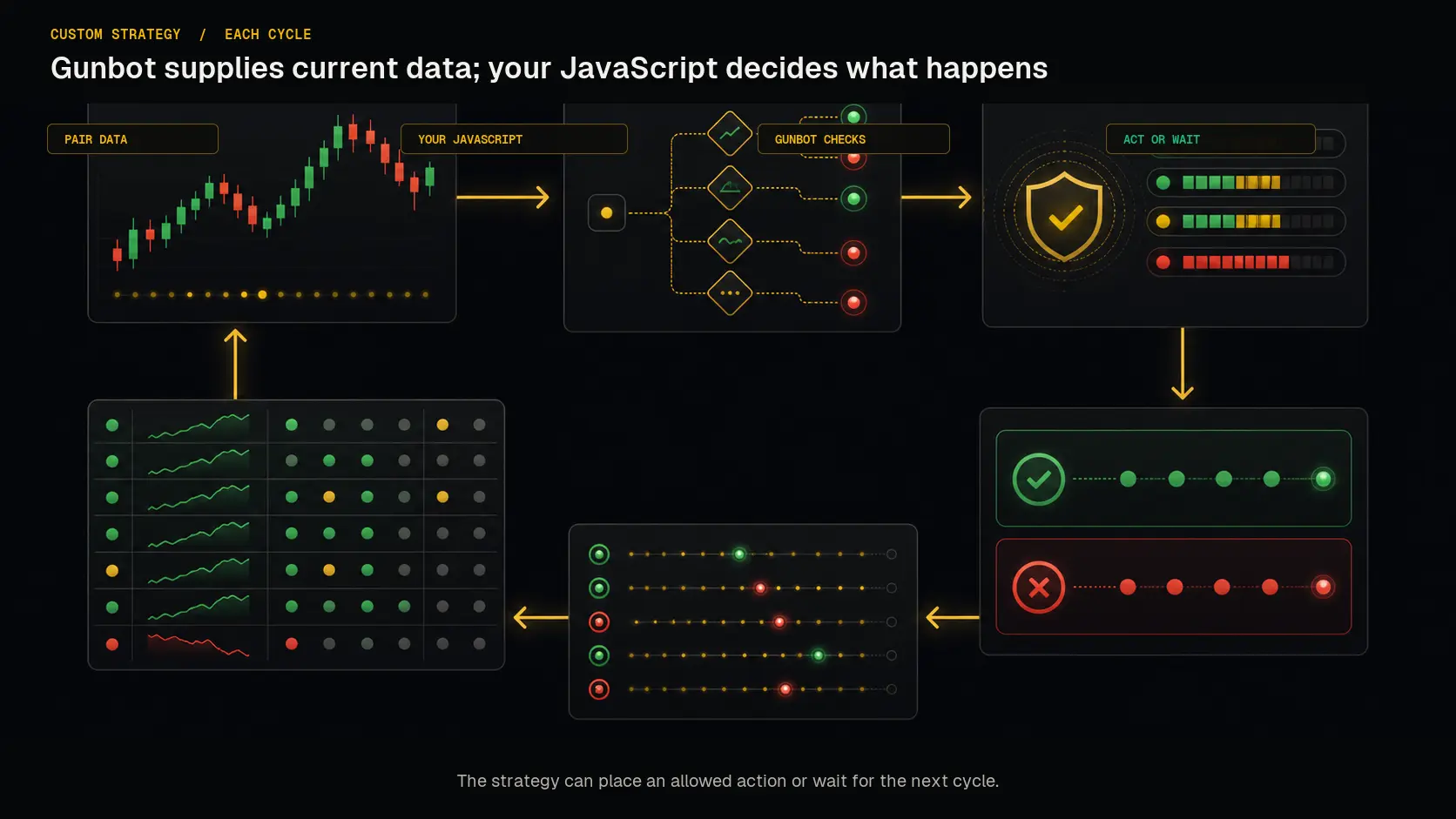 Gunbot supplies pair data and exchange connectivity on every cycle; your JavaScript decides whether to act or wait.
With Gunbot handling the heavy lifting, you can focus on strategy logic and tuning.
Custom Strategy Guru GPT
Prototype new strategy code in seconds using our Custom Strategy Guru GPT.
Why Use Custom Strategies?
Use custom strategies when you want to implement your own trading logic without rebuilding a full bot. You can rely on Gunbot features like:
- Built-in Exchange Connectivity: Skip the hassle of coding API integrations yourself.
- Complete Market Data and Indicators: Access real-time data across multiple timeframes without extra effort.
- Trading Methods: Use pre-built methods for executing trades easily and reliably.
Info
A custom strategy in Gunbot lets you define your trading logic using JavaScript, which Gunbot then executes. This combines your unique algorithms with Gunbot's stable trading engine and exchange integrations.
Key Features of Custom Strategies
Smooth Integration with Gunbot's Tools
Custom strategies can call Gunbot's trading methods and indicators so you can:
- Combine Multiple Indicators: Build advanced strategies by integrating different technical indicators.
- Access Real-Time Market Data: Make informed decisions using real-time data across as many timeframes as you need.
- Simplify Complex Calculations: Easily obtain tricky data points like unit costs including fees for spot assets, saving you from manual calculations.
For more details on the methods and modules available, check out Methods and Modules.
Flexible Execution Cycle
Your custom strategies run as asynchronous (async) functions, executing once per 'cycle' for each trading pair. Here's what that means:
- Independent Pair Execution: Each trading pair triggers the strategy independently, giving you granular control over each asset.
- Cross-Pair Access: While each strategy runs per pair, you can access data and place orders on other pairs if needed.
- Responsive to Market Changes: Design strategies that react swiftly to market fluctuations on a per-cycle basis.
- Time-Sensitive Logic: Implement trading logic that relies on specific timing or conditions.
Write in Plain JavaScript
You can write strategies in plain JavaScript, which makes it easy to:
- Iterate Quickly: Modify and test your code rapidly to adapt to changing market conditions.
- Integrate External Data: Fetch and use data from external APIs to enhance your strategy.
Enhanced Charting Capabilities
Trades from custom strategies appear on Gunbot's integrated TradingView charts. You can extend this by:
- Adding Dynamic Chart Elements: Place custom lines, boxes, icons, and more to visualize key aspects of your strategy.
- Displaying Custom Stats: Show the metrics that matter most to you in the chart sidebar.
- Leaving Timescale Marks: Annotate specific bars on the chart with notes or signals.
Learn how to visualize strategy targets in Visualize Strategy Targets and display custom stats in Display Custom Stats.
How to Build Your Own Crypto Trading Bot with Custom Strategies
Setting Up Your Environment
- Strategy File Location: Save your custom strategy files (e.g.,
myStrategy.js) in the./customStrategiesdirectory within your Gunbot installation folder. - Programming Language: Use plain JavaScript.
Understanding the gb Object
The gb object is your primary interface to Gunbot inside a custom strategy. It provides access to:
- Market Data (
gb.data): Fetch current prices, volumes, order books, candle data, and other essential market information. - Indicators (
gb.datafor pre-calculated,gb.method.tulindfor custom): Use technical indicators like RSI, MACD, Bollinger Bands, and more, or calculate your own. - Trade Execution Methods (
gb.method): Execute buy and sell orders (market, limit) with ease. - Persistent Storage (
gb.data.pairLedger.customStratStore): Store and retrieve data that persists across strategy execution cycles.
For a complete list of available market data, see Available Market and Position Data. To understand how to use persistent storage, refer to Persistent Storage for Custom Strategies.
Writing Your First Custom Strategy
Each custom strategy runs as an async function that Gunbot executes once per trading cycle for each assigned pair. Here's a simple example:
// Imagine all of the user code below is inside an async function, which Gunbot will call.
  const rsiValue = gb.data.rsi; // Assuming RSI is enabled in strategy settings
  const hasAsset = gb.data.gotBag; // Boolean: true if you hold the quote asset

  const buyConditions = rsiValue < 30 && !hasAsset;
  const sellConditions = rsiValue > 70 && hasAsset;

  if (buyConditions) {
    // Example: Buy with 95% of available base currency balance
    const buyAmountInBaseCurrency = gb.data.baseBalance * 0.95;
    // Convert base currency amount to quote currency amount for the order
    const amountToBuy = buyAmountInBaseCurrency / gb.data.bid; // Using current bid as reference price
    console.log(`Attempting to buy ${amountToBuy} of ${gb.data.pairName.split('-')[1]}`);
    gb.method.buyMarket(amountToBuy, gb.data.pairName);
  } else if (sellConditions) {
    // Example: Sell the entire balance of the quote currency
    console.log(`Attempting to sell ${gb.data.quoteBalance} of ${gb.data.pairName.split('-')[1]}`);
    gb.method.sellMarket(gb.data.quoteBalance, gb.data.pairName);
  }
In this snippet, the strategy buys when RSI is below 30 (oversold) and sells when it's above 70 (overbought), using most of your available balance for buys and selling the entire quote asset balance.
For more code examples to inspire you, visit Custom Strategy Code Examples or see working code examples.
Technical Considerations
Safety and Reliability
- Test Thoroughly: Custom strategies do not come with the same built-in safeguards as Gunbot's core strategies. Test your code extensively, preferably in a simulated environment or with very small amounts, before deploying it live.
- Error Handling: Implement error handling (e.g.,
try...catchblocks) within your JavaScript code and use logging to make troubleshooting easier.
Node.js Compatibility
- Version Support: Gunbot executes custom strategies in a Node.js environment. Ensure your strategies are compatible with Node.js v14.4.0, which is the version bundled with and used by Gunbot.
Effective Logging
- Use Console Logging: Use
console.log()to output messages, variable values, and status updates to the Gunbot console (and the main log file). This helps with debugging and monitoring decisions. - Custom Log Files: For structured or extensive logging, write to your own log files using Node.js's
fsmodule, as detailed in Add Your Own Logs to Custom Strategies.
Asynchronous Operations
Since your strategy runs within an async function, you can use await for asynchronous operations, such as fetching data from external APIs:
// Example: Fetch data from a custom API
// Ensure you have 'node-fetch' or a similar library if not using a browser environment's fetch.
// For Gunbot, you might need to install 'node-fetch' into 'user_modules' and require it.
// const fetch = gb.method.require(gb.modulesPath + '/node-fetch'); // If installed

async function fetchData() {
  try {
    const response = await fetch('https://api.example.com/data'); // Replace with actual API
    const externalData = await response.json();

    // Use the externalData in your strategy
    if (externalData.signal === 'buy' && !gb.data.gotBag) {
      const buyAmount = gb.data.baseBalance * 0.95 / gb.data.bid;
      gb.method.buyMarket(buyAmount, gb.data.pairName);
    }
  } catch (error) {
    console.error('Error fetching or processing external data:', error);
  }
}

// Call this function within your main strategy function
// module.exports = async function() { ... await fetchData(); ... }
Sending Notifications
You can send custom notifications directly to the Gunbot GUI:
// Example: Send a success notification
gb.data.pairLedger.notifications = [{
  text: 'Custom strategy executed a trade successfully!',
  variant: 'success', // 'success', 'error', 'info', 'warning'
  persist: true // Stays until dismissed
}];
Learn more about this feature in Send Notifications to the Gunbot GUI.
Enhancing Your Strategy with Custom Modules
To keep your strategy code organized and reusable, you can create custom JavaScript modules.
Creating and Using Custom Modules
- Module Location: Place your custom JavaScript module files (e.g.,
myHelperFunctions.js) in theuser_modulesfolder located within your Gunbot installation directory. - Using Modules: Require your module in your strategy file using the
gb.method.requireutility:
// In your custom strategy file (e.g., myStrategy.js)

// Require your custom module
const myCustomLogic = gb.method.require(gb.modulesPath + '/myHelperFunctions.js');

// Use functions or variables exported from your custom module
let signal = myCustomLogic.calculateSignal(gb.data.candlesClose);
if (signal === 'buy') {
  // ... your buying logic
}
This approach helps you manage complex strategies more effectively by separating concerns and promoting code reuse.
For more information on available methods and using modules, see Methods and Modules for Custom Strategies.
Best Practices
- Continuous Testing: Regularly test your strategies under different market conditions, including backtesting (if possible with your setup) and paper trading, to ensure they perform as expected.
- Optimize Performance: Keep an eye on how your strategy behaves in terms of execution time and resource usage. Make adjustments as needed for best results, especially if performing complex calculations or many API calls.
- Version Control: Use a version control system like Git to track changes to your strategies and modules.
- Engage with the Community: Share your experiences, ask questions, and learn from others in the Gunbot community to enhance your strategies further.
Conclusion
If you write your own trading logic, Gunbot custom strategies let you build strategy code without maintaining a full trading bot. You handle the algorithm. Gunbot handles exchange connections, market data, and trade execution.