ATRTS
Info
Average True Range (ATR): ATR is a technical analysis indicator that measures market volatility by decomposing the entire range of an asset price for that period. It does not indicate price trend, only the degree of price volatility.
The Average True Range (ATR) indicator measures market volatility by considering the high, low, and closing prices over a specified period (typically 14 days).
Traders use ATR to gauge how large price swings are. Higher ATR values indicate more volatility; lower values indicate less.
The ATRTS strategy uses ATR to set dynamic trailing stops, automating buy and sell signals based on volatility. A configurable multiplier, ATRX, is applied to the ATR value to calculate upper and lower threshold lines. The resulting values are the strategy's ATR long (upper limit for buys) and ATR short (lower limit for sells). Because ATR does not indicate direction, consider adding a momentum indicator (like RSI) for confirmation.
Trailing Stop Calculation
The strategy calculates upper and lower trailing stop levels using the ATR value and the ATRX multiplier:
ATR short(lower limit for sells) is calculated based on subtracting the (ATR *ATRX) value from the bid price.ATR long(upper limit for buys) is calculated based on adding the (ATR *ATRX) value to the ask price.
How It Works
Buy Conditions:
A buy order is triggered when the current ask price crosses above the calculated ATR long limit.
Sell Conditions:
A sell order is triggered when the current bid price crosses below the calculated ATR short limit, provided the price is above break-even (if GAIN is > 0).
Trading Example
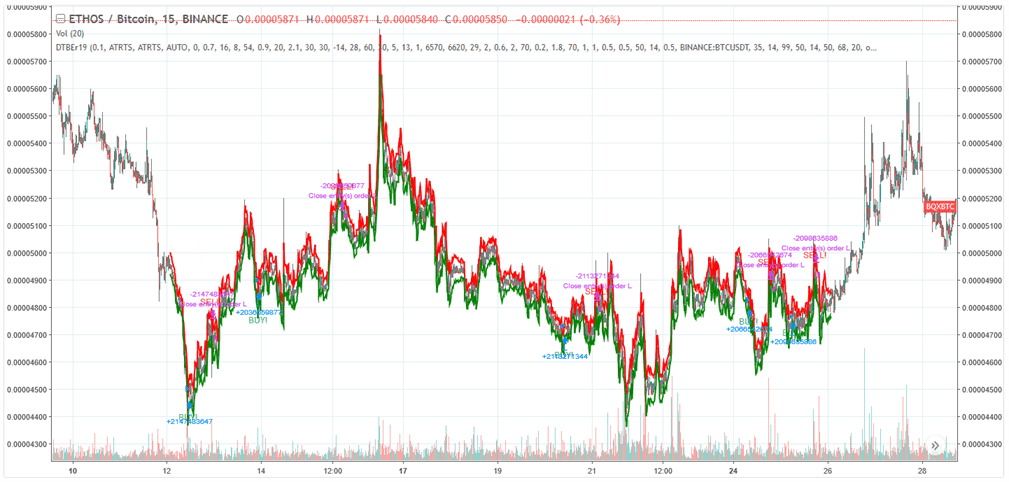
Example of potential ATRTS strategy performance. Details and settings
ATRTS Strategy Settings
Buy Settings
| Label | Config Parameter | Default Value | Detailed Description |
|---|---|---|---|
| Buy enabled | BUY_ENABLED | true | Enable or disable buy (long) orders for the strategy. |
Sell Settings
| Label | Config Parameter | Default Value | Detailed Description |
|---|---|---|---|
| Sell enabled | SELL_ENABLED | true | Enable or disable sell (short) orders for the strategy. |
| Gain | GAIN | 1 | Minimum profit percentage above break-even required to place a sell order. If set to 0, sells can occur based on ATR signal alone, potentially at a loss. |
| Stop limit | STOP_LIMIT | 99 | Stop-loss threshold. If the price drops by this percentage below break-even, a sell order is triggered. A high value like 99 effectively disables it. |
| Count sell | COUNT_SELL | 9999 | Disables trading for the pair after the specified number of sell orders. |
Indicators
| Label | Config Parameter | Default Value | Detailed Description |
|---|---|---|---|
| Period | PERIOD | 15 | Candlestick period (e.g., 15 minutes) used for indicator calculations, including ATR. Ensure the value is supported by your exchange. |
| ATRx | ATRX | 0.5 | Multiplier applied to ATR to set the ATR long (buy) and ATR short (sell) thresholds. |
| ATR period | ATR_PERIOD | 14 | The number of historical periods (candles) used to calculate the Average True Range (ATR). |
Overview of Effects on Different Order Types
| Config Parameter | Affected Order Types | Not Affected Order Types |
|---|---|---|
| Buy Enabled | Strategy buy, DCA buy, RT buy, RT buyback | Strategy sell, Stop limit, Close, RT sell |
| Sell Enabled | Strategy sell, Stop limit, RT sell | Strategy buy, RT buy, RT buyback, Close, DCA buy |
| Gain | Strategy sell | Strategy buy, RT buy, RT buyback, RT sell, Close, DCA buy, Stop limit |
| Period | Strategy sell, Strategy buy, DCA buy (when using an indicator) | RT buy, RT buyback, RT sell, Close, Stop limit |
| ATRx | Strategy sell, Strategy buy | RT buy, RT buyback, RT sell, Close, Stop limit, DCA buy |
| ATR Period | Strategy sell, Strategy buy | RT buy, RT buyback, RT sell, Close, Stop limit, DCA buy |