Support Resistance Spot Trading Strategy
This method buys near support and sells near resistance. You can customize the trading range by setting a buffer from the detected support and resistance levels.
To use the strategy effectively, understand support and resistance. A support level is a price area where demand is expected to rise, slowing or reversing a decline. A resistance level is a price area where supply is expected to rise, often slowing or reversing an advance.
In technical analysis, traders use these levels to anticipate potential price turns. In this method, you monitor price and buy when it reaches support, then sell when it reaches resistance.
How to work with it
Buy method conditions
A buy order is placed when price is within SupRes_SPREAD % from support.
This strategy can buy multiple times, it can be capped with SupRes_MAX.
Sell method conditions
A sell order is placed when price is within SupRes_SPREAD % from resistance, and additionally the set gain % is reached.
Gain protection is optional for this strategy. Be aware that this can lead to sell orders below your break-even point.
How to work with this strategy
There is one primary setting that defines the entry point for this strategy: SupRes_SPREAD.
This setting is a price percentage above the first support level (for buys) or below the first resistance level (for sells). When price crosses this threshold, an order is placed. If balance settings allow multiple orders, a buy order is placed each time the buy conditions are met.
In the example below, SupRes_SPREAD is set to 0.1, the "buy at" line visualizes the target. The sell target would be 0.1 % below the first resistance level.
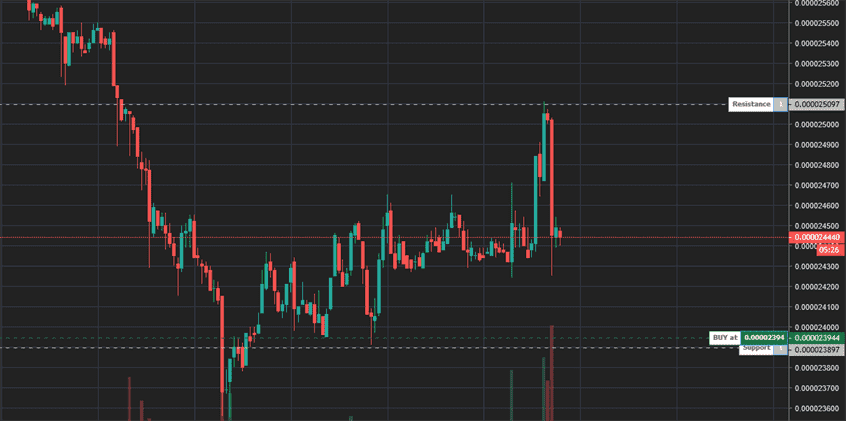
Keep in mind that support and resistance are not static targets. This makes SupRes_SPREAD a trailing range, so set a value that fits the pair and its price range; too large a spread can cause immediate trades.
The strategy sells when price crosses SupRes_SPREAD and GAIN is reached.
Formula
Gunbot uses the following formula to calculate support and resistance levels. The number of candles used as input is user configurable with the SMAPERIOD setting.
P = (H + L + C) / 3
R1 = (P * 2) - L
R2 = P + (H - L)
S1 = (P * 2) - H
S2 = P - (H - L)
This strategy is a bit different from other strategies, it has much less configurable options. Confirming indicators or additional trailing are disabled.
Strategy settings for SupportResistance
Buy settings
| Label | Config Parameter | Default Value | Detailed Description |
|---|---|---|---|
| Allow Buy Orders | BUY_ENABLED | true | Enables you to allow buy orders within this trading strategy. When set to true, the strategy can initiate buy orders based on other configured settings. |
| Support/Resistance Spread | SupRes_SPREAD | 0.1 | Sets the minimum percentage range from the first detected support or resistance level within which no orders will be placed. This applies to both buy and sell orders, ensuring that they are executed only after this buffer zone is maintained. The value represents a percentage of the price. |
| Maximum Buys | SupRes_MAX | 0 | Use this setting to cap the number of times the strategy is allowed to execute buy orders. If the sum of your quote balance, value of open orders, and the upcoming order exceeds this set limit, further buy orders will not be placed. This is useful for managing exposure and budget. |
Sell settings
| Label | Config Parameter | Default Value | Detailed Description |
|---|---|---|---|
| Allow Sell Orders | SELL_ENABLED | true | Enables you to allow sell or short orders within this trading strategy. When enabled, it allows for the initiation of sell orders based on other strategy parameters. |
| Gain Target | GAIN | 1 | Defines the target gain percentage above the break-even point for sell orders. This setting helps you to set profit targets, where a sell order will be executed once this gain target is achieved, relative to the buying price. |
| Sell Order Limit | COUNT_SELL | 9999 | Limits the number of sell orders that can be placed for a trading pair, effective from the time the pair was added. This can help manage frequent trading on volatile pairs, ensuring a cap on the number of transactions. |
Indicators
| Label | Config Parameter | Default Value | Detailed Description |
|---|---|---|---|
| Candlestick Period | PERIOD | 15 minutes | Specifies the duration of candlesticks used for the calculation of various indicators. This setting should align with the time frames supported by your exchange. The value is denoted in minutes, representing the candlestick period. |
| SMA Period | SMAPERIOD | 30 | Determines the number of candlesticks used to calculate the Simple Moving Average, which is part of the Bollinger Bands, trend watcher, support and resistance, and Fibonacci retracements. This provides a basis for various trend and volatility assessments in the strategy. |
Overview of effects on different order types
| Config Parameter | Affected Order Types | Not Affected Order Types |
|---|---|---|
| Buy Enabled | Strategy buy, DCA buy, RT buy, RT buyback | Strategy sell, Stop limit, Close, RT sell |
| Sell Enabled | Strategy sell, Stop limit, RT sell | Strategy buy, RT buy, RT buyback, Close, DCA buy |
| Gain | Strategy sell | Strategy buy, RT buy, RT buyback, RT sell, Close, DCA buy, Stop limit |
| Sup / Res Spread | Strategy sell, Strategy buy | Stop limit, RT sell, RT buy, RT buyback, Close, DCA buy |
| Sup / Res Max | Strategy sell, Strategy buy | Stop limit, RT sell, RT buy, RT buyback, Close, DCA buy |
| Period | Strategy sell, Strategy buy, DCA buy (trigger) | RT buy, RT buyback, RT sell, Close, Stop limit |
| SMA Period | Strategy sell, Strategy buy | RT buy, RT buyback, RT sell, Close, Stop limit, DCA buy order |