BB (futures)
Bollinger Bands are a technical analysis indicator that help identify relative highs and lows. Using this information, you can potentially buy at lower prices and sell at higher prices.
The indicator consists of three lines: the middle line is a simple moving average, and the other two lines are plotted above and below it at a distance based on standard deviation. The wider the distance between the upper and lower bands, the higher the price volatility.
Using Bollinger Bands in Gunbot, you configure the percentage that triggers trades: the percentage from the lower Bollinger Band for buys and from the upper Bollinger Band for sells. When prices reach those distances, Gunbot places the orders automatically.
How to work with it
Gunbot opens one position, either long or short, and closes it when the target is reached. If the stop is hit before profitably closing a trade, Gunbot places a stop order at a loss. After closing a position, Gunbot looks to open a new long or short position. Gunbot does not add to existing open positions.
Do not manually add to or reduce positions opened by Gunbot unless you stop running Gunbot on this trading pair until you've closed the position.
info
Using bb (futures) is only meaningful with MEAN_REVERSION enabled.
The info below assumes you have set this.
The examples below show how the basic triggers for bb work. you can use confirming indicators and settings like ROE trailing.
Buy method conditions
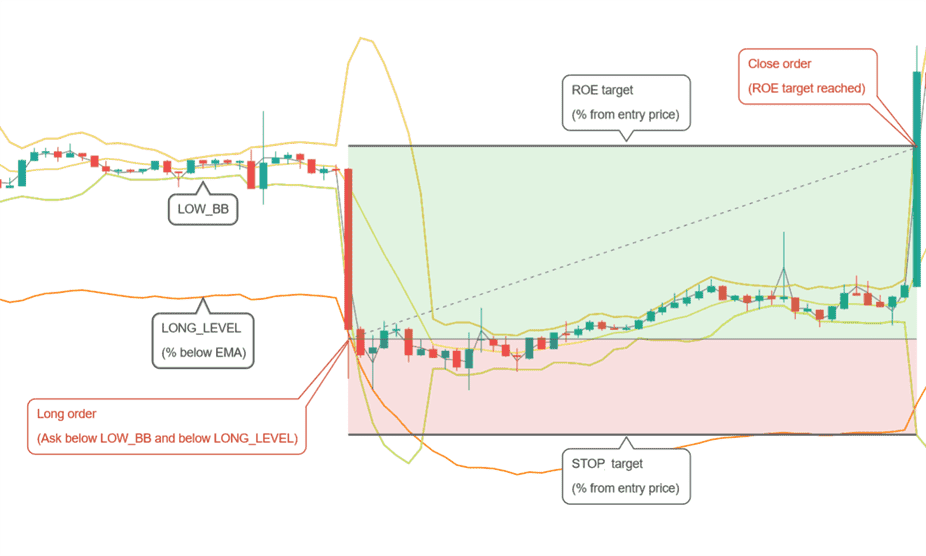
A long position is allowed when the ask price is below LOW_BB and LONG_LEVEL. In the example above, LOW_BB is set to 0, which represents the actual lower Bollinger Band. With different values, you can set a target above (positive value) or below (negative value) the lower band.
Sell method conditions
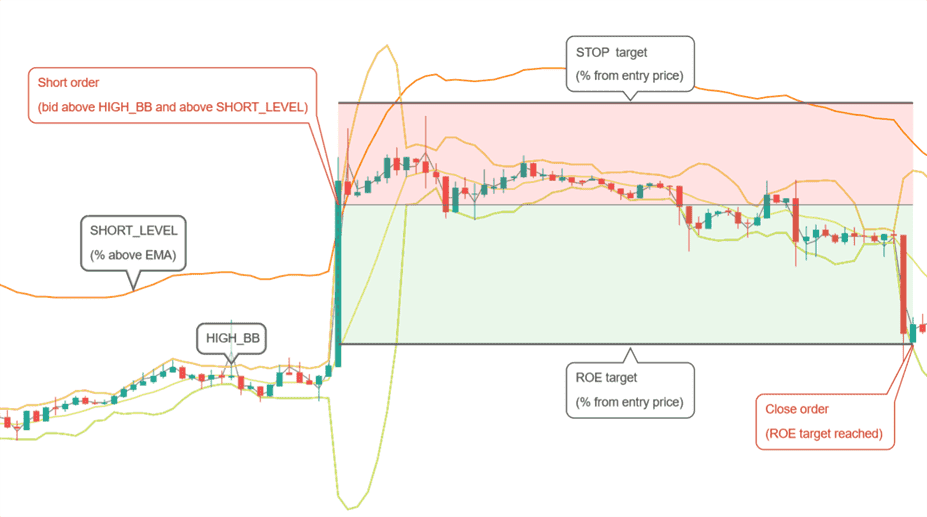
A short position is allowed when the bid price is above HIGH_BB and SHORT_LEVEL. In the example above, HIGH_BB is set to 0, which represents the actual upper Bollinger Band. With different values, you can set a target below (positive value) or above (negative value) the upper band.
Conditions to close
Position is closed when the target ROE (return on equity) is reached. This is a percentage from the entry point, taking leverage into consideration.
Conditions to stop
A position is closed at a loss when negative ROE reaches the STOP_LIMIT target.
Strategy settings for BB (futures)
Long settings
| Label | Config Parameter | Default Value | Detailed Description |
|---|---|---|---|
| Buy enabled | BUY_ENABLED | true | When enabled, you can execute buy or long orders within your trading strategy. This setting must be on to allow purchases. |
| Long level | LONG_LEVEL | 1 | This setting determines the percentage distance from the Exponential Moving Average (EMA) at which long orders are allowed. For example, a setting of 1 means a buy order can be placed when the market price is within 1% of the EMA. |
| Low BB | LOW_BB | 0.1 | This parameter sets the target on the lower Bollinger Band as a percentage from 0% (bottom) to 100% (top) of the band. It specifies how far within the band a price point must be to trigger trading actions such as buying. |
Short settings
| Label | Config Parameter | Default Value | Detailed Description |
|---|---|---|---|
| Sell enabled | SELL_ENABLED | true | When enabled, you can execute sell or short orders within your trading strategy. This setting must be on to allow sales. |
| Short level | SHORT_LEVEL | 1 | Defines the percentage from the EMA where short orders are allowed. For instance, setting this at 1 lets you place short orders when prices are within 1% of the EMA. This setting depends on your selected sell method. |
| High BB | HIGH_BB | 0.1 | This setting determines your target within the upper Bollinger Band, ranging from 0% (top) to 100% (bottom). Use this to control where within the band actions like selling should occur. |
Indicators
| Label | Config Parameter | Default Value | Detailed Description |
|---|---|---|---|
| Period | PERIOD | 15 | The period setting defines the duration, in minutes, of candlesticks used in calculating indicators. Make sure that the period you select is supported by your exchange. Typical settings range from 1 minute for high-frequency trading scenarios to longer periods for less volatile strategies. |
| SMA period | SMAPERIOD | 30 | Defines the number of candles used to calculate the Simple Moving Average (SMA), which is used to calculate Bollinger Bands. Longer periods smooth price data more, reducing responsiveness to price changes but potentially filtering out noise. |
| Standard deviation | STDV | 2 | The standard deviation multiplier determines the width of the Bollinger Bands. A higher value increases the gap between the bands, which can be useful in more volatile markets to avoid premature buy or sell signals. |
| Medium EMA | EMA1 | 16 | The number of candles used to calculate the medium-term Exponential Moving Average (EMA). This EMA is critical for detecting trends over a moderate timeframe, balancing short-term fluctuations and long-term trends. |
| Fast EMA | EMA2 | 8 | The fast EMA setting uses fewer candles to calculate, making it more responsive to recent price changes. This setting helps traders react quickly to new trends or reversals. |
| Mean reversion | MEAN_REVERSION | true | Enabling this feature adjusts the strategy to capitalize on mean reversion, where prices tend to return to a mean or average level after significant movements. This can be effective in range-bound or oscillating market conditions. |