How Do I Use Trading Bots on TradingView?
TradingView is known for customizable charts and reliable alerts. It can also work with trading bots like Gunbot to execute trades when your market conditions trigger. Think of it this way: TradingView handles the brains (strategy and signals), and your bot handles trade execution. This approach reduces constant screen-watching and guesswork.
Below, you'll learn how to connect TradingView's alerts to a trading bot, define better rules, troubleshoot common hiccups, and keep the setup flexible so you can refine it over time. You'll get practical steps and an honest view of automation - both the benefits and the limits.
In this setup, TradingView generates the signal and Gunbot handles the execution, so it works as a TradingView bot without giving TradingView exchange API access. This is the practical difference between TradingView automated trading alerts and a standalone trading bot for TradingView.
What Are Trading Bots on TradingView?
TradingView itself won't log into your account and place trades on an exchange, but it can fire alerts based on conditions you define. These alerts can travel through a webhook (a special URL) to a trading bot like Gunbot. The bot interprets the alerts and places trades on your behalf.
In plain terms: you write rules in TradingView - maybe "Buy if this indicator crosses above that line" or "Sell if the price drops below this moving average." When those events happen, TradingView sends a signal and your bot turns it into a trade on your chosen exchange. This turns your ideas into trades without sitting at your desk all day.
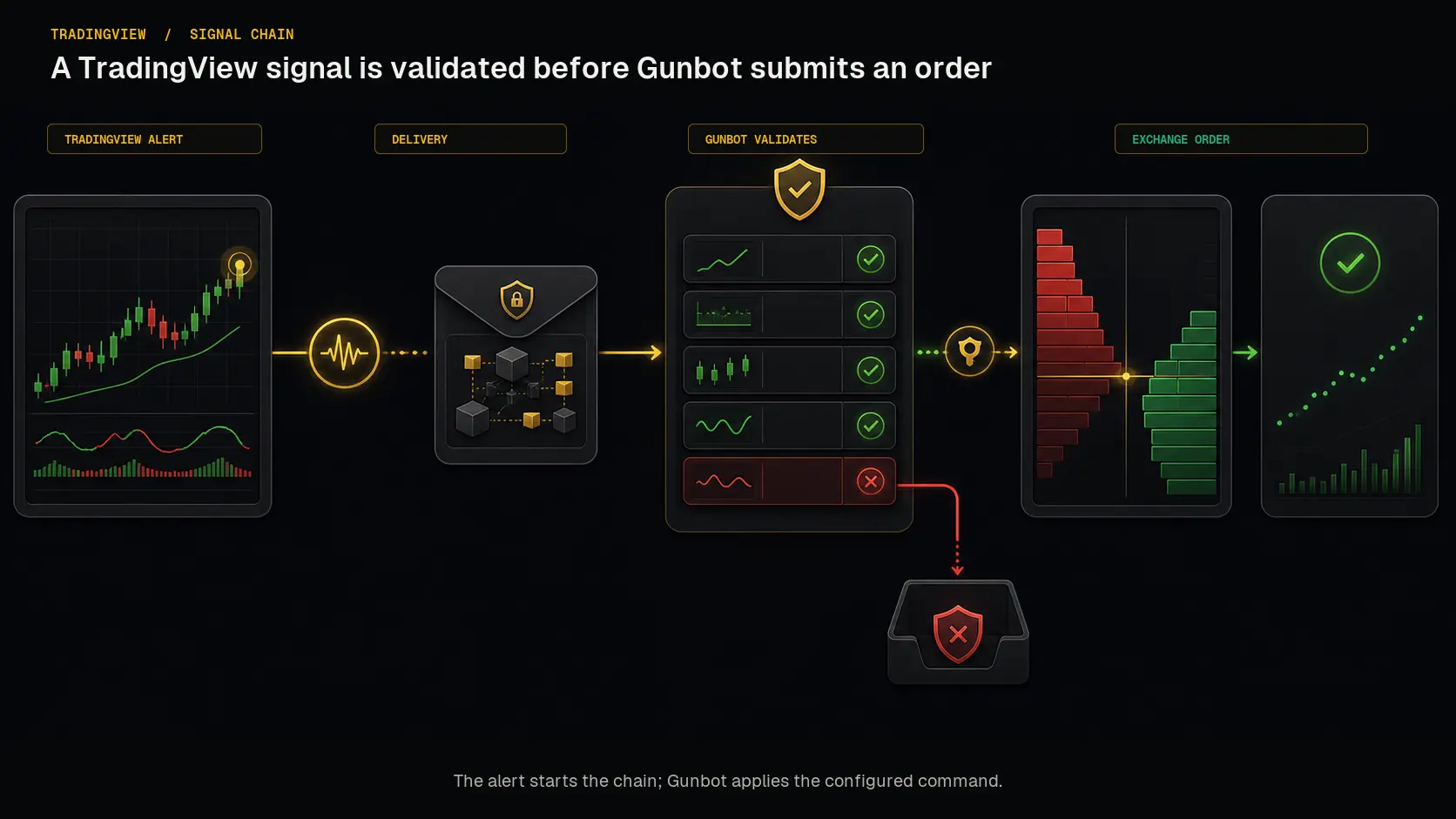 The alert carries the instruction, while Gunbot owns exchange connectivity and order execution.
Getting Started: Linking a Bot to TradingView Step-by-Step
If you want a dedicated integration walkthrough before configuring alerts, follow the TradingView addon guide.
Step 1: Shape Your Strategy in TradingView
Before you send alerts, build a strategy you trust. This might mean plotting moving averages, using RSI or MACD signals, or mixing in custom Pine scripts. Test ideas thoroughly in TradingView's replay mode or paper trading mode. See how the strategy would have performed last month or last year so you know if it's reliable enough to risk real money.
Step 2: Set Up Webhook Alerts in TradingView
-
Create Your Alerts: In TradingView, pick the chart and timeframe that matter most to your strategy. Set a condition, such as "When RSI crosses below 30, trigger an alert."
-
Add a Webhook URL: TradingView lets you paste a webhook URL. This is the direct line to your trading bot. For Gunbot, use the webhook alerts documentation to pick the right URL and format.
-
Customize the Alert Message: The alert message you send via the webhook must match what your bot expects. For example, a bot might expect JSON like
{"action": "buy", "pair": "BTC-USDT", "price": "market"}. If you get this wrong, your bot might ignore the alert or place unintended orders. -
Test the Alert: Run a test alert before going live. Trigger one alert, see if it reaches your bot, and confirm that the bot logs or console show something like "Alert received." This is the time to fix formatting mistakes.
Step 3: Configure the Bot's Settings
Inside your bot (for example, Gunbot), you'll have options for handling incoming alerts. You might set:
- Default Exchange and Pair: If your alert doesn't specify a trading pair, what should the bot assume?
- Order Types: Should the bot place a limit order or a market order when it gets a "buy" alert?
- Safety Checks: Some bots let you add rules like "If I'm already in a trade, ignore new buy alerts" or "Never buy above a certain price." Use these guardrails so a single bad alert doesn't wreak havoc.
Once that's done, send a test alert from TradingView and watch the bot's response. If everything lines up, you're good to go.
Making Full Use of This Setup
Keeping an Eye on Performance
When you first move to an automated system, it's tempting to go hands-off right away. Don't. Especially early on, monitor how the bot behaves. Watch how TradingView's alerts fire and see if the trades make sense. Are the trades aligned with your logic, or did a formatting error cause a buy at the wrong time?
As you gain confidence, you can step back, but it's still wise to check in occasionally to ensure no unexpected glitches have crept in.
Adjusting Strategies as Markets Shift
Markets don't stand still. Conditions that worked a month ago might fail now. Maybe you designed your strategy around a trending market, but we're stuck going sideways. Perhaps your alerts are triggering too often, resulting in a flood of small trades, or they're too rare, causing you to miss good entries.
Revisit your TradingView rules. Tighten or loosen your alerts. Experiment with new indicators or timeframes. Update alert conditions and ensure the bot still understands the revised messages. Consider paper trading big changes first so you don't risk real funds on unproven tweaks.
Troubleshooting Common Problems
1. Alerts Not Triggering Any Trades
- Double-check the webhook URL. Even a small typo can break the chain.
- Confirm your bot is running and listening for alerts. If the bot is offline, alerts vanish into thin air.
- Verify that your alert message format matches what your bot expects. Missing quotes or brackets can cause issues.
2. Delayed or Missed Trades
- Network latency might cause delays. If your internet connection is unstable, your bot might respond slowly.
- The exchange itself could be busy. Sometimes trade execution is delayed if the exchange is under heavy load.
- Check if your bot's logs mention any internal errors.
3. Unwanted Trades or Over-Trading
- Maybe your alert conditions are too loose. Consider adding more filters so your bot isn't reacting to every tiny price wiggle.
- Implement a cooldown period. For example, the bot might ignore new alerts for 10 minutes after placing a trade, to avoid whipsawing in and out on tiny fluctuations.
Practical Tips for Making Your Setup More Reliable
-
Use Specific Conditions: A vague alert condition like "RSI < 50" might fire too often. Combine multiple conditions so you only trade in scenarios that matter, like "RSI < 30 AND price is below the 20-day moving average."
-
Backup Your Settings: Keep a record of your bot configurations and alert messages. If something breaks, you won't have to start from scratch.
-
Simulate Before Going Live: If your bot (like Gunbot) has a simulation mode, use it. Run TradingView alerts through a dummy environment first. See what your trades would look like. This can save you money and headaches.
-
Stay Flexible: Don't treat your initial setup as carved in stone. As you learn more and gather performance data, make small adjustments. Automation is powerful, but it's not a one-and-done deal. Think of it as a living system you keep improving.
Additional Resources
- TradingView Alerts Documentation offers guidance on how to structure alerts and what the platform can do.
- Gunbot's Webhook Alerts Setup details how to format and send alerts to Gunbot specifically.
- Automating TradingView Alerts with Gunbot provides examples of complex scenarios, so you can learn from others who've already put this into practice.
Summary
Connecting TradingView alerts to a trading bot can simplify your approach, reducing the need to stare at charts or make panicked decisions. It lets you define rules and have software carry out the grunt work, which can reduce emotional bias and improve consistency.
Nothing is foolproof, though. You still have to think like a trader - track market conditions, refine signals, test new ideas, and know when to pause or tweak your bot. Over time, you'll find a balance between automation and oversight. The goal is to make trading more efficient and less stressful, not to hand over the keys and walk away forever.